Android OS vs iOS: The Definitive Architectural and Ecosystem Comparison
Choosing between Android OS and iOS comes down to whether you prioritize hardware flexibility, deep software customization, and open-platform control (Android) or vertical hardware-software integration, reliable long-term software supp...
Choosing between Android OS and iOS comes down to whether you prioritize hardware flexibility, deep software customization, and open-platform control (Android) or vertical hardware-software integration, reliable long-term software support, and strict end-to-end data privacy defaults (iOS). Both operating systems provide world-class security and mature application platforms, but they operate on fundamentally divergent technical philosophies.
Contents
Architectural Foundations: How Android and iOS Differ Under the Hood
To understand how each platform behaves in daily operation, one must first examine their core system architectures. The underlying design dictates memory management, process scheduling, application execution, and hardware communication.
The Android Kernel and Runtime Environment
Android is built on top of an upstream Long Term Support (LTS) Linux kernel. Above the kernel sits the Hardware Abstraction Layer (HAL), which defines standard interfaces that hardware vendors (such as Qualcomm, MediaTek, and Samsung) implement to allow the higher-level operating system to communicate with underlying silicon without modifying core framework code.
Application code on modern Android runs inside the Android Runtime (ART). When developers write applications in Kotlin or Java, the code compiles into Dalvik Executable (.dex) bytecode. ART compiles this bytecode into native machine instructions using a hybrid approach:
- Ahead-of-Time (AOT) Compilation: Compiles code during application installation or system idle states to maximize execution speed.
- Just-in-Time (JIT) Compilation: Dynamically profiles and recompiles frequently executed code routines during active usage.
- Profile-Guided Compilation: Utilizes baseline profiles gathered from real-world usage to optimize critical launch paths and decrease cold-start latency.
Because Android relies on garbage collection (GC) for memory management, the runtime periodically reclaims allocated heap memory no longer referenced by active objects. While modern concurrent garbage collectors have minimized UI stutter ("jank"), this model fundamentally requires more baseline physical RAM than systems using deterministic memory tracking.
The iOS Kernel and Direct Native Execution
iOS is built upon the Darwin operating system, utilizing the XNU (X is Not Unix) hybrid kernel. XNU combines the Mach microkernel architecture—responsible for inter-process communication (IPC), thread scheduling, and virtual memory management—with components of FreeBSD that handle POSIX application programming interfaces (APIs), networking stacks, and user credentials.
Unlike Android’s runtime execution model, iOS applications written in Swift or Objective-C compile directly to native ARM64 machine code via the LLVM compiler toolchain. There is no intermediate bytecode layer or system-wide garbage collector. Instead, iOS manages system memory using Automatic Reference Counting (ARC):
- Deterministic Allocation: The compiler injects memory allocation and deallocation instructions directly into the binary at compile time.
- Zero GC Overhead: Memory is freed instantly when an object’s reference count hits zero, eliminating sudden background garbage-collection pauses.
- Reduced Memory Footprint: Because memory management is static and deterministic, iOS devices routinely deliver smooth multitasking and animation performance with significantly lower physical RAM configurations than equivalent Android flagships.
Technical Comparison Matrix
The table below breaks down the primary architectural, security, and operational metrics distinguishing modern Android OS releases from iOS.
| Architecture & Operational Vectors | Android OS | iOS |
|---|---|---|
| Core Kernel Architecture | Upstream Linux Kernel (LTS branches) | XNU (Mach microkernel + FreeBSD elements) |
| Application Runtime | Android Runtime (ART) with AOT/JIT compilation | Direct native ARM64 execution (Mach-O binaries) |
| Memory Management Engine | Concurrent Garbage Collection (GC) | Automatic Reference Counting (ARC) |
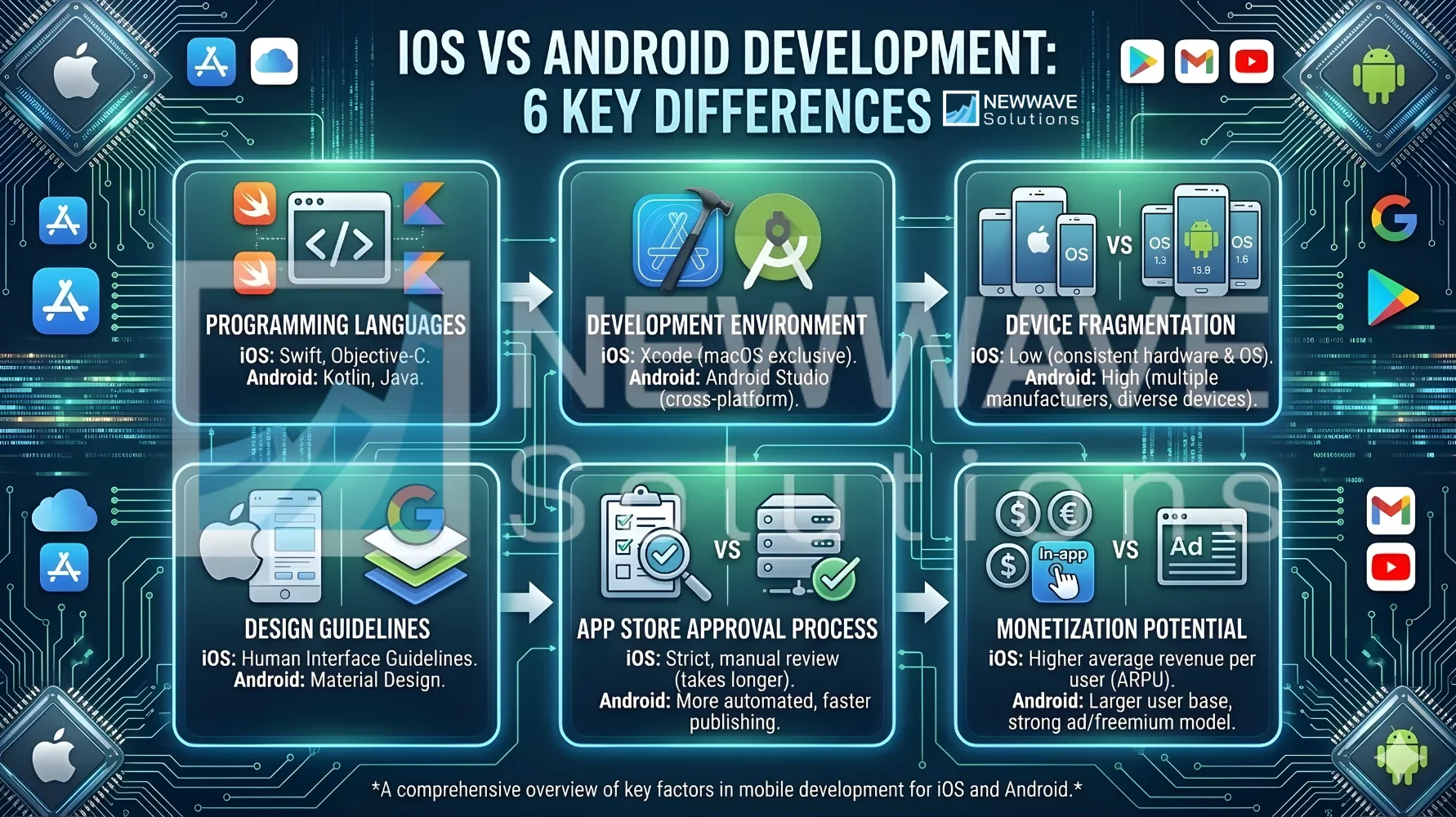
| Primary Programming Languages | Kotlin, Java, C++ (via NDK) | Swift, Objective-C, C/C++ |
| App Distribution Engine | Google Play Store, third-party stores, native APK/APKM sideloading | Apple App Store, region-restricted alternative marketplaces (EU) |
| Security Sandboxing Model | Linux UID/GID isolation, SELinux enforcement, seccomp filters | App Sandbox, Seatbelt profiles, FairPlay DRM, Secure Enclave |
| System Update Delivery | Google Play System Updates (Project Mainline), OEM-specific OTA | Direct, unified Over-The-Air (OTA) system image push |
| Standard Baseline RAM | 8 GB to 16 GB (Flagship standard) | 6 GB to 8 GB (Flagship standard) |
| Customization Depth | Native launchers, icon packs, system fonts, default app overrides, root access | Lock Screen widgets, Home Screen focus modes, Shortcuts automation |
| Desktop Mode Capabilities | Native hardware display out (Samsung DeX, Motorola Ready For, native desktop mode) | Stage Manager (iPadOS specific; mirror-only external output on iPhone) |
App Ecosystems, Distribution, and Monetization Models
The software ecosystem defines how users and developers interact with each operating system. Application distribution policies, monetization trends, and developer APIs create distinct operational environments.
Google Play Store and Alternative Distribution
Android was designed around open software principles. The Google Play Store serves as the primary distribution channel for the vast majority of international users, enforcing quality checks through Google Play Protect. However, Android retains native support for alternative app stores (such as the Samsung Galaxy Store, Amazon Appstore, and F-Droid) alongside direct package installations via APK or APKM files.
This openness provides significant advantages:
- Developer Flexibility: Enterprise and utility applications can bypass marketplace restrictions and distribute internal builds directly.
- Software Archiving: Users can manually install older versions of applications if a recent update introduces bugs or deprecates critical features.
- Alternative Payment Rails: Alternative stores and direct distributions can utilize independent billing systems, bypassing platform commission tiers.
However, open distribution creates a wider attack surface. While Android strictly isolates sideloaded applications within the standard sandbox, malicious APKs distributed via social engineering campaigns remain the predominant vector for mobile malware.
The Apple App Store and Walled Garden Infrastructure
Apple maintains strict administrative control over iOS app distribution. With few exceptions—such as compliance frameworks mandated by the European Union’s Digital Markets Act (DMA) that permit certified alternative marketplaces in specific jurisdictions—all iOS applications must be distributed through the official Apple App Store.
Every application and update submitted to the App Store undergoes automated static analysis and human review to ensure compliance with Apple's App Review Guidelines. This model results in:
- Higher Revenue per User: iOS users historically spend significantly more on in-app purchases, software subscriptions, and digital goods than Android users, making iOS the primary target platform for many commercial software studios.
- Rigid Quality and Interface Consistency: Apple enforces uniform Human Interface Guidelines (HIG), ensuring that iOS apps share coherent navigation structures, haptic responses, and typography.
- Zero Sideloading Outside Mandated Regions: Outside specific regulatory regions, users cannot freely download an installation file from a web browser and install it, restricting legacy software usage and unapproved tools.
Security Frameworks and Privacy Enforcement
Mobile security encompasses software sandboxing, cryptographic hardware, and permission models that safeguard user data against unauthorized exfiltration.
Security Architecture Layer
| Android OS | iOS |
|---|---|
| User-Space Sandbox (Linux UID) | App Sandbox (Seatbelt Profiles) |
| Mandatory Access: SELinux | Hardened Mach IPC Layer |
| Hardware: Titan M2 / Knox Vault | Hardware: Secure Enclave (SEP) |
Sandbox Implementations and Privilege Separation
On Android, each application is assigned a unique Linux User Identifier (UID). Processes run in isolated address spaces, meaning one app cannot inspect or alter the memory space of another. Mandatory Access Control (MAC) is enforced through SELinux policies, which explicitly restrict the hardware resources, system calls, and filesystem locations an application can access, even if the application acquires elevated internal rights.
iOS implements an App Sandbox backed by Seatbelt profiles at the kernel level. An iOS app resides in its own isolated container directory on the filesystem. The sandbox prohibits apps from reading or writing files outside their assigned container, accessing low-level hardware ports directly, or dynamically executing unverified code out of writable memory spaces.
Dedicated Security Hardware
Both platforms rely on dedicated physical hardware co-processors to isolate encryption keys and handle biometric operations:
- Apple Secure Enclave (SEP): A dedicated system-on-chip subsystem that runs its own microkernel OS (sepOS). It manages the hardware cryptographic engine, handles Touch ID and Face ID data, and verifies device integrity independently of the main application processor.
- Android Hardware Security Modules: Android flagships use discrete hardware modules, such as Google’s Titan M2 or Samsung Knox Vault. These chips operate on physically separate silicon, storing root encryption keys, running Android Keystore hardware-backed authentication, and enforcing hardware-level rollback prevention.
Permission Frameworks and Data Tracking Controls
Both platforms require runtime permission requests for access to cameras, microphones, background location, local networks, and photo libraries.
Apple enforces App Tracking Transparency (ATT), a framework that requires developers to request explicit permission before tracking a user’s activity across third-party apps and websites for advertising purposes. This policy has fundamentally altered the mobile advertising landscape by significantly restricting identifier-for-advertisers (IDFA) harvesting.
Android enforces data protection via the Privacy Dashboard, granular location access (approximate vs. precise), and automated permission revocation for unused apps. Instead of completely disallowing cross-app measurement, Google implements the Privacy Sandbox on Android, an initiative designed to provide tracking-free, interest-based advertising APIs that operate locally on-device without exposing unique persistent device identifiers.
Hardware Diversity, System Updates, and Longevity
The hardware models driving Android and iOS represent two completely different economic and engineering paradigms.
Hardware Fragmentation vs. Vertical Integration
Apple designs its own silicon (A-Series and M-Series processors), writes the operating system, packages the firmware, and sells the final consumer hardware. This strict vertical integration enables precise optimization:
- System software is compiled specifically for a narrow set of CPU microarchitectures.
- Hardware components (cameras, display display-engine controllers, power management ICs) are engineered specifically around the capabilities of iOS.
- Power efficiency is maintained through tightly constrained background thread execution and hardware-level sleep states.
Android operates within a horizontally integrated hardware model. Google publishes the source code via the Android Open Source Project (AOSP), which is then picked up, modified, and compiled by independent original equipment manufacturers (OEMs) such as Samsung, Xiaomi, OnePlus, Sony, and Google itself.
- Product Variety: Consumers can choose devices spanning diverse form factors, including clamshell and book-style foldables, ultra-rugged field devices, dedicated gaming phones with active cooling fans, and budget-tier options.
- Hardware Innovation: Features such as periscope zoom lenses, 100W+ wired fast charging, under-display front cameras, and high-refresh-rate OLED panels frequently debut on Android devices years before appearing in Apple's lineup.
Software Lifecycle and Update Mechanisms
The update delivery pipeline represents one of the most critical operational distinctions between the two platforms:
Update Distribution Pipelines:
Apple:
- Apple Engineering
- Direct OTA Release
- All Supported iPhones Worldwide
Android:
- Google AOSP Release
- SoC Vendors (Qualcomm/MediaTek)
- Device OEMs (Samsung/Xiaomi)
- Carriers (Testing)
- End Users OTA
To solve historical fragmentation issues, modern Android uses modular platform architecture:
- Project Treble: Separates the vendor-specific hardware implementation from the core Android OS framework via a versioned interface, allowing OEMs to upgrade the core OS without waiting for custom board-support packages from chip manufacturers.
- Project Mainline: Enables Google to update critical core OS components directly (such as cryptographic libraries, media decoders, and runtime environments) via Google Play System Updates without requiring a full OEM firmware flash.
Major Android manufacturers, including Google and Samsung, provide up to seven years of official operating system updates and monthly security patches for their flagship tiers. Apple provides continuous, direct-to-device operating system upgrades to supported devices globally on the exact same calendar day, historically maintaining full functional and security support for six to eight years per device generation.
Productivity, Customization, and Ecosystem Integration
A smartphone OS does not exist in isolation; its utility is magnified by its surrounding computing ecosystem.
File Systems and Multitasking
Android presents an open, PC-like file management model:
- Users have access to an accessible user-space filesystem through standard File Transfer Protocol (MTP) over USB.
- You can connect flash drives, export raw documents directly from the local download cache, and organize internal storage arbitrarily.
- Multitasking supports split-screen view, free-form floating windows, and true background execution for heavy batch tasks (such as large file downloads or local media processing).
- Desktop environments—such as Samsung DeX or external monitor display pipelines—convert the phone into a functional desktop workstation when connected to an external display, mouse, and keyboard.
iOS operates on a sandboxed, abstraction-first filesystem:
- The native Files app integrates with iCloud Drive, network storage (SMB), and local sandboxed folders, but low-level filesystem access is intentionally restricted.
- File transfers over a physical cable require specific utility suites or cloud mediation.
- Background processing is managed through specialized background execution APIs (Background Tasks framework), where the OS dynamically suspends, throttles, or terminates processes to preserve battery life and foreground application frame rates.
Ecosystem Continuity
Apple’s primary market advantage is continuity across its hardware portfolio:
- AirDrop and Universal Clipboard: Effortless peer-to-peer file transfer and immediate clipboard synchronicity between iOS, iPadOS, and macOS.
- Continuity Camera and Sidecar: The ability to use an iPhone as an ultra-high-definition webcam for a Mac or use an iPad as an external display with zero manual configuration.
- Handoff and iMessage/FaceTime: Seamless transition of active workflows (Safari tabs, mail drafts, incoming calls) across watches, tablets, phones, and desktop computers.
Google and its hardware partners offer cross-platform continuity through alternative protocols:
- Quick Share: Peer-to-peer wireless transfer across Android phones, tablets, and Windows PCs.
- Link to Windows (Microsoft Phone Link): Deep integration with the Windows desktop environment, providing mirrored notification feeds, direct cross-device text messaging, and native streaming of Android apps on the PC desktop.
- Google Workspace and Chrome Synchronization: Universal cloud synchronization across any platform running the Chrome browser, offering broader platform agnosticism than Apple’s ecosystem.
Troubleshooting Common Operating System Failures
Operating systems occasionally encounter structural errors, memory deadlocks, and sync failures. The remediation paths for these errors diverge significantly based on platform architecture.
Resolving Critical Android System Issues
- Persistent App Crashes ("App Keeps Stopping"):
- Root Cause: Corrupted local SQLite database files, stale compiled ART profiles, or incompatible runtime permissions.
- Remediation: Navigate to
Settings > Apps > [Affected App] > Storage. Tap Clear Cache. If issues persist, select Clear Data to reset the application sandbox. If system-wide WebViews are crashing, update the Android System WebView component directly via the Google Play Store.
- Bootloop or Post-Update Soft-Brick:
- Root Cause: Corrupted system partition writes, damaged A/B seamless partition switching, or non-matching vendor binary updates.
- Remediation: Power off the device. Hold
Power + Volume Up(or manufacturer-specific key combinations) to access the Android Recovery Menu. Use the physical volume keys to navigate to Wipe Cache Partition and reboot. If the loop persists, select Run Graphics Test to attempt auto-repair, or execute Factory Reset / Wipe Data.\n3. Severe Background Battery Drain: - Root Cause: Rogue partial wake-locks preventing the application processor from entering a deep sleep state (C-states).
- Remediation: Access
Settings > Battery > Battery Usage. Identify background processes with disproportionate active hours relative to screen-on time. Enforce background usage limits by setting the application profile from Optimized to Restricted.
Resolving Critical iOS System Issues
- Application UI Freezing or Instant Crash on Launch:
- Root Cause: Memory allocation violation (EXC_BAD_ACCESS), unhandled Swift runtime errors, or stale local keychain references.
- Remediation: Force-close the application by swiping up from the Home indicator to open the App Switcher, then swiping the app card off the top of the display. If crashes repeat, navigate to
Settings > General > iPhone Storage > [Affected App]. Select Offload App (which removes the binary but preserves user documents), followed by Reinstall App.
- Device Stuck on the Apple Logo:
- Root Cause: Storage volume exhaustion preventing springboard launch, or interrupted firmware patching during an OTA cycle.
- Remediation: Initiate a dynamic hardware reset (press and release Volume Up, press and release Volume Down, then hold the Side Power Button until the screen reboots). If the logo remains, attach the device via USB to a Mac or PC running Apple Devices / Finder, enter DFU (Device Firmware Update) Mode, and choose Update (which attempts to reinstall the base OS without wiping userdata) before choosing Restore.
- System Storage ("Other" or "System Data") Bloat:
- Root Cause: Cached streaming logs, local diagnostic reports, and interrupted media synchronizations occupying unindexed storage blocks.
- Remediation: Connect the iPhone to a host computer, create an encrypted local backup, trigger a full device wipe via
Settings > General > Transfer or Reset iPhone > Erase All Content and Settings, and restore the encrypted backup. The restore process purges orphaned caches and rebuilds the dynamic file catalog from scratch.
Frequently Asked Questions
Which operating system provides stronger real-world security?
Both operating systems offer enterprise-grade, hardware-backed security, but they mitigate threats through different operational models. iOS utilizes a strict "walled garden" approach, minimizing user exposure to malicious applications by preventing unauthorized app installation and heavily restricting background system operations. Android enforces strong SELinux policies, app sandboxing, and hardware key storage while offering users more administrative freedom, which inherently introduces more potential attack vectors if a user explicitly chooses to bypass built-in system protections.
Why do Android devices generally require more RAM than iPhones?
Android applications run via the Android Runtime (ART) and use garbage collection (GC) for memory management, which requires surplus heap memory to run background cleanup cycles without stalling active threads. In contrast, iOS applications compile directly into native machine code and manage memory through Automatic Reference Counting (ARC). Because iOS immediately allocates and deallocates memory deterministically at runtime, it maintains high performance and smooth multitasking with smaller physical RAM configurations.
Can I run Android applications on iOS, or iOS applications on Android?
No. Android applications compile to run on the Android Runtime using Android-specific APIs and Linux kernel structures, packaged in APK or AAB formats. iOS apps compile to Mach-O binaries built specifically for the Darwin/XNU kernel and Apple’s proprietary frameworks (such as UIKit and SwiftUI). Neither system features native runtime compatibility with or cross-execution support for the other's binaries.
Is file management between a computer and a phone easier on Android or iOS?
Android provides an experience similar to an external flash drive or external hard disk. When plugged into a Windows, macOS, or Linux computer via USB, Android devices can mount internal storage using standard Media Transfer Protocol (MTP), allowing users to drag and drop any file type directly to and from arbitrary folders. iOS isolates files within application sandboxes and requires cloud services, AirDrop, or dedicated sync applications to transfer files between the mobile device and a desktop.
How do system update lifecycles compare across both platforms?
Historically, Apple held a clear advantage by offering six to eight years of continuous, same-day operating system updates across its entire phone lineup. Modern Android flagship manufacturers—most notably Google and Samsung—now match this longevity by providing up to seven years of complete operating system and security updates for their primary devices. However, low-tier and budget Android hardware from secondary manufacturers often receives significantly shorter support windows.
The Verdict: Selecting Your Platform
Your choice between Android OS and iOS should align directly with your operational requirements, desktop computing environment, and personal priorities regarding platform control:
Choose Android OS if your workflow requires extensive hardware variety (such as foldable displays, custom cooling systems, or dedicated hardware expansion), complete control over your filesystem, true multi-window productivity, deep home-screen customization, or direct software installation independent of a single corporate gatekeeper.
Choose iOS if you value seamless continuity with macOS and iPadOS hardware, desire guaranteed day-one software updates across all global devices, prefer unified interface design across third-party software, and want a strictly managed software marketplace that limits corporate tracking and malicious binaries by default.
Image Gallery