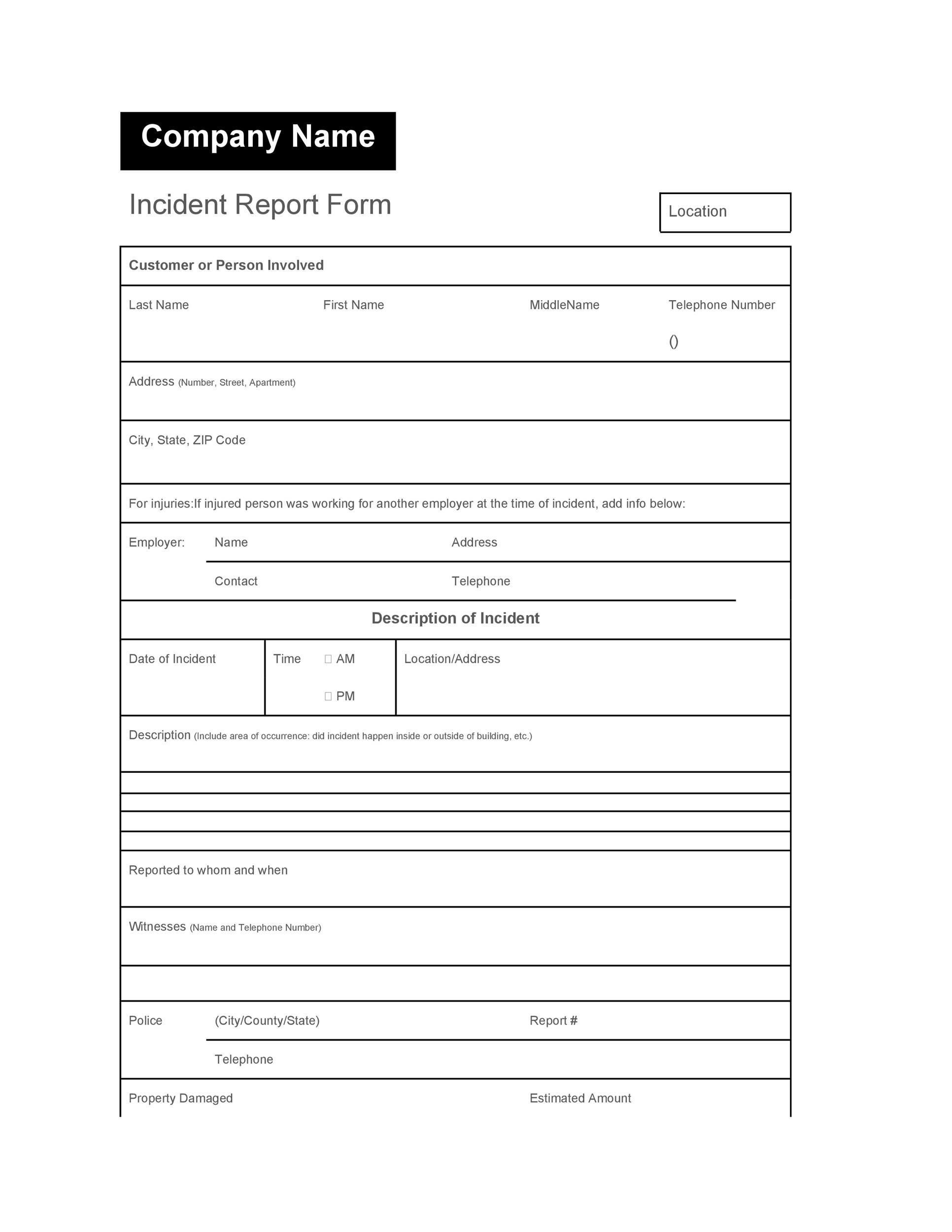
Comprehensive Guide to Company Incident Report Forms: Implementation and Compliance in 2026
A company incident report form is a formal document used to record workplace injuries, illnesses, near misses, property damage, or security breaches. It serves as the primary record for internal investigations, insurance claims, and re...
A company incident report form is a formal document used to record workplace injuries, illnesses, near misses, property damage, or security breaches. It serves as the primary record for internal investigations, insurance claims, and regulatory compliance, ensuring that organizations can identify hazards and implement corrective actions to prevent future occurrences and maintain a safe environment.
Contents
Establishing a robust reporting system is not merely a bureaucratic requirement; it is a fundamental pillar of modern risk management. In 2026, as workplace dynamics continue to evolve with hybrid models and increased automation, the company incident report form has transitioned from a static piece of paper to a dynamic tool for data-driven safety improvements. Whether you are an HR professional, a safety officer, or a business owner, understanding the nuances of this document is essential for protecting both your employees and your organization's legal standing.
The Critical Importance of Standardized Incident Reporting
The primary purpose of a company incident report form is to capture an accurate, contemporaneous account of an event. Human memory is fallible; the longer the gap between an event and its documentation, the more likely critical details are to be lost or distorted. By providing a standardized template, a company ensures that every incident—no matter who reports it—is documented with the same level of detail and rigor.
From a regulatory perspective, maintaining these records is often a legal mandate. In the United States, the Occupational Safety and Health Administration (OSHA) requires most employers with more than 10 employees to keep a log of serious work-related injuries and illnesses. While the "OSHA Form 301" is the federal standard for individual incident reports, many companies use internal forms that capture even more data to satisfy insurance providers and internal safety audits.
Furthermore, a well-implemented reporting culture reduces "hidden" costs. For every major injury, there are often dozens of "near misses"—events where an accident nearly occurred but was avoided by chance. By using incident report forms to document these near misses, companies can identify systemic weaknesses before they result in a catastrophic loss or a significant workers' compensation claim.
Essential Components of an Effective Incident Report Form
To be effective, a form must be comprehensive enough to provide actionable data but simple enough that employees will actually complete it. A poorly designed form often leads to "pencil-whipping," where users skip fields or provide vague answers just to finish the task.
1. Administrative Data
This section identifies the foundational facts of the event. It should include the name of the person involved, their job title, department, and supervisor. Crucially, it must also include the names and contact information of any witnesses. In 2026, many digital forms also include a "Geolocation" field to pinpoint exactly where an incident occurred in large facilities or remote worksites.
2. Time and Location
Precision is vital here. The form should distinguish between the time the incident occurred and the time it was reported. If there is a significant delay, the form should include a field for the reporter to explain why. The location should be specific—not just "the warehouse," but "Warehouse A, Row 4, near the loading dock."
3. Detailed Narrative of the Event
This is the core of the report. The form should prompt the user to describe the sequence of events leading up to the incident. What was the individual doing? What tools or equipment were in use? What was the environmental condition (e.g., lighting, weather, noise levels)? The narrative should stick to objective facts rather than opinions or blame.
4. Nature of the Injury or Damage
If the incident involved a person, the form must detail the specific body parts affected and the type of injury (e.g., a laceration to the left index finger). If property was damaged, the form should list the equipment involved and an initial estimate of the severity.
5. Immediate Actions Taken
What happened in the minutes following the incident? Was first aid administered? Was the area cordoned off? Was the equipment locked out? Documenting these immediate responses is critical for showing that the company fulfilled its "duty of care" following an accident.
Categories of Incidents to Document
Not all incidents are created equal. A versatile company incident report form should have categories or "logic paths" that adapt to the type of event being reported.
- Medical Emergencies and Injuries: These are the most common and require detailed information regarding the type of treatment provided (on-site first aid vs. emergency room visit).
- Near Misses: Often overlooked, these reports are "free lessons." They document events where no damage or injury occurred, but the potential was there.
- Property and Equipment Damage: These reports are essential for maintenance logs and insurance claims involving company vehicles, heavy machinery, or IT infrastructure.
- Environmental Incidents: This includes chemical spills, gas leaks, or unauthorized discharge of waste. These often trigger specific reporting timelines to environmental regulators.
- Security and Behavioral Incidents: This category covers workplace violence, harassment, theft, or unauthorized access to sensitive areas. These forms often require higher levels of confidentiality and restricted access.
Comparison of Reporting Methods: Paper vs. Digital
While some smaller organizations still rely on paper forms, the shift toward digital incident management systems (EHS Software) has become the standard for medium-to-large enterprises in 2026.
| Feature | Paper-Based Forms | Digital Reporting Software |
|---|---|---|
| Accessibility | Limited to physical location of the form. | Accessible via mobile devices/apps anywhere. |
| Data Integrity | Prone to illegible handwriting and loss. | Standardized inputs; cloud-backed security. |
| Speed of Notification | Manual delivery to HR/Safety officer. | Instant automated alerts to stakeholders. |
| Analysis | Requires manual data entry into spreadsheets. | Real-time dashboards and trend analysis. |
| Evidence Attachment | Physical photos must be printed/stapled. | Direct upload of photos, video, and audio. |
| Compliance | Harder to track version history. | Automated version control and audit trails. |
The Incident Investigation Workflow
Filling out the form is only the first step in a five-stage risk management process. A company incident report form should be the catalyst for the following workflow:
- Notification: The employee or supervisor completes the form immediately. In 2026, digital systems often trigger an automatic SMS or email to the Safety Director and the Legal Department.
- Investigation: A designated investigator reviews the form and visits the site. They may take additional photos or conduct formal witness interviews to supplement the initial report.
- Root Cause Analysis (RCA): The team uses the data from the form to ask "Why?" until the source of the problem is found. For example, if a worker slipped, the RCA might find it wasn't just "wet floor" but a "leaking valve" that had been reported for repair three times previously.
- Corrective Action: Based on the RCA, the company implements changes. This might involve new PPE, updated training protocols, or replacing faulty machinery.
- Verification and Closing: After a set period, the safety team verifies that the corrective actions are working. The incident report is then officially "closed" but remains in the permanent archive.
Common Mistakes in Incident Reporting
Even with a perfect form, human error can undermine the process. Avoiding these common pitfalls is essential for maintaining a legally defensible and useful safety record.
- Delayed Reporting: The most common mistake is waiting until the end of a shift or the next day to fill out the form. The "Golden Hour" of reporting is the first 60 minutes after an incident when details are freshest.
- Assigning Blame: Forms that focus on who was at fault rather than what happened discourage employees from reporting incidents. The goal is "system improvement," not "punishment."
- Vague Language: Using phrases like "the employee was careless" or "an accident happened" provides no value for future prevention. Encourage descriptive, objective language.
- Incomplete Fields: Leaving sections blank creates gaps that insurance adjusters or regulatory inspectors may interpret as negligence or a lack of thoroughness.
- Failure to Follow Up: If an employee submits a report and never hears back about the resolution, they will likely stop reporting incidents in the future, leading to a degraded safety culture.
Legal and Privacy Considerations
In 2026, data privacy is a significant concern for incident reporting. Forms often contain Sensitive Personal Information (SPI) or Protected Health Information (PHI). Organizations must ensure that:
- Access is Restricted: Only authorized personnel (HR, Safety, Legal) should have access to the full details of an injury report.
- GDPR/CCPA Compliance: If your company operates in jurisdictions with strict data privacy laws, the form must include a privacy notice explaining how the data will be used and stored.
- Legal Privilege: In some high-stakes incidents, companies may work with legal counsel to ensure that certain parts of the investigation are "attorney-client privileged" to protect the company during potential litigation.
Frequently Asked Questions
Who is responsible for filling out the company incident report form? Ideally, the person involved in the incident should complete the form. However, if they are incapacitated or unable to do so, their immediate supervisor or a designated first-aid responder should take the lead. Regardless of who writes it, the report should be reviewed by a supervisor to ensure accuracy before official submission.
Should near misses be reported on the same form as actual injuries? While many companies use the same basic form to maintain a consistent workflow, it is helpful to have a checkbox that identifies the event as a "Near Miss." This allows the safety team to filter data and prioritize investigations. Reporting near misses is one of the most effective ways to prevent future actual injuries.
How long should a company keep incident report forms on file? Retention periods vary by jurisdiction and incident type. For example, OSHA requires records to be kept for five years following the end of the calendar year that the records cover. However, for incidents involving toxic substance exposure, some regulations require records to be kept for 30 years or more. Always check your local and industry-specific statutes of limitations.
Is an incident report the same as a workers' compensation claim? No. An incident report is an internal company document used to record the facts of an event and initiate an investigation. A workers' compensation claim is a separate legal and insurance process used to seek financial benefits for medical bills and lost wages. While the incident report is often used as evidence in a claim, filing one does not automatically start the other.
Can an employee be fired for filing an incident report? In almost all jurisdictions, it is illegal for an employer to retaliate against an employee for reporting a workplace injury or safety concern. Doing so can lead to "whistleblower" lawsuits and significant fines from regulatory bodies like OSHA. Companies should explicitly state in their safety policy that reporting is a protected activity.
Practical Recommendation
To optimize your company's safety protocol, transition to a mobile-first digital reporting system that allows employees to upload photos and voice-to-text descriptions immediately at the scene. Ensure your form includes a "Root Cause" section to move beyond documentation and into active prevention. Finally, conduct a quarterly review of all incident reports to identify trends—such as a specific machine or time of day associated with higher risk—to proactively address hazards before they escalate.
Image Gallery