How to Master the Housecall Pro Tutorial for Your Service Business
Mastering Housecall Pro involves a systematic approach to digitizing your workflow, beginning with clean data migration and ending with automated customer communication. By following a structured tutorial path—covering scheduling, disp...
Mastering Housecall Pro involves a systematic approach to digitizing your workflow, beginning with clean data migration and ending with automated customer communication. By following a structured tutorial path—covering scheduling, dispatching, and financial reconciliation—service businesses can reduce administrative overhead by up to 40% while significantly improving the technician and customer experience.
Contents
Housecall Pro has established itself as a leading Field Service Management (FSM) platform, designed specifically for home service professionals such as HVAC technicians, plumbers, electricians, and cleaning companies. As we navigate the business landscape of 2026, the necessity of a centralized "operating system" for your business is no longer a luxury; it is a requirement for scalability. Mastering the platform’s tutorial and implementation process allows you to move beyond basic scheduling into high-level business intelligence and automated growth.
Understanding the Housecall Pro Ecosystem
Before diving into the specific steps of the tutorial, it is vital to understand what Housecall Pro actually does. At its core, it is a cloud-based SaaS (Software as a Service) platform that connects the back office, the field technician, and the end customer.
The mastery of this tool is not merely about learning where buttons are located; it is about translating your physical business processes into digital workflows. In 2026, this includes leveraging AI-driven dispatching suggestions and advanced fintech integrations that allow for instantaneous payment processing. If your business is currently running on whiteboards, paper invoices, or a patchwork of disconnected apps, the transition to Housecall Pro will require a mindset shift toward data-driven management.
Prerequisites: Preparing Your Business for Implementation
You cannot master a digital tool if your analog data is in disarray. Before beginning the official setup tutorial within the app, ensure you have the following components ready:
- Clean Customer Data: Gather your customer names, addresses, emails, and phone numbers in a CSV or Excel format. Garbage in results in garbage out; ensure there are no duplicates.
- A Comprehensive Price Book: List your services, labor rates, and material costs. In 2026, Housecall Pro emphasizes "Flat Rate" pricing models, which help in providing instant, professional estimates.
- Employee Permissions: Decide who gets "Admin" access versus "Field Tech" access. Technicians usually only need to see their own schedules and job details, while office staff need a broader view of the dispatch board.
- Financial Integration Readiness: Most businesses sync Housecall Pro with QuickBooks Online. Ensure your QuickBooks chart of accounts is organized to prevent syncing errors later.
Phase 1: Initial Configuration and Data Migration
The first step in the Housecall Pro tutorial is the "Account Setup" wizard. This phase is where the foundation is laid.
Importing Your Database
The platform provides a robust import tool. When you upload your customer list, Housecall Pro’s system will attempt to map your spreadsheet columns to its internal fields. Pay close attention to "Service Addresses" versus "Billing Addresses." Mastering this step prevents technicians from showing up at the wrong location—a common pitfall for new users.
Building the Price Book
Your Price Book is the engine of your profitability. When setting this up, group items into categories (e.g., "Emergency Repair," "Standard Maintenance," "Installation"). By 2026 standards, many successful businesses also include "Add-on" items. The Housecall Pro tutorial emphasizes creating packages; for example, a "Good, Better, Best" proposal allows customers to choose their price point, which historically increases average ticket sizes by 20-30%.
Phase 2: Mastering Scheduling and Dispatching
The Dispatch Board is the most-used feature in the software. Mastery here means moving beyond simple data entry to proactive fleet management.
The Drag-and-Drop Interface
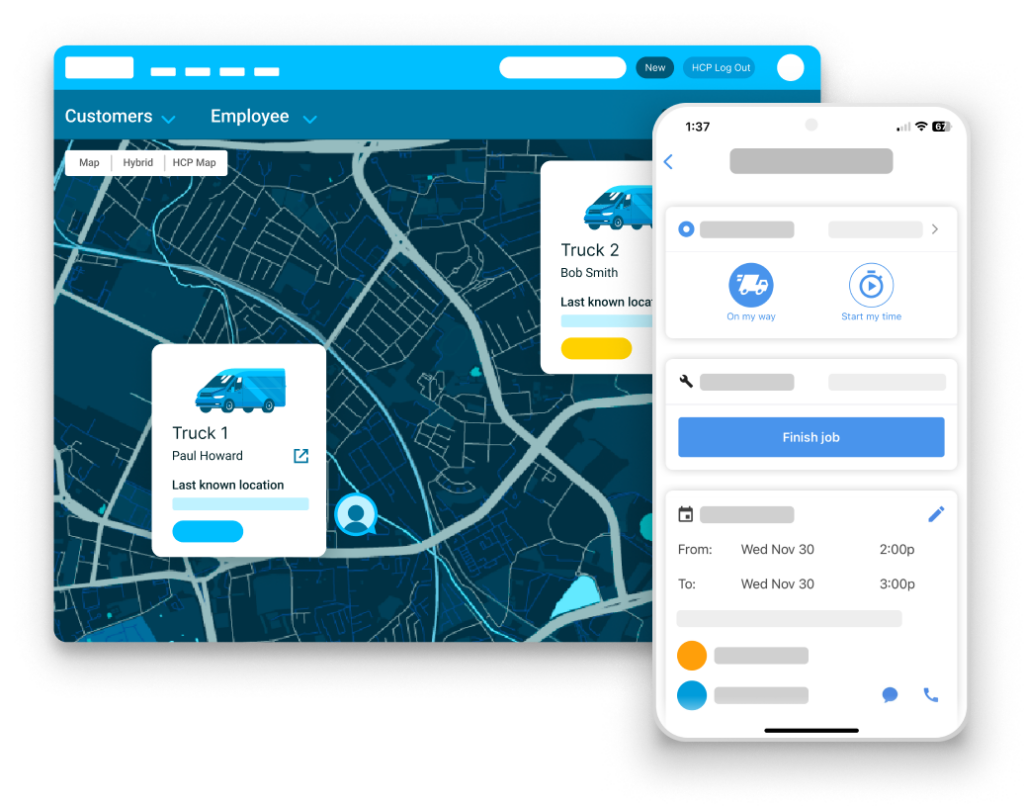
The calendar allows you to drag jobs to different technicians based on their availability and proximity. A key feature to master is the "Unassigned" bucket. Jobs that are sold but not yet scheduled sit here. Efficient dispatchers use the map view to see where technicians are currently located (via GPS) and assign unassigned jobs to the closest available pro to minimize "windshield time" (travel time).
Automated Notifications
One of the highest-value features in the Housecall Pro tutorial is the "On My Way" (OMW) text. When a technician starts a job in the field app, the customer receives a text with a photo of the tech and a tracking link. Mastering the customization of these templates ensures your brand voice remains consistent. In 2026, customers expect this level of transparency, and failing to utilize it makes a business look outdated.
Phase 3: The Financial Workflow – From Estimate to Payment
If you don't master the financial loop, you are essentially using Housecall Pro as an expensive calendar. The goal is a "paperless" workflow where money moves through the system automatically.
The Professional Estimate
Mastering the estimate tool involves using "Line Item Images." Customers are much more likely to approve a $2,000 repair if they can see photos of the broken part alongside the estimate. Use the "Sales Proposals" feature to present tiered options. Once a customer clicks "Approve" on their mobile device, the estimate can be instantly converted into an active job.
Invoicing and Payments
Once a job is marked "Finished" by the technician, the office can send the invoice with one click. Housecall Pro's native payment processor, Instapay, allows businesses to receive funds in their bank accounts within minutes rather than days. To master this, you should also set up "Automatic Follow-ups." If an invoice remains unpaid for three days, the system should automatically email the customer a reminder, removing the need for awkward collection calls.
Housecall Pro Feature Comparison (2026)
| Feature | Basic Plan | Essentials Plan | Max Plan |
|---|---|---|---|
| Users Included | 1 User | 1-10 Users | Unlimited (Custom) |
| Online Booking | Basic Link | Full Integration | Custom API |
| QuickBooks Sync | Manual Export | Real-time Sync | Advanced Mapping |
| Marketing Tools | Not Included | Email Marketing | Full Automation Suite |
| Reporting | Standard | Advanced | Custom BI Dashboards |
| Support | Email/Chat | Priority Chat/Phone | Dedicated Account Manager |
Phase 4: Customer Relationship Management (CRM) and Marketing
Mastery of Housecall Pro culminates in how you handle the "Customer Lifecycle." It is five times more expensive to acquire a new customer than to retain an old one.
The "Recall" Workflow
The system allows you to tag customers based on the services they received. If you performed an HVAC tune-up in the spring, you can filter your list and send a bulk email or text for a furnace check-up in the fall. Mastering these "Post-Job Automations" ensures your schedule remains full during shoulder seasons.
Online Reviews
Housecall Pro integrates with Google Business Profile. A critical part of the tutorial is setting up the automatic "Review Request." After a job is paid, the system sends a text asking for a review. Businesses that master this feature often see their 5-star review count double within the first six months of implementation.
Troubleshooting Common Implementation Hurdles
Even with a detailed tutorial, you may encounter friction points. Being aware of these helps in achieving mastery faster.
- Sync Errors: Most sync errors with accounting software stem from "Sales Tax" mismatches. Ensure the tax rates in Housecall Pro exactly match those in QuickBooks.
- Technician Adoption: The biggest hurdle is often the field staff. To overcome this, focus the training on how the app makes their life easier (e.g., no more paperwork at the end of the day, clearer directions to jobs).
- Duplicate Records: If you have multiple entries for the same customer, the "Merge" tool is your best friend. Regularly auditing your database prevents communication errors.
Advanced Tips for 2026: Leveraging AI and Automation
By 2026, Housecall Pro has integrated several AI-driven features that take mastery to the next level. Smart Dispatching now analyzes traffic patterns and historical job durations to suggest the optimal technician for a specific task. Furthermore, "Voice-to-Job" features allow technicians to dictate job notes, which the AI then summarizes into professional descriptions for the final invoice.
Another area for mastery is the Consumer Financing integration. For high-ticket items, offering "Buy Now, Pay Later" options directly on the estimate can increase conversion rates by up to 15%. Mastering the application process for these financial tools is essential for any service business looking to compete at a high level.
Frequently Asked Questions
Does Housecall Pro work without an internet connection?
Yes, the mobile app has an offline mode. Technicians can view their schedules, take photos, and collect signatures without a signal. Once the device reconnects to LTE or Wi-Fi, the data syncs back to the office dashboard automatically.
Can I migrate my data from Jobber or ServiceTitan to Housecall Pro?
Yes, Housecall Pro has dedicated migration specialists who handle data transfers from competitors. While the automated tools handle most of the work, a manual audit of the "Price Book" is recommended after the migration to ensure category mappings are correct.
Is the Instapay feature secure for my customers?
Instapay utilizes PCI-compliant encryption. Housecall Pro does not store full credit card numbers on its servers; instead, it uses tokenization through its payment partners (like Stripe), ensuring that your business and your customers are protected from data breaches.
How many technicians can I manage on the platform?
The platform is built to scale from a "man-in-a-van" operation to enterprises with hundreds of technicians. The "Max" plan is specifically designed for larger fleets, offering advanced reporting and dedicated account management to handle the complexity of large-scale operations.
What is the "Housecall Pro XL" or "Max" tier used for?
The higher tiers are designed for businesses doing over $1M in annual revenue. They include features like "Sales Proposals," which allow for multi-option bidding, and "Employee Gamification," which tracks technician performance metrics like average ticket size and review counts to foster healthy competition.
Final Recommendation for Mastery
To truly master the Housecall Pro tutorial for your service business, do not attempt to implement every feature on day one. Start with the "Core Four": Customer Import, Price Book Construction, Basic Scheduling, and Invoicing. Once your team is comfortable with these essentials, layer in advanced automations like email marketing and consumer financing. Consistent use of the reporting dashboard will eventually allow you to stop "guessing" about your business's health and start "knowing" your profit margins, lead sources, and technician efficiency.
Image Gallery