Why Scary FaceTime Numbers Keep You on Edge (and How to Stop Them)
Receiving unexpected FaceTime calls from scary or unknown numbers creates an immediate, intense psychological reaction because video calling invasively breaches your personal physical space. Unlike standard audio spam, FaceTime implies...
Receiving unexpected FaceTime calls from scary or unknown numbers creates an immediate, intense psychological reaction because video calling invasively breaches your personal physical space. Unlike standard audio spam, FaceTime implies visual access, immediate presence, and potential exposure, triggering a heightened startle response. This anxiety is amplified by caller ID spoofing, online urban legends, and cyber-harassment tactics.
Contents
The Psychological Mechanics of Digital Intrusion
An incoming phone call from an unknown number is often an annoyance; an incoming FaceTime call from an unknown or bizarre number feels like a direct security threat. Understanding why these calls provoke such a visceral reaction requires examining how human psychology interacts with modern communication interfaces.
Standard Audio Spam --> Auditory Interruption (Low Threat Perception) FaceTime Call Attempt --> Visual + Spatial Boundary Invasion (High Threat Perception) Unknown / Scary Identity --> Hypervigilance & Cortisol Spike (Loss of Control)
Violation of Personal Spatial Boundaries
Standard voice calls occupy an auditory channel, allowing the receiver to maintain complete control over their physical environment and visual presentation. FaceTime, by default, requests access to both camera and microphone the second a call is answered. The human brain perceives video communication as a proxy for physical proximity. When a random string of numbers—or a number associated with viral internet horror stories—initiates a video request, your brain registers it as an uninvited stranger knocking on your bedroom window rather than a harmless telemarketing effort.
The Auditory Startle Reflex and Hypervigilance
The default iOS FaceTime ringtone is distinctly urgent and persistent. Combined with the high-contrast incoming call screen displaying an unfamiliar geographic location, email address, or obscure number string, it triggers an instant fight-or-flight reflex. Repeated late-night ring cycles from unknown accounts induce a state of hypervigilance, where the user begins anticipating the sound, keeping their nervous system in a constant state of mild stress.
The Fear of Asymmetric Observation
A fundamental source of anxiety during unexpected video requests is the risk of asymmetric observation. Users worry that if they accidentally tap "Accept," their front-facing camera will immediately transmit their face, location, or intimate surroundings to a malicious actor, while the caller remains hidden behind a blank screen or a unsettling static image. This asymmetry strips away the user's sense of agency.
Technical Anatomy: How Scary FaceTime Numbers Reach Your iPhone
To lower your anxiety, it helps to demystify how these numbers find your device in the first place. FaceTime does not operate on traditional public switched telephone network (PSTN) routing alone; it relies on Apple's proprietary communication infrastructure tied to Apple ID accounts.
Apple ID Reachability and Data Scrapers
FaceTime calls can be initiated using either a traditional phone number or an email address associated with an active Apple ID. Cybercriminals, pranksters, and automated script operators utilize automated scrapers to collect leaked credential lists from historical data breaches. If your email address or mobile number appears on a public breach list, automated scripts can attempt to ping that identifier across Apple Push Notification services (APNs) to verify whether an active FaceTime endpoint exists.
Caller ID Spoofing and VoIP Gateway Manipulation
Spammers utilize Voice over IP (VoIP) software and SIP trunks to mask their true originating numbers. They can format caller ID displays to mirror local area codes, display unnatural number sequences (such as all zeros or repeated single digits), or manipulate contact names to appear unsettling. Because FaceTime handles incoming requests based on network pings rather than traditional carrier filtering, spoofed handles often pass through basic carrier spam filters undetected.
Group FaceTime Ping Flooding
A recurring harassment vector involves placing high-volume Group FaceTime calls. Malicious actors add dozens of random email addresses or numbers to a single FaceTime group call. When the call rings, every participant's device lights up simultaneously. Even if one person declines, the call often continues ringing as long as other endpoints remain active, creating a chaotic and overwhelming disruption.
Comparing Digital Communication Threat Vectors
Different communication protocols carry varying levels of psychological disruption and technical risk. The table below outlines how standard spam compares to FaceTime intrusions.
| Vector Type | Interface Exposure | Default System Filtering | Psychological Impact Level | Primary Risk Vector |
|---|---|---|---|---|
| Standard Voice Call | Audio only; easily muted | Carrier-level spam blocking & Silence Unknown Callers | Low to Moderate | Vishing (Voice Phishing), Impersonation |
| SMS / iMessage Spam | Text and optional media attachments | Filter Unknown Senders folder | Low | Malicious Links, Smishing |
| FaceTime Audio | Audio only; high-priority overlay | iOS Silence Unknown Callers (iOS 13+) | Moderate | Harassment, Social Engineering |
| FaceTime Video | Audio + Camera activation potential | iOS Silence Unknown Callers | High to Severe | Camera Exposure, Doxxing, Extortion |
Step-by-Step iOS Configuration: Securing FaceTime Against Unknown Callers
You do not have to endure unexpected FaceTime disruptions. Apple provides granular operating system controls to restrict who can contact you via FaceTime while leaving essential communications intact.
1. Enable "Silence Unknown Callers"
The most effective global defense against random FaceTime pings is enabling native call suppression in iOS settings.
- Open Settings on your iPhone or iPad.
- Scroll down and select Phone (or FaceTime on Wi-Fi-only devices).
- Tap Silence Unknown Callers.
- Toggle the switch to On.
Result: Calls from numbers not saved in your Contacts, recent outgoing calls, or Siri Suggestions will be silenced automatically and sent directly to voicemail or rejected without ringing your display.
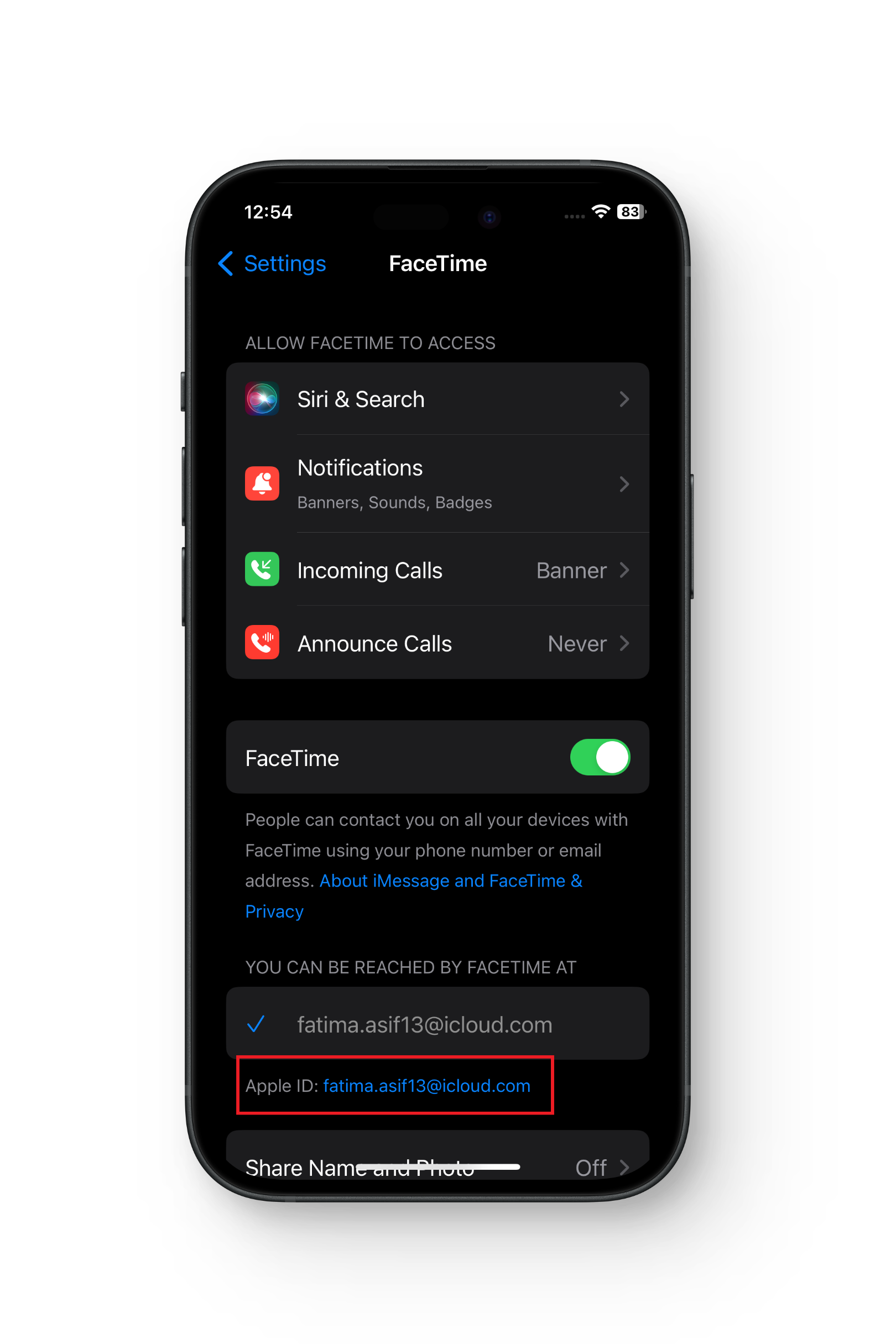
2. Restrict "You Can Be Reached By FaceTime At"
By default, FaceTime registers every email address associated with your Apple ID alongside your phone number. Disabling secondary email handles limits your exposure surface.
- Navigate to Settings > FaceTime.
- Locate the section labeled You Can Be Reached By FaceTime At.
- Uncheck all secondary email addresses, leaving only your primary mobile phone number active (or a dedicated private email).
- Under Caller ID, select your preferred verified phone number so your outgoing calls are recognized by loved ones.
Settings -> FaceTime -> "You Can Be Reached By FaceTime At" [x] +1 (555) 019-2831 <-- KEEP CHECKED (Known Mobile) [ ] user@old-email.com <-- UNCHECK (Exposed to Breaches) [ ] contact@domain.org <-- UNCHECK (Public Business Mail)
3. Block Specific Persistent Contacts and Handles
If a specific scary number or email handle repeatedly attempts to call, block it directly across the system level.
- Open the FaceTime app.
- Tap the Info icon (i) next to the offending caller ID or email.
- Scroll to the bottom of the card and select Block this Caller.
- Confirm Block Contact.
4. Configure Focus Modes to Filter Communication
Use iOS Focus modes to enforce strict call allowlists during nighttime hours or focused work periods.
- Open Settings > Focus > Do Not Disturb (or custom Sleep Focus).
- Tap People.
- Select Allow Calls From and choose Allowed People Only or Favorites Only.
- Ensure Allow Repeated Calls is toggled off if persistent harassers are trying to ring back-to-back.
Defensive Protocols: What to Do If You Answer a Suspicious FaceTime Call
If muscle memory causes you to tap "Accept" on a scary or unfamiliar FaceTime call, execute the following emergency measures to safeguard your privacy:
Cover the Camera Immediately
Keep your finger over the front-facing camera lens, or orient the phone flat down on a surface. This prevents the caller from capturing your face, live location, or home environment.
Do Not Speak or Reveal Audio
Harassers and automated social-engineering tools record audio to harvest voice samples or verify active lines. Maintain absolute silence and press the red End Call button immediately.
Inspect App Permissions
Verify that apps on your device do not have unauthorized access to your camera or microphone background permissions:
- Go to Settings > Privacy & Security > Camera and review active permissions.
- Go to Settings > Privacy & Security > Microphone to restrict unnecessary access.
Report the Account to Apple and Your Carrier
You can report abusive FaceTime accounts directly to Apple. Take a screenshot of the call log displaying the full email address or phone number, navigate to Apple's official feedback or support portal, and submit a security report regarding unwanted Apple ID communications.
Frequently Asked Questions
Can someone hack my iPhone just by calling me on FaceTime?
No. Simply receiving or answering a FaceTime call does not instantly grant an attacker remote control of your iPhone or extract your private device files. Modern operating systems isolate FaceTime within secure app sandboxes. However, answering allows the caller to capture video or audio of you, confirm that your number is active, and attempt direct social engineering attacks.
Why do some FaceTime calls show up as full email addresses instead of numbers?
FaceTime operates over internet protocols using Apple IDs as user identifiers. Anyone can register a free Apple ID using a disposable email address, generate an eerie or randomized username, and make FaceTime calls directly from an iPad, Mac, or iPhone without registering a cellular phone number.
How are spammers getting my number for FaceTime calls?
Your phone number or email address was likely exposed in a third-party website data breach, scraped from public social media profiles, or generated via automated number-dialing scripts. Once an automated system confirms that an Apple ID is tied to your phone number, it can be added to mass contact lists used for spam or pranks.
Will turning off FaceTime prevent me from receiving standard phone calls?
No. Disabling FaceTime entirely via Settings > FaceTime (toggled to Off) only stops internet-based FaceTime Video and FaceTime Audio calls. Your standard cellular voice calls, SMS text messages, and third-party messaging apps will continue to operate normally.
Why does the FaceTime ring tone sound more alarming late at night?
The human auditory system is naturally sensitive to high-pitched, rhythmic stimuli when ambient sound levels drop. During low-light hours, your sympathetic nervous system is geared toward rest, making any sudden high-priority visual and sound alert feel vastly more disruptive and threatening.
Recommended Next Steps
To permanently eliminate the anxiety caused by unwanted FaceTime calls, take five minutes right now to adjust your security settings:
- Activate Silence Unknown Callers under both your Phone and FaceTime settings.
- Audit your Apple ID endpoints by unchecking unused email addresses under Settings > FaceTime.
- Establish a strict Sleep Focus schedule to prevent unscheduled video calls from waking you up.
- If harassment persists from multiple unknown handles, temporarily disable FaceTime entirely by toggling Settings > FaceTime to Off for 48 to 72 hours to force automated scripts to drop your active status.
Image Gallery