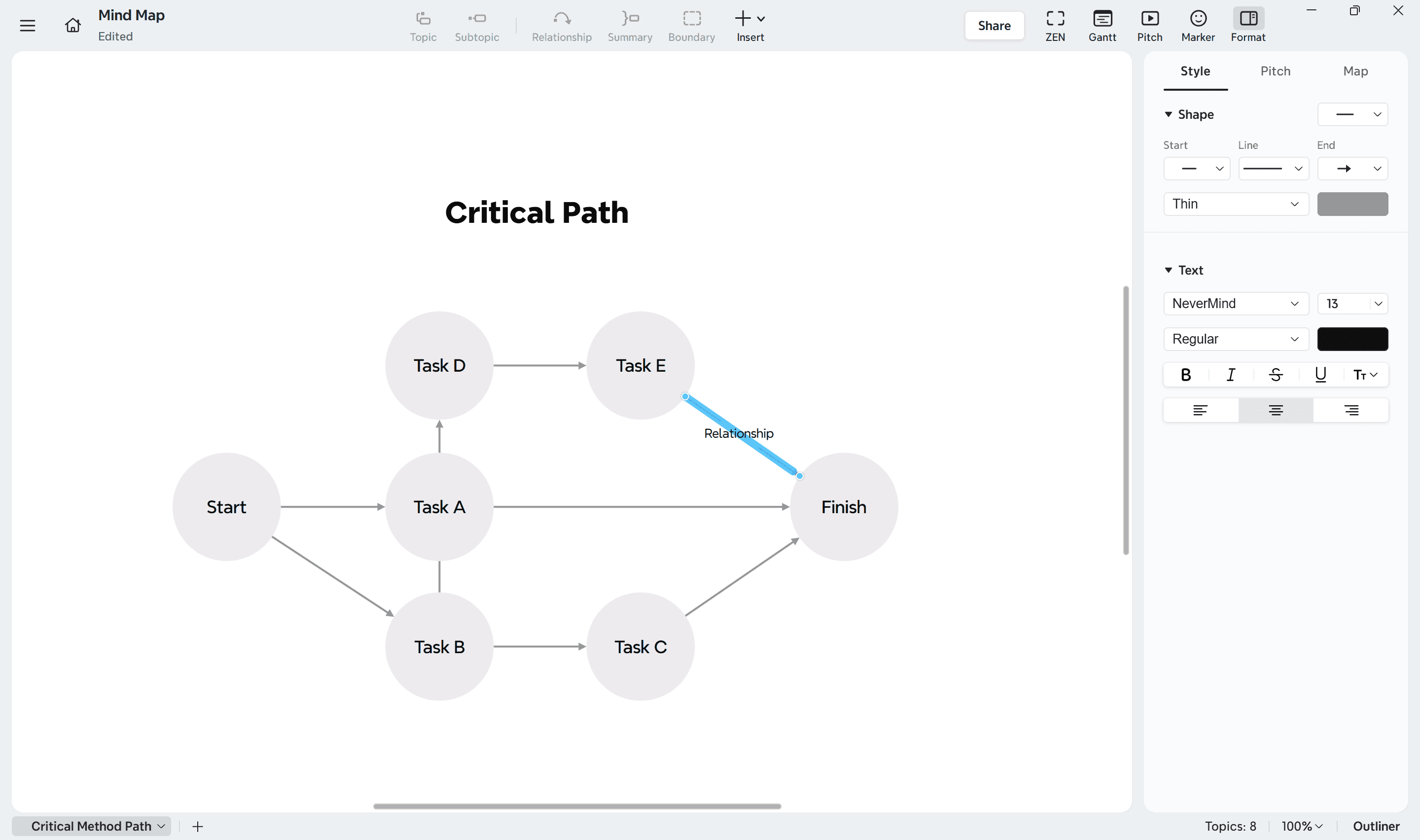
Why Critical Path Software Matters for Modern Projects
Critical path software matters for modern projects because it automates the identification of sequence-dependent tasks that dictate a project’s minimum completion timeline. By dynamically calculating task float, highlighting schedule b...
Critical path software matters for modern projects because it automates the identification of sequence-dependent tasks that dictate a project’s minimum completion timeline. By dynamically calculating task float, highlighting schedule bottlenecks, and modeling schedule risks in real time, critical path tools prevent costly project overruns across complex enterprise environments.
Contents
Understanding the Critical Path Method in Modern Project Management
The Critical Path Method (CPM) originated in the late 1950s through a collaborative development between DuPont and Remington Rand to manage complex industrial plant maintenance schedules. At its core, the critical path represents the longest continuous sequence of dependent activities from project start to finish. Any delay in a task residing on the critical path directly pushes back the final target completion date.
In simple project environments, project managers could map dependencies manually on paper or using basic spreadsheets. Modern projects, however, operate in volatile environments characterized by distributed teams, matrixed resources, tight vendor SLAs, and constantly shifting technical scope.
Mathematical calculations under CPM rely on four primary scheduling timestamps for every project activity:
- Early Start (ES): The earliest possible time a task can begin once predecessor tasks are complete.
- Early Finish (EF): The earliest possible time a task can conclude ($EF = ES + \text{Duration}$).
- Late Start (LS): The latest possible time a task can begin without delaying the overall project finish date.
- Late Finish (LF): The latest possible time a task can conclude without delaying project completion ($LF = LS + \text{Duration}$).
The mathematical difference between the late start and early start (or late finish and early finish) is known as total float or slack. Tasks with zero total float reside directly on the critical path. If a task has float, project managers possess operational leeway to reschedule or delay that specific item without breaching contractually obligated completion dates. Modern critical path software automates these forward-pass and backward-pass mathematical sweeps continuously as task statuses update.
Key Reasons Critical Path Software Is Essential Today
Managing modern cross-functional projects without algorithmic schedule engines introduces major operational risk. Dedicated critical path software transforms static project schedules into dynamic, predictive decision engines.
- Task A: System Specs (5 days)
- Task B: Core Architecture (10 days) (On Critical Path: Float = 0)
- Task C: Integration & Testing (8 days)
1. Automated Dependency Tracking and Dynamic Recalculation
Modern software projects and infrastructure deployments involve hundreds—sometimes thousands—of interdependent work packages. A single delay in a technical architectural review can create domino delays across procurement, engineering, compliance, and quality assurance.
Critical path software continuously evaluates four distinct dependency relationships:
- Finish-to-Start (FS): Task B cannot start until Task A finishes (the most common dependency type).
- Start-to-Start (SS): Task B cannot start until Task A starts (used for concurrent work streams).
- Finish-to-Finish (FF): Task B cannot finish until Task A finishes (used for supervisory or testing activities).
- Start-to-Finish (SF): Task B cannot finish until Task A starts (rare, used mainly for legacy replacement cutovers).
When team members update actual progress in cloud-based CPM platforms, the system instantly recalculates downstream impact across all four dependency logic paths. Manual spreadsheet updates fail to maintain complex link relationships accurately, leaving organizations blind to hidden downstream schedule slippage.
2. Early Identification of Resource Constraints and Bottlenecks
A project schedule may appear mathematically sound on paper until resource availability is factored in. High-specialization roles—such as enterprise cloud architects, regulatory compliance counsel, or specialized commissioning engineers—are often over-allocated across multiple simultaneous project tasks.
Modern CPM platforms integrate resource-constrained critical path analysis (sometimes aligned with Critical Chain Project Management principles). The software flags instances where tasks on the critical path rely on over-allocated resources. By displaying real-time resource histograms alongside schedule logic, software enables project directors to level resources proactive, acquire supplemental contractor capacity, or resequence non-critical activities before work stalls.
3. Predictive Risk Mitigation via What-If Scenario Modeling
Project teams operate under constant uncertainty, from vendor delays to sudden regulatory compliance adjustments. Modern critical path tools allow leadership to conduct sandbox risk analyses without altering the live project baseline.
Through Monte Carlo simulation integrations and scenario engines, project planners can test hypothetical disruptions—such as a 15-day delay in hardware delivery or a 20% reduction in testing bandwidth. The software evaluates thousands of potential outcomes to calculate the statistical probability of meeting specified milestone dates. This quantitative approach allows managers to allocate contingency reserves based on hard empirical data rather than subjective guessing.
4. Enterprise Cross-Functional Alignment and Visibility
Modern enterprise projects span engineering, product development, finance, legal, and operational units. Without a unified, cloud-connected scheduling engine, departments operate in operational silos using disparate progress metrics.
Critical path software provides tailored executive dashboards and real-time Gantt visualizations. Stakeholders can filter views to highlight near-critical paths—activities that currently possess low float (e.g., less than 3 days) and risk becoming critical if minor delays occur. This shared operational visibility ensures executive focus remains anchored to activities that materially govern delivery deadlines.
Core Features of Modern Critical Path Software
Selecting the appropriate software platform requires understanding the core capabilities that separate enterprise-grade schedule engines from basic task management applications.
| Feature / Metric | Basic Task Management Tools | Dedicated Critical Path Software |
|---|---|---|
| Logic Engine Support | Linear task lists, simple predecessors | Complex dependency networks (FS, SS, FF, SF), leads, and lags |
| Float / Slack Calculation | Not supported or manually calculated | Automated real-time tracking of Total Float and Free Float |
| Baseline Management | Single baseline or target snapshot | Unlimited historical baselines with automated variance analysis |
| Resource Leveling | Manual visual inspection | Automated algorithmic resource leveling across portfolios |
| Schedule Integrity Auditing | None | Built-in logic checks (e.g., DCMA 14-Point Assessment metrics) |
| Multi-Project Portfolio Visibility | Isolated individual project boards | Enterprise-wide critical path rollups across shared resource pools |
Step-by-Step Framework for Implementing Critical Path Software
To extract maximum value from critical path software, organizations must follow a structured implementation framework. Merely uploading task lists into software without strict scheduling logic creates flawed models that misinform project leaders.
- STEP 1: Deconstruct Scope into Work Breakdown Structure (WBS)
- STEP 2: Assign Strict Dependency Relationships (No Open Ends)
- STEP 3: Input Resource Assignments and Fixed Constraints
- STEP 4: Establish Approved Project Schedule Baseline
- STEP 5: Perform Ongoing Variance Analysis & Float Monitoring
Step 1: Establish a Clean Work Breakdown Structure (WBS)
Before defining critical path schedules, break total project scope down into discrete, manageable work packages using a standard Work Breakdown Structure (WBS).
Work packages should represent actionable deliverables with clear start and finish criteria. Avoid defining tasks that are excessively broad (e.g., "Build System - 60 Days") or unnecessarily granular (e.g., "Draft Email - 15 Minutes"). Optimal activity durations typically range between 2 and 10 business days for standard enterprise projects.
Step 2: Define Task Logic and Avoid Open Ends
Connect activities using logical task dependencies. Every activity in the schedule—except the project start milestone and final completion milestone—must have at least one predecessor and at least one successor.
- Avoid "Dangling" Activities: Unlinked tasks break the critical path calculation engine, leading to false float estimates.
- Minimize Hard Constraints: Rely on logical relationships rather than hard-coded dates (e.g., "Must Finish On"). Hard constraints override dynamic schedule math, obscuring true sequence dependencies when upstream activities slide.
Step 3: Assign Duration Estimates and Resource Limits
Assign realistic activity durations based on historic performance data, subject-matter expert input, or standard parametric estimates. Input resource assignments into the software, defining maximum daily availability limits (e.g., 8 hours per day per engineer).
If a task relies on specific physical equipment or certified external auditors, declare these constraints inside the platform to enable accurate resource-constrained critical path modeling.
Step 4: Establish the Schedule Baseline
Once the initial schedule network logic passes verification checks, set the formal project baseline within the software. The baseline serves as the permanent, frozen benchmark against which all actual performance, scope changes, and schedule variances are measured throughout execution.
Step 5: Update Progress and Audit Near-Critical Paths
Maintain strict cadence for progress updates (typically weekly or bi-weekly). Project managers must input actual start dates, actual finish dates, and remaining duration for active tasks.
During each update cycle, project planners must review two critical metrics:
- Current Critical Path Variance: Has the total project completion date shifted relative to the approved baseline?
- Near-Critical Paths: Which non-critical paths have float values approaching zero? Tracking near-critical activities prevents surprise shifts where a minor secondary delay abruptly becomes the primary schedule driver.
Common Pitfalls When Using Critical Path Software
Even high-performing software platforms produce misleading results if configured improperly. Project organizations must guard against common operational errors.
Excessive Use of Date Constraints
Placing mandatory date constraints (such as "Start No Earlier Than" or "Must Finish On") on non-milestone activities forces the software to override natural schedule calculation. This creates artificial float values and conceals the authentic critical path. Use logic relationships (predecessors/successors) to drive dates whenever possible.
Neglecting Near-Critical Paths
Focusing exclusively on the immediate zero-float path can leave teams blind to secondary task chains. If Activity Path A has 0 days of float and Activity Path B has 1 day of float, a minor 48-hour delay on Path B immediately turns Path B into the new critical path. Comprehensive oversight requires monitoring all paths with float values under a predefined threshold (such as 5 business days).
Static Baseline Management
Re-baselining a project schedule every time a task slips destroys schedule variance reporting. Baselines should only be formally revised following approved change control procedures (e.g., contractually authorized scope adjustments or major budget shifts). Maintaining historical baseline versions allows auditors and executives to analyze true delay causation over time.
Frequently Asked Questions
What is the primary difference between CPM and PERT in modern project software?
The Critical Path Method (CPM) assumes deterministic, single-point activity duration estimates based on known historical norms. Program Evaluation and Review Technique (PERT) incorporates probabilistic, three-point estimation (Optimistic, Most Likely, and Pessimistic) to calculate expected durations in highly uncertain environments. Modern enterprise CPM software platforms frequently integrate both methods, allowing teams to run probabilistic PERT or Monte Carlo calculations over standard CPM logic networks.
How does critical path software support Agile or hybrid delivery models?
In hybrid project environments, high-level structural milestones, hardware procurement, external releases, and regulatory approvals follow critical path scheduling, while sprint teams execute iterative work blocks within localized iterations. Modern CPM software links high-level critical path dependencies directly to epic-level completion metrics tracked in Agile tools like Jira or Azure DevOps, ensuring development iterations remain aligned with fixed target milestones.
What is the difference between total float and free float?
Total float is the amount of time an activity can be delayed without pushing back the contractually defined final project completion date. Free float is the amount of time an activity can be delayed without delaying the early start date of any immediate successor activity. Understanding both metrics prevents resource re-allocations that might inadvertently stall immediate downstream work streams.
Can critical path software automatically fix schedule delays?
Critical path software identifies where delays occur and calculates downstream impacts, but human intervention is required to resolve schedule overruns. Project managers use software data to evaluate recovery strategies such as fast-tracking (executing dependent activities concurrently rather than sequentially) or crashing (adding supplemental resource capacity to critical activities to reduce overall task duration).
Strategic Next Actions for Implementation
To maximize project control and safeguard completion timelines, organizations should systematically evaluate and enhance their critical path scheduling capabilities:
- Audit Current Schedule Health: Evaluate active project schedules using standard integrity metrics (such as the DCMA 14-Point Assessment framework) to identify open-ended tasks, excessive constraints, and missing logic links.
- Standardize Enterprise WBS Templates: Create reusable Work Breakdown Structures and activity template libraries across functional departments to ensure consistent baseline construction.
- Implement Integrated CPM Software: Transition teams off static spreadsheets and onto modern, cloud-native critical path scheduling platforms capable of dynamic float calculations, resource leveling, and scenario modeling.
- Establish Baseline Governance: Formulate clear organizational standards defining when schedule baselines may be updated, ensuring historical variance metrics remain accurate across project lifecycles.
Image Gallery