x64 vs x32: Which Architecture is Better for Your Computer?
For the vast majority of users in 2026, a 64-bit (x64) operating system is the standard and necessary choice for modern computing. While 32-bit (x32 or x86) systems were the norm in the early 2000s, they are now obsolete for general co...
For the vast majority of users in 2026, a 64-bit (x64) operating system is the standard and necessary choice for modern computing. While 32-bit (x32 or x86) systems were the norm in the early 2000s, they are now obsolete for general consumer use, as they lack the ability to support modern memory requirements, advanced security features, and the latest software applications.
Contents
Understanding the Basics: Bits and Addressing
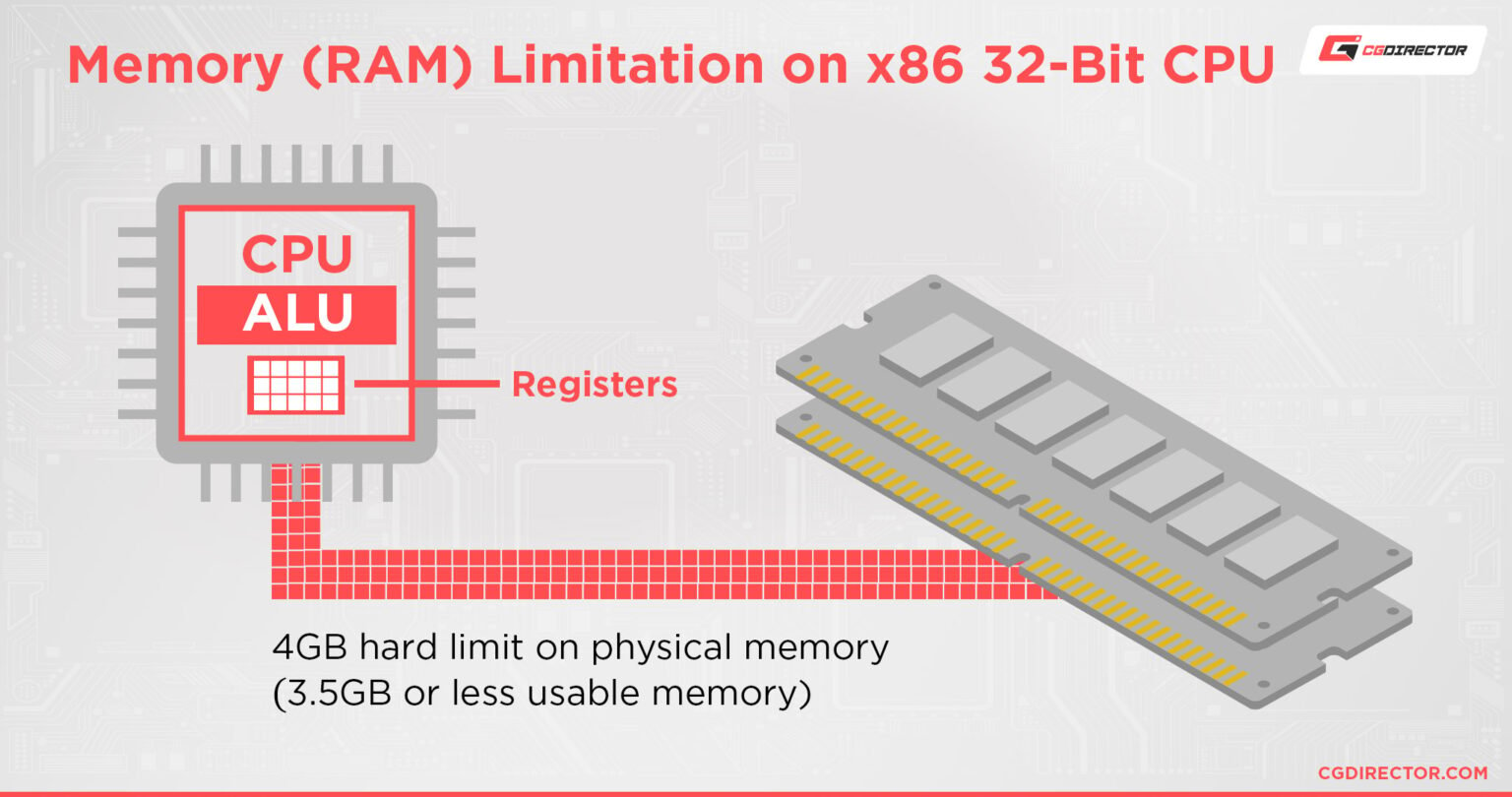
At the heart of every central processing unit (CPU) is an architecture that determines how the processor handles data. The terms "x64" and "x32" refer to the width of the registers in the processor. Registers are small, high-speed storage locations within the CPU that hold data the processor is currently working on.
The "bit" count defines how much information the processor can handle at once and, more importantly, how much system memory (RAM) it can address. A 32-bit processor uses a 32-bit address space, which limits its ability to recognize and utilize physical RAM. Specifically, a 32-bit architecture can only address $2^{32}$ bytes of memory, which equates to exactly 4 gigabytes (GB). Even if you install 16GB of RAM into a computer running a 32-bit operating system, the system will never be able to access more than 4GB, rendering the remaining capacity useless.
In contrast, 64-bit architecture uses 64-bit registers. The theoretical memory limit for an x64 system is effectively infinite for current consumer needs (16 exabytes), though modern Windows and Linux distributions have practical, self-imposed limits that are still far beyond what any standard consumer or professional hardware currently requires.
The Memory Bottleneck
The primary reason x64 is superior to x32 is the memory bottleneck. Modern applications, including web browsers like Google Chrome, professional creative suites like Adobe Creative Cloud, and even standard office productivity tools, are designed to utilize significant amounts of RAM to improve performance.
When an application runs out of physical RAM on a 32-bit system, the operating system is forced to use "virtual memory"—a portion of your storage drive (HDD or SSD) acting as temporary RAM. Because even the fastest NVMe SSDs are significantly slower than actual system RAM, your computer will experience severe performance degradation, frequent freezing, and system instability. By choosing x64, you ensure that your operating system can map and utilize every gigabyte of RAM installed in your machine, allowing for smoother multitasking and better overall system responsiveness.
Software Compatibility and Security
Compatibility is another major differentiator. Most software developers stopped providing 32-bit installers years ago. If you attempt to install modern professional software, such as high-end video editors, virtual machine managers, or the latest security suites, you will likely find that they require a 64-bit environment. While some 64-bit operating systems can run 32-bit applications through emulation layers (such as Windows on Windows 64, or WOW64), the reverse is not true: 32-bit operating systems cannot run 64-bit software.
Furthermore, security features in modern operating systems—such as Kernel Patch Protection and improved Address Space Layout Randomization (ASLR)—are significantly more robust on 64-bit architectures. These features protect your system against various forms of memory-based attacks and malware. Using a 32-bit operating system in 2026 exposes your machine to unnecessary vulnerabilities because these sophisticated protection mechanisms are often unavailable or severely constrained in the x32 environment.
Comparison Table: x64 vs x32
| Feature | x64 (64-bit) | x32 (32-bit) |
|---|---|---|
| Max Theoretical RAM | 16 Exabytes | 4 Gigabytes |
| Recommended RAM | 8GB or more | 4GB or less |
| Software Support | Full, modern compatibility | Limited, legacy only |
| Processing Speed | Faster for large calculations | Slower for complex data |
| Security Features | Advanced, hardware-backed | Basic, legacy support |
| System Stability | High (handles heavy loads) | Low (prone to memory errors) |
How to Check Your Current Architecture
Before deciding if you need to switch or upgrade, you should verify what your current computer is running.
- On Windows: Press the "Windows" key + "Pause/Break," or navigate to "Settings" > "System" > "About." Look for "System type." It will clearly state whether you are running a 64-bit operating system on an x64-based processor.
- On Linux: Open your terminal and type
lscpu. Look for the "Architecture" line. If it saysx86_64, your hardware and OS are 64-bit. - On macOS: Click the Apple logo in the corner, select "About This Mac," and look for the processor type. Every Mac released in the last decade is exclusively 64-bit.
When Might You Actually Need x32?
It is very rare to find a valid use case for a 32-bit system in 2026. The only scenarios where x32 might remain relevant are:
- Legacy Industrial Hardware: Some very old laboratory equipment or manufacturing controllers rely on specific drivers that were only compiled for 32-bit Windows XP or Windows 7.
- Embedded Systems: Certain low-power microcontrollers or specific legacy point-of-sale systems may still be locked into 32-bit architectures due to proprietary software that cannot be ported to 64-bit.
If you are not managing a piece of highly specific, decade-old hardware, there is no technical or practical reason to choose a 32-bit environment.
Transitioning to x64
If you are currently running a 32-bit operating system on hardware that supports 64-bit (which almost all CPUs since 2007 do), you cannot simply "switch" the system architecture. You must perform a clean installation of a 64-bit operating system.
Before doing this, ensure you have backed up all personal files, as a clean installation will wipe your system drive. Verify that your hardware has at least 4GB of RAM; while 64-bit systems can run on 4GB, they perform significantly better with 8GB or 16GB. Once the 64-bit OS is installed, you will be able to run both legacy 32-bit programs and modern 64-bit software, providing the best of both worlds.
Frequently Asked Questions
Can I run 64-bit software on a 32-bit OS? No. A 32-bit operating system lacks the instruction sets and addressing capabilities to execute 64-bit code. The architecture is fundamentally incompatible at the binary level.
Will upgrading to x64 make my computer faster? In tasks involving heavy data processing, large files, or multitasking, yes. Because your CPU can handle more data per cycle and access more memory, the system will feel more responsive, especially when running multiple modern applications simultaneously.
Does my CPU support x64? Almost every processor manufactured for general-purpose computing since 2007 supports the x64 instruction set. You can verify this by checking your processor model name online and looking for "x64" or "AMD64/Intel64" support in the specifications.
Are there any downsides to x64? The only downside is that 64-bit applications consume slightly more memory for their data structures than their 32-bit counterparts. However, given that memory is inexpensive and standard systems now come with 16GB or more, this trade-off is irrelevant for the vast majority of users.
Is x32 the same as x86? Yes. In common technical parlance, "x86" refers to the 32-bit architecture family, while "x64" or "x86-64" refers to the 64-bit extension of that family. When you see a download labeled "x86," it is intended for a 32-bit system.
Recommendation
If you are currently using a 32-bit system, your priority should be migrating to a 64-bit environment. It will grant you access to a wider range of software, improve system security, and allow your computer to utilize its full hardware potential. Do not settle for the limitations of x32 when modern software and hardware are designed for the capacity and safety of x64.
Image Gallery