SAP CRM Software Overview: Navigating the Modern Customer Experience Suite
SAP CRM software is a comprehensive suite of enterprise tools designed to manage customer relationships, automate sales, and streamline service operations. In 2026, the ecosystem has fully transitioned from the legacy SAP CRM 7.0 on-pr...
SAP CRM software is a comprehensive suite of enterprise tools designed to manage customer relationships, automate sales, and streamline service operations. In 2026, the ecosystem has fully transitioned from the legacy SAP CRM 7.0 on-premise system to the cloud-native SAP Customer Experience (CX) suite, which integrates deeply with SAP S/4HANA for end-to-end business process management.
Contents
To understand SAP’s current CRM landscape, one must distinguish between the historical legacy products and the modern cloud architecture. While many long-standing enterprises still maintain older on-premise installations, the strategic focus for SAP in 2026 is its "Intelligent Enterprise" framework. This framework treats CRM not as a siloed database of contacts, but as a dynamic engine that connects front-office engagement directly to back-office supply chain and finance data.
The Evolution from SAP CRM 7.0 to SAP Customer Experience (CX)
For decades, SAP CRM 7.0 was the industry standard for large-scale on-premise customer relationship management. However, as of 2026, mainstream maintenance for the core SAP Business Suite 7 (which includes legacy CRM) has moved into its final phase, with most organizations migrating to the cloud or the SAP S/4HANA environment.
The current flagship offering is SAP Customer Experience (CX), formerly known during its development phase as SAP C/4HANA. Unlike the monolithic structure of the past, the modern suite is modular. It consists of five distinct "clouds" that can be deployed individually or as an integrated whole. This modularity allows businesses to solve specific friction points—such as disorganized lead management or fragmented customer data—without the massive overhead of a total system overhaul.
Why the Shift to Cloud Occurred
The transition was driven by the need for real-time data processing and mobile accessibility. Legacy systems often suffered from "data lag," where sales figures in the CRM did not match inventory levels in the ERP (Enterprise Resource Planning) system. By moving to the SAP Business Technology Platform (BTP), the modern CRM suite provides a "Single Source of Truth," ensuring that a customer service agent sees the same inventory and credit limits as the warehouse manager.
The Five Pillars of the SAP Customer Experience Suite
SAP CX is organized into five specialized modules. Each serves a specific stage of the customer lifecycle, from initial brand awareness to long-term service and retention.
1. SAP Sales Cloud
The Sales Cloud focuses on accelerating the "quote-to-cash" cycle. In 2026, it heavily utilizes SAP Business AI to provide predictive lead scoring and forecasting. Instead of sales reps manually guessing which deals are likely to close, the system analyzes historical patterns and engagement levels to prioritize high-value opportunities.
- Key Functions: Sales force automation, territory management, and Configure, Price, Quote (CPQ) capabilities.
- Primary Benefit: It eliminates manual data entry by automatically syncing email and calendar interactions into the CRM record.
2. SAP Service Cloud
Service Cloud is designed for both desk-based support and field service management. It connects the service department with the supply chain, meaning if a technician needs a spare part to fix a customer's machine, they can check availability and trigger a logistics order directly from their mobile device.
- Key Functions: Omnichannel ticketing (email, chat, social media), field service scheduling, and AI-powered self-service portals.
- Primary Benefit: It reduces "Mean Time to Repair" (MTTR) by ensuring technicians have the right data and parts before they arrive on-site.
3. SAP Commerce Cloud
This module handles the digital storefronts for both B2B and B2C organizations. SAP Commerce Cloud is built on a "headless" architecture, which means the back-end engine (handling payments, taxes, and inventory) is separate from the front-end user interface. This allows brands to change their website's look and feel without risking the stability of the transaction engine.
- Key Functions: Multi-site management, complex product catalog handling, and integrated promotion engines.
- Primary Benefit: It supports high-volume global commerce with native multi-currency and multi-language support.
4. SAP Marketing Cloud
Marketing Cloud focuses on building detailed customer profiles to deliver personalized experiences. By 2026, the emphasis has shifted away from mass emailing toward "intent-based marketing." The system tracks how customers interact with various touchpoints and triggers automated, relevant responses.
- Key Functions: Dynamic customer segmentation, campaign management, and attribution modeling.
- Primary Benefit: It helps marketing departments prove ROI by linking specific campaigns directly to sales closed in the Sales Cloud.
5. SAP Customer Data Cloud
Built on the foundations of the Gigya acquisition, this module is the compliance and identity layer of the suite. It manages customer logins, preferences, and, most importantly, consent. In an era of strict global privacy laws (like GDPR and CCPA), the Customer Data Cloud ensures that a business only uses data that the customer has explicitly permitted.
- Key Functions: Social login, preference management, and centralized consent tracking.
- Primary Benefit: It builds customer trust and protects the enterprise from the legal risks of data mishandling.
Technical Specifications and Integration Architecture
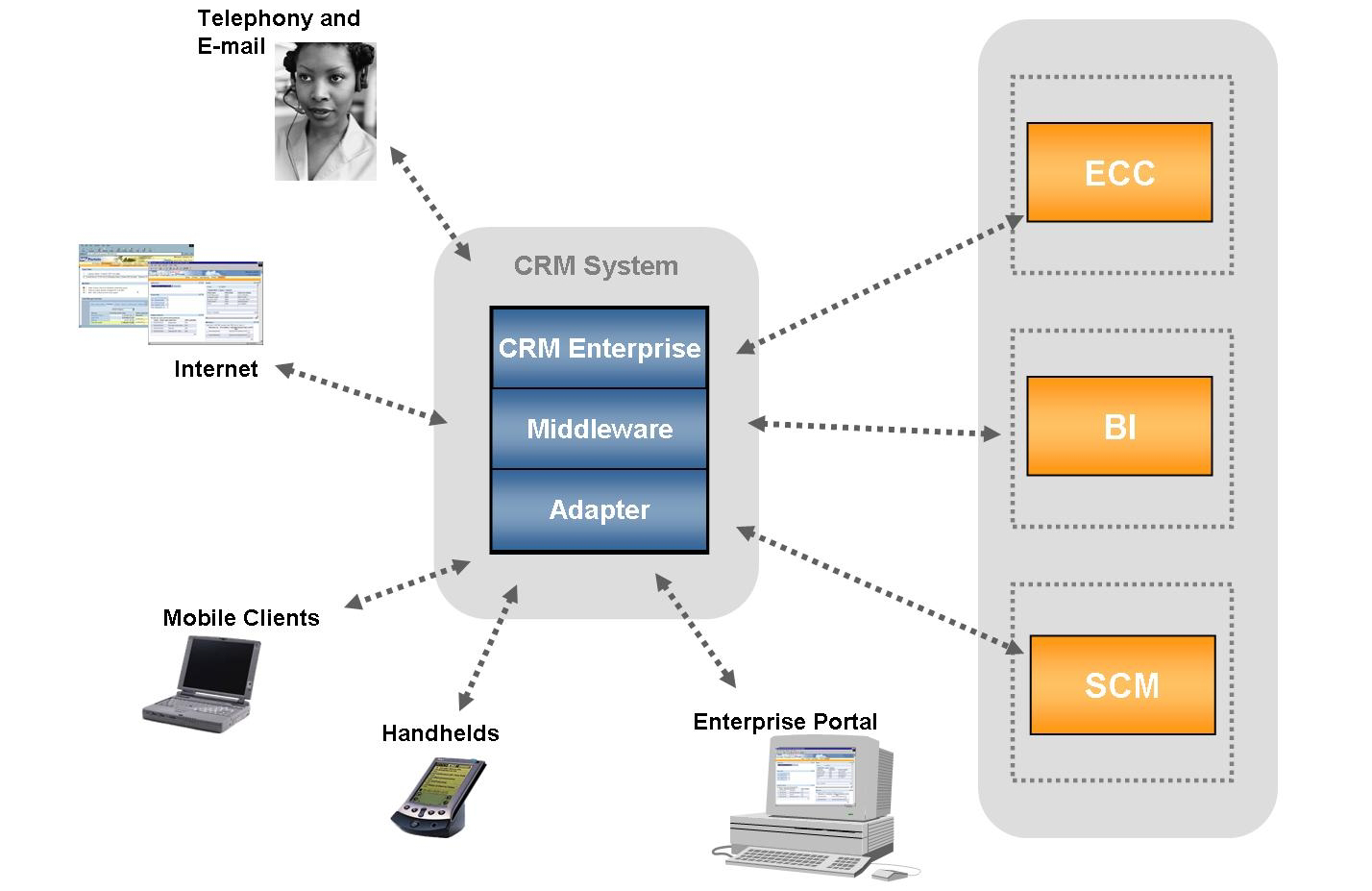
The true power of SAP CRM lies in its integration with the broader SAP ecosystem. Most modern deployments rely on the SAP Business Technology Platform (BTP) as the middleware.
Integration with SAP S/4HANA
Unlike third-party CRM systems that require complex "connectors" to talk to an ERP, SAP CX is designed to be "natively integrated." This means that master data—such as Product IDs, Customer Account Numbers, and Price Lists—are shared across the front and back office. When a customer is created in the Sales Cloud, that record is instantly available in S/4HANA Finance for credit checks.
Extensibility via SAP BTP
In the past, customizing SAP CRM required modifying the core ABAP code, which made upgrades difficult and expensive. In 2026, the standard practice is "Side-by-Side Extensibility." Developers write custom features or integrations on the SAP BTP, leaving the core CRM software "clean." This allows SAP to push regular cloud updates without breaking the company’s custom business logic.
Comparison: Legacy SAP CRM vs. Modern SAP CX
| Feature | Legacy SAP CRM (7.0/On-Premise) | Modern SAP CX (Cloud) |
|---|---|---|
| Deployment Model | On-premise servers or private hosting | Public or Private Cloud (SaaS) |
| User Interface | SAP GUI or WebClient UI | SAP Fiori (Mobile-first, responsive) |
| Update Frequency | Annual or multi-year upgrade cycles | Quarterly automated updates |
| Data Processing | Traditional relational databases | SAP HANA (In-memory, real-time) |
| AI Integration | Limited/Add-on required | Embedded (SAP Business AI) |
| Primary Focus | Record-keeping and process control | Customer experience and engagement |
| Licensing | Perpetual licenses + maintenance fees | Subscription-based (OpEx) |
Implementation Costs and Considerations
Transitioning to or implementing SAP CRM is a significant investment that goes beyond software licensing. Organizations must account for several cost centers:
- Subscription Fees: These are typically calculated per user per month or based on document volume (e.g., number of orders processed in Commerce Cloud).
- Data Migration: Moving decades of customer data from legacy systems or disparate spreadsheets into a clean, de-duplicated SAP environment often requires specialized ETL (Extract, Transform, Load) tools.
- Change Management: Because the modern SAP Fiori interface is vastly different from the old SAP GUI, user training is a non-negotiable expense for successful adoption.
- Integration Logic: While SAP-to-SAP integration is streamlined, connecting SAP CX to third-party legacy tools or niche marketing apps requires custom API development.
According to the SAP Trust Center, security and compliance are built into these costs, providing enterprise-grade encryption and regional data residency which can offset the costs of independent security audits.
Common Pitfalls in SAP CRM Adoption
Despite its robust features, SAP CRM projects can fail if not managed correctly. One frequent mistake is "over-customization." Attempting to force the cloud software to behave exactly like a legacy 20-year-old on-premise system usually leads to performance issues and high maintenance costs.
Another pitfall is poor data quality. SAP’s AI-driven forecasting and marketing automation are only as good as the data they consume. If an enterprise has duplicate records for the same customer across three different regions, the "Single View of the Customer" becomes impossible to achieve. High-performing organizations typically undergo a rigorous "data cleansing" phase before the software goes live.
Frequently Asked Questions
Does SAP still support the old on-premise CRM?
SAP has established a clear roadmap for its legacy products. While mainstream maintenance for SAP Business Suite 7 (including CRM 7.0) is ending, specific maintenance extensions are available for customers moving to S/4HANA. However, all new feature development has shifted exclusively to the cloud-based SAP CX suite.
Can I use SAP Sales Cloud without having SAP S/4HANA?
Yes. While the integration is most seamless with an SAP back-end, SAP CX modules are designed to be "open." They can be integrated with non-SAP ERP systems or legacy databases using APIs and the SAP Business Technology Platform.
How does SAP CRM handle mobile access?
Modern SAP CRM is built on the SAP Fiori design language, which is inherently responsive. This means the software works natively on tablets and smartphones without requiring separate mobile-only development. There are also dedicated offline-capable apps for field service and sales reps who may not have a consistent internet connection.
What is the role of AI in SAP CRM as of 2026?
AI is no longer a separate module; it is embedded in the workflow. For example, "Joule," SAP’s generative AI assistant, can summarize long email threads for a sales rep or suggest the most likely resolution for a customer service ticket based on historical data.
Is SAP CRM suitable for small businesses?
SAP CRM is primarily designed for mid-market and large enterprises with complex global operations. While there are "Public Cloud" editions that are easier to deploy, smaller businesses with simple requirements might find the suite's extensive feature set more complex than they require.
Final Recommendation
For organizations currently operating on legacy systems, the move to SAP Customer Experience should be viewed as a business transformation rather than a simple IT upgrade. The primary objective should be the unification of customer data.
To start, enterprises should perform a "Fit-Gap" analysis to see how their current processes align with the standard "Best Practices" delivered in the SAP Cloud. Prioritize the implementation of the Customer Data Cloud first to establish a clean, compliant foundation of customer identities, then layer on Sales or Service modules based on the most pressing business needs.
Image Gallery