Apple iOS MDM Complete Guide: Enterprise Deployment and Management
Apple iOS Mobile Device Management (MDM) is a framework that allows IT administrators to securely configure, monitor, and manage corporate-owned or personal Apple devices over-the-air. By leveraging built-in iOS management protocols, o...
Apple iOS Mobile Device Management (MDM) is a framework that allows IT administrators to securely configure, monitor, and manage corporate-owned or personal Apple devices over-the-air. By leveraging built-in iOS management protocols, organizations can enforce security policies, distribute applications, and remotely wipe compromised hardware without physical access.
Contents
Understanding Apple iOS MDM Architecture and Core Frameworks
Mobile Device Management on iOS operates through a deep integration between Apple's operating system architecture, an MDM server solution, and Apple deployment programs. The core of this system relies on the Apple Push Notification service (APNs). The APNs maintains a persistent connection to managed iOS devices, allowing the MDM server to instantly push commands, configuration updates, and security instructions to hardware in the field.
The management lifecycle begins at the hardware or account level. Administrators configure an MDM server, which generates an APNs certificate. This certificate must be renewed annually through the Apple Push Certificates Portal to maintain uninterrupted communication with enrolled devices. Once the server is active, devices are enrolled using automated enrollment mechanisms or user-initiated enrollment profiles.
Understanding the distinction between supervised and unsupervised states is critical for any enterprise deployment. Supervision gives organizations deeper control over the device, unlocking advanced configuration payloads, silent app installation, and restrictions on core features like iCloud sign-out or AirDrop.
Enrollment Methodologies for iOS Fleet Management
Organizations must choose the right enrollment strategy based on device ownership models, deployment scale, and user privacy requirements. Selecting the correct method impacts administrative overhead and the user out-of-the-box experience.
| Enrollment Method | Primary Use Case | Supervision Status | User Interaction Required |
|---|---|---|---|
| Automated Device Enrollment (formerly DEP) | Corporate-owned bulk deployments | Automatically Supervised | High-level setup assistant steps |
| Device Enrollment (User Enrollment) | Bring Your Own Device (BYOD) | Unsupervised | Manual profile download and Apple ID sign-in |
| Account-Driven Device Enrollment | Modern BYOD and corporate deployment | Unsupervised or Managed | Settings app configuration |
| Manual Profile Enrollment | Testing, legacy deployments, or specific local networks | Unsupervised (can be supervised via Apple Configurator) | High-level manual trust and profile installation |
Automated Device Enrollment represents the gold standard for corporate-owned hardware. Devices purchased through Apple Authorized Resellers or cellular carriers are automatically registered in Apple Business Manager (ABM) or Apple School Manager (ASM). When an employee unboxes a new iPhone or iPad, the Setup Assistant communicates with Apple's activation servers, forces the device to pull configuration profiles from the designated MDM server, and locks the device to the organization.
For privacy-first Bring Your Own Device (BYOD) deployments, User Enrollment utilizes cryptographic isolation. Personal data remains completely separated from corporate data. The MDM can manage corporate applications, push enterprise certificates, and wipe corporate containers, but it cannot access personal photos, personal email accounts, or browser history.
Core Security Policies and Configuration Payloads
MDM payloads dictate how iOS enforces security baselines. Administrators deploy configuration profiles containing property list (plist) data that controls device behavior, network access, and application permissions.
Passcode enforcement is the foundational layer of iOS security. IT administrators can mandate complex alphanumeric passcodes, set strict maximum inactivity timeout locks, limit failed passcode attempts before a device wipe triggers, and enforce history restrictions to prevent users from reusing recent passcodes.
Network security configurations ensure that corporate data traverses encrypted channels. MDM allows administrators to silently push Wi-Fi configurations with enterprise-grade authentication protocols like WPA2/WPA3 Enterprise, configure global HTTP proxies, and deploy Per-App VPN tunnels. When a user opens a managed enterprise app, the iOS networking stack automatically establishes a secure VPN tunnel without requiring manual intervention.
Data protection payloads govern how apps handle files on disk. iOS enforces hardware-accelerated AES-256 encryption for all file storage, but MDM adds restrictions on top of this hardware foundation. Policies can block document sharing from managed apps to unmanaged personal apps, prevent screen recording of sensitive corporate applications, and restrict iCloud backup of managed application data.
Application Lifecycle Management and Silent Distribution
Deploying and maintaining applications across hundreds or thousands of iOS devices requires automated pipelines. Apple Business Manager integrates directly with MDM solutions to facilitate Volume Purchase Program (VPP) license distribution.
Organizations purchase software licenses in bulk through ABM without needing individual Apple IDs for every device. The MDM server assigns these licenses to devices or users. When an app is assigned, the MDM initiates a silent installation command. The application deploys to the home screen without prompting the user for an Apple ID password.
Administrators can also configure managed app configurations, pushing specific settings, server endpoints, or user credentials directly into the application upon first launch. When a device is retired or reassigned, the MDM revokes the VPP license and wipes the managed app and all associated containerized data from the storage volume.
Pros and Cons of Implementing Apple iOS MDM
Adopting an MDM framework transforms how organizations manage risk and productivity, but it introduces architectural complexity and user friction if mismanaged.
- Pros:
- Automated provisioning through Automated Device Enrollment drastically reduces IT onboarding hours.
- Enhanced security postures protect corporate intellectual property via hardware encryption and policy enforcement.
- Remote wipe capabilities mitigate data leakage risks if a device is lost or stolen.
- Seamless integration with Apple Business Manager simplifies software licensing and zero-touch deployment.
- Cons:
- Strict management policies can cause user friction, particularly regarding BYOD privacy concerns.
- Annual APNs certificate renewals require administrative vigilance to prevent sudden loss of fleet control.
- Subscription costs for enterprise MDM software platforms scale continuously with fleet size.
- Troubleshooting deep network payload or supervision errors requires specialized technical expertise.
Step-by-Step Guide to Deploying an MDM Profile
Implementing a basic MDM configuration requires proper administrative hierarchy setup, identity generation, and profile publishing.
- Establish an Apple Business Manager Account: Register your organization with Apple, verify your organization's D-U-N-S number, and assign administrative roles to IT personnel.
- Connect Your MDM Server: Generate a server token file within your MDM dashboard, upload it to Apple Business Manager, and link your hardware reseller or cellular carrier accounts to the server.
- Generate and Upload the APNs Certificate: Navigate to the Apple Push Certificates Portal, sign in with an Apple ID, upload the CSR generated by your MDM, and download the resulting .pem certificate to complete the cryptographic trust handshake.
- Configure Profiles and Security Baselines: Define your security payloads in the MDM console, specifying passcode requirements, Wi-Fi parameters, and restrictions on features like camera use or iCloud synchronization.
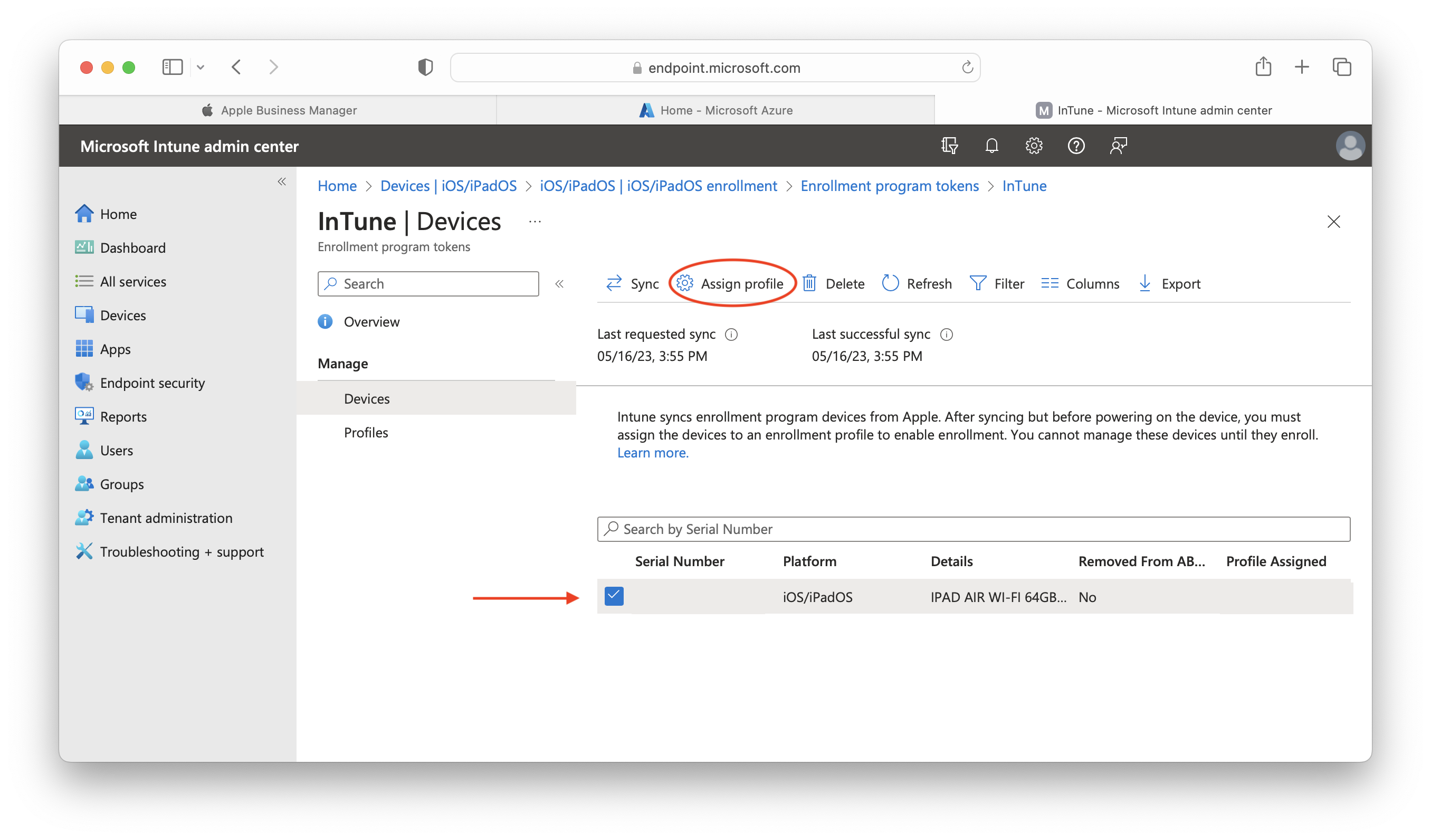
- Assign Devices and Test Enrollment: Link target devices in Apple Business Manager to your active MDM server profile, then perform a test enrollment using a factory-reset device to verify configuration payload delivery.
Comparative Analysis of Popular MDM Solutions
Choosing the correct MDM vendor depends on platform maturity, operating system support breadth, and enterprise budget constraints.
| Solution | Primary Focus | Platform Support | Deployment Complexity |
|---|---|---|---|
| Microsoft Intune | Enterprise cloud integration | Apple, Android, Windows, macOS | Moderate to High |
| Jamf Pro | Apple-specific deep management | Apple Ecosystem Only | High |
| Kandji | Modern, automated Apple fleet management | Apple Ecosystem Only | Low to Moderate |
| VMware Workspace ONE | Unified endpoint management | Cross-Platform | High |
Jamf Pro and Kandji offer specialized workflows built specifically around Apple's proprietary framework, making them ideal for organizations with an all-Apple or heavily Apple-centric infrastructure. Microsoft Intune and Workspace ONE suit heterogeneous environments where IT teams need a single pane of glass to manage iOS, Android, and Windows endpoints simultaneously.
Troubleshooting Common iOS MDM Errors
Managing an iOS fleet inevitably presents edge cases where devices lose connection with the management server or reject configuration payloads.
- APNs Expiration Issues: If devices suddenly stop receiving commands, verify that the APNs certificate has not passed its 365-day validity window. Renewing the certificate immediately restores connectivity without requiring re-enrollment.
- Activation Lock Interferences: When an employee leaves a company without signing out of their personal iCloud account, devices can become locked via Activation Lock. Enterprise deployment bypass codes can be retrieved directly from the MDM console to clear the lock without user intervention.
- Profile Installation Failures: If a manual enrollment profile fails to install, verify that the device's date and time settings are set to automatic, ensure no conflicting third-party VPN or root certificates are blocking the enrollment URL, and check that the iOS version meets the minimum requirements specified in the profile payload.
Frequently Asked Questions About Apple iOS MDM
What is the difference between supervised and unsupervised iOS devices in MDM?
Supervised mode grants deep administrative control over an iOS device, allowing silent app installation, custom home screen layouts, and advanced security restrictions. Unsupervised mode provides standard management capabilities suitable for basic enterprise email or BYOD privacy setups.
Can an MDM read personal messages or track personal browsing history?
No. On unsupervised BYOD devices, MDM software has zero visibility into personal data, personal emails, text messages, photos, or browsing history. On corporate-owned supervised devices, administrators can enforce security restrictions, but privacy standards and platform constraints prevent direct inspection of private conversational content.
How do I remove an MDM profile from an iOS device?
For unsupervised devices, users can remove the profile directly through the iOS Settings app unless the profile was configured with a removal passcode. For supervised corporate devices enrolled via Automated Device Enrollment, the profile cannot be removed locally and requires a remote wipe command issued by the administrator.
What happens to a device when a remote wipe command is executed?
Issuing a remote wipe command triggers an immediate cryptographic erase of all data stored on the iOS device, resetting it to factory default settings and returning the device to the initial Setup Assistant screen.
Do managed iOS devices require an Apple ID for every user?
No. Organizations can utilize Apple Business Manager and Volume Purchase Program licenses to assign, distribute, and manage applications silently without requiring users to sign in with personal or corporate Apple IDs.
Image Gallery