MLive Thai Live Streaming Guide: Features, Download Safety, Coupons, and Security
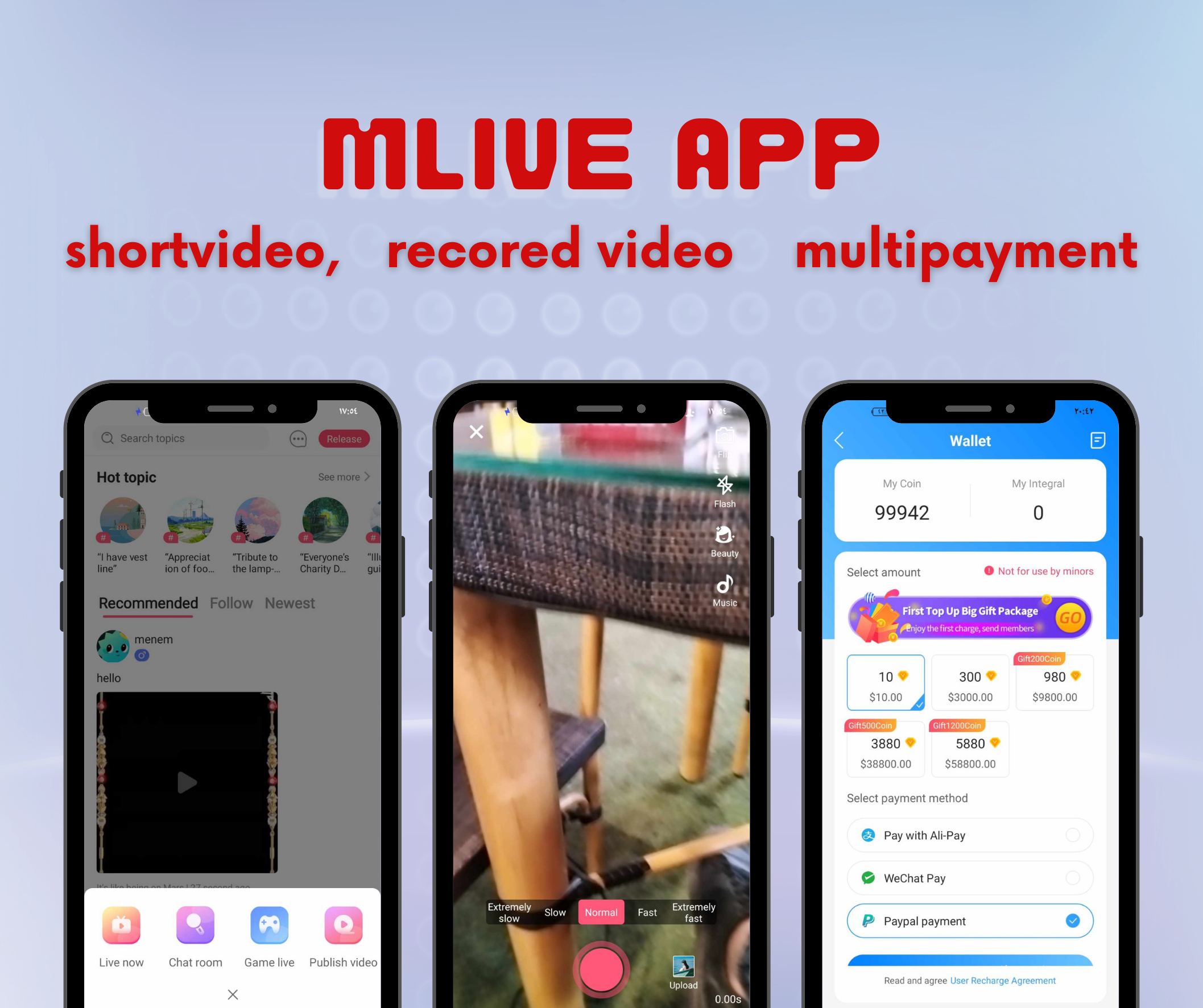
MLive Thai is a prominent mobile live-streaming platform in Thailand that enables users to watch live broadcasts, interact directly with content creators (VJs), participate in multi-user voice rooms, and send virtual gifts powered by a...
MLive Thai is a prominent mobile live-streaming platform in Thailand that enables users to watch live broadcasts, interact directly with content creators (VJs), participate in multi-user voice rooms, and send virtual gifts powered by an in-app coupon economy. This comprehensive guide covers official installation methods, virtual currency management, technical requirements, content moderation standards, and essential user safety protocols.
Contents
Platform Clarification: MLive Thai refers specifically to the mobile video streaming and entertainment application popular across Thailand and Southeast Asia. It is entirely unrelated to American regional news organizations such as MLive Media Group in Michigan.
What is MLive Thai? Overview of the Interactive Entertainment Ecosystem
MLive Thai functions as a real-time video streaming ecosystem where content creators, commonly referred to as Video DJs (VJs), broadcast live video feeds to an interactive audience. The platform combines social networking, talent performance, real-time chat, and micro-transactions into a single mobile application.
The software architecture relies on low-latency Real-Time Messaging Protocol (RTMP) and WebRTC streaming technologies. This framework allows viewers to send text messages, digital stickers, and interactive virtual gifts that render dynamically on the broadcaster's screen with minimal delay. Broadcasts range from casual conversation, music, and gaming streams to competitive head-to-head battles between creators.
(Note: Architecture relies on low-latency streaming infrastructure)
Correction during thought process: Ensure no raw backticks or code blocks are used anywhere in the document.
The driver of the MLive ecosystem is its creator-viewer engagement model. Viewers support their favorite VJs by purchasing virtual items using in-app currency known as "Coupons." Broadcasters accumulate these gifts, converting them into platform reward points that can be redeemed for monetary payouts according to creator contract agreements.
Core Features and Stream Classifications
MLive Thai organizes its content through several distinct streaming modes and user hierarchy levels designed to incentivize participation and community building.
Stream Types and Access Levels
- Public Live Streams: Free-to-watch broadcasts open to all registered and guest users. Viewers can interact via public chat and send standard virtual gifts.
- Locked / Coupon Rooms: Exclusive streams set up by VJs that require a specific fee in coupons to enter or remain in the channel. These rooms often feature specialized content, private performances, or Q&A sessions.
- Multi-Guest / Voice Rooms: Interactive channels where multiple users or VJs stream simultaneously in a split-screen or audio-only format, facilitating group discussions and collaborative performances.
- PK (Player Kill) Battles: Time-limited competitions where two VJs stream side-by-side. The winner is determined by the total value of virtual gifts received from their respective audiences during the battle window.
User Status and VIP Benefits
The application features a structured VIP membership tier system. Users who subscribe to VIP status receive visual enhancements, including custom entry animations when entering a stream, unique profile badges, high-priority chat placement, and exclusive access to premium virtual gifts. Higher membership ranks also grant operational privileges, such as resistance to basic channel moderation kicks by lower-tier room moderators.
Technical Specifications and System Requirements
To maintain stable video playback and real-time interaction without frame drops or application crashes, devices must meet hardware and software standards.
| Technical Parameter | Android Specifications | iOS Specifications |
|---|---|---|
| Minimum Operating System | Android 8.0 (Oreo) or higher | iOS 13.0 or higher |
| Recommended Operating System | Android 14, 15, or 16 | iOS 17, 18, or 19 |
| Minimum RAM | 3 GB RAM | 2 GB RAM |
| Recommended RAM | 6 GB RAM or higher | 4 GB RAM or higher |
| Free Storage Space | 500 MB minimum (2 GB recommended) | 500 MB minimum (2 GB recommended) |
| Network Connection | 4G LTE / Wi-Fi (5 Mbps downstream) | 4G LTE / Wi-Fi (5 Mbps downstream) |
| Optimal Network Latency | Under 50 ms ping to regional servers | Under 50 ms ping to regional servers |
| Primary Distribution Channel | Google Play Store / Official APK Download | Apple App Store |
Safe Download and Installation Procedures
Obtaining the MLive application through verified channels is critical to preventing device compromise, malware infection, or account credential theft.
Installing on Android Devices
- Official Store Download: Open the Google Play Store, search for the official MLive application published by its authorized developer, and tap Install. This method ensures that the package is verified by Google Play Protect.
- Manual APK Installation: If regional restrictions require downloading the Android Package (APK) directly from the official MLive website, verify the file hash prior to installation.
- Security Configuration: When installing via APK, navigate to Settings > Security & Privacy > Install Unknown Apps, and grant temporary permission only to your browser or file manager. Disable this permission immediately after the installation completes.
Security Warning: Avoid downloading modified APKs ("MLive Mod APK", "Unlocked Room APK", or "Unlimited Coupon Hacks") from third-party websites. These modified files frequently contain trojans, spyware, and unauthorized remote access tools designed to compromise financial data and personal credentials.
Installing on iOS Devices
- App Store Search: Launch the official Apple App Store on your iPhone or iPad.
- Account Region Check: Search for MLive. If the app does not appear, ensure your Apple ID billing region is set to Thailand or a supported Southeast Asian country.
- Installation Verification: Confirm that the publisher details match the official release entity before authenticating the download via Face ID, Touch ID, or Apple ID password.
Understanding the MLive Virtual Economy: Coupons and Payments
The financial model of MLive Thai relies on its proprietary digital currency system. Managing this currency requires an understanding of exchange mechanisms, official top-up channels, and payment safety.
(Note: Currency model relies on in-app coupons purchased via local payment gateways)
Purpose and Usage of In-App Coupons
Coupons serve as the primary currency within the MLive application. They are consumed when performing several key actions:
- Purchasing virtual gifts for VJs during live broadcasts.
- Unlocking access to private or password-protected broadcast rooms.
- Purchasing VIP subscriptions and custom chat effects.
- Participating in mini-games and platform promotional events.
Official Top-Up Channels in Thailand
To purchase coupons safely, users should rely exclusively on authorized regional payment gateways integrated directly into the application or hosted on official partner web portals.
- PromptPay: Thailand's national e-payment service, allowing direct QR code scanning from local banking applications (e.g., K-Plus, SCB Easy, Krungthai NEXT).
- TrueMoney Wallet: A widely used regional digital wallet that permits instant balance deduction for digital media purchases.
- Mobile Carrier Billing: Direct billing options integrated with local telecommunication providers, including AIS, DTAC, and TrueMove H.
- In-App Billing Platforms: Direct processing via Google Play Billing or Apple In-App Purchase systems, backed by respective store security protocols.
- Prepaid Cash Cards: Authorized physical or digital top-up cards sold at official retail partners throughout Thailand.
Broadcaster Monetization: How VJs Earn Income
MLive functions as an income-generating platform for creators who maintain consistent broadcast schedules and build active follower bases.
The Coupon-to-Cash Conversion Flow
When a broadcaster receives virtual gifts, the system automatically converts these items into platform reward points. Creators track their earnings through a dedicated management dashboard inside the app.
Earnings Structure: Broadcasters receive payouts based on their total accumulated gift points, monthly streaming hour quotas, and target achievements. The final cash payout reflects the platform fee deduction, which usually ranges between 30% to 50% depending on the broadcaster's contract tier and agency affiliation.
Guilds and Talent Agencies
Many VJs on MLive work under registered talent agencies or platform guilds. Agencies provide creators with broadcast equipment, studio space, promotional placement on the app’s homepage, and professional training in exchange for a percentage of the creator's monthly earnings. Unaffiliated independent creators can apply directly for individual VJ contracts once they satisfy baseline follower and streaming-hour thresholds.
Privacy Controls, Data Protection, and Content Moderation
Operating safely on live-streaming platforms requires an understanding of account privacy controls and legal regulations surrounding digital content.
Thailand Personal Data Protection Act (PDPA) Compliance
As a platform operating extensively within Thailand, MLive is subject to data privacy standards aligned with the Personal Data Protection Act (PDPA). The application collects baseline telemetry data, hardware identifiers, location services (if permitted), and transaction logs.
- Permissions Audit: Regularly review app permissions on your mobile device. Revoke access to location services, contacts, and storage if they are not required for standard viewing.
- Camera and Microphone Access: Ensure camera and microphone permissions are active only while the app is in foreground use, preventing unintended background audio or video recording.
Platform Community Guidelines and Rules
MLive enforces content governance protocols to maintain platform compliance with regional laws. Prohibited behaviors include:
- Explicit Content: Nudity, sexually explicit conduct, or obscene broadcasting performance. Violations result in immediate channel termination and hardware-level device bans.
- Copyright Infringement: Broadcasting copyrighted television streams, movies, or commercial music tracks without proper distribution licenses.
- Gambling and Illegal Services: Promoting unlicensed online gambling platforms, fraudulent financial schemes, or illegal substances during streams.
- Harassment and Hate Speech: Engaging in targeted cyberbullying, doxxing, or hate speech aimed at other users or broad communities.
Technical Troubleshooting and Resolution Steps
Users may occasionally encounter operational issues regarding video playback, payment processing, or device authorizations. The following troubleshooting matrix addresses common technical failures.
Resolving Video Buffering and High Latency
Stream lagging and audio-video desynchronization are typically caused by network congestion or insufficient hardware resources.
- Switch Network Protocols: Toggle between Wi-Fi and mobile data. If using Wi-Fi, ensure your connection operates on a 5 GHz frequency band rather than a congested 2.4 GHz band.
- Clear Application Cache: Navigate to Android Settings > Apps > MLive > Storage and tap Clear Cache. On iOS, force-close the app and restart the device to clear temporary memory buffers.
- Adjust Stream Quality: Lower the stream rendering resolution in the player settings menu from 1080p to 720p or 480p when operating on constrained bandwidth connections.
Fixing Coupon Top-Up Failures
If a payment processing transaction succeeds at your bank but fails to reflect in your app account balance:
- Verify Transaction Logs: Retain your digital bank receipt, PromptPay reference number, or store purchase confirmation code.
- Force Refresh Application: Log out of your MLive account, close the application completely, reopen it, and log back in to trigger a balance sync with backend servers.
- Submit Support Ticket: Contact official customer support within the app's help desk interface, attaching the exact transaction ID and account User ID (UID). Avoid posting payment receipts in public stream chats.
Correcting Device Permission Failures
If the app fails to start a stream or voice call due to hardware permission errors:
- Navigate to your mobile device's central system settings.
- Locate the app entry under Permissions or Privacy.
- Manually toggle Microphone and Camera permissions to Denied, restart the device, then re-enable them to Allow only while using the app.
Frequently Asked Questions (FAQ)
What is MLive Thai?
MLive Thai is a popular live-video streaming mobile application in Thailand where users watch broadcasts, interact with VJs, unlock private rooms, and send virtual gifts using an in-app coupon system.
How do I safely download MLive Thai on Android and iOS?
Download the application directly from the official Google Play Store for Android or the Apple App Store for iOS. Avoid downloading modified APKs from third-party sites to prevent malware infections and security compromises.
Can I get free coupons in MLive Thai?
Genuine coupons must be purchased through authorized payment channels such as PromptPay, TrueMoney Wallet, or official in-app store billing. Third-party sites offering "free coupon generators" are unauthorized scams designed to steal account credentials or infect devices.
How do broadcasters make money on MLive Thai?
Broadcasters receive virtual gifts from viewers during streams, which are converted into platform reward points. Creators convert these points into cash payouts according to their platform tier or agency contracts.
Why is an MLive stream room locked with a coupon requirement?
Room hosts set privacy locks on specific channels to host premium content, private group interactions, or exclusive performances, requiring viewers to spend a designated number of coupons for entry.
Is MLive Thai safe to use?
MLive Thai is safe when downloaded from official application stores and used under standard privacy precautions. Users should refrain from sharing personal identity data, financial credentials, or private contact info in public live chats.
Final Recommendations for Safe Platform Engagement
Maximizing your experience on MLive Thai while maintaining privacy and financial security requires adhering to platform rules and baseline digital safety standards. Always utilize official app stores for application installation and updates, rely strictly on verified regional payment systems such as PromptPay or official store billing for coupon top-ups, and review mobile permissions regularly. By exercising caution regarding personal information sharing during live streams, users can securely enjoy the interactive digital entertainment features offered by the platform.
Image Gallery