How Much Does Microsoft 365 Cost? 2026 Pricing and Plan Guide
In 2026, Microsoft 365 pricing ranges from $6.99 per month for individual Personal subscriptions to $57.00 or more per user, per month for high-end Enterprise E5 tiers. Most small-to-medium businesses find the best value in the Busines...
In 2026, Microsoft 365 pricing ranges from $6.99 per month for individual Personal subscriptions to $57.00 or more per user, per month for high-end Enterprise E5 tiers. Most small-to-medium businesses find the best value in the Business Standard plan, which currently costs approximately $15.00 per user, per month when billed annually.
Contents
The transition from the traditional "Office 365" branding to "Microsoft 365" is now complete, reflecting a shift from a mere suite of productivity apps to a comprehensive cloud-based ecosystem. While the core applications like Word, Excel, and PowerPoint remains the foundation, current pricing is heavily influenced by cloud storage capacities, advanced cybersecurity features, and the integration of AI-driven tools like Microsoft Copilot. Understanding which plan fits your specific needs requires a breakdown of the three primary pillars: Home, Business, and Enterprise.
The Evolution of Office 365 into Microsoft 365
Before diving into the specific dollar amounts, it is essential to clarify the nomenclature. Although many users still search for "Office 365 cost," Microsoft has rebranded nearly all versions of the product to Microsoft 365. This change signifies that the subscription includes more than just the desktop applications; it encompasses OneDrive cloud storage, Teams for communication, and advanced security protocols that are updated in real-time.
In 2026, the value proposition has shifted significantly toward AI integration. Most plans now offer varying levels of access to Copilot, Microsoft's generative AI assistant. While some basic versions include web-based AI assistance, premium business and enterprise tiers offer deep integration across the entire app suite, which has become a primary driver of subscription cost increases over the past few years.
Microsoft 365 for Home: Personal and Family Costs
For individuals, students, and households, Microsoft offers two primary subscription models. These are designed for non-commercial use and provide the full suite of premium apps across multiple devices.
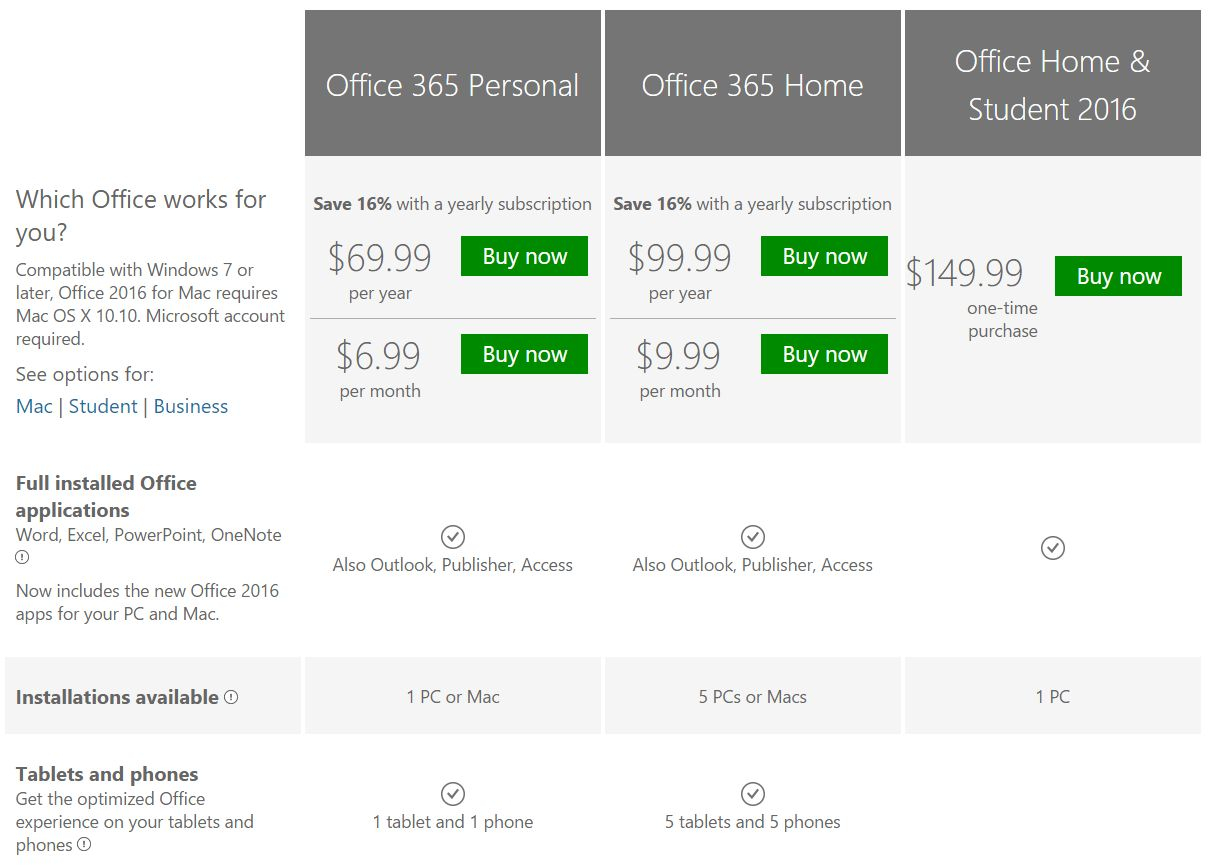
Microsoft 365 Personal
The Personal plan is tailored for a single user. In 2026, this plan remains the most affordable entry point for the full suite of desktop applications.
- Annual Cost: Approximately $69.99 per year.
- Monthly Cost: Approximately $6.99 per month.
- What’s Included: One user can use the apps on up to five devices simultaneously. It includes 1 TB of OneDrive cloud storage, advanced security via Microsoft Defender, and the premium versions of Word, Excel, PowerPoint, and Outlook.
Microsoft 365 Family
The Family plan is the most cost-effective option for households with multiple users.
- Annual Cost: Approximately $99.99 per year.
- Monthly Cost: Approximately $9.99 per month.
- What’s Included: This plan covers up to six people. Each person receives their own 1 TB of OneDrive storage (6 TB total) and can install the apps on their own devices. It also includes "Family Safety" features, which help parents manage screen time and location sharing.
Microsoft 365 for Business: Small and Medium Enterprises (SMEs)
Business plans are designed for organizations with up to 300 users. These plans include professional email hosting (Exchange) and collaborative tools like Microsoft Teams.
Microsoft 365 Business Basic
This is an entry-level, cloud-only solution. It is ideal for businesses that do not require desktop versions of Office apps.
- Cost: Approximately $6.00 per user, per month (annual commitment).
- Primary Features: Includes web and mobile versions of apps, 1 TB of cloud storage per user, and business-class email. It is the go-to choice for frontline workers or companies that operate entirely within a web browser.
Microsoft 365 Business Standard
The "Standard" plan is the benchmark for most professional environments.
- Cost: Approximately $15.00 per user, per month (annual commitment).
- Primary Features: This tier includes everything in the Basic plan plus the fully installed desktop versions of Word, Excel, PowerPoint, and Outlook. It also includes access to Microsoft Bookings and the ability to host larger webinars via Teams.
Microsoft 365 Business Premium
Business Premium is geared toward companies that prioritize data security and remote device management.
- Cost: Approximately $22.00 per user, per month (annual commitment).
- Primary Features: It adds advanced security features like Microsoft Intune (for mobile device management) and Azure Information Protection. In 2026, this plan is increasingly popular due to its built-in defenses against ransomware and sophisticated phishing attacks, which often cost businesses more in the long run than the subscription itself.
Microsoft 365 Enterprise: Large-Scale Organizations
Enterprise plans (E3, E5, and F3) are designed for organizations with more than 300 users or those with extreme security and compliance requirements. These plans do not have a seat limit.
Microsoft 365 E3
E3 is the standard enterprise-grade subscription.
- Cost: Approximately $36.00 per user, per month.
- Key Value: It provides robust security and compliance tools, such as eDiscovery and core Litigation Hold, alongside the full suite of productivity apps.
Microsoft 365 E5
E5 is the most comprehensive and expensive tier offered by Microsoft.
- Cost: Approximately $57.00 per user, per month.
- Key Value: E5 is a "total solution." It includes advanced analytics (Power BI Pro), sophisticated identity and threat protection, and specialized compliance tools. Most importantly, it often includes advanced voice and phone system capabilities, allowing a company to replace their traditional PBX system entirely.
2026 Microsoft 365 Pricing Comparison Table
| Plan Tier | Target Audience | Est. Monthly Cost (Annual) | Key Features |
|---|---|---|---|
| Personal | Individual Users | $6.99 | 1 TB Storage, All Desktop Apps |
| Family | Up to 6 Users | $9.99 | 6 TB Total Storage, Family Safety |
| Business Basic | Small Teams | $6.00 | Web/Mobile Apps only, Email Hosting |
| Business Standard | Professional SMEs | $15.00 | Desktop Apps, 1 TB Storage, Teams |
| Business Premium | Security-Focused SMEs | $22.00 | Intune, Defender, Cyber-protection |
| Enterprise E3 | Large Corporations | $36.00 | Unlimited seats, Advanced Compliance |
| Enterprise E5 | Enterprise Power Users | $57.00 | Power BI, Advanced Security, Voice |
Additional Costs and Influencing Factors
When calculating the total cost of ownership (TCO) for Microsoft 365 in 2026, the sticker price of the subscription is often only one part of the equation. Several other factors can influence the final monthly bill.
Monthly vs. Annual Commitments
Microsoft typically offers a discount for users who commit to a full year. If you prefer the flexibility of a month-to-month plan without a long-term contract, expect to pay a 20% premium over the annual rates listed above. For a Business Standard plan, this could mean the difference between $15.00 and $18.00 per month.
Microsoft Copilot Add-ons
While basic AI features are baked into many plans, the full-throttle Microsoft 365 Copilot experience—which automates data analysis in Excel and generates full presentations in PowerPoint—often requires an additional add-on fee. In 2026, this add-on typically costs around $30.00 per user, per month. For businesses looking to maximize productivity, this can effectively double the cost of a Business Standard or E3 license.
Storage Overages
While 1 TB per user is generous for most, organizations dealing with high-resolution video or massive datasets may exceed their OneDrive or SharePoint limits. Additional storage can be purchased in 1 TB increments, usually costing approximately $5.00 to $10.00 per month depending on the specific tenant agreement.
Specialized Plans: Education, Non-Profit, and Frontline
Microsoft continues to offer significant discounts for specific sectors. These prices are often not publicized on standard retail pages and require verification of status.
- Education (A1, A3, A5): Schools can often access Microsoft 365 for free (A1) or at a deeply discounted rate (A3/A5) for students and faculty.
- Non-Profit: Registered 500(c)(3) organizations are eligible for "Business Basic" for free for up to 10 users and significant discounts on higher tiers like Business Premium (often around $5.50 per user).
- Frontline (F-Series): These plans (F1 and F3) are designed for workers who don't have a dedicated desk but need access to communication tools and basic apps. Prices generally range from $2.25 to $8.00 per user, per month.
How to Choose the Right Plan
Choosing the wrong plan can lead to unnecessary spending or, conversely, a lack of essential security. To determine your path, follow these criteria:
- Do you need desktop apps? If you only use a web browser for work, Business Basic or Enterprise F3 will save you over 50% compared to higher tiers.
- How many users do you have? If you have more than 300, you are legally required to use Enterprise (E-series) plans.
- What is your security risk profile? If your business handles sensitive client data (HIPAA, GDPR), the Business Premium or E5 tiers are essential due to their inclusion of data loss prevention (DLP) and automated threat response.
- Are you a heavy AI user? Calculate the cost of the Copilot add-on. For some, the time saved by AI justifies the $30 premium; for others, the standard tools are sufficient.
Frequently Asked Questions
Can I mix and match different Microsoft 365 plans?
Yes. Organizations are not restricted to a single plan type. You can assign Business Basic to your warehouse staff and Business Premium to your executive team within the same company account. This is a common strategy to optimize costs while ensuring everyone has the tools they need.
Is there a free version of Microsoft 365?
Microsoft offers "Microsoft 365 Free," which includes web-based versions of Word, Excel, and PowerPoint with 5 GB of OneDrive storage. However, this version does not include desktop applications, professional email hosting, or the advanced security features found in paid plans.
Does the cost include a custom domain for email?
The cost of the subscription covers the hosting of the email, but it does not usually include the purchase of the domain name (e.g., @yourcompany.com). You must purchase your domain separately through a registrar, though Microsoft allows you to link it to your 365 account easily.
What happens if I stop paying for my subscription?
If a subscription expires, Microsoft enters a "grace period." Initially, users have full access. After 30 days, the account enters a "Disabled" state where only administrators can access data. After 90 to 120 days, the data is permanently deleted from Microsoft's servers.
Are there any hidden fees in Microsoft 365 pricing?
There are no "hidden" fees in the traditional sense, but costs can rise due to "consumption-based" services. For example, using Azure services integrated with 365 or making international calls through Teams Phone may incur additional charges beyond the flat monthly subscription.
Final Recommendation
For most users in 2026, the Microsoft 365 Business Standard plan remains the gold standard for value, providing the essential desktop tools and cloud collaboration features needed for modern work. However, if your organization manages sensitive data, the step up to Business Premium is a statistically sound investment to prevent the catastrophic costs of data breaches. Always opt for an annual commitment to secure the lowest possible rate, and audit your user list quarterly to ensure you aren't paying for "ghost" licenses that are no longer in use.
Image Gallery