A Comprehensive Overview of Home Health Care Software
Home health care software is a specialized category of health information technology designed to digitize, manage, and optimize the operational and clinical workflows of agencies providing medical care in patient homes. By centralizing...
Home health care software is a specialized category of health information technology designed to digitize, manage, and optimize the operational and clinical workflows of agencies providing medical care in patient homes. By centralizing electronic medical records (EMR), point-of-care documentation, billing, and staff scheduling, these platforms enable agencies to maintain regulatory compliance, improve patient outcomes, and ensure timely reimbursement from payers like Medicare and private insurers.
Contents
Understanding the Role of Home Health Care Software
As the demand for home-based care grows, the operational complexity of managing a mobile workforce increases. Unlike facility-based care, home health requires real-time coordination between clinicians in the field and administrative staff at a central office. Home health care software serves as the digital backbone for this environment, replacing manual, paper-based processes that are prone to error and regulatory risk.
The core objective of this software is to facilitate a seamless flow of data. When a nurse or therapist visits a patient, they record vitals, medication changes, and clinical notes directly into the system. This data is transmitted to the agency’s central repository, allowing supervisors to review care quality, ensure the plan of care is being followed, and prepare for billing cycles.
Key Functional Components
Most modern enterprise-grade home health software suites are built around a modular architecture, addressing four primary pillars of agency operations:
1. Clinical Documentation and EMR
This is the heart of the software. It allows clinicians to complete comprehensive assessments, such as the Outcome and Assessment Information Set (OASIS) in the United States, which is vital for clinical tracking and reimbursement. The system often includes built-in clinical decision support, which flags potential drug interactions or missing documentation fields to ensure the agency meets the standards set by accreditation bodies and government regulators.
2. Scheduling and Dispatch
Managing the logistics of a distributed workforce is a significant challenge. Software tools allow managers to match patient needs—such as wound care or physical therapy—with the certifications, availability, and geographic location of the staff. Geofencing or GPS-based check-ins are often integrated to verify that the staff member was physically present at the patient's residence for the duration of the visit, which is a critical audit requirement for many payers.
3. Revenue Cycle Management (RCM)
Billing in home health is notoriously complex, governed by per-episode payment models and strict coding requirements. Integrated RCM tools automate the claim scrubbing process—checking claims for errors before they are submitted—to reduce the frequency of denials. These systems also track accounts receivable and manage electronic remittance advice (ERA) to provide a clear picture of cash flow.
4. Patient Engagement and Communication
Modern platforms often include secure patient portals or caregiver apps. These allow patients and their families to view upcoming visits, communicate with their care team, and access educational materials, which improves patient adherence to the plan of care.
Operational Benefits and Strategic Value
Implementing a robust software solution yields measurable benefits for agencies navigating the 2026 healthcare landscape:
- Audit Readiness: Regulators prioritize documentation accuracy. Digital systems provide an immutable audit trail, making it significantly easier to produce records during external reviews.
- Operational Efficiency: Automating redundant data entry reduces administrative burnout and allows clinical staff to spend more time on direct patient interaction.
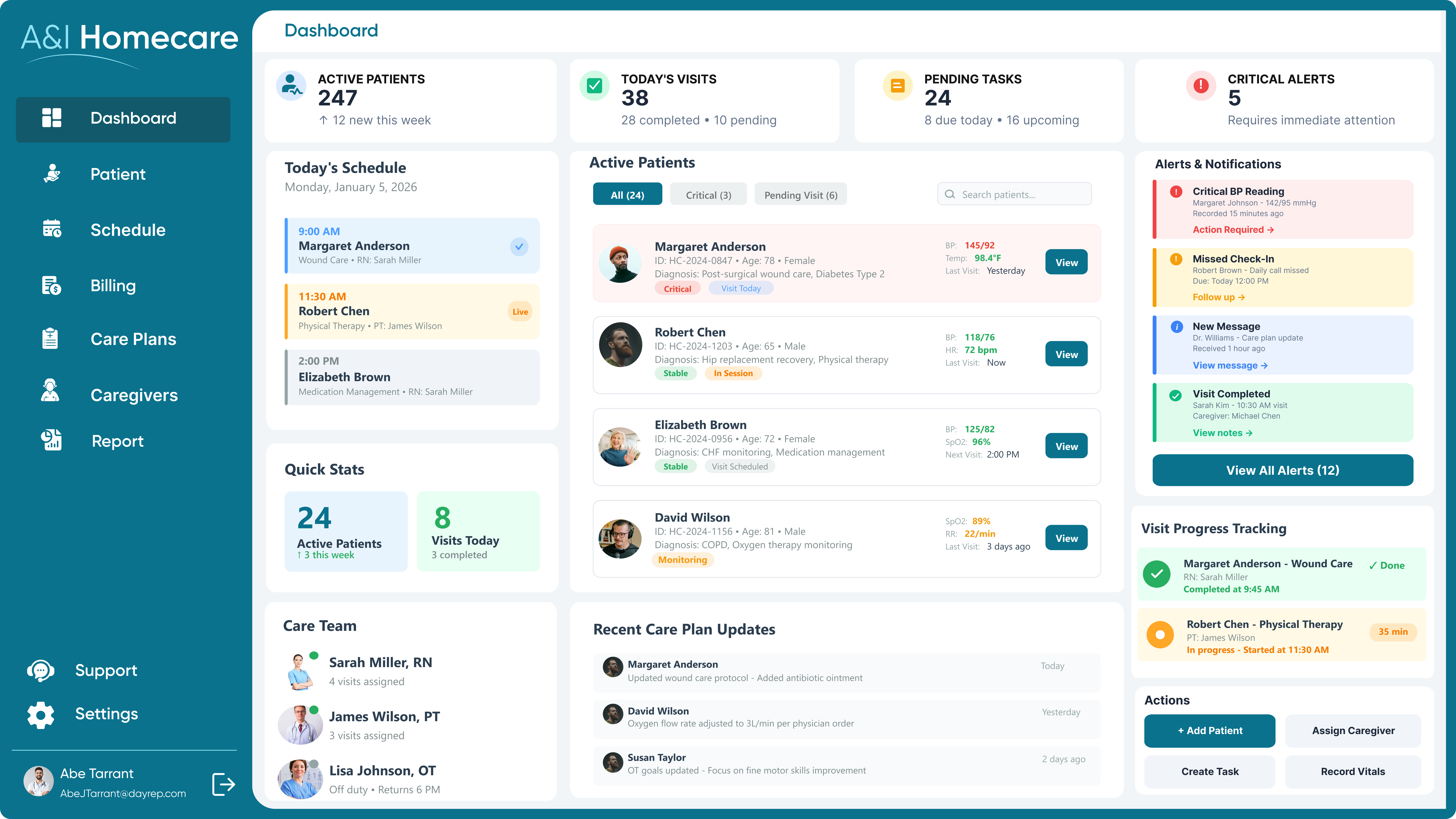
- Data-Driven Decision Making: Real-time dashboards allow administrators to monitor key performance indicators (KPIs) such as visit volume, employee turnover, and patient readmission rates.
- Regulatory Compliance: Updates to coding standards (like ICD-10) and regulatory requirements are typically pushed to the cloud software automatically, ensuring the agency remains compliant without manual intervention.
Comparative Overview of Core Features
The following table highlights essential features that agencies should evaluate when comparing software vendors:
| Feature Category | Description | Significance for Agencies |
|---|---|---|
| OASIS Integration | Built-in logic for OASIS-E data collection. | Critical for accurate Medicare reimbursement. |
| Mobile Access | Offline capability for remote or rural visits. | Ensures data capture where connectivity is poor. |
| Claim Scrubbing | Pre-submission validation of ICD-10/CPT codes. | Reduces billing denials and payment delays. |
| GPS Verification | Geo-located visit check-in and check-out. | Provides objective proof of visit for payroll/audit. |
| Telehealth Modules | Integrated video conferencing tools. | Expands care options beyond physical visits. |
Prerequisites for Successful Adoption
Transitioning to or upgrading home health care software is a significant investment that requires careful preparation. Before selecting a vendor, agencies must conduct an internal audit of their current workflows:
- Assess IT Infrastructure: Ensure that staff devices (tablets/smartphones) meet the hardware specifications required by the software to avoid performance bottlenecks.
- Define Workflow Gaps: Identify which operational areas are causing the most friction—is it billing errors, scheduling conflicts, or clinical documentation delays? Use these as the primary evaluation criteria for prospective systems.
- Staff Training Strategy: Resistance to change is common. Develop a phased training plan that emphasizes the benefits to the end-user (e.g., faster documentation, less paperwork) rather than just the administrative benefits.
- Compliance Verification: Ensure the vendor supports the specific regulatory reporting requirements of your jurisdiction (e.g., CMS in the US, or other national health service requirements internationally).
Common Challenges and Limitations
Despite the advantages, agencies frequently encounter challenges during the implementation and maintenance phases:
- Interoperability: Integrating with hospital-based Electronic Health Records (EHR) or pharmacy systems remains a persistent hurdle. While APIs are becoming more common, data silos still occur.
- User Experience (UX) Complexity: Software designed to capture thousands of data points can be overwhelming. A steep learning curve can lead to incomplete documentation or “workarounds” where staff revert to paper notes, creating compliance risks.
- Security Risks: As repositories for protected health information (PHI), these platforms are high-value targets for cybersecurity threats. Agencies must ensure that the software adheres to standards like HIPAA or regional equivalents, including regular penetration testing and multi-factor authentication (MFA).
Expert Guidance: Choosing the Right Solution
When selecting a software provider, prioritize vendors that offer specialized support for your specific sub-sector (e.g., pediatric home health versus hospice care). A generic solution may lack the specific clinical forms or billing logic required for your niche.
Next Action Steps for Agencies:
- Draft a "Request for Proposal" (RFP) that outlines your specific volume of visits and current billing pain points.
- Request a live, scenario-based demo where a staff member walks through a standard visit—from scheduling to clinical note entry and claim creation.
- Verify the vendor's roadmap for 2026 and 2027 to ensure their technology is not reaching "end-of-life" status.
- Check references from agencies of similar size and specialty to gauge the quality of customer support and system uptime.
Image Gallery