Photo Size Examples for Print and Social Media: Dimensions, Ratios, and Resolution Guide
Selecting the correct photo size requires matching digital pixel dimensions and aspect ratios to your final display medium. Physical prints demand high-density pixels (typically 300 dots per inch) and specific inch dimensions like 4x6...
Selecting the correct photo size requires matching digital pixel dimensions and aspect ratios to your final display medium. Physical prints demand high-density pixels (typically 300 dots per inch) and specific inch dimensions like 4x6 or 8x10, while social media platforms utilize optimized pixel dimensions and vertical or square ratios tailored for modern device screens.
Contents
Core Technical Concepts: Pixels, DPI, PPI, and Aspect Ratios
Preparing an image for output—whether on a photo printing press or a digital feed—requires a clear understanding of resolution metrics and shape proportions. Confusing pixels with physical measurements or miscalculating resolution leads to blurry prints, cropped subjects, or pixelated web images.
- PIXEL DIMENSIONS vs. PRINT DIMENSIONS AT 300 DPI:
- Width: 3000 pixels = 10 Inches Width (3000 / 300)
- Height: 2400 pixels = 8 Inches Height (2400 / 300)
PPI vs. DPI Explained
digital images are constructed from tiny colored squares called pixels. The density of these pixels determines the sharp details visible in an image.
- PPI (Pixels Per Inch): Refers to digital resolution—the number of pixels displayed per inch on a monitor, smartphone screen, or digital sensor. Higher PPI values yield sharper on-screen displays.
- DPI (Dots Per Inch): Refers to physical printing resolution—the density of physical ink droplets sprayed or printed onto paper by a digital printer.
For high-quality physical prints, the industry standard is 300 DPI (or 300 PPI at 100% print scale). Printing at 300 DPI delivers crisp detail without visible pixelation. For digital screens, PPI is governed by the native display resolution of the device, making overall pixel dimensions (such as 1080 x 1350 pixels) the primary specification.
Understanding Aspect Ratios
An aspect ratio represents the proportional relationship between an image's width and height, expressed as two numbers separated by a colon (e.g., 4:5 or 16:9). The aspect ratio determines the shape of the image frame regardless of its overall size.
- 1:1 (Square): Equal width and height. Standard for Instagram feed posts and profile pictures.
- 4:5 (Portrait): Taller than wide. Common for portrait photo prints (8x10 inches) and vertical social media posts.
- 2:3 (Classic Photographic Ratio): Standard output ratio for digital single-lens reflex (DSLR) and mirrorless camera sensors. Used for 4x6 prints and 24x36 posters.
- 16:9 (Widescreen Landscape): Standard format for HDTVs, monitors, YouTube thumbnails, and modern video displays.
- 9:16 (Vertical Widescreen): Full-screen vertical orientation used for smartphone content, including Instagram Stories, Instagram Reels, TikTok videos, and YouTube Shorts.
If you attempt to print a 2:3 ratio digital photo onto a 4:5 ratio paper size (such as an 8x10 inch frame) without re-cropping, the outer edges of the photograph will be cut off.
Color Spaces: sRGB vs. CMYK
Color spaces define the spectrum of colors an image file can produce. Using the wrong color space can distort colors upon export.
- sRGB: Standard RGB color space for web browsing, computer monitors, smartphones, and social media platforms. All digital media images must be saved in sRGB to ensure accurate color rendition across devices.
- CMYK (Cyan, Magenta, Yellow, Key/Black): Four-color subtractive ink model used in professional offset and commercial printing. Digital designs created for commercial print presses should be converted to CMYK before production to avoid unexpected color shifts.
Standard Photo Size Examples for Print
Physical photo printing relies on precise physical dimensions paired with minimum pixel requirements to prevent blurriness. The table below lists standard physical print sizes, their aspect ratios, and the exact pixel dimensions required for archival-quality 300 DPI output.
Small Prints and Standard Photo Albums
Small prints are typically held close to the viewer's eyes, making high resolution critical.
- 4 x 6 Inches (10 x 15 cm): The standard photo print size for albums, framed prints, and postcards. Derived from the native 2:3 aspect ratio of 35mm film and standard digital sensors. Requires 1200 x 1800 pixels at 300 DPI.
- 5 x 7 Inches (13 x 18 cm): Popular choice for greeting cards, desk displays, and framed portraits. Uses a 5:7 aspect ratio, requiring 1500 x 2100 pixels at 300 DPI.
Medium Frame Prints and Gallery Wall Sizes
Medium-sized prints are ideal for wall display collages and tabletop frames.
- 8 x 10 Inches (20 x 25 cm): Traditional size for portraiture, school photos, and artwork displays. Utilizes a 4:5 aspect ratio and requires 2400 x 3000 pixels at 300 DPI.
- 8.5 x 11 Inches (US Letter): Standard paper size for domestic printing and documentation. Requires 2550 x 3300 pixels at 300 DPI.
- 11 x 14 Inches (28 x 36 cm): Small wall display size. Requires 3300 x 4200 pixels at 300 DPI.
Large Format Wall Art and Posters
As print sizes increase, the viewing distance generally increases. While 300 DPI remains ideal, large format prints viewed from several feet away can maintain visual clarity at 150 to 200 DPI.
- 16 x 20 Inches (40 x 50 cm): Standard size for accent wall art, framed prints, and gallery displays. Uses a 4:5 aspect ratio and requires 4800 x 6000 pixels at 300 DPI.
- 20 x 30 Inches (50 x 75 cm): Medium poster format. Uses a 2:3 aspect ratio and requires 6000 x 9000 pixels at 300 DPI.
- 24 x 36 Inches (60 x 90 cm): Standard large poster size. Uses a 2:3 aspect ratio and requires 7200 x 10800 pixels for full 300 DPI reproduction (or 3600 x 5400 pixels at 150 DPI).
Print Dimensions & Pixel Resolution Reference Table
| Print Size (Inches) | Aspect Ratio | Dimensions (cm) | Minimum Pixels (300 DPI) | Primary Common Use Case |
|---|---|---|---|---|
| 2.5 x 3.5 | 5:7 | 6.35 x 8.89 | 750 x 1050 px | Wallet prints, trading cards |
| 4 x 6 | 2:3 | 10.16 x 15.24 | 1200 x 1800 px | Album prints, standard photos, postcards |
| 5 x 7 | 5:7 | 12.7 x 17.78 | 1500 x 2100 px | Desk frames, greeting cards, invitations |
| 8 x 10 | 4:5 | 20.32 x 25.4 | 2400 x 3000 px | Fine art prints, portraits, gallery walls |
| 8.5 x 11 | 1:1.29 | 21.59 x 27.94 | 2550 x 3300 px | US Letter documents, flyer prints, portfolios |
| 11 x 14 | 11:14 | 27.94 x 35.56 | 3300 x 4200 px | Mid-size wall frames, studio portraits |
| 12 x 12 | 1:1 | 30.48 x 30.48 | 3600 x 3600 px | Scrapbook layouts, vinyl album covers |
| 16 x 20 | 4:5 | 40.64 x 50.8 | 4800 x 6000 px | Wall displays, fine art canvas prints |
| 20 x 30 | 2:3 | 50.8 x 76.2 | 6000 x 9000 px | Large wall art, exhibit displays |
| 24 x 36 | 2:3 | 60.96 x 91.44 | 7200 x 10800 px | Commercial posters, large wall decor |
Social Media Photo Sizes and Specifications
Social media platforms compress and resize images upon upload. To ensure maximum sharp display and avoid automatic cropping, image assets should be uploaded using recommended pixel dimensions, sRGB color spaces, and correct aspect ratios.
- COMMON SOCIAL MEDIA ASPECT RATIOS:
- [1:1]: Square (1080x1080)
- [4:5]: Vertical (1080x1350)
- [16:9]: Landscape (1600x900)
- [9:16]: Vertical (1080x1920)
Instagram Specifications
Instagram prioritizes vertical orientation content to maximize screen real estate on mobile devices.
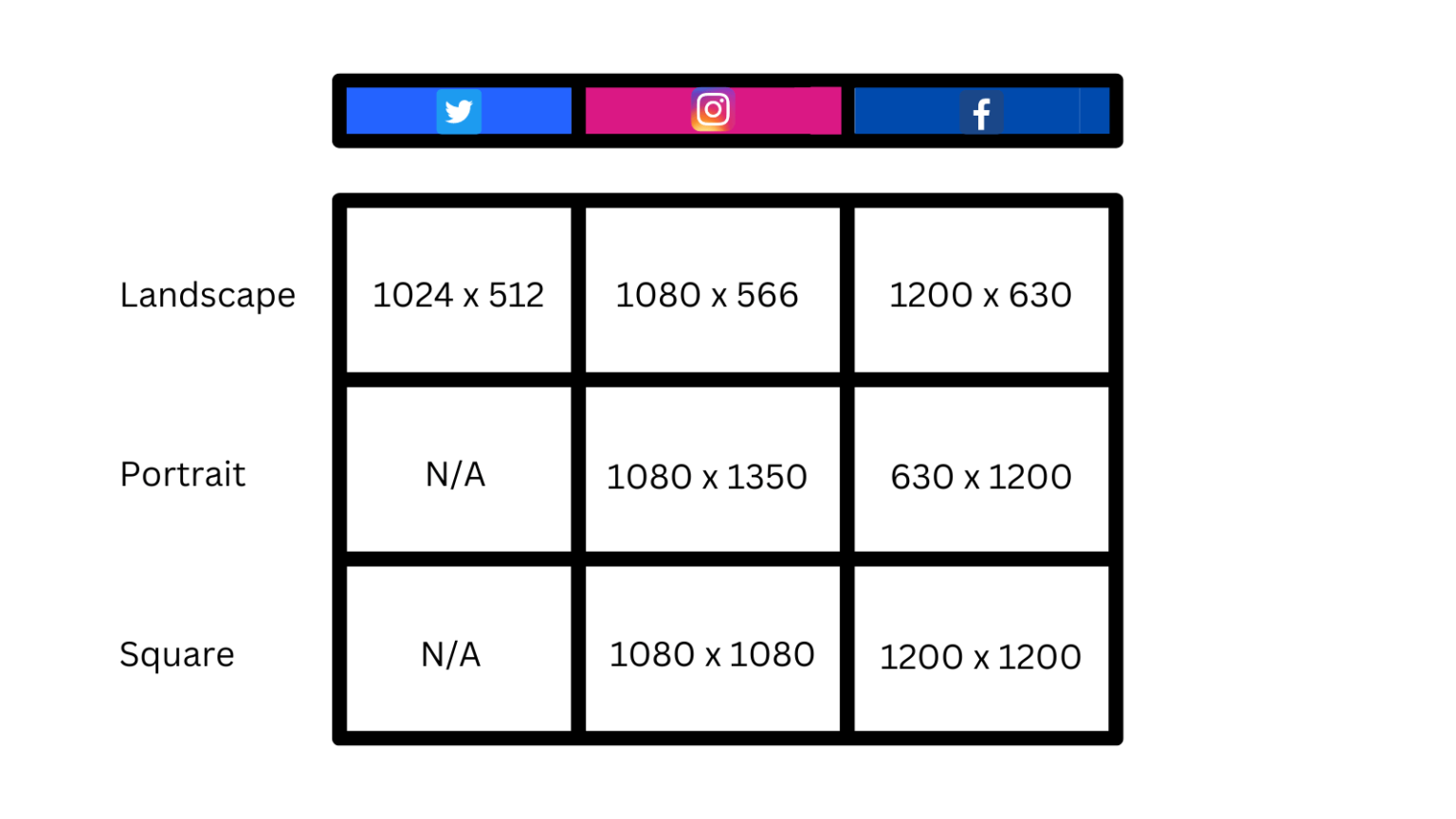
- Feed Post (Portrait): 1080 x 1350 pixels (4:5 ratio). Recommended feed image format because it fills the largest vertical space on smartphone screens.
- Feed Post (Square): 1080 x 1080 pixels (1:1 ratio). Standard square display format.
- Feed Post (Landscape): 1080 x 566 pixels (1.91:1 ratio). Widescreen display format.
- Stories & Reels: 1080 x 1920 pixels (9:16 ratio). Full-screen vertical media. Keep critical visual elements and text within a central safe zone (leaving 250 pixels top and bottom clear) to avoid overlapping platform UI overlays.
- Profile Picture: 320 x 320 pixels (1:1 ratio). Displayed as a circle, so centralize critical design elements.
Facebook Specifications
Facebook renders images dynamically depending on whether a user views content on mobile devices or desktop displays.
- In-Feed Single Image: 1200 x 630 pixels (1.91:1 landscape) or 1080 x 1350 pixels (4:5 portrait).
- Cover Photo (Pages & Profiles): 820 x 312 pixels on desktop, rendering at 640 x 360 pixels on mobile screens. Design assets at 1200 x 630 pixels while keeping important elements centered to account for responsive mobile cropping.
- Profile Picture: Upload at 800 x 800 pixels (1:1 ratio). Displays at 170 x 170 pixels on desktop computers.
- Event Cover Photo: 1920 x 1005 pixels (16:9 ratio).
LinkedIn Specifications
LinkedIn content targets business professionals on desktop monitors and mobile devices.
- Feed Shared Image: 1200 x 627 pixels (1.91:1 ratio) for link previews and landscape posts; 1080 x 1080 pixels (1:1 ratio) for square image posts.
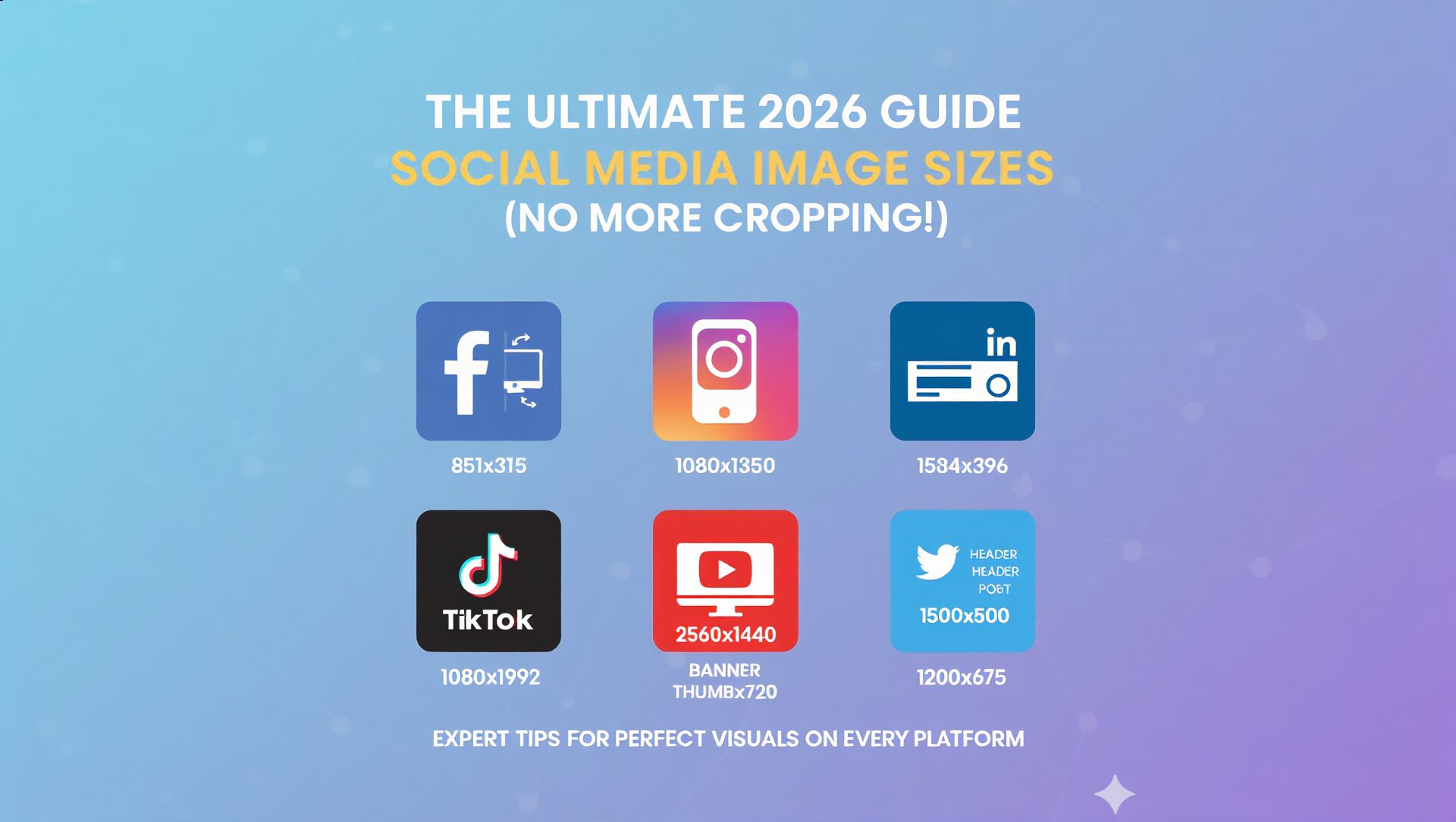
- Personal Profile Cover Banner: 1584 x 396 pixels (4:1 aspect ratio).
- Company Page Cover Banner: 1128 x 191 pixels.
- Profile Photo: 400 x 400 pixels (1:1 ratio, circular crop).
X (formerly Twitter), YouTube, Pinterest, and TikTok Specifications
- X (Twitter) Feed Image: 1600 x 900 pixels (16:9 ratio) for optimal desktop and mobile presentation.
- X (Twitter) Header Banner: 1500 x 500 pixels (3:1 ratio). Allow for responsive cropping near corners.
- YouTube Video Thumbnail: 1280 x 720 pixels (16:9 aspect ratio) with a minimum width of 640 pixels. Saved as JPEG or PNG under 2 MB.
- YouTube Channel Banner: 2560 x 1440 pixels (16:9 overall ratio). Maintain text and main graphics within the central 1546 x 423 pixel safe area to ensure proper display across mobile screens, desktop monitors, and TV displays.
- Pinterest Standard Pin: 1000 x 1500 pixels (2:3 aspect ratio). Pinterest algorithmically limits feed reach for pins taller than a 1:2.1 ratio.
- TikTok Video Cover & Story: 1080 x 1920 pixels (9:16 vertical ratio).
Social Media Image Specifications Table
| Platform | Asset Type | Recommended Pixels (W x H) | Aspect Ratio | Maximum File Size / Format |
|---|---|---|---|---|
| Portrait Post | 1080 x 1350 px | 4:5 | 8 MB (JPEG, PNG, WEBP) | |
| Story / Reel | 1080 x 1920 px | 9:16 | 4 MB (JPEG, PNG) | |
| Profile Picture | 320 x 320 px | 1:1 | 2 MB (JPEG, PNG) | |
| Feed Image | 1200 x 630 px | 1.91:1 | 10 MB (JPEG, PNG) | |
| Cover Photo | 1200 x 630 px | 16:9 / Responsive | 4 MB (PNG recommended for text) | |
| Shared Post Image | 1200 x 627 px | 1.91:1 | 5 MB (JPEG, PNG) | |
| Personal Banner | 1584 x 396 px | 4:1 | 8 MB (JPEG, PNG) | |
| X (Twitter) | In-Feed Post | 1600 x 900 px | 16:9 | 5 MB (JPEG, PNG, GIF) |
| X (Twitter) | Header Banner | 1500 x 500 px | 3:1 | 5 MB (JPEG, PNG) |
| YouTube | Custom Thumbnail | 1280 x 720 px | 16:9 | 2 MB (JPEG, PNG, GIF) |
| YouTube | Channel Banner | 2560 x 1440 px | 16:9 | 6 MB (JPEG, PNG) |
| Standard Pin | 1000 x 1500 px | 2:3 | 20 MB (JPEG, PNG) | |
| TikTok | Frame / Story | 1080 x 1920 px | 9:16 | 20 MB (JPEG, PNG) |
Key Differences: Preparing Images for Print vs. Digital Screens
Preparing images for print demands fundamentally different technical workflows than preparing assets for web distribution.
- PRINT vs. DIGITAL WORKFLOW COMPARISON:
- PRINT WORKFLOW:
- High DPI (300 DPI)
- CMYK Color Space
- Uncompressed TIFF
- Measured in Inches
- DIGITAL WORKFLOW:
- Screen Pixels
- sRGB Color Space
- Compressed WEBP
- Measured in Pixels
- PRINT WORKFLOW:
Resolution and Scaling Differences
- Print: Physical dimensions (inches or centimeters) combined with DPI determine file size. Shrinking an image increases effective DPI, whereas enlarging an image decreases DPI, potentially introducing blurriness.
- Digital: Physical inch sizes are irrelevant. Displays adapt content to pixel density and viewport size. A 1080 x 1080 pixel image occupies different physical areas on a desktop monitor versus a high-density smartphone screen, but the image detail remains identical.
Color Spaces and Soft Proofing
Monitors use RGB (Red, Green, Blue) additive light, which can render vibrant neon colors and deep blacks. Printers use CMYK subtractive inks, which rely on reflected ambient light and possess a narrower color gamut.
When preparing photos for physical printing:
- Work initially in RGB for non-destructive photo editing.
- Enable soft proofing in software like Adobe Photoshop or Lightroom using the target printer's ICC profile.
- Convert to CMYK or export as an uncompressed RGB TIFF (depending on the printer vendor's specifications).
Compression and Export File Formats
Selecting the appropriate export format balances visual quality against file upload sizes:
- JPEG (.jpg): The standard format for photographic content on both print and web. Offers controllable lossy compression.
- PNG (.png): Lossless format ideal for social media graphics containing text, logos, or transparent backgrounds. Prevents compression artifacts around crisp vector edges.
- WEBP (.webp): Modern web format providing superior compression efficiency for websites and supported digital apps.
- TIFF (.tif): Uncompressed raster file format standard for professional photo printing, archival preservation, and fine art reproduction.
Common Photo Sizing Errors and How to Fix Them
1. Upscaling Low-Resolution Images
Taking a small web image (e.g., 600 x 400 pixels) and stretching it to fit a 300 DPI 8x10 print (requiring 2400 x 3000 pixels) causes heavy blurring and visible pixel blocks.
- Fix: Use specialized AI-based resampling software (such as Adobe Preserve Details 2.0 or dedicated upscaling tools) to extrapolate missing pixels, or select a smaller physical print output size consistent with the original file dimensions.
2. Over-Cropping without Preserving Safe Zones
Placing subjects or text logos too close to the edge of an image asset often results in cut-off content when platforms apply dynamic responsive cropping (e.g., Facebook covers shifting between mobile and desktop screens).
- Fix: Design with safe zones. Place primary subjects, titles, and call-to-action elements within the central 80% area of the canvas.
3. Color Distortion During Upload
Uploading images saved in wider color profiles (such as Adobe RGB or ProPhoto RGB) to social media platforms causes colors to appear muted, dull, or washed-out.
- Fix: Convert color profiles to sRGB IEC61966-2.1 prior to exporting any file intended for screen view.
Frequently Asked Questions
What happens if I print a 72 PPI web image at 8x10 inches?
If an image measures 720 x 576 pixels (72 PPI over an 8x10 inch area), printing it at 8x10 inches spreads those pixels out, resulting in a physical printing resolution of roughly 72 DPI. The print will appear pixelated, soft, and visibly blurry.
Why do printed photo colors differ from on-screen display colors?
Monitors emit direct RGB light with high brightness and contrast, while paper reflects ambient light off CMYK ink droplets. Uncalibrated monitors often display oversaturated colors that physical ink cannot replicate. Using calibrated displays and soft-proofing color profiles resolves this disparity.
Can I use the same photo for Instagram, LinkedIn, and print without re-editing?
No. An optimal Instagram portrait post uses a 4:5 vertical aspect ratio at 1080 x 1350 pixels in sRGB. An optimal LinkedIn banner uses a 4:1 horizontal aspect ratio (1584 x 396 pixels). A 4x6 print uses a 2:3 ratio requires 1200 x 1800 pixels at 300 DPI. Each distribution channel requires custom cropping and export settings.
What is the standard photo size for framed pictures?
The most standard framed photo sizes are 4x6 inches, 5x7 inches, 8x10 inches, and 11x14 inches. When choosing matting for frames, purchase prints corresponding to the interior mat opening dimensions rather than the outer frame boundaries.
Why is sRGB recommended for web images instead of Adobe RGB?
Adobe RGB contains a wider color gamut designed for print workflows. However, most web browsers, mobile operating systems, and social media apps assume images are encoded in sRGB. If an Adobe RGB file is rendered without proper color management, its colors display flat and desaturated.
Recommended Next Steps for Exporting Your Photos
To ensure your images look crisp across print and screen:
- Audit Your Source Resolution: Before editing, check the native pixel width and height of your original photo to determine maximum achievable print sizes at 300 DPI.
- Set the Correct Canvas Aspect Ratio: Crop your raw image early in the editing process to match the target output channel (e.g., 4:5 for Instagram/8x10 prints, 16:9 for YouTube/X).
- Convert Color Profiles: Convert digital web assets to sRGB and print assets to CMYK or printer-specified RGB profiles.
- Export to Platform Dimensions: Resize web photos to recommended pixel dimensions (such as 1080 x 1350 px for Instagram portrait) to prevent aggressive platform compression algorithms from degrading quality.
Image Gallery