Understanding the EmailMessage Object in Salesforce: Structure, Architecture, and Usage
The EmailMessage object in Salesforce is a standard sObject designed to store detailed metadata, raw text, HTML content, and structural relationships for emails sent or received within the platform. Primarily utilized by features like...
The EmailMessage object in Salesforce is a standard sObject designed to store detailed metadata, raw text, HTML content, and structural relationships for emails sent or received within the platform. Primarily utilized by features like Email-to-Case, Enhanced Email, and Outlook or Gmail integrations, the EmailMessage object transforms unstructured email communications into queryable, automated data records tied to CRM objects.
Contents
Architectural Overview of the EmailMessage sObject
In early iterations of Salesforce, email communications were recorded almost exclusively as generic Task records under the Activity model. While effective for simple log-keeping, storing emails as standard activities limited an enterprise’s ability to capture complex email headers, HTML rendering, multi-recipient lists, and specialized trigger-based automation.
To overcome these constraints, Salesforce introduced the dedicated EmailMessage standard sObject. With the activation of Enhanced Email (standard across modern Salesforce implementations), emails sent from or logged to Salesforce are represented as first-class records. Rather than existing as mere text summaries in activity history, EmailMessage records feature dedicated page layouts, custom fields, granular security controls, and direct database relationships across standard and custom entities.
- Case / Account / Opportunity / etc. (1)
- EmailMessage (N)
- ContentDocumentLink (1 to N)
- EmailMessageRelation (N)
- Lead / Contact / User (N)
- EmailMessage (N)
Understanding this underlying structure is critical for technical architects, system administrators, and developers who need to design reliable customer service channels, build custom compliance filters, or execute advanced data migration projects.
Key Fields and Database Schema
The EmailMessage object encapsulates both communication content and metadata. It incorporates core tracking fields, relationship identifiers, system state flags, and rich-text content storage.
Core Standard Fields Reference
| Field API Name | Data Type | Description and Operational Usage |
|---|---|---|
Id |
ID | The unique 18-character identifier for the EmailMessage record. |
ParentId |
Lookup (Case) | Foreign key pointing to the associated Case record. Populated primarily in Email-to-Case scenarios. |
RelatedToId |
Lookup (Polymorphic) | Foreign key connecting the email to non-Case entities, such as Accounts, Opportunities, or Custom Objects. |
ActivityId |
Lookup (Task) | Points to the underlying Task record generated alongside the email for unified Activity Timeline display. |
Subject |
String (3000) | The subject line of the email message. |
TextBody |
Long Text Area | Plain-text version of the email body, used for text processing and search indexing. |
HtmlBody |
Long Text Area | HTML-formatted content of the email, preserving inline formatting, layout structure, and rich text. |
FromAddress |
Email address of the sender. | |
FromName |
String (1000) | Display name of the email sender. |
ToAddress |
Text Area | Delimited string containing primary recipient email addresses. |
CcAddress |
Text Area | Delimited string containing carbon copy (CC) recipient email addresses. |
BccAddress |
Text Area | Delimited string containing blind carbon copy (BCC) recipient email addresses. |
Incoming |
Boolean | Flags directionality: true indicates an incoming email (e.g., customer to support), false indicates outbound. |
Status |
Picklist | Represents state (e.g., 0 = New, 1 = Read, 2 = Replied, 3 = Sent, 4 = Draft, 5 = Forwarded). |
MessageDate |
Date/Time | Timestamp indicating when the email was actually sent or received according to message headers. |
HasAttachment |
Boolean | System-calculated flag indicating whether the message includes linked files or email attachments. |
Relational Architecture: Connecting Emails across Salesforce
One of the most powerful architectural features of the EmailMessage object is its ability to establish complex structural links across the Salesforce data model using dual foreign keys and junction entities.
- EmailMessage
- ParentId (Direct Case FK)
- Case Record
- RelatedToId (Polymorphic FK)
- Account, Optty, Custom Objects
- ParentId (Direct Case FK)
The Dual Foreign Key Strategy (ParentId vs. RelatedToId)
The EmailMessage object utilizes two primary lookup fields to handle contextual ownership:
ParentId: Dedicated specifically to the standard Case object. When an email enters Salesforce via Service Cloud Email-to-Case,ParentIdties the message directly to its parent ticket.RelatedToId: A polymorphic lookup field (similar toWhatIdon Tasks) available when Enhanced Email is active.RelatedToIdallows anEmailMessageto link directly to non-Case records, including Accounts, Contacts, Leads, Opportunities, and fully custom sObjects (e.g.,Invoice__c).
The Role of EmailMessageRelation
While string fields like ToAddress and CcAddress store plain-text values, Salesforce utilizes a junction object called EmailMessageRelation to bind EmailMessage records to distinct CRM individual entities (Contact, Lead, or User).
Each EmailMessageRelation record maintains:
EmailMessageId: The parent email message.RelationId: The specific ID of the related Contact, Lead, or User record.RelationType: Defines the party's involvement, such asFromAddress,ToAddress,CcAddress, orBccAddress.RelationAddress: The specific email address associated with the relation record.
This normalization allows developers to perform SOQL queries that identify every email associated with a specific Contact or Lead, even if the individual was only included as a CC or BCC recipient.
Comparing Email Architecture: Activity Task vs. EmailMessage sObject
To understand how email records function across the Salesforce ecosystem, it helps to compare legacy Task-based email logging with standard and enhanced EmailMessage structures.
| Architectural Dimension | Legacy Task (Email Activity) | Standard EmailMessage (Case Only) | Enhanced EmailMessage (Platform-Wide) |
|---|---|---|---|
| Primary Scope | Basic Activity Timeline logging across standard records. | Support operations tied exclusively to Service Cloud Cases. | Enterprise-wide integration across standard and custom sObjects. |
| Object Relationships | Standard WhoId / WhatId lookup parameters. |
Direct ParentId lookup to Case. |
Dual linkage via ParentId (Case) and RelatedToId (Polymorphic). |
| Rich Text & HTML Support | Plain text truncated inside Description field. |
Full HtmlBody and TextBody fields. |
Full HtmlBody and TextBody fields. |
| Individual Recipient Tracking | Aggregated into text fields on the Task record. | Aggregated string arrays on EmailMessage. |
Normalized tracking via EmailMessageRelation junction records. |
| Extensibility | Supports custom fields with standard Task limits. | Supports custom fields, page layouts, and triggers. | Supports custom fields, page layouts, validation rules, and triggers. |
| Execution Triggers | standard Task triggers fire. |
Dedicated EmailMessage triggers fire. |
Dedicated EmailMessage triggers fire platform-wide. |
Implementing Automation: Apex Triggers and Record-Triggered Flows
Because EmailMessage operates as a standard sObject, system architects can leverage programmatic Apex code or low-code declarative Flows to intercept email events.
Use Cases for EmailMessage Automation
- Automated Case Status Updates: Reopening a closed Case automatically when an incoming email (
Incoming = true) is logged against aParentId. - Sentiment Analysis and Keyword Filtering: Scanning the incoming
TextBodyorSubjectfor critical terms (e.g., "URGENT", "CANCEL", "LEGAL") to adjust Case priority or escalate records. - Attachment Security Scanning: Intercepting incoming messages with
HasAttachment = trueto validate compliance before processing. - Custom Routing: Re-routing messages based on domain parameters parsed directly out of
FromAddress.
Apex Trigger Implementation Pattern
When writing Apex Triggers on EmailMessage, developers must account for execution context. Incoming Email-to-Case runs within automated system contexts, requiring optimized bulkification to avoid governor limits.
/** * @description Demonstrates an apex trigger handler pattern on EmailMessage * to process incoming emails linked to Cases. */ public with sharing class EmailMessageHandler { public static void handleAfterInsert(List newEmails) { Set parentCaseIds = new Set(); for (EmailMessage email : newEmails) { // Check if the email is incoming and linked directly to a Case if (email.Incoming && email.ParentId != null && email.ParentId.getSObjectType() == Case.sObjectType) { parentCaseIds.add(email.ParentId); } } if (!parentCaseIds.isEmpty()) { reopenAssociatedCases(parentCaseIds); } } private static void reopenAssociatedCases(Set caseIds) { List casesToUpdate = new List(); for (Case c : [SELECT Id, Status FROM Case WHERE Id IN :caseIds AND IsClosed = true]) { c.Status = 'Re-Opened'; c.Comments = 'System Notice: Case automatically reopened due to customer incoming email reply.'; casesToUpdate.add(c); } if (!casesToUpdate.isEmpty()) { update casesToUpdate; } } }
Important Execution Considerations
Messaging.sendEmail()Behavior: Standard programmatic email sending via Apex (Messaging.singleEmailMessage) does not automatically generate anEmailMessagerecord unlesssetSaveAsActivity(true)is set and Enhanced Email settings are active, or anEmailMessagerecord is explicitly inserted.- Order of Execution: During Email-to-Case operations, Salesforce creates the
Caserecord (if new) before inserting theEmailMessage. If an email matches an existing thread, theEmailMessagerecord is inserted, firingbefore insertandafter inserttriggers onEmailMessage, followed by updates to the parentCase. - Recursion Control: Automated updates to a Case triggered by an
EmailMessagerecord can inadvertently re-trigger Case assignment rules or secondary workflows. Developers should implement strict static guards or feature flags to prevent recursive execution loops.
Security Model, Sharing Rules, and Encryption
The EmailMessage security model combines parent-based sharing rules with explicit record-level access restrictions.
Implicit Sharing Mechanics
Access to an EmailMessage record is generally derived from access to its associated parent record—a concept known as implicit sharing or Controlled by Parent:
- An administrator or agent who has read/write visibility into a specific
CaseorAccountrecord inherits visibility into theEmailMessagerecords attached viaParentIdorRelatedToId. - If a user lacks read permission on a parent Opportunity record, standard queries to
EmailMessagerecords related to that Opportunity viaRelatedToIdwill yield zero accessible records for that context.
Field-Level Security and Custom Permissions
Custom fields created on the EmailMessage object (such as Classification_Tag__c or Sentiment_Score__c) enforce standard Field-Level Security (FLS). System administrators must configure these permissions inside Profile definitions or Permission Sets.
Salesforce Shield Platform Encryption
For organizations subject to legal compliance frameworks (such as HIPAA, GDPR, or SOC2), Sensitive personal data inside email bodies must be encrypted at rest. Using Salesforce Shield Platform Encryption, enterprise instances can natively encrypt fields on the EmailMessage object:
SubjectTextBodyHtmlBodyHeadersToAddress,FromAddress,CcAddress,BccAddress
Encrypting long text area fields such as HtmlBody prevents those specific fields from being filtered directly inside SOQL WHERE clauses, requiring developers to adjust query logic to target indexed metadata instead.
Data Volume Considerations, Archiving, and Best Practices
Given the high volume of communications processed by enterprise sales and service desks, the EmailMessage object often represents one of the largest consumers of data storage within a Salesforce instance.
Managing Storage Overhead
Unlike operational metadata records that consume standard 2 KB chunk allocations, EmailMessage records with large HtmlBody content, inline base64 images, or heavy header strings can balloon database footprint rapidly:
- Attachments: File attachments sent with emails are converted into
ContentDocumentLinkandContentVersionrecords rather than stored directly inside theEmailMessagebody text. - Inline Images: HTML-embedded graphics often create separate
ContentVersiondocuments or bloatHtmlBodymarkup.
- EmailMessage (1:N)
- ContentDocumentLink (N:1)
- ContentDocument
- ContentDocumentLink (N:1)
SOQL Performance and Query Optimization
When writing SOQL queries against EmailMessage, fetching heavy text bodies across large datasets can exhaust Apex heap size limits (6 MB synchronous / 12 MB asynchronous).
Suboptimal Query Pattern:
-- Risk: Can easily exceed Apex Heap Limits if text bodies are large SELECT Id, Subject, HtmlBody, TextBody FROM EmailMessage WHERE CreatedDate = TODAY
Optimized Query Pattern:
-- Preferred: Query lightweight attributes, filter by selective indexed fields SELECT Id, Subject, Incoming, ParentId, MessageDate FROM EmailMessage WHERE ParentId IN :caseIdSet AND Incoming = true
If message body contents are strictly required for processing, developers should fetch the list of IDs first, then retrieve HtmlBody or TextBody selectively inside single-record detail handlers.
Data Archiving and Offloading Strategies
To maintain optimal system performance and prevent data storage overages:
- Salesforce Data Pipelines / Big Objects: Move historic
EmailMessagedata (e.g., messages older than 2 years) to custom Big Objects for persistent query capability at a fraction of standard storage costs. - Automated Purging Workflows: Implement scheduled Apex batch jobs or enterprise ETL solutions (such as MuleSoft or dedicated archiving suites) to back up email data to external data lakes (S3, Azure Blob) before deleting raw records from the primary sObject table.
Frequently Asked Questions
Can custom fields be added to the EmailMessage object?
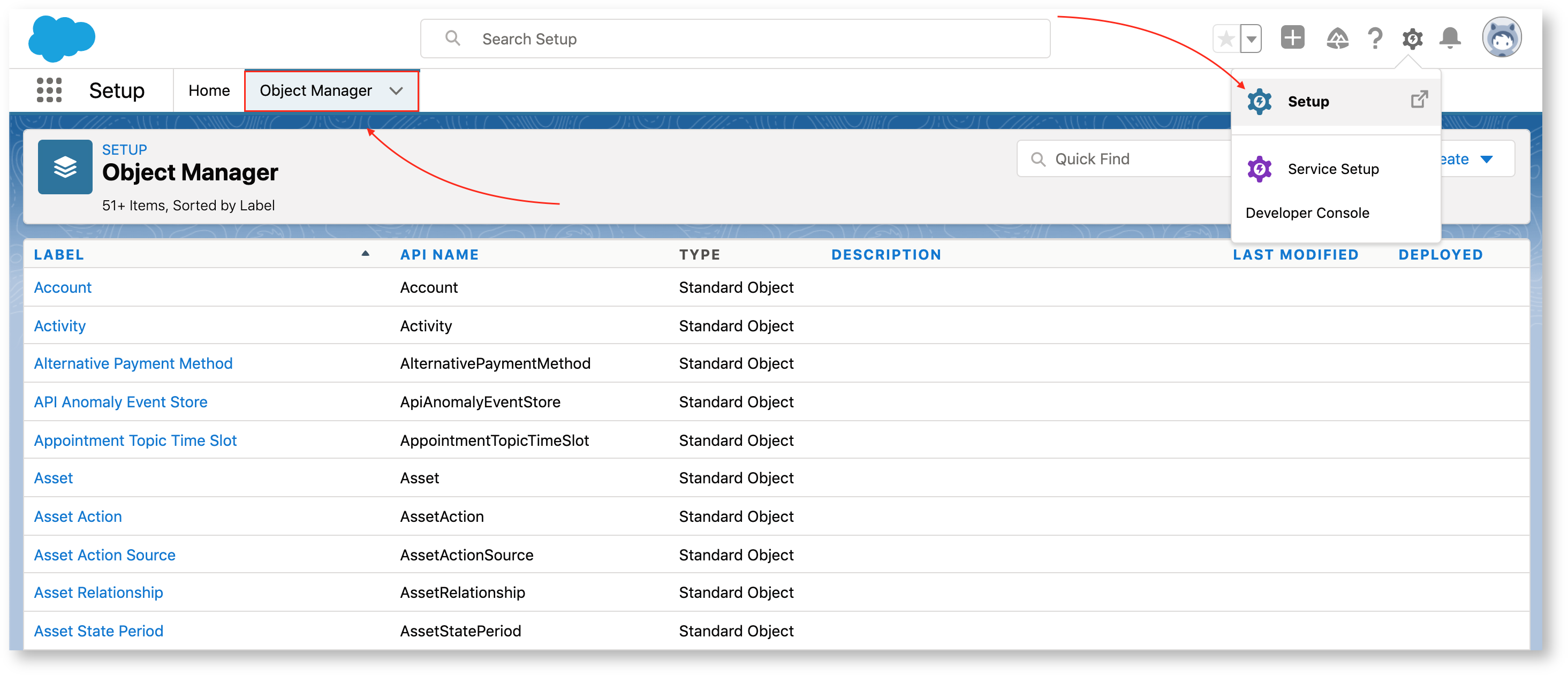
Yes. With Enhanced Email enabled, custom fields can be added to the EmailMessage object via Setup > Object Manager > Email Message > Fields & Relationships. These custom fields can be populated using standard page layouts, Apex triggers, or Flow automations.
What is the primary operational difference between ParentId and RelatedToId?
ParentId is a dedicated lookup field pointing exclusively to a Case record, heavily integrated with standard Service Cloud workflows like Email-to-Case. RelatedToId is a polymorphic lookup field used by Enhanced Email to connect an email record to non-Case objects, including Accounts, Opportunities, Contacts, Leads, and Custom Objects.
Why doesn't an Apex trigger fire when an email is sent via standard Messaging.sendEmail()?
Standard Apex outbound emails dispatched via Messaging.sendEmail() execute in system memory and do not automatically persist an EmailMessage database record unless explicitly configured. To trigger EmailMessage events via Apex, ensure the email configuration explicitly handles task/activity logging, or create and insert an EmailMessage sObject record directly within your execution logic.
How does Email-to-Case handle incoming attachments on an EmailMessage?
When an incoming email contains file attachments, Salesforce creates an EmailMessage record and automatically converts each attachment into a ContentVersion record. It then generates a ContentDocumentLink connecting the document to the newly created EmailMessage record (and by extension, making it accessible on the parent Case record).
Can record-triggered Flows be built on the EmailMessage object?
Yes. You can create Record-Triggered Flows that execute on EmailMessage creation, update, or deletion. These flows support conditions based on field values such as Incoming, Status, ParentId, or domain values parsed from FromAddress.
Strategic Recommendations for System Implementation
To maximize performance, security, and scalability when leveraging the EmailMessage object in Salesforce, adhere to these technical best practices:
- Activate Enhanced Email: Ensure Enhanced Email is enabled in your Salesforce organization setup to unlock full sObject capabilities, page layout customizations, and polymorphic relationships beyond Case management.
- Enforce Heap-Conscious SOQL Patterns: Never include
HtmlBodyorTextBodyin SOQL queries executed over bulk record sets. Query lightweight metadata fields first, fetching rich body content selectively when rendering detail views or processing specific records. - Implement Robust Threading Logic: Leverage Salesforce’s standard Email-to-Case threading mechanisms (such as Light Weight Email Threading) to prevent fragmented communication threads and ensure
ParentIdvalues are correctly assigned to incoming customer responses. - Monitor Storage Metrics Routinely: Track system storage usage inside Setup > Storage Usage. Establish automated data archiving policies to offload high-volume
EmailMessagehistory to cloud storage or Big Objects before database thresholds are exceeded.
Image Gallery