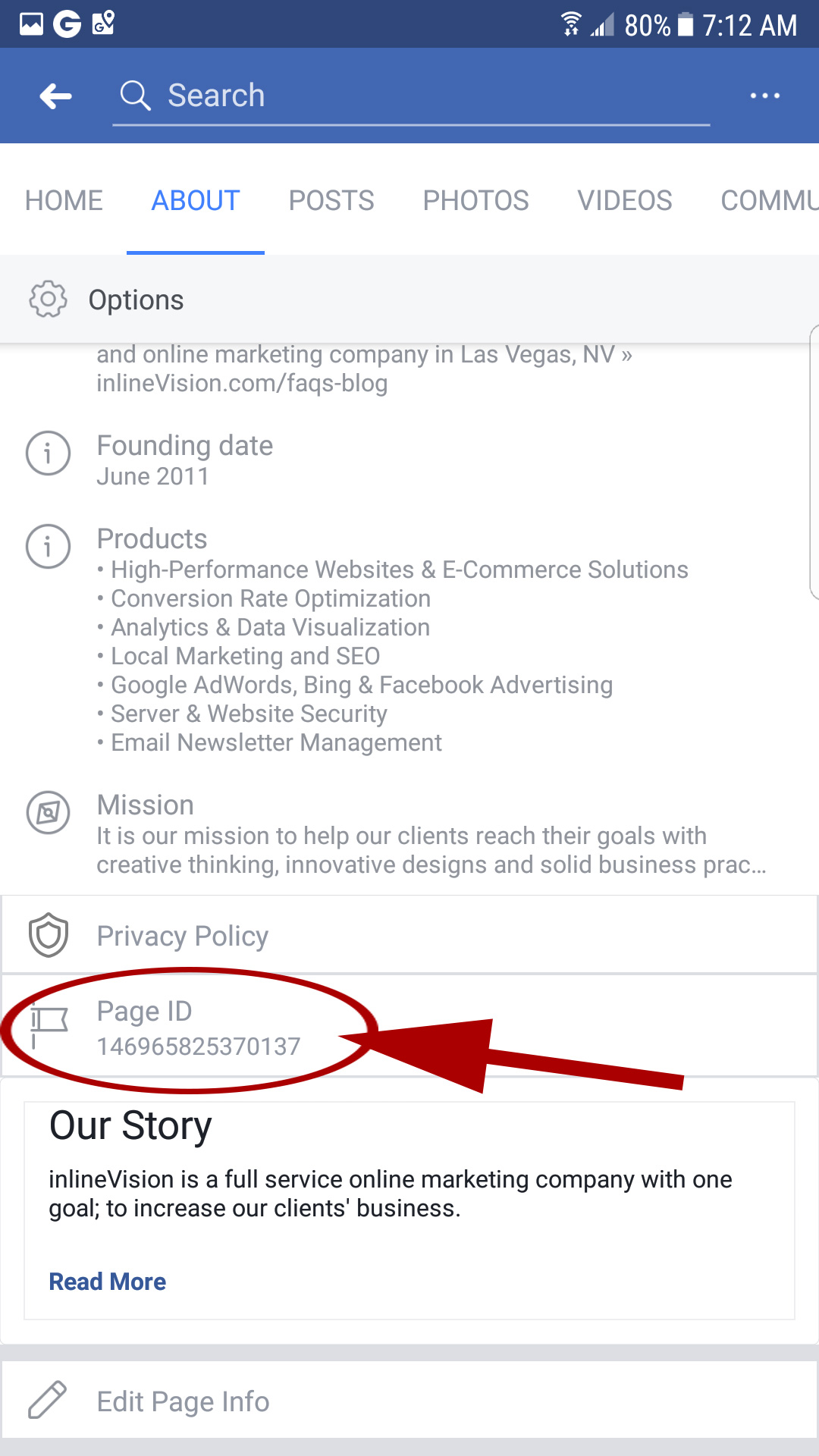
Understanding a Facebook Page ID and How to Find It
A Facebook Page ID is a unique numerical string assigned by Meta to every public page on its platform, serving as a permanent digital identifier that remains constant even if the page changes its public display name, vanity URL, or bra...
A Facebook Page ID is a unique numerical string assigned by Meta to every public page on its platform, serving as a permanent digital identifier that remains constant even if the page changes its public display name, vanity URL, or branding.
Contents
Navigating the architecture of Meta’s social media ecosystem requires more than just recognizing a brand by its public-facing handle. Behind every custom vanity URL—such as facebook.com/mybusiness—lies a permanent, underlying numerical coordinate known as the Facebook Page ID. Understanding what this identifier is, why it matters for technical integrations, and how to retrieve it accurately is essential for developers, digital marketers, and page administrators alike.
What Is a Facebook Page ID and Why Does It Matter?
A Facebook Page ID is a unique sequence of numbers generated automatically by Meta's database when a page is created. Unlike custom usernames (or vanity URLs) that can be modified at will by administrators, the numerical Page ID is permanent.
This permanence makes the Page ID indispensable for various technical applications. When developers integrate Facebook plugins, connect third-party customer relationship management (CRM) software, configure Meta Pixel event tracking, or utilize the Meta Graph API, requests often fail if they rely on mutable text handles. The Graph API, for instance, processes programmatic requests much more reliably when pointed directly at a Page ID rather than a text-based slug that might change or encounter routing errors.
Furthermore, digital advertising campaigns managed through Meta Ads Manager occasionally require the explicit specification of a Page ID to link sponsored content, verify business assets in Meta Business Suite, or establish custom audience exclusions. Knowing how to locate and verify this string prevents integration bottlenecks and ensures seamless communication between external applications and your Meta properties.
Anatomy of a Facebook URL vs. Page ID
To understand how Page IDs function, it helps to look at how Meta structures web addresses. When you visit a Facebook page, the URL in your browser's address bar typically follows one of several standard formats.
- Vanity URL Structure:
https://www.facebook.com/BrandName - Numeric ID URL Structure:
https://www.facebook.com/profile.php?id=123456789012345 - Direct Page Link Structure:
https://www.facebook.com/pages/BrandName/123456789012345
In the first example, BrandName is a customizable alias. While human users easily recognize text handles, web servers and APIs require the numeric sequence seen in the second and third examples. If a page has not claimed a custom vanity URL, Meta defaults to displaying the numeric Page ID directly within the profile link.
| URL Type | Format Example | Variability | Primary Use Case |
|---|---|---|---|
| Vanity Username | facebook.com/CompanyName |
Highly mutable; can be changed by admins. | Human navigation, marketing materials, and branding. |
| Numeric Page ID | facebook.com/profile.php?id=12345678 |
Immutable; permanently fixed at creation. | API calls, developer integrations, and ad asset mapping. |
| Legacy Page Path | facebook.com/pages/Name/123456 |
Immutable; historical format. | Legacy linking and deep redirects. |
Methods to Find Any Facebook Page ID
Finding a Page ID varies depending on whether you have administrative access to the page or are trying to locate the ID of a third-party public entity. Several reliable methods exist to uncover this information.
Method 1: Inspecting Page Source Code
For any public Facebook page, you can find the Page ID directly through your browser's developer tools without needing administrative rights.
- Navigate to the target Facebook page in your desktop web browser.
- Right-click anywhere on the blank space of the page and select View Page Source (or press
Ctrl+Uon Windows orCmd+Option+Uon macOS). - Open the search utility by pressing
Ctrl+ForCmd+F. - Type
page_idorentity_idinto the search box. - Look through the highlighted results for a long string of numbers, typically associated with terms like
"page_id":"123456789012345"or"actorID":"123456789012345". That sequence is the Page ID.
Method 2: Navigating Page Settings (For Admins)
If you manage the page in question, Meta provides a direct path to view administrative details, including the Page ID, within your dashboard settings.
- Log into Facebook and switch to your professional dashboard or page profile.
- Navigate to the Settings & Privacy menu, then select Settings.
- Click on New Page Experience or Page Settings depending on your interface version.
- Scroll down to the Page Info or General section where basic identifiers, templates, and administrative details are listed. The Page ID will be displayed alongside other foundational page parameters.
Method 3: Using Third-Party Lookup Tools
Several web utilities specialize in converting public vanity URLs into numeric Page IDs. To use these safely:
- Copy the full public URL of the Facebook page (e.g.,
https://www.facebook.com/TargetPage). - Paste the URL into a reputable lookup tool or an online HTML parser.
- The tool will parse the page's public source code and output the numeric identifier. Caution: Avoid untrusted third-party platforms that request login credentials or permissions to access your personal Facebook account.
Technical Applications and API Usage
Once retrieved, the Facebook Page ID serves as the anchor for programmatic interactions with Meta's developer ecosystem. Developers rely on this numeric string across several key programming environments.
The Meta Graph API
The Graph API is the primary way for apps to read and write data to Facebook. When requesting public posts, subscriber counts, or visitor reviews, endpoints are structured around the Page ID. A standard API call to fetch basic page metadata looks like this:
https://graph.facebook.com/v19.0/{page-id}?fields=name,fan_count,verification_status&access_token={your-access-token}
Replacing {page-id} with the actual numerical string ensures the request resolves correctly, bypassing potential routing errors caused by renamed vanity URLs.
Webhooks and Real-Time Updates
When configuring webhooks to listen for new messages sent to a page's Messenger inbox or new comments on published posts, the webhook subscription binds directly to the Page ID. Event payloads returned by Meta's servers reference this ID to designate which asset generated the incoming data stream.
Common Mistakes and Troubleshooting
When attempting to locate or utilize a Facebook Page ID, users frequently encounter specific roadblocks. Recognizing these issues helps streamline technical workflows.
- Confusing User IDs with Page IDs: Personal user profiles, user groups, and business pages all have distinct numeric IDs. Ensure you are pulling the identifier for a Page, as user profile IDs cannot be used to manage business page integrations or Meta Ads assets.
- Using Modified Vanity URLs: If a page has undergone multiple name changes and username updates, legacy links may redirect improperly. Always extract the ID directly from the current page source code rather than relying on historical bookmarks.
- Insufficient Permissions: When querying the Graph API, receiving a
GraphMethodExceptionoften indicates that the access token lacks the necessary permissions (pages_read_engagement,pages_show_list) associated with that specific Page ID.
Frequently Asked Questions
Can a Facebook Page ID be changed?
No. Unlike vanity URLs and page names, which administrators can update at any time, a Page ID is permanently hardcoded into Meta's database at the moment of creation.
Do personal profiles have Page IDs?
No. Personal Facebook profiles have User IDs, which operate differently and feature strict privacy controls. Page IDs apply exclusively to public pages, businesses, brands, and public figure profiles.
Is my Page ID confidential?
No. A Facebook Page ID is completely public information. Anyone can view a page's numeric ID by inspecting its source code or looking at its public URL structure. It poses no security risk to share or display a Page ID publicly.
Why does my API call fail when using my page username?
Many Meta Graph API endpoints require immutable numerical identifiers to prevent broken queries caused by vanity URL modifications. Always substitute custom usernames with the permanent numeric Page ID.
Can I find a Page ID on a mobile device?
Finding a Page ID through mobile browsers requires requesting the desktop site via browser settings to access the page source code. Alternatively, administrators can find page details within the Meta Business Suite mobile application settings.
Next Actions for Developers and Marketers
With your Facebook Page ID successfully located, verify its functionality by testing it within your intended environment. If you are configuring a developer integration, test a basic Graph API call via the Meta Graph API Explorer to confirm data retrieval. If you are managing advertising assets, input the ID into your Meta Business Suite partner sharing settings to ensure secure asset allocation. Keeping a documented inventory of your brand's core numeric identifiers safeguards your digital infrastructure against future URL modifications and rebranding efforts.
Image Gallery