Remote Authentication Dial-In User Service (RADIUS): A Comprehensive Guide for 2026
Remote Authentication Dial-In User Service (RADIUS) is a networking protocol that provides centralized Authentication, Authorization, and Accounting (AAA) management for users who connect and use a network service. It acts as a gatekee...
Remote Authentication Dial-In User Service (RADIUS) is a networking protocol that provides centralized Authentication, Authorization, and Accounting (AAA) management for users who connect and use a network service. It acts as a gatekeeper, allowing network administrators to manage access to routers, switches, VPNs, and wireless access points from a single database.
Contents
What is Remote Authentication Dial-In User Service?
Remote Authentication Dial-In User Service, commonly known as RADIUS, is a client-server protocol and software that enables remote access servers to communicate with a central server to authenticate dial-in users and authorize their access to the requested system or service. While the name suggests a legacy "dial-in" focus, the protocol has evolved significantly since its inception in 1991 by Livingston Enterprises. In 2026, it remains the industry standard for controlling access to enterprise-grade Wi-Fi (WPA2/WPA3-Enterprise), Virtual Private Networks (VPNs), and Ethernet switches via 802.1X.
The fundamental purpose of RADIUS is to offload the burden of user management from individual network devices. Without RADIUS, a network administrator would have to manually update user credentials on every single router or access point in a building. With RADIUS, all credentials reside in one central location, such as an Active Directory or LDAP database, and the network devices simply "ask" the RADIUS server for permission to let a user in.
The AAA Framework: The Core of RADIUS
To understand RADIUS, one must understand the AAA framework—Authentication, Authorization, and Accounting. This framework defines the three distinct processes that occur when a user attempts to access a network resource.
Authentication
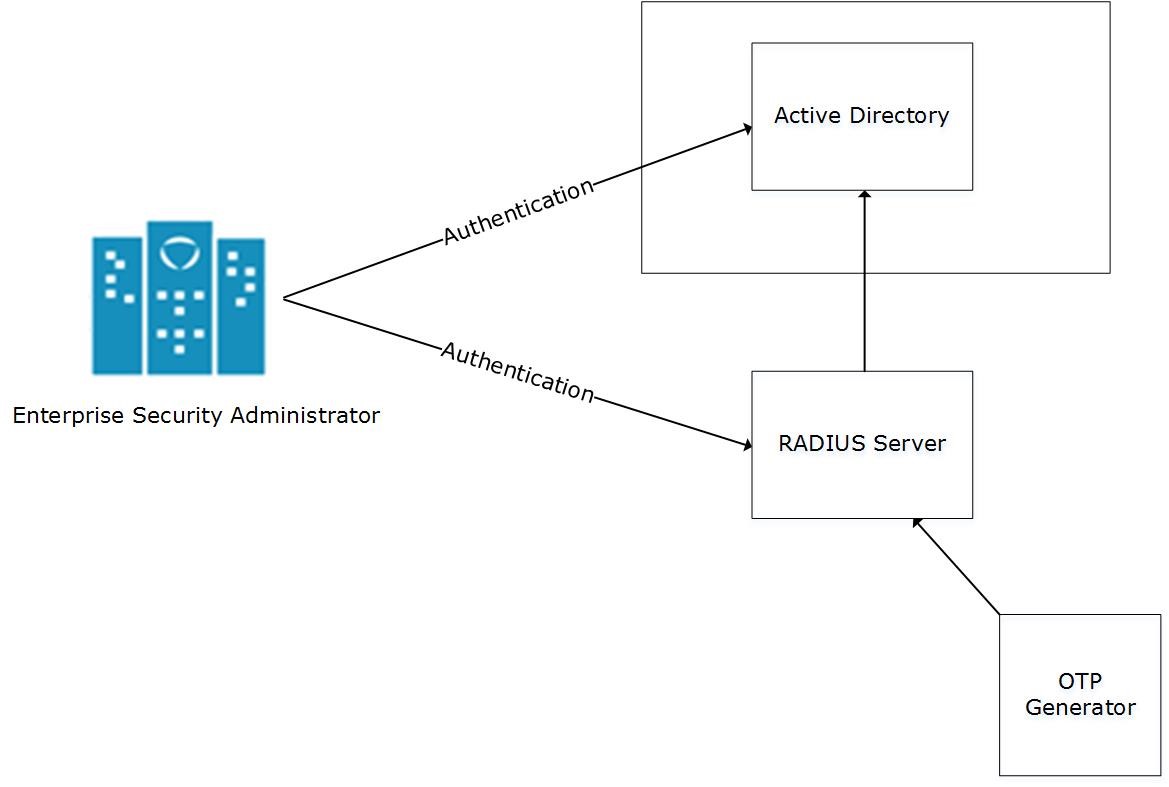
Authentication is the process of verifying that a user is who they claim to be. When a user connects to a network access point, they provide credentials (typically a username and password, or a digital certificate). The RADIUS server checks these credentials against its database. If they match, the user is authenticated. In 2026, RADIUS is frequently paired with Multi-Factor Authentication (MFA) to provide an extra layer of security beyond simple passwords.
Authorization
Once a user is authenticated, the RADIUS server determines what that user is allowed to do. This is authorization. For example, a member of the IT department might be authorized to access the core server VLAN, while a guest user is restricted to a separate internet-only VLAN. The RADIUS server sends "attributes" back to the network device, such as a VLAN ID or a time-out limit, which the device then enforces.
Accounting
Accounting is the process of tracking what the user did while on the network. The RADIUS server records when the session started, when it ended, how much data was transferred, and the IP address assigned. This data is vital for billing in service provider environments, but it is equally important in enterprise settings for security audits and troubleshooting.
How RADIUS Works: The Client-Server Architecture
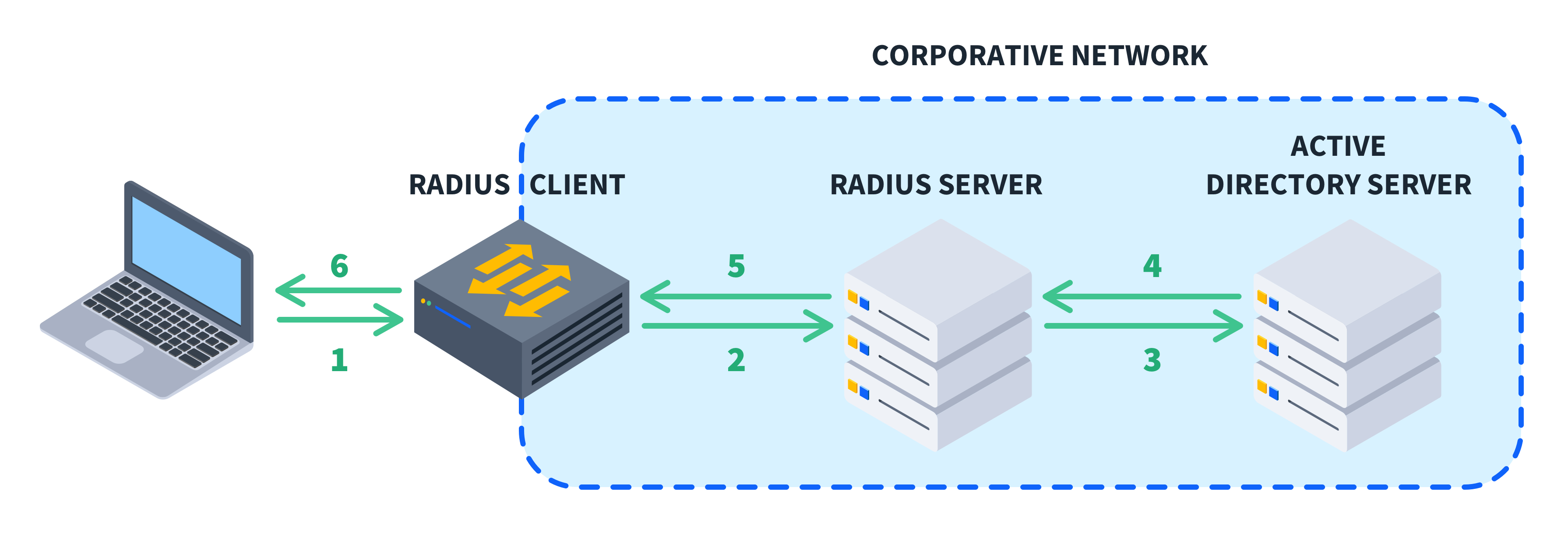
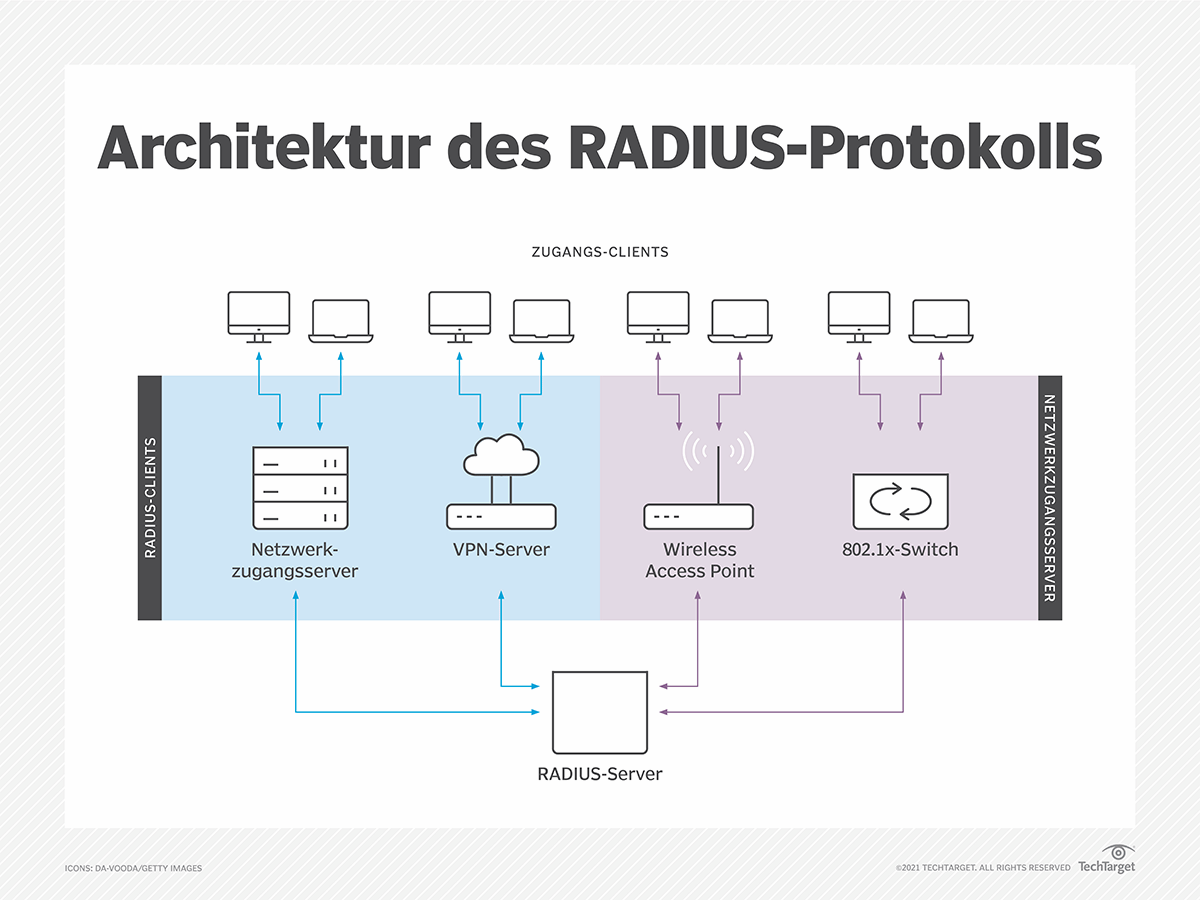
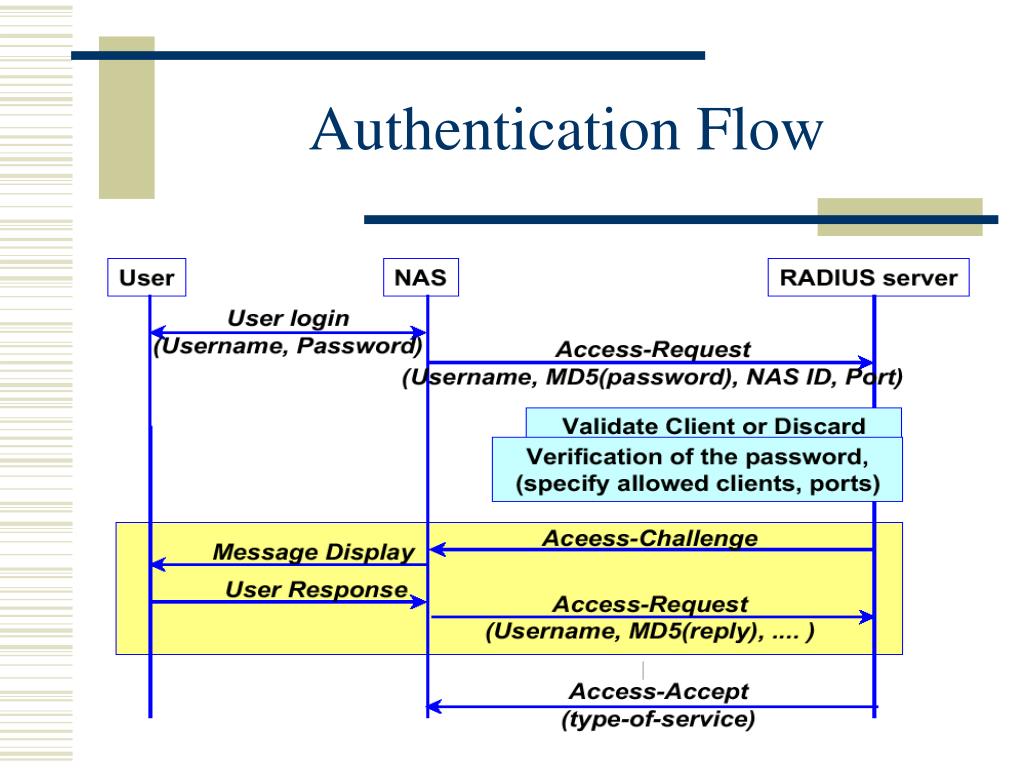
The RADIUS architecture is built on a specific relationship between the user, the Network Access Server (NAS), and the RADIUS server itself. It is important to note that in this context, the "client" is not the user's laptop; the "client" is the network hardware.
- The Supplicant (The User): This is the device (phone, laptop, IoT sensor) attempting to join the network.
- The RADIUS Client (NAS): This is the gateway device, such as a wireless access point, a VPN concentrator, or a network switch. It acts as the intermediary. It does not know if the user’s password is correct; it only knows how to pass that information to the server.
- The RADIUS Server: This is the "brain" of the operation. It receives the request from the NAS, checks its database, and sends an "Access-Accept" or "Access-Reject" message back.
The Connection Process
When a supplicant attempts to connect, the NAS sends a RADIUS Access-Request packet to the RADIUS server. This packet contains the username and an encrypted version of the password (using a shared secret). The server evaluates the request and responds with one of three messages:
- Access-Accept: The user is permitted.
- Access-Reject: The user is denied.
- Access-Challenge: The server requires more information, such as an MFA token or a secondary certificate check.
RADIUS Technical Specifications: Ports and Security
RADIUS typically operates over the User Datagram Protocol (UDP). UDP is preferred over TCP in this instance because it offers lower overhead and faster processing for the high volume of short-lived authentication requests typically seen in large networks.
Historically, RADIUS used ports 1645 for authentication and 1646 for accounting. However, these ports often conflicted with the "datametrics" service. To resolve this, the Internet Engineering Task Force (IETF) officially assigned the following ports:
- Port 1812: RADIUS Authentication and Authorization.
- Port 1813: RADIUS Accounting.
Security and Encryption
One of the most critical aspects of RADIUS is the Shared Secret. This is a text string known only to the RADIUS client (the NAS) and the RADIUS server. It is used to encrypt the passwords within the packets and to verify that the packets have not been tampered with in transit.
However, standard RADIUS does not encrypt the entire packet—only the password field. Because of this, modern implementations in 2026 often use RadSec (RADIUS over TLS). RadSec wraps the entire RADIUS conversation in a TLS (Transport Layer Security) tunnel, providing end-to-end encryption and much higher security, especially when authentication traffic must travel over the public internet.
RADIUS vs. TACACS+: Key Differences
While RADIUS is the most common AAA protocol, it is often compared to TACACS+ (Terminal Access Controller Access-Control System Plus). While they serve similar goals, their implementation and focus differ.
| Feature | RADIUS | TACACS+ |
|---|---|---|
| Protocol | UDP (Ports 1812/1813) | TCP (Port 49) |
| Encryption | Only the password is encrypted | The entire packet is encrypted |
| AAA Separation | Combines Authentication & Authorization | Separates Authentication, Authorization, & Accounting |
| Main Use Case | Network access (Wi-Fi, VPN, ISP) | Device administration (Configuring routers) |
| Standard | Open standard (IETF) | Originally Cisco proprietary (now open) |
| Reliability | Relies on application-level retries | Relies on TCP's connection-oriented nature |
Common RADIUS Implementations in 2026
Choosing the right RADIUS server depends on the organization's existing infrastructure and technical expertise.
- FreeRADIUS: The most popular open-source RADIUS server in the world. It is highly modular and supports almost every EAP (Extensible Authentication Protocol) type. It is the gold standard for organizations that require deep customization.
- Microsoft Network Policy Server (NPS): A component of Windows Server. It is the go-to choice for businesses heavily invested in the Microsoft ecosystem, as it integrates natively with Active Directory.
- Cisco Identity Services Engine (ISE): An enterprise-level security policy platform that uses RADIUS to provide highly granular control over who and what can connect to the network.
- Cloud-Native RADIUS: In 2026, many organizations have moved away from on-premises servers. Services like JumpCloud, Okta, and Microsoft Entra ID (formerly Azure AD) offer RADIUS-as-a-Service, allowing companies to secure their Wi-Fi and VPNs without maintaining physical hardware.
Implementation Best Practices for 2026
Setting up a RADIUS environment requires more than just installing software. To ensure a secure and stable network, follow these guidelines:
- Use Strong Shared Secrets: Avoid simple passwords for your shared secrets. Treat them like administrative passwords, using long, complex strings of characters.
- Implement EAP-TLS: Whenever possible, use certificate-based authentication (EAP-TLS) rather than password-based authentication (PEAP). Certificates are significantly harder to spoof or steal.
- Segment Network Traffic: Ensure that RADIUS traffic travels over a dedicated management VLAN rather than the general user VLAN to prevent "man-in-the-middle" attacks.
- Redundancy is Mandatory: If your RADIUS server goes down, your entire network becomes inaccessible. Always deploy at least two RADIUS servers in a high-availability configuration.
- Enable Logging and Monitoring: Regularly review accounting logs. Sudden spikes in "Access-Reject" messages can indicate a brute-force attack or a misconfigured client.
Common RADIUS Troubleshooting Steps
Troubleshooting RADIUS can be complex because the problem could exist at the supplicant, the NAS, or the server level.
- Check Shared Secret Mismatch: This is the most common cause of authentication failure. If the shared secret on the access point does not match the one on the server, the server will silently drop the packets.
- Verify IP Connectivity: Ensure the NAS can reach the server on ports 1812 and 1813. Firewalls are a frequent culprit here.
- Examine EAP Types: The client and server must agree on an authentication method (e.g., PEAP, MS-CHAPv2). if the server is configured for EAP-TLS but the client is sending a password, the connection will fail.
- Monitor System Clocks: Certificate-based authentication relies on accurate time. If the server and client clocks are out of sync, certificates may appear invalid or expired.
Frequently Asked Questions
Is RADIUS still relevant in 2026?
Yes, RADIUS remains highly relevant. While newer protocols like SAML and OIDC dominate web-based Single Sign-On (SSO), RADIUS remains the standard for low-level network access control (802.1X). It has evolved to support modern security standards like WPA3 and RadSec.
What is the difference between a RADIUS client and a RADIUS server?
The RADIUS server is the central database that holds user permissions. The RADIUS client is the hardware device (like a router or Wi-Fi access point) that requests authentication on behalf of the user.
Can RADIUS work with Multi-Factor Authentication (MFA)?
Absolutely. Most modern RADIUS servers act as a proxy. When they receive a password, they forward the request to an MFA provider (like Duo or Okta). The user then receives a push notification on their phone to approve the login.
Does RADIUS encrypt user data?
No. RADIUS only handles the authentication and authorization process. Once a user is connected to the network, their data traffic is handled by other protocols (like IPsec for VPNs or AES for Wi-Fi).
Can I use RADIUS for cloud applications?
While RADIUS is built for network access, you can use it in conjunction with cloud identity providers. However, for SaaS applications (like Slack or Salesforce), protocols like SAML or SCIM are more appropriate.
Practical Recommendation
For organizations looking to secure their network infrastructure in 2026, the first step is to transition away from shared Wi-Fi passwords to WPA3-Enterprise using RADIUS. If you have an existing Windows environment, start by configuring Microsoft Network Policy Server (NPS). For smaller or cloud-first teams, explore RADIUS-as-a-Service providers to eliminate the overhead of managing local servers while maintaining high-security standards for remote and office-based workers.
Image Gallery