Understanding the UPS Access Point Network: A Comprehensive Guide for 2026
A UPS Access Point is a secure, third-party retail location—such as a local grocery store, pharmacy, or convenience store—where customers can have their packages shipped for convenient pickup or drop off packages for shipping. These pa...
A UPS Access Point is a secure, third-party retail location—such as a local grocery store, pharmacy, or convenience store—where customers can have their packages shipped for convenient pickup or drop off packages for shipping. These partner locations offer an alternative to home delivery, eliminating missed delivery attempts and package theft risks.
Contents
Defining the UPS Access Point Ecosystem and Infrastructure
The UPS Access Point network operates as an extension of United Parcel Service logistics, leveraging pre-existing local businesses to optimize the last-mile delivery framework. Designed to solve the rising rate of missed deliveries and residential package theft, these locations integrate local retail storefronts into the global tracking and routing infrastructure. When a residential delivery fails because a recipient is not home, or when a sender proactively selects an alternative destination, the package is redirected to a designated nearby partner business.
These facilities operate under strict security and operational guidelines mandated by UPS. Staff at these partner locations undergo training to handle package intake, secure storage, and identity verification using authorized barcode-scanning equipment tied directly into the UPS tracking network. As consumer expectations for delivery flexibility grow, the infrastructure has expanded to include secure, automated locker systems placed in accessible public and semi-public spaces alongside traditional staffed retail counters.
Core Features and Operational Specifications
Participating in the UPS Access Point network requires adherence to standardized operational metrics and physical security protocols. Packages delivered to these locations must meet specific size and weight limitations to ensure partner businesses can store them safely without disrupting their primary retail operations.
| Specification Parameter | Standard Retail Counter Limit | Automated Locker Limit |
|---|---|---|
| Maximum Weight | Up to 44 lbs (20 kg) | Up to 44 lbs (20 kg) |
| Maximum Length | Up to 38 inches (97 cm) | Varies by compartment size |
| Storage Duration | 7 calendar days before return to sender | 3 calendar days before return to sender |
| Identification Required | Government-issued photo ID | Digital barcode or PIN code |
| Handling Fee for Pickup | Free for standard incoming redirected shipments | Free for standard incoming redirected shipments |
Standard retail locations can typically accept larger packages than automated lockers, though both share identical weight caps for safety. If a package exceeds these dimensions or the declared value exceeds specific thresholds, UPS typically redirects the shipment to a customer center or requires a direct delivery signature at a residential address.
How to Redirect a Delivery to a UPS Access Point
Managing deliveries through alternative locations requires familiarity with the digital tools provided by UPS. Consumers can utilize these services proactively during checkout with participating retailers or reactively after an initial delivery attempt has been made.
- Access Tracking Tools: Locate your tracking number provided by the merchant and open the official UPS tracking portal or the mobile application.
- Select Delivery Change Options: Choose the option to change the delivery instructions or select an alternative delivery location.
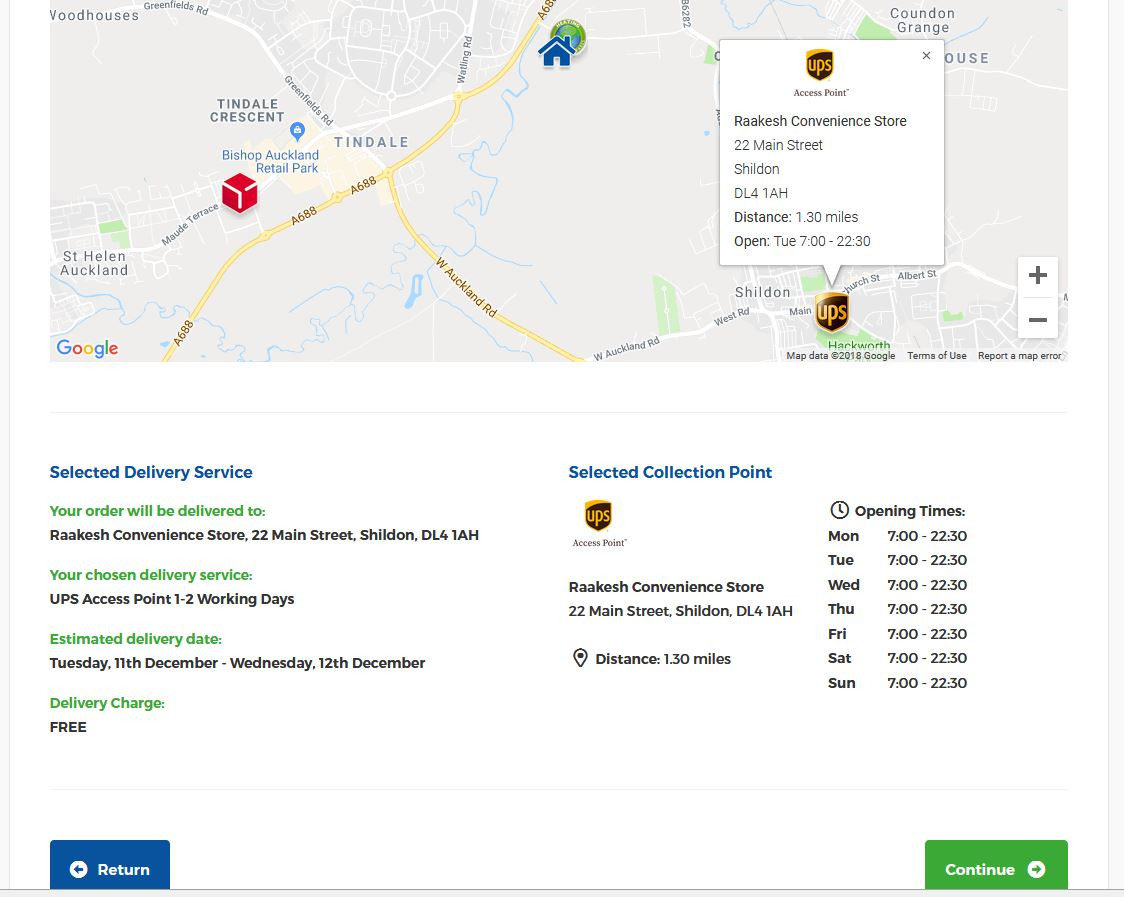
- Choose Your Preferred Location: Enter your zip code or specific address to view a map of nearby UPS Access Point locations, complete with operating hours and storage capacity indicators.
- Confirm the Selection: Submit the change request. Note that requests made after the driver has loaded the package for morning delivery may take an extra business day to process and route.
- Receive Notification: Wait for a confirmation email or push notification stating the package has arrived at the chosen location and is ready for collection.
Dropping Off Pre-Labeled Packages
The network serves as an outbound shipping hub as well as a collection point. Individuals and small business owners who prefer not to wait for a daily home pickup can bring pre-labeled packages directly to these retail partners.
- Package Requirements: The shipment must have a valid, machine-readable UPS shipping label already affixed. Hand-written addresses without a generated barcode are not accepted at partner retail locations.
- Receipt Generation: Always request a physical or digital receipt scanned directly from the package barcode at the time of drop-off. This scan serves as the official proof of transfer of custody.
- Daily Collection Schedules: Check the specific placard on the door or the digital listing for the location's daily pickup time. Packages dropped off after the scheduled daily courier pickup remain secure in-store until the following business day.
Comparing Home Delivery, UPS Access Points, and Customer Centers
Choosing the right delivery method depends on schedule predictability, security requirements, and the urgency of the shipment.
Delivery Method Comparison
Home Delivery: Offers maximum convenience for individuals who work remotely or have secure porches, but introduces high vulnerability to package theft and missed delivery delays if a signature is required.
UPS Access Point: Balances security and flexibility by utilizing staffed local businesses with extended evening and weekend hours, protecting shipments from weather and theft while allowing pickup on the recipient's schedule.
UPS Customer Center: Provides the highest level of security and accommodates oversized or high-value freight that partner retail locations cannot accept, though these facilities are typically less numerous and located further from residential neighborhoods.
Advantages and Limitations of Using Partner Locations
Utilizing this alternative delivery model presents distinct operational benefits alongside minor logistical constraints that users must consider.
Advantages
- Enhanced Security: Packages remain locked behind secure counters or inside automated terminals, drastically reducing porch piracy.
- Extended Operating Hours: Many partner locations—such as corner markets, dry cleaners, and pharmacies—stay open late into the evening and remain accessible on weekends.
- Consolidated Errands: Pickup and drop-off can be combined with routine weekly shopping or errands, saving time.
Limitations
- Strict Holding Windows: Uncollected packages are automatically returned to the sender after seven days, leaving little room for extended travel absences.
- Size Restrictions: Bulky furniture, heavy automotive parts, and oversized commercial boxes cannot be processed through standard retail partners.
- Third-Party Policies: Partner staff cannot alter shipping addresses, collect payment for cash-on-delivery items, or resolve complex billing disputes.
Troubleshooting Common Pickup and Drop-Off Issues
Navigating logistical hurdles efficiently ensures smooth package management when utilizing third-party shipping partners.
- Identification Mismatch: The name on the package must match the government-issued photo ID presented at the counter. If someone else must pick up the package, utilize the digital authorization feature within the UPS mobile app to designate an alternate receiver.
- Expired Holding Windows: If a package is marked for return to sender because the seven-day window expired, contact customer support immediately to request a intercept, though success depends on the package's physical location in the return pipeline.
- Lost or Damaged Receipts: For drop-offs where a receipt was not scanned, reference the tracking number immediately to verify whether the courier has scanned the package into the broader transit network upon daily pickup.
Frequently Asked Questions
What is a UPS Access Point?
A UPS Access Point is a secure, local partner business—such as a convenience store or pharmacy—where you can pick up missed deliveries or drop off pre-labeled shipments. These locations provide a safe alternative to leaving boxes unattended on residential doorsteps.
Is there an extra fee to use a UPS Access Point?
There is generally no additional charge to have your package redirected to or held at a UPS Access Point for standard shipments. Standard shipping rates apply for outbound packages dropped off at these locations.
What do I need to bring to pick up my package?
You must bring a valid government-issued photo identification card that matches the name and delivery address printed on the package label. If using an automated locker, bring the digital barcode or secure PIN code sent via email or text.
How long will my package be held at the location?
Packages delivered to a staffed retail partner are typically held for up to seven calendar days before being processed as a return to sender. Packages sent to automated lockers usually feature a shorter holding window of three calendar days.
Can I drop off any package at these locations?
You can drop off any package as long as it has a valid, pre-printed UPS tracking barcode attached and meets the maximum weight limit of 44 lbs and standard dimensional restrictions. Unlabeled or handwritten packages cannot be accepted.
What should I do if the location refuses my package?
Ensure your package meets the size, weight, and labeling requirements. If the business has reached its maximum storage capacity or experienced a technical outage, check the UPS mobile app to locate an alternate nearby partner facility.
Securing Your Deliveries
Optimizing your shipping routine through alternative drop-off locations removes the uncertainty of home delivery schedules. To get started, review your delivery preferences on the official UPS portal or designate a preferred partner location through your consumer profile to ensure every future package routes directly to a secure, convenient destination.
Image Gallery