Email to RSS: Turning Mail into Feed Streams for Efficient Information Management
Email to RSS conversion is a technical process that intercepts incoming electronic mail—typically newsletters, alerts, or system notifications—and transforms them into a structured Really Simple Syndication (RSS) feed. By rerouting spe...
Email to RSS conversion is a technical process that intercepts incoming electronic mail—typically newsletters, alerts, or system notifications—and transforms them into a structured Really Simple Syndication (RSS) feed. By rerouting specific emails into a centralized aggregator, users can decouple their information consumption from the often-cluttered inbox environment, effectively managing diverse digital streams within a single, unified interface.
Contents
The Problem of Information Overload in the Inbox
The standard email client is designed for asynchronous, bidirectional communication. However, in the modern digital ecosystem, it has inadvertently become the default delivery vehicle for unidirectional content like newsletters, update logs, and service notifications. This causes the "inbox as a graveyard" phenomenon, where valuable informational content is buried under high-priority personal or professional correspondence.
When you convert an email stream into an RSS feed, you shift the consumption paradigm from "push" to "pull." Instead of your email client alerting you to every arrival, the content is funneled into an RSS reader. This reader acts as a filter, allowing you to curate, categorize, and read content on your own schedule without the pressure of managing an inbox. This transformation is particularly useful for technical professionals tracking mailing lists, project managers monitoring automated system status alerts, or researchers managing periodic publication updates.
Core Prerequisites and Technical Considerations
To successfully implement an email-to-RSS workflow, you must possess or configure three primary components: a dedicated email address for the feed, a conversion service or script, and an RSS aggregator.
1. The Gateway Email Address
You should never use your primary business or personal email address for the source of an RSS feed. Create a dedicated "feed-sink" email address. This separation serves two purposes:
- Filtering and Management: It prevents potential leakage of your main address into marketing databases.
- Stream Integrity: It ensures that if the conversion service encounters a parsing error or if the address is compromised by spam, your primary communications remain unaffected.
2. The Conversion Mechanism
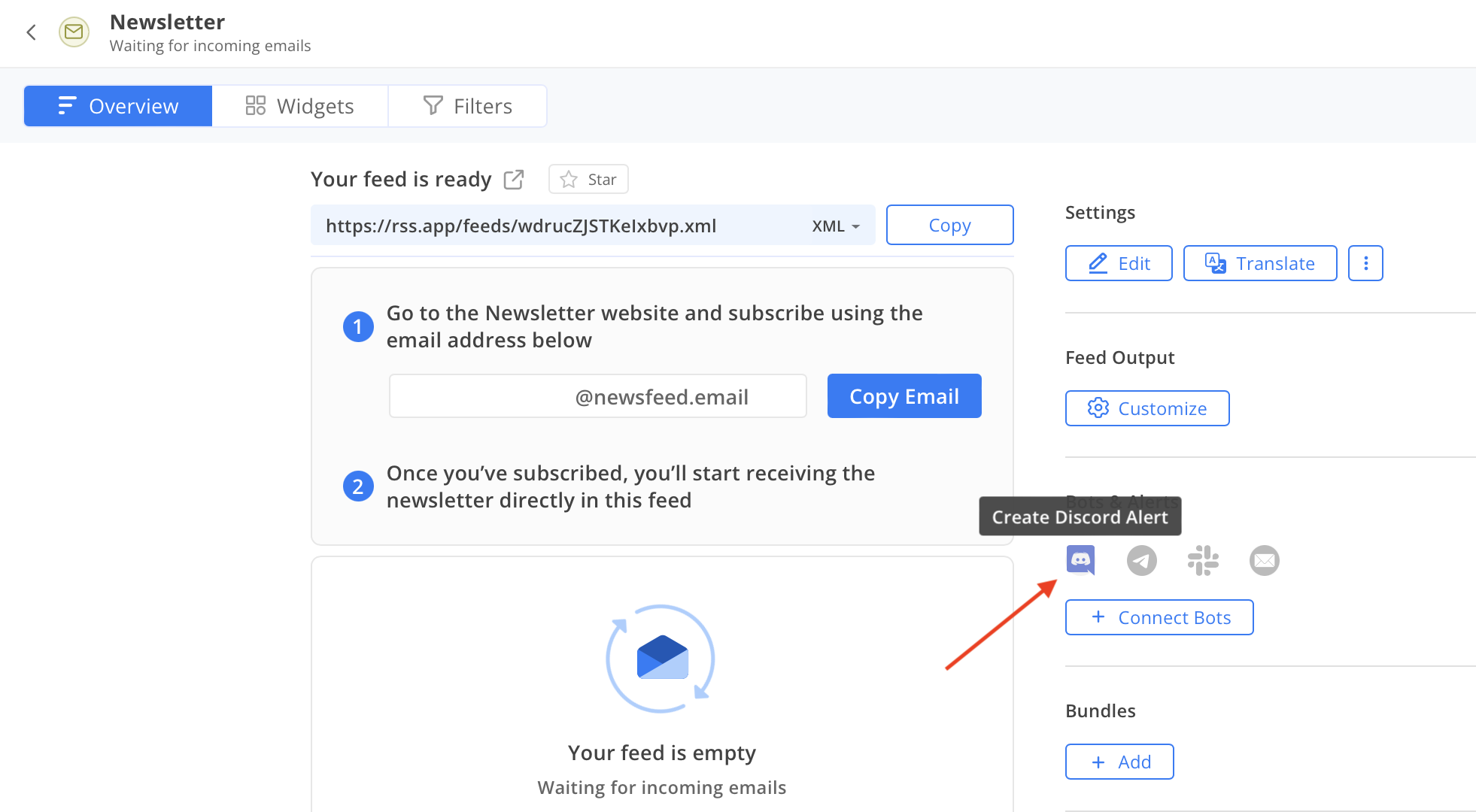
There are several ways to facilitate the conversion. The most common involves using third-party services that generate a unique, randomized email address for you. When a message is sent to that address, the service strips the header, parses the body content—usually converting HTML to a feed-compliant format—and updates the associated RSS XML file.
3. The Aggregator
Once the feed is generated, it functions like any other RSS source. You will need an aggregator (e.g., Feedly, NewsBlur, or self-hosted solutions like FreshRSS) to subscribe to the custom URL provided by your conversion service.
Comparing Common Email-to-RSS Methodologies
Choosing the right approach depends on your technical comfort level and the sensitivity of the content being processed.
| Method | Technical Barrier | Privacy/Security | Use Case |
|---|---|---|---|
| SaaS Aggregators | Low | Moderate | Casual newsletter tracking |
| Custom Scripting | High | High (Self-hosted) | Sensitive system notifications |
| Automation Platforms | Medium | Moderate | Business workflow integration |
SaaS Aggregators
Platforms specifically designed to generate "mail-to-feed" links are the most user-friendly. These services provide an email address in a format like username@service.com. When an email arrives, they extract the content and provide an RSS URL.
- Pros: Near-instant setup; no coding required.
- Cons: Reliant on third-party uptime; limited control over data retention.
Custom Scripting (Self-Hosted)
For power users, self-hosting a script (often written in Python or PHP) on a server that fetches mail via IMAP and generates an XML file is the gold standard.
- Pros: Total control over the data; no middleman; highly customizable parsing logic.
- Cons: Requires server maintenance; requires knowledge of IMAP protocols and XML structure.
Implementation Steps: A Standard Workflow
- Identify the Content Source: Select the newsletters or automated emails you wish to move.
- Setup the Sink: Configure your chosen service to provide a unique endpoint email address.
- Configure Forwarding: Set up a forwarding rule in your current inbox or subscribe to the service directly using the provided sink address.
- Parsing Configuration: If using a manual script, define how the parser should handle attachments. Most RSS readers have limited support for complex attachments; consider stripping them or converting them to links.
- Validation: Send a test email to the sink address and verify that the RSS feed updates correctly.
- Aggregator Integration: Paste the RSS URL into your reader and verify the formatting of the content.
Troubleshooting Common Challenges
Parsing Errors and Encoding
The most common point of failure is character encoding. Newsletters often use complex HTML structures that do not translate cleanly into the standardized RSS 2.0 or Atom formats. If your feed returns empty entries or malformed text, you may need to use a service that performs "HTML stripping" or "reader mode" extraction before adding the content to the feed.
Delivery Delays
Because these services often run on a polling cycle, there is typically a delay between the email arrival and the feed update. Expect a latency ranging from 5 to 30 minutes, depending on the service provider's polling frequency.
Privacy and Security
Be aware that the conversion service acts as a "man-in-the-middle." If you are processing sensitive or proprietary information through this pipeline, ensure the provider has a transparent privacy policy regarding data storage and metadata scrubbing. For highly sensitive material, avoid cloud-based conversion services in favor of a private, self-hosted script.
Frequently Asked Questions (FAQ)
Does converting email to RSS help with spam reduction? Yes, partially. By moving newsletters to an RSS feed, you can easily unsubscribe from multiple sources within the reader without the risk of an "unsubscribe" link confirming your email as active to a spammer. However, the feed itself does not eliminate the spam sent to your original email address.
Can I keep my email attachments in an RSS feed? Generally, no. RSS is a text-heavy protocol. While some formats support enclosures, most aggregators will ignore or block attachments for security reasons. It is best to treat the RSS feed as a summary or full-text view of the email, and use the original email source for retrieving high-resolution files or attachments.
What happens if I use a free email service for my RSS sink? Free email providers often have strict rate limits on incoming messages. If you receive a high volume of newsletters, your account may be throttled or flagged. A dedicated domain with a catch-all email account is more robust for high-volume feed generation.
Are there legal implications for converting newsletters? Generally, individuals creating private RSS feeds for personal use do not violate copyright. However, redistributing a private RSS feed of a newsletter that has a paid subscription model may violate the publisher's terms of service. Always use this technology for personal, non-commercial aggregation of content you are authorized to receive.
Next Steps for Implementation
To begin, start with a single, low-volume newsletter that currently clutters your inbox. Sign up for a reputable mail-to-RSS provider, generate your unique feed address, and update your subscription settings on the target newsletter. Monitor the feed for one week to ensure the parsing matches your expectations. Once comfortable, migrate your remaining high-volume newsletters, gradually emptying your inbox of non-essential correspondence to improve your daily focus.
Image Gallery