Optimizing Your Workflow for Trading on iPad: A Professional 2026 Guide
Trading on an iPad offers a powerful blend of mobility and high-performance touchscreen navigation, transforming Apple's tablet into a capable terminal for executing equities, options, futures, and crypto orders. Modern tablet applicat...
Trading on an iPad offers a powerful blend of mobility and high-performance touchscreen navigation, transforming Apple's tablet into a capable terminal for executing equities, options, futures, and crypto orders. Modern tablet applications rival desktop platforms, providing advanced charting, split-screen multitasking, and instantaneous order routing for active market participants.
Contents
Hardware and System Prerequisites for Mobile Market Execution
Achieving a seamless trading experience requires hardware capable of handling real-time data feeds, heavy charting indicators, and rapid order execution without thermal throttling or memory lag. When evaluating devices for market participation, processing capability and screen real estate dictate performance quality.
Modern Apple tablet architectures utilize advanced M-series silicon chips, which deliver desktop-grade performance in a portable form factor. These processors easily handle complex technical analysis studies and multi-chart layouts.
- Processing Power: Devices equipped with Apple M-series chips (M1, M2, or M4) ensure zero lag during high-volatility market events like Federal Reserve rate announcements or major earnings releases.
- Connectivity Standards: High-speed Wi-Fi 6E/7 and 5G cellular capabilities are essential for maintaining stable, low-latency connections when trading away from a home office.
- Display Specifications: Liquid Retina and Tandem OLED displays offer high contrast ratios and crisp text rendering, reducing eye strain during long trading sessions.
- Input Peripherals: Pairing the device with a Magic Keyboard and Apple Pencil allows for precise manual chart drawing and rapid keystroke entry when managing complex options spreads.
Selecting Brokerage Applications Optimized for iPadOS
Not all brokerage mobile applications are created equal. Many platforms offer stripped-down interfaces that limit order types or charting capabilities, while others provide fully realized workstation environments tailored specifically for tablet usage.
When selecting a brokerage for tablet-based operations, traders must evaluate proprietary software design against execution speed and API integration. The top platforms leverage iPadOS multitasking frameworks, such as Slide Over and Split View, allowing users to run financial news feeds alongside active trading tickets.
| Brokerage Platform | Primary iPad Strengths | Advanced Order Types | Multi-Chart Support | Ecosystem Integration |
|---|---|---|---|---|
| Interactive Brokers (IBKR Mobile) | Global market access, deep data analytics | Complex multi-leg options, algos | Moderate (Grid layouts available) | Advanced API and portfolio margining |
| thinkorswim (Schwab) | Professional-grade charting, script engine | OCO, bracket orders, conditional | High (Detachable windows, grid views) | Seamless transition from desktop |
| Webull | Modern interface, intuitive UI, paper trading | Stop-limit, trailing stops, brackets | High (Multi-pane layouts) | Built-in technical indicators |
| TradingView | Superior charting tools, global assets | Execution via integrated brokers | Exceptional (Up to 8 charts per screen) | Cross-device cloud sync |
Configuring Your Tablet Workspace for Maximum Efficiency
Eliminating friction in your workflow directly impacts execution speed. A poorly organized tablet screen can lead to fat-finger errors or missed fills during rapid price movements. Optimizing your workspace involves leveraging native iPadOS features to create a customized command center.
Using Stage Manager on supported hardware allows you to resize windows and overlay your charting software on top of your order entry ticket. This layout mimics a multi-monitor desktop setup within a compact footprint.
Workspace Optimization Tips
Eliminate Distractions: Disable non-essential push notifications from messaging and social media applications to prevent accidental screen taps during active trade management.
Color-Coded Watchlists: Organize your asset watchlists by sector or strategy using high-contrast color palettes to instantly identify gaining and losing positions.
Biometric Security: Enable Face ID or Touch ID authentication to ensure rapid, secure login access without compromising account safety.
Technical Analysis and Charting on iOS Interfaces
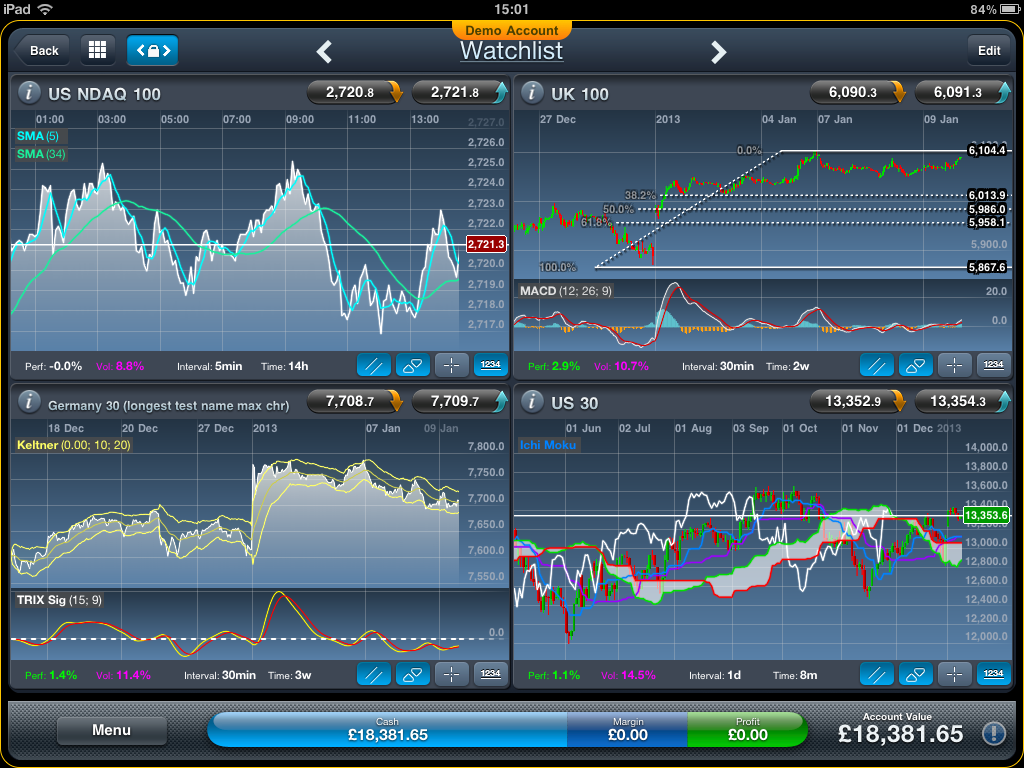
Executing trades based on technical setups requires robust charting tools that function smoothly via touch and stylus inputs. Modern iOS trading apps support dozens of technical indicators, including Moving Average Convergence Divergence (MACD), Relative Strength Index (RSI), and Bollinger Bands.
Drawing trend lines, Fibonacci retracements, and support-resistance zones is significantly enhanced using the Apple Pencil. The low latency of modern displays allows traders to snap trend lines directly to swing highs and lows with high precision. Furthermore, saving chart templates to the cloud ensures that annotations made on your tablet automatically sync with your desktop workstation.
Risk Management and Execution Best Practices
Managing downside exposure is paramount when operating from a mobile device where market distractions are prevalent. Implementing strict risk parameters before placing any order prevents catastrophic portfolio drawdowns.
- Always Use Bracket Orders: Attach stop-loss and take-profit targets simultaneously upon entry to automate risk management.
- Verify Order Routing: Ensure your broker routes orders through direct market access (DMA) or transparent market makers to avoid unfavorable execution prices.
- Monitor Battery and Network Health: Maintain a portable power bank and verify cellular signal strength before executing trades in transit.
Comparative Pros and Cons of Mobile Market Participation
Evaluating the operational realities of tablet-based trading highlights both distinct advantages and unavoidable limitations compared to traditional multi-screen desktop setups.
- Pros:
- Exceptional portability allows market participation from any location with internet connectivity.
- Intuitive touchscreen navigation accelerates menu selection and order modification.
- Instantaneous boot times eliminate delays experienced during cold boots on legacy desktop hardware.
- Lower power consumption compared to high-end desktop rigs.
- Cons:
- Screen real estate limitations can make complex multi-leg options chains harder to parse simultaneously.
- Mobile operating systems handle background app refreshes aggressively, which can occasionally disrupt real-time data streaming if the app is minimized.
- Reliance on wireless networks exposes the user to latency spikes compared to hardwired Ethernet connections.
Troubleshooting Common Mobile Execution Issues
Technical glitches during high-volatility events can result in significant financial losses. Knowing how to diagnose and resolve common tablet trading issues ensures operational continuity.
- Frozen Data Feeds: If charts stop updating, force-quit the application and clear the cache. Verify that your cellular data or Wi-Fi connection has not dropped packets.
- Order Rejections: Check margin requirements and ensure your account has settled cash if trading equities in a cash account. Review order type compatibility with current market hours (pre-market, regular session, after-hours).
- App Crashes During Volatility: Heavy processing loads during market opens can overwhelm system RAM. Restart your tablet prior to the market open to clear system memory and ensure optimal performance.
Frequently Asked Questions
Can I execute complex options strategies on an iPad?
Yes, institutional-grade brokerages like Interactive Brokers and Charles Schwab offer fully featured mobile apps that support multi-leg options spreads, iron condors, and vertical spreads directly from tablet interfaces. Ensure your brokerage account is approved for the appropriate options tier.
Is tablet trading as secure as desktop trading?
Tablet trading utilizes the same 256-bit encryption protocols, two-factor authentication (2FA), and biometric security measures (Face ID/Touch ID) as desktop platforms, making account access highly secure.
How do I prevent missed fills due to app background refreshing?
Go to your iPad Settings, locate your brokerage application, and ensure that Background App Refresh is enabled, while also disabling low power mode during active trading hours to maintain continuous data streaming.
Which iPad model is best suited for professional market analysis?
The 12.9-inch or 13-inch iPad Pro models featuring Apple M-series chips provide the necessary screen real estate for multi-chart grids and the processing power required for zero-lag technical analysis.
Can I connect external monitors to my tablet for a multi-screen setup?
Yes, using iPadOS external display support via Stage Manager, compatible M-series iPads can project workstation layouts onto external monitors, transforming the tablet into a dual-screen trading terminal.
Take control of your portfolio mobility today by upgrading your hardware configuration, selecting a robust brokerage platform tailored for iPadOS, and implementing disciplined risk management protocols for every trade you execute.
Image Gallery