Linux EFI Support in Modern Systems: Architecture, Bootloaders, and Administration
Modern Linux distributions provide full native support for UEFI (Unified Extensible Firmware Interface), utilizing kernel-level EFISTUB capabilities, NVRAM integration, and standard 64-bit executable binaries. Linux boots on modern har...
Modern Linux distributions provide full native support for UEFI (Unified Extensible Firmware Interface), utilizing kernel-level EFISTUB capabilities, NVRAM integration, and standard 64-bit executable binaries. Linux boots on modern hardware via an EFI System Partition (ESP) formatted as FAT32, leveraging signed bootloaders like Shim for Secure Boot compliance alongside advanced features such as Unified Kernel Images (UKIs) and systemd-boot.
Contents
The Evolution of Linux Firmware: MBR Legacy to UEFI Class 3+
For decades, the standard x86 boot pipeline relied on the PC BIOS (Basic Input/Output System) executing 16-bit real-mode code located in the Master Boot Record (MBR) of a storage drive. MBR architecture suffered from severe constraints, including a 2-terabyte partition limit, a maximum of four primary partitions, and a complete lack of standard security controls during early firmware execution.
The Unified Extensible Firmware Interface (UEFI) specification replaced the legacy BIOS model with a modular, 32-bit or 64-bit firmware environment. UEFI boots directly from storage devices using the GUID Partition Table (GPT) standard, which supports disk sizes up to 9.4 zettabytes and up to 128 primary partitions by default.
Modern hardware systems operate exclusively as UEFI Class 3 or Class 3+ devices. UEFI Class 3 removes the Compatibility Support Module (CSM), permanently eliminating legacy MBR fallback booting. Modern 64-bit Linux kernels (x86_64 and aarch64) interface natively with UEFI firmware, exposing system status, hardware diagnostics, and non-volatile variable storage directly to the operating system userland.
Architecture of the Linux EFI Boot Process
The Linux EFI startup sequence replaces raw disk sector execution with standard file path execution. Firmware reads configuration data from non-volatile random-access memory (NVRAM) and loads executable files formatted according to the Portable Executable (PE/COFF) standard.
- UEFI Firmware
- Initializes hardware
- Reads Boot Order from NVRAM
- Accesses EFI System Partition (ESP)
- Shim Bootloader
- Executed if Secure Boot is enabled
- Verifies signature of main bootloader
- Contains Microsoft CA & Vendor Certificate / MOK
- Main Bootloader
- e.g., GRUB2, systemd-boot, or direct EFISTUB
- Offers menu selection, loads kernel & initramfs
- Linux Kernel
- Takes control via EFI Handover Protocol
- Initializes devices & mounts root filesystem
The EFI System Partition (ESP)
The storage foundation of modern Linux EFI booting is the EFI System Partition. Standardized under the UEFI specification, the ESP must meet specific filesystem and structural guidelines:
- Filesystem Standard: The ESP must be formatted as VFAT (FAT16 or FAT32). FAT32 is required for standard storage devices larger than 512 MiB to maintain cross-vendor compatibility.
- Partition GUID: Under the GPT schema, the ESP requires the specific partition type GUID
c12a7328-f81f-11d2-ba4b-00a0c93ec93b. - Mount Points: Linux systems typically mount the ESP at
/boot/efior directly at/boot. The modern Unified Kernel Image specification recommends/efior/bootto isolate vendor files from local system configuration.
The Linux EFISTUB (CONFIG_EFI_STUB)
The Linux kernel contains a built-in feature called EFISTUB (CONFIG_EFI_STUB). Enabled by default across standard Linux distributions, EFISTUB allows the compiled Linux kernel image (vmlinuz) to act as a self-contained, valid PE/COFF executable.
When EFISTUB is compiled into the kernel, UEFI firmware can load and execute the kernel directly from the ESP without requiring a traditional third-party bootloader like GRUB2. The firmware hands control directly to the kernel's internal entry point, passing command-line parameters directly from system NVRAM.
Modern Linux EFI Boot Managers
While EFISTUB allows direct booting, multi-boot configuration, kernel rollbacks, and recovery environments usually necessitate an intermediate boot manager. Three primary boot managers dominate modern Linux environments:
1. GRUB 2 (GRand Unified Bootloader)
GRUB 2 remains the standard bootloader across established enterprise distributions such as Red Hat Enterprise Linux, Ubuntu, and SUSE Linux Enterprise Server.
- Features: Dynamic scripting capabilities, module loading, support for complex storage layouts (LVM, LUKS encryption, software RAID), and broad legacy compatibility.
- EFI Implementation: Installs as an EFI executable binary (such as
grubx64.efi) inside vendor-specific subdirectories on the ESP (for example,/boot/efi/EFI/ubuntu/).
2. systemd-boot (formerly gummiboot)
systemd-boot is a lightweight, text-based EFI boot manager integrated directly into the systemd ecosystem.
- Features: Extremely fast initialization, zero external configuration language, dynamic drop-in menu entries under
/boot/loader/entries/, and clean support for Unified Kernel Images. - Scope: Unlike GRUB 2,
systemd-bootcannot read filesystems outside the ESP or simple FAT/XBOOTLDR partitions. It relies on system firmware drivers to read media.
3. rEFInd
rEFInd is an independent, graphical boot manager designed for systems with multiple operating systems installed.
- Features: Automatic boot entry discovery, graphical themes, integrated EFI driver management, and native memory testing tools.
Unified Kernel Images (UKIs)
Modern Linux deployments increasingly adopt Unified Kernel Images (UKIs) to simplify Secure Boot signature enforcement and prevent tampering during boot time.
A Unified Kernel Image consolidates all early-boot assets into a single PE/COFF executable file:
- UEFI Stub Executable: The execution entry header (
systemd-stub). - Linux Kernel Image: The compressed
vmlinuzexecutable. - Initramfs / Initrd: The early userspace ramdisk environment containing initial drivers.
- CPU Microcode: Security and hardware patches for Intel or AMD processors.
- Kernel Command Line: The static parameters passed to the kernel at boot (e.g.,
root=UUID=... ro quiet). - OS Release Metadata: Identification strings used by recovery interfaces.
By unifying these components into one binary, administrators can sign the single UKI file with a private cryptographic key. This ensures that kernel parameters and initial ramdisk contents cannot be modified on disk without invalidating the system's Secure Boot trust state.
Managing EFI NVRAM: efibootmgr and efivars
UEFI systems store boot paths and system settings inside NVRAM as key-value structures called EFI Variables. Linux exposes these variables to userspace via the efivars pseudo-filesystem located at /sys/firmware/efi/efivars.
System administrators interact with hardware NVRAM using the command-line utility efibootmgr.
Common efibootmgr Operational Tasks
Display Current Boot Order and Entries: Running
efibootmgr -vlists all defined boot entries, active boot priority, and detailed disk device paths.Create a New Boot Entry Manually: To add an entry named "Fedora Linux" targeting a boot file on
/dev/nvme0n1partition 1:efibootmgr -c -d /dev/nvme0n1 -p 1 -L "Fedora Linux" -l '\EFI\fedora\grubx64.efi'Modify System Boot Sequence: To change the boot priority order to boot Entry 0002 first, followed by Entry 0000:
efibootmgr -o 0002,0000Delete a Stale or Unwanted Boot Entry: To remove entry 0003 permanently from NVRAM:
efibootmgr -b 0003 -B
Secure Boot, MOK, and TPM 2.0 Measured Boot
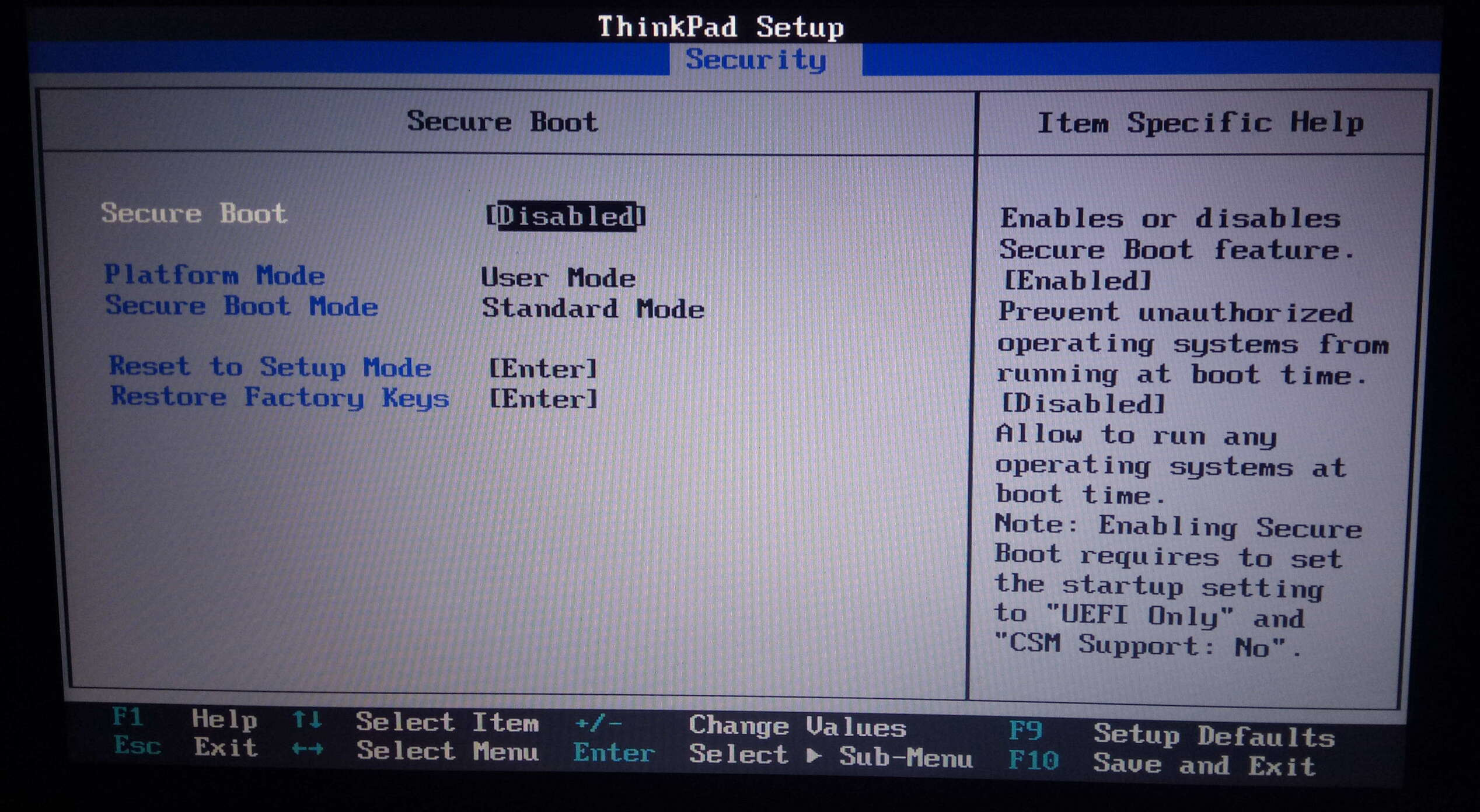
Secure Boot is a cryptographic verification system built into UEFI firmware designed to ensure that a hardware platform executes only trusted software during startup.
The Linux Secure Boot Trust Chain
Most enterprise motherboard firmware ships pre-loaded with public certificates signed by the Microsoft Corporation root Certificate Authority (CA). To boot seamlessly on commodity hardware, Linux distributions use a multi-stage validation chain:
UEFI Platform Firmware: Verifies the cryptographic signature of the initial stage bootloader using public keys stored in system firmware PK/KEK/db databases.
Shim (
shim.efi): A small binary signed directly by the Microsoft Third-Party UEFI CA. Firmware validates Shim and executes it.Shim Key Validation: Shim contains internal vendor certificates (Canonical, Red Hat, SUSE, Arch Linux) and checks the signature of the second-stage bootloader (GRUB2 or
systemd-boot).Kernel Execution: The bootloader verifies the kernel binary signature before handing over execution control.
UEFI Firmware (PK/db)
- Checks signature against pre-loaded public CA keys
- Verifies & Executes:
shim.efi
- Signed by Microsoft Third-Party UEFI CA
- Verifies & Executes:
Main Bootloader (GRUB2 / UKI)
- Validated via Shim Vendor Certificate / MOK
- Verifies & Executes:
Linux Kernel
- Enforces Kernel Lockdown Mode
Machine Owner Keys (MOK)
For custom-compiled kernels, proprietary kernel modules (such as custom hardware or GPU drivers), or independent Linux builds, administrators generate personal key pairs and enroll public keys into the Machine Owner Key (MOK) database.
Tools like mokutil allow users to submit keys locally:
- Import a custom public certificate into the MOK database:
mokutil --import custom_key.der - Upon reboot, the Shim interface prompts the system administrator physically at the console to confirm password authentication and complete key enrollment into NVRAM.
Measured Boot and TPM 2.0 Integration
Modern Linux systems combine Secure Boot with a Trusted Platform Module (TPM 2.0) to perform Measured Boot. As each boot phase completes (Firmware -> Shim -> Bootloader -> Kernel -> Initramfs), cryptographic hashes of the executed code are stored in TPM Platform Configuration Registers (PCRs).
If any file in the boot pathway changes, the TPM PCR values alter automatically. Full Disk Encryption tools like systemd-cryptenroll or LUKS2 use these PCR measurements to lock disk encryption keys, ensuring drives automatically unlock only if system software remains unmodified.
Technical Comparison of Boot Architecture Approaches
| Metric / Feature | Legacy BIOS (MBR) | GRUB 2 on UEFI | systemd-boot on UEFI | EFISTUB Direct Boot |
|---|---|---|---|---|
| Max Disk Addressability | 2.0 Terabytes | Unlimited (GPT) | Unlimited (GPT) | Unlimited (GPT) |
| Configuration Filesystem | Raw Sectors / Local | FAT32, ext4, XFS, etc. | VFAT (ESP only) | None (NVRAM strings) |
| Secure Boot Integration | Unsupported | Complete (via Shim) | Complete (via UKI/Shim) | Complete (via UKI signing) |
| Complexity Level | Deprecated / Low | High (scripted) | Low (declarative) | Minimal (Firmware direct) |
| Execution Performance | Slow (Real-mode transitions) | Fast (Native 64-bit) | Very Fast | Maximum Speed |
| Recovery Options | Limited | Broad (Built-in CLI) | Basic Menu Entry | Firmware Shell Required |
Troubleshooting Common Linux EFI Boot Failures
When Linux EFI boot sequences fail, issues typically fall into three categories: NVRAM entry loss, partition sizing errors, or Secure Boot verification rejections.
Issue 1: System Boots Directly to Firmware / Missing NVRAM Options
- Root Cause: A motherboard firmware update, battery failure, or NVRAM reset cleared system boot entries.
- Resolution: Modern UEFI firmware uses a standard fallback path specified by the EFI standard. If NVRAM entries disappear, copy or symlink the target bootloader executable to the standardized default location on the ESP:
/EFI/BOOT/BOOTX64.EFI(for x86_64 systems) or/EFI/BOOT/BOOTAA64.EFI(for ARM64 systems). Firmware will discover and boot this file automatically.
Issue 2: ESP Out of Storage Space
- Root Cause: Modern kernel updates, multiple RAM disk generations, and debug symbols quickly exhaust legacy 100 MiB or 200 MiB ESP partitions.
- Resolution: Partition drives with an ESP size of at least 1 GiB (1024 MiB) during initial deployment. If resizing is impossible, remove old installed kernel packages, disable debug ramdisk modules, or relocate large initramfs files to an auxiliary Extended Boot Loader Partition (XBOOTLDR) formatted as FAT32.
Issue 3: Verification Failure / Secure Boot Violation
- Root Cause: A kernel update, third-party kernel driver module, or custom boot option was loaded without a valid signature present in the system database or MOK registry.
- Resolution: Boot into system UEFI setup utility and provision custom keys via the MOK manager, or run
mokutil --importusing a signed key matching your installed packages. Alternatively, temporarily disable Secure Boot in hardware settings to inspect failing drivers viajournalctl -b.
Practical Recommendations for Modern Deployment
- Standardize on GPT and UEFI Only: Disable legacy CSM settings in motherboard firmware to streamline hardware initialization, avoid partition layout issues, and ensure full hardware security enablement.
- Allocate Sufficient ESP Capacity: Allocate a minimum of 1 GiB for
/boot/efito easily accommodate multiple kernels, backup RAM disks, microcode updates, and Unified Kernel Images. - Transition to Unified Kernel Images: Implement UKIs alongside
systemd-bootor signed GRUB binaries to prevent unauthenticated modifications to initial ramdisk scripts and command-line parameters. - Automate NVRAM Variable Backups: Export active
efibootmgrdefinitions to local disk archives during scheduled maintenance so original boot states can be quickly restored following hardware replacements or motherboard firmware flashes.
Image Gallery