Understanding How Long Will iPad Battery Last: Longevity, Performance, and Maintenance
Apple’s tablets are renowned for their reliability, but understanding how long an iPad battery will last involves examining two distinct metrics: daily operational runtime on a single charge and the overall multi-year lifespan of the l...
Apple’s tablets are renowned for their reliability, but understanding how long an iPad battery will last involves examining two distinct metrics: daily operational runtime on a single charge and the overall multi-year lifespan of the lithium-ion cell before it requires service.
Contents
When evaluating how long an iPad battery will last, users must look beyond the standard manufacturer claim of "up to 10 hours of surfs or video playback." Actual battery longevity depends on hardware configurations, display brightness, background app refresh settings, cellular connectivity, and ambient thermal conditions. Over the lifespan of the device, proper charging habits and iOS diagnostic tools help users monitor chemical health and maximize overall hardware endurance.
Defining iPad Battery Life: Daily Runtime vs. Lifespan
The phrase "how long will an iPad battery last" typically points to two separate concepts:
- Single-Charge Runtime: How many hours of continuous or mixed usage an iPad can sustain before its percentage drops from 100% to 0%.
- Lifespan (Chemical Health): How many years or charging cycles the internal lithium-ion battery can endure before its maximum capacity significantly degrades, usually defined by Apple as retaining up to 80% of its original capacity under normal conditions.
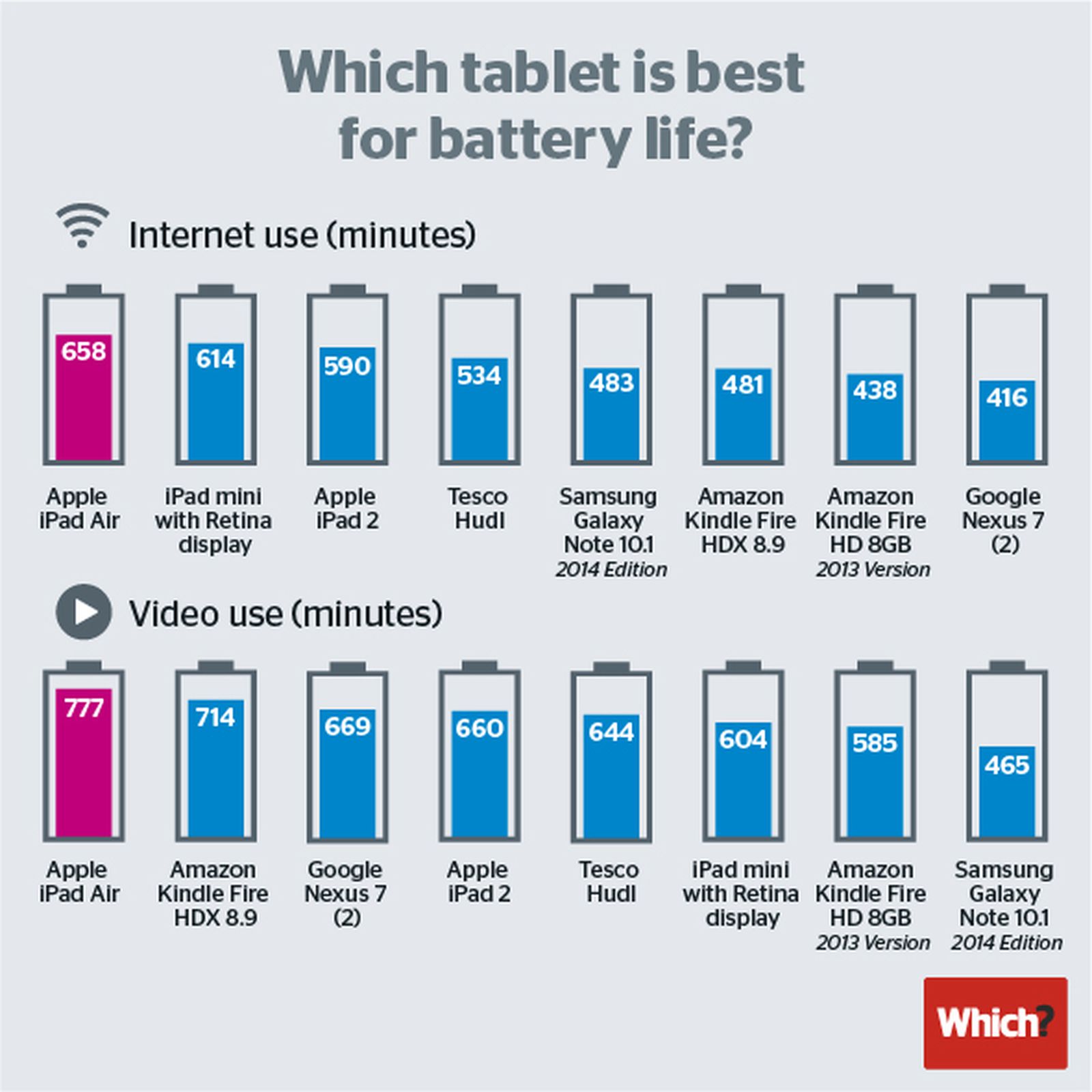
Apple rates almost all current iPad models—including the iPad Pro, iPad Air, iPad mini, and standard iPad—for approximately 10 hours of surfing the web on Wi-Fi or watching video. However, this benchmark assumes specific lab-tested conditions: default factory settings, 50% screen brightness, audio played through headphones, and no heavy cellular data streaming.
Standard Daily Runtime Estimates by iPad Model Family
| iPad Model Family | Typical Screen-On Runtime (Mixed Usage) | Primary Usage Factors |
|---|---|---|
| iPad (Standard/Entry) | 9 to 10 hours | Balanced for education, media consumption, and casual multitasking. |
| iPad Air | 9 to 10 hours | Efficient mid-tier processors balancing performance and power draw. |
| iPad Pro (11-inch & 13-inch) | 8 to 10 hours | ProMotion displays and high-performance M-series chips consume more power during intensive tasks. |
| iPad mini | 8 to 10 hours | Smaller physical battery cell matched to a smaller screen footprint. |
Key Factors That Drain an iPad Battery Quickly
Real-world usage rarely mirrors laboratory benchmarks. Several hardware features and software processes accelerate power consumption, reducing daily runtime significantly.
Display Brightness and Technology
The iPad's screen is typically the single largest power consumer. Running an iPad at maximum brightness, especially outdoors under direct sunlight or in high-ambient-light environments, drains the battery at an accelerated rate. Furthermore, displays featuring ProMotion technology (adaptive refresh rates up to 120Hz) scale dynamically. While they conserve energy during static reading, they draw more power during rapid scrolling, gaming, or high-frame-rate video editing.
Cellular Connectivity vs. Wi-Fi
Cellular-enabled models (Wi-Fi + Cellular) experience faster battery depletion when connected to a mobile network rather than a Wi-Fi router. If the cellular signal is weak, the iPad’s internal modem increases its transmission power to maintain a stable connection, generating excess heat and draining the battery rapidly.
Background Processes and Push Notifications
Background App Refresh allows apps to check for new content even when you are not actively using them. Coupled with continuous email fetching, location services, and cloud synchronization, these invisible background tasks prevent the iPad's processor from entering a low-power sleep state, wearing down the battery over the course of the day.
Intensive App Execution
Running resource-heavy applications—such as 3D games, professional video editing suites (like Final Cut Pro for iPad), or multi-layer illustration software—forces the M-series or A-series processor to draw peak wattage. Under these conditions, runtime can drop from the advertised 10 hours to 3 or 4 hours.
Understanding iPad Battery Lifespan and Chemical Aging
Lithium-ion batteries chemically age over time due to a combination of charging cycles, age, and exposure to high temperatures. Apple designs its iPad batteries to retain up to 80% of their original capacity at 1000 complete charge cycles under normal operational parameters.
A "charge cycle" is defined as using an amount of power that equals 100% of the battery's capacity—though this does not necessarily mean a single charge from 0% to 100%. For example, using 60% of your battery one day, recharging it fully overnight, and then using 40% the next day constitutes one complete charge cycle.
Checking Your iPad Battery Health
Unlike iPhones, iPadOS historically lacked a direct, user-facing "Battery Health" percentage menu in the Settings application. However, users running modern versions of iPadOS can check diagnostic logs or utilize third-party desktop utilities (such as coconutBattery on macOS or specialized diagnostic tools on Windows) connected via USB to read the exact cycle count and maximum remaining capacity reported by the iPad's internal power management system.
Best Practices to Maximize Daily Runtime and Long-Term Health
Implementing smart charging and configuration habits helps preserve both daily operational stamina and the multi-year lifespan of the hardware.
1. Optimize Display and Location Settings
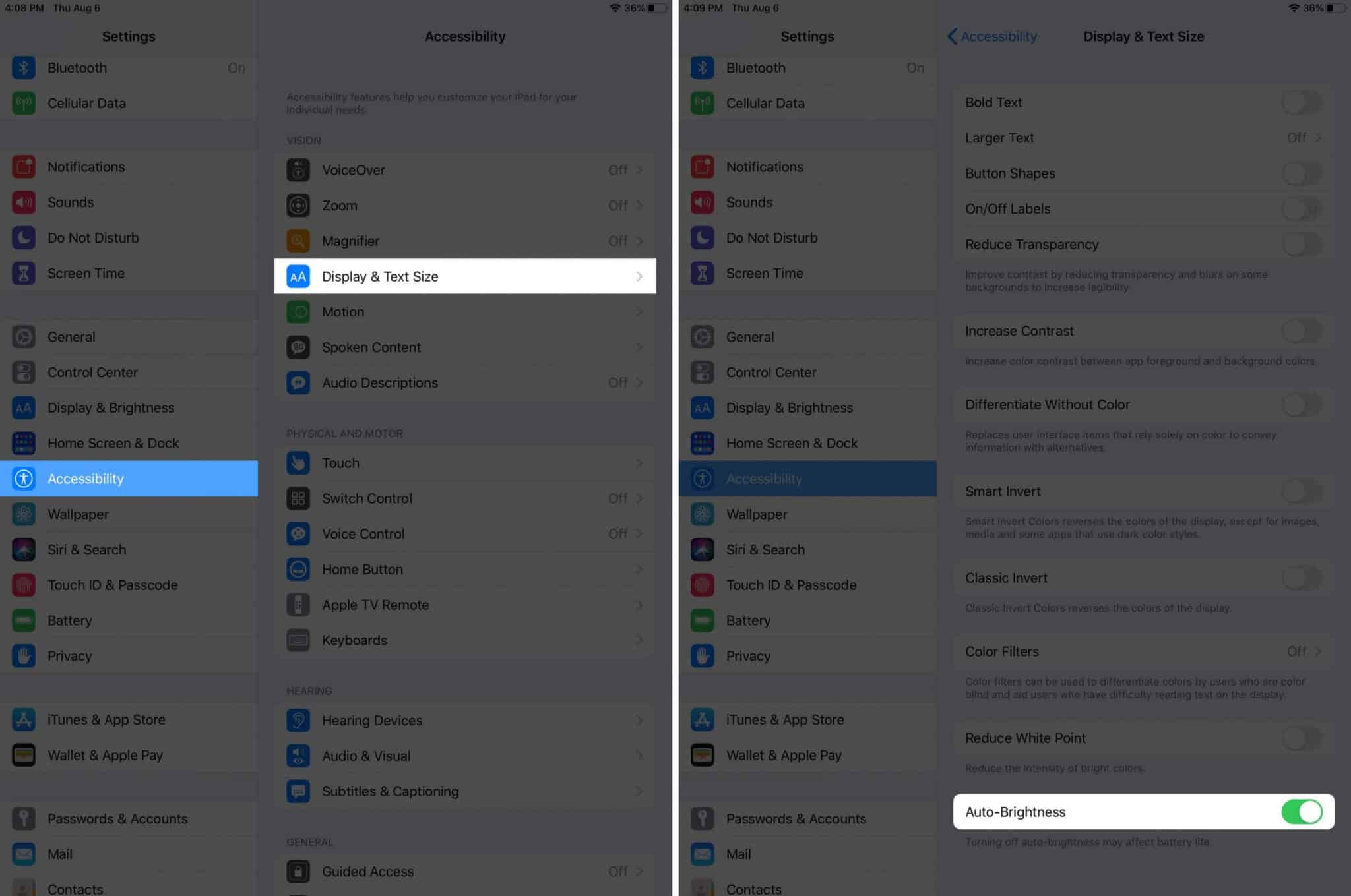
- Lower Screen Brightness: Manually reduce brightness or enable Auto-Brightness so the iPad adjusts to ambient lighting conditions.
- Manage Location Services: Restrict apps to using location data only "While Using the App" rather than "Always."
- Limit Background Activity: Navigate to Settings > General > Background App Refresh and disable it for non-essential applications.
2. Manage Thermal Conditions
Lithium-ion batteries are highly sensitive to extreme temperatures. Operating or charging an iPad in ambient temperatures higher than 35°C (95°F)—such as leaving it inside a parked car on a warm day—can cause permanent capacity loss. Conversely, using the device in sub-zero temperatures may temporarily reduce runtime, but capacity typically returns to normal once the device warms up.
3. Utilize Optimized Battery Charging
Modern iPadOS versions feature Optimized Battery Charging, a feature that learns your daily charging routine. It delays charging past 80% until you need to use the device, reducing the time the battery spends at 100% state of charge, which minimizes chemical wear.
Troubleshooting Rapid Battery Drain
If an iPad battery discharges unexpectedly fast, methodical troubleshooting can isolate the root cause.
- Inspect Battery Usage Metrics: Go to Settings > Battery to view a breakdown of which apps have consumed the most energy over the last 24 hours or 10 days. If an app shows disproportionate background usage, force-close it or reinstall it.
- Restart the Device: A simple reboot clears stuck background processes and transient software loops that cause abnormal CPU usage and battery drain.
- Check for Software Updates: Software bugs in operating system builds can occasionally cause excessive power consumption. Updating to the latest stable release of iPadOS frequently resolves these power management anomalies.
- Evaluate Hardware Age: If an iPad is more than four to five years old and has undergone hundreds of charge cycles, physical degradation may be the primary culprit. In such cases, software tweaks will yield minimal improvements.
Replacing an Aging iPad Battery
When an iPad battery no longer holds an adequate charge, users face the question of replacement. Unlike iPhones, iPads are assembled with extensive adhesives, making user-level battery replacement exceptionally difficult and risky for untrained individuals.
If the iPad is covered by AppleCare+ and the battery retains less than 80% of its original capacity, replacement service is typically covered. For out-of-warranty devices, Apple offers a battery service fee. Authorized Service Providers can inspect the unit, safely remove the bonded screen, replace the internal power cell, and reseal the chassis according to factory specifications.
Frequently Asked Questions
How long does an iPad battery last on a single charge?
Most iPads last between 8 and 10 hours of continuous mixed usage, such as web browsing over Wi-Fi or streaming video, under standard factory settings with moderate screen brightness. Heavy gaming, cellular data streaming, and maximum brightness will reduce this runtime.
Can I check my iPad battery health percentage in settings?
iPadOS does not display a simple battery health percentage directly in the standard Settings menu on most models, unlike modern iPhones. However, users can check exact cycle counts and maximum capacity metrics by reviewing system diagnostic analytics logs or connecting the device to a trusted computer running third-party hardware diagnostic software.
How many years will an iPad battery last before needing replacement?
An iPad battery typically lasts between 3 to 5 years, or roughly 1000 complete charge cycles, before its maximum capacity drops below 80%. Proper thermal management and avoiding extreme temperatures can help extend this practical lifespan.
Does leaving my iPad plugged in all the time ruin the battery?
No. Modern iPads feature advanced power management circuits and Optimized Battery Charging software that prevent overcharging. Once the internal cell reaches 100%, the charging circuit cuts off and safely draws power directly from the external power adapter rather than cycling the battery.
What should I do if my iPad battery drains while turned off?
Some battery drain during standby is normal due to background sync, system maintenance, and maintaining the system state. However, if your iPad loses significant percentage while powered down, disable background app refresh, turn off push email notifications, or check for a malfunctioning hardware accessory connected to the USB-C or Lightning port.
Conclusion
Understanding how long an iPad battery will last requires managing both short-term expectations for daily tasks and long-term care for the internal lithium-ion cell. By monitoring screen brightness, limiting background data activity, avoiding extreme thermal environments, and utilizing modern charging features, users can maximize both daily runtime and overall multi-year hardware durability. When capacity eventually degrades past acceptable thresholds, professional diagnostic and replacement services remain available through Apple and authorized channels.
Image Gallery