Understanding a WhatsApp Ban: How It Happens and What You Can Do
A WhatsApp ban occurs when the platform’s automated systems or manual reviews determine that an account has violated the Terms of Service. This typically results in a "This account is not allowed to use WhatsApp" notification. To resol...
A WhatsApp ban occurs when the platform’s automated systems or manual reviews determine that an account has violated the Terms of Service. This typically results in a "This account is not allowed to use WhatsApp" notification. To resolve this, users must verify their account status, cease non-compliant behavior, and submit a formal request for review via the application’s built-in support interface.
Contents
Why WhatsApp Bans Occur
WhatsApp employs a sophisticated multi-layered security system designed to protect the integrity of its messaging platform. Because WhatsApp is a service with billions of users, the company relies heavily on automated machine learning to identify and flag accounts that exhibit patterns indicative of spam, automated scraping, or malicious activity. Understanding the triggers for these bans is the first step toward prevention and recovery.
Common Triggers for Account Suspension
- Mass Messaging and Spam: Sending bulk messages to individuals who have not saved your number in their contacts is a primary trigger. When multiple recipients report your messages or block you in a short period, the system flags the account for "spammy behavior."
- Third-Party Applications: Using unofficial versions of the application, such as WhatsApp Plus or GBWhatsApp, is a direct violation of the Terms of Service. These apps pose severe security risks, often lacking end-to-end encryption, and are frequently used to distribute malware or bypass rate limits.
- Group Activity: Being added to or creating a large number of groups—especially if you do not know the other participants—can lead to a ban. If many users leave your groups or report the group activity, the administrator or the participant accounts involved may be flagged.
- Content Policy Violations: Distributing illegal, threatening, defamatory, or hateful content is strictly prohibited. While WhatsApp is end-to-end encrypted, it does monitor metadata and user reports regarding illegal activity to ensure compliance with its community standards.
- Automated Scraping: Using bots or scripts to scrape user data, such as phone numbers, profile pictures, or status updates, results in an immediate and often permanent ban.
Recognizing the Status of Your Account
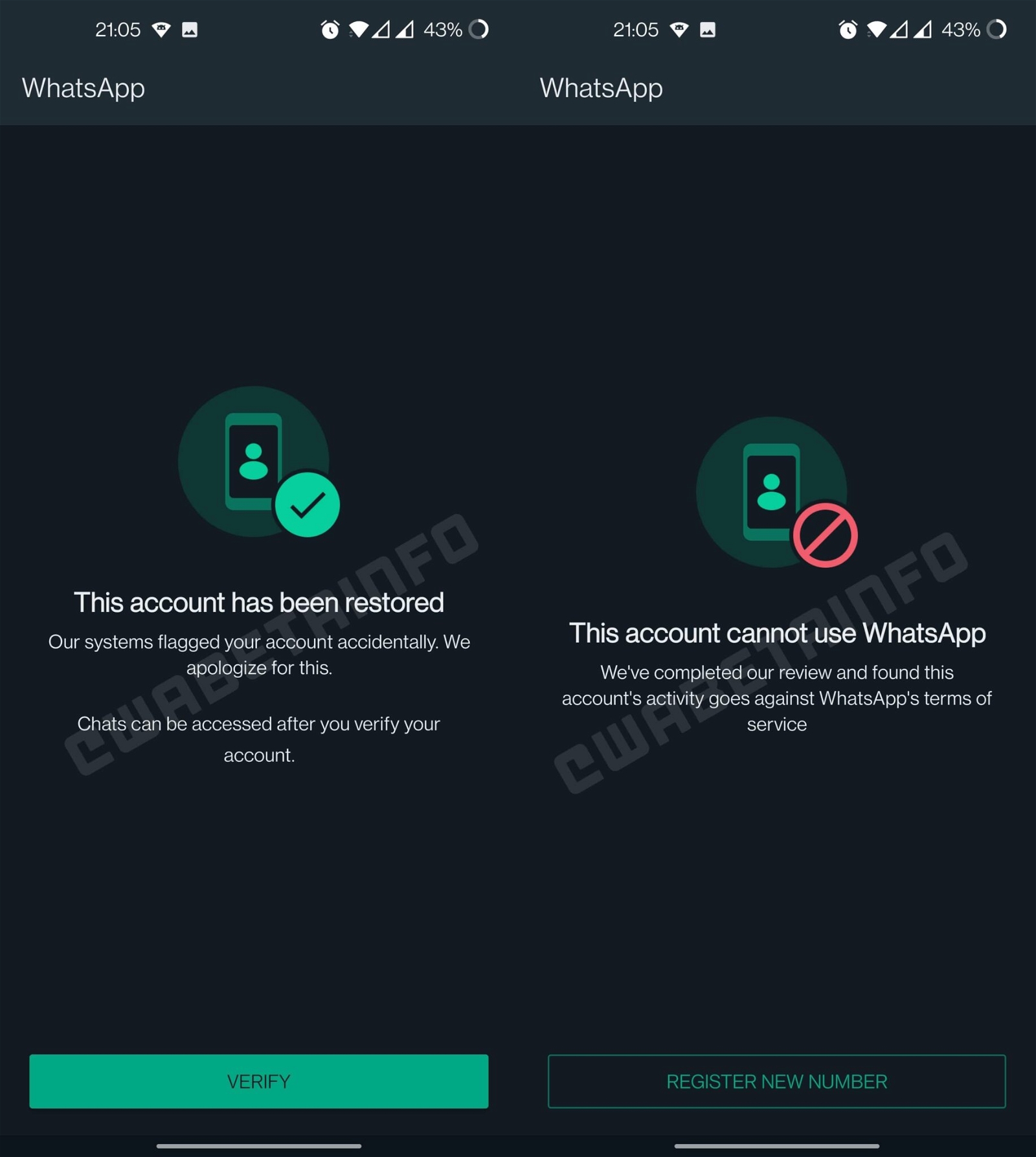
When your account is restricted, the WhatsApp application will display a clear notification. Distinguishing between a temporary restriction and a permanent ban is essential for your next steps.
- Temporary Ban: You may see a countdown timer on your screen indicating that your account is temporarily banned. During this period, you are unable to use the app. Once the timer expires, the account is usually restored, provided you stop the prohibited activity.
- Permanent Ban: If you see the message, "Your phone number is banned from using WhatsApp," you have been permanently restricted. In this scenario, you must manually initiate an appeal process.
Steps to Resolve a Ban
If your account has been banned, you have the right to request a review. The platform provides a structured path for users to regain access if they believe the ban was an error or if they have rectified their behavior.
The Appeal Procedure
To submit a request for review, follow these steps:
- Open the app: When the "Not allowed to use WhatsApp" notification appears, tap the Support or Request a Review button.
- Provide context: You will be prompted to write a brief explanation. Be honest and professional. If you believe your account was compromised or if you were using an unofficial app unknowingly, state this clearly.
- Wait for the review: WhatsApp’s support team reviews these requests. The turnaround time typically ranges from 24 to 72 hours. You will receive a notification within the app or via email regarding the outcome of the review.
| Action | Result | Note |
|---|---|---|
| Request a Review | Potential Unban | Best for accidental violations or compromised accounts. |
| Switching to Official App | Required Step | You must delete unofficial apps before requesting a review. |
| Waiting for Timer | Automatic Access | Necessary for temporary bans; do not try to bypass. |
| Creating a New Account | Risk of Re-ban | If you do not resolve the root cause, a new number will likely be banned. |
Preventing Future Bans
Once you have regained access, or if you are looking to protect your current account, adherence to best practices is critical. The following guidelines are designed to keep your account in good standing with the platform’s security protocols.
- Communication with Known Contacts: Limit your messaging to people who have your number saved in their address book. If you are operating a business, use the WhatsApp Business App or the WhatsApp Business API, which are designed for commercial communication and offer different rate limits.
- Avoid Automation Tools: Never use unauthorized third-party software to automate messages or manage chats. If you need automation, utilize the official WhatsApp Business API provided by Meta’s verified partners.
- Report, Don't Block: If you are receiving spam, use the "Report" feature rather than just blocking the contact. This helps the system learn and filter out malicious actors, keeping the ecosystem healthier for everyone.
- Mind Your Groups: Only add people to groups if they have given you permission to do so. Being a member of too many groups with high churn rates (where users constantly join and leave) can negatively impact your account reputation.
Frequently Asked Questions
Will my chat history be deleted if my account is banned? Generally, your messages are stored locally on your device. If you were using the official WhatsApp application, your chats will remain on your phone unless you manually delete them. However, if you were using an unofficial version of the app, your data may be lost, as these versions do not sync correctly with official servers.
Can I create a new account with the same number after a permanent ban? Usually, no. If your number has been permanently banned, it is flagged in the system. Creating a new account with the same number will likely lead to an immediate re-ban. You must successfully appeal the original ban to use that specific phone number again.
How long does a ban review take? Most reviews are processed within 48 hours. During periods of high traffic or systemic technical updates, this may take slightly longer. Avoid submitting multiple tickets for the same issue, as this can slow down the review process.
Can I get unbanned if I was using an unofficial app? If you have been banned for using an unofficial app, you must uninstall the unauthorized software and install the official WhatsApp client from the Google Play Store or Apple App Store. Once the official app is installed, submit an appeal request stating that you have switched to the official version and will comply with the Terms of Service.
Does a ban affect my WhatsApp Business account differently? Yes. WhatsApp Business accounts have different thresholds for activity. However, they are also subject to stricter compliance regarding spam and promotional messaging. If your business account is banned, you may need to reach out to your specific Business Solution Provider (BSP) if you are using the API.
Recommended Next Steps
If your account is currently banned, prioritize installing the official application from an authentic app store and gathering any evidence that might explain your situation (e.g., if you were a victim of a SIM swap or account takeover). Navigate to the "Request a Review" section within the app and provide a clear, concise statement. Patience is necessary, as the automated review systems are strict and designed to mitigate high-volume malicious activity. If your appeal is denied, understand that the decision is often final and linked to the specific activity detected on your device or network.
Image Gallery