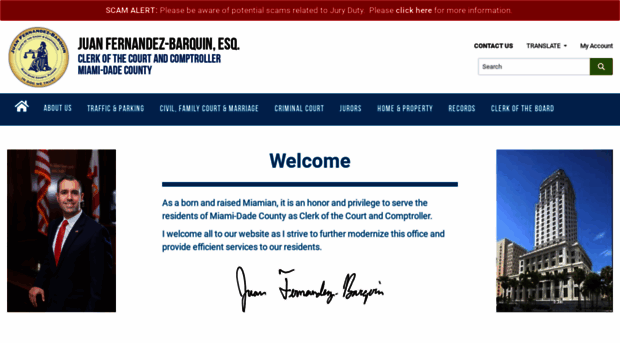
Navigating the Miami-Dade Clerk of Courts Website: Official 2026 Guide
Accessing the Miami-Dade Clerk of Courts website allows residents and legal professionals to perform official tasks such as conducting court case searches, paying traffic citations, viewing marriage license records, and managing jury d...
Accessing the Miami-Dade Clerk of Courts website allows residents and legal professionals to perform official tasks such as conducting court case searches, paying traffic citations, viewing marriage license records, and managing jury duty online. This comprehensive portal serves as the digital gateway to the Eleventh Judicial Circuit of Florida, streamlining public access to judicial records and court services without requiring an in-person courthouse visit.
Contents
Understanding the Miami-Dade County Judicial Infrastructure
The Eleventh Judicial Circuit of Florida handles civil, criminal, traffic, family, and probate cases across Miami-Dade County. The Clerk of the Circuit and County Courts acts as the ministerial officer and custodian of all court records, administrative documents, and financial transactions related to judicial proceedings. Operating efficiently requires a solid understanding of how public records are indexed, maintained, and retrieved through the official online infrastructure.
Public access is governed by Florida Statutes regarding public records and privacy laws. While most court filings are open to public inspection, certain sensitive documents—such as juvenile records, adoption files, and specific medical or financial identifiers protected by privacy statutes—are restricted from public view. The online portal automatically applies these filters, though users may need to file formal motions to seal or redact records when sensitive information is inadvertently exposed.
Core Portals Available on the Official Website
- Online Case Search: Provides docket histories, judge assignments, party names, and scheduled hearing dates for civil, criminal, and traffic divisions.
- Traffic Citations and Payments: Allows motorists to view citation details, elect driving school, request extensions, or pay civil traffic infractions securely.
- Marriage Licenses and Ceremonies: Facilitates the online application process for marriage licenses and scheduling civil wedding ceremonies at county facilities.
- Jury Duty Management: Enables summoned jurors to check reporting status, request postponements, or update personal information.
- E-Filing Portal: Provides attorneys and registered pro se litigants with a secure mechanism to submit court documents directly to active case dockets.
Essential Prerequisites for Online Court Record Searches
Before initiating a search on the Miami-Dade Clerk of Courts website, gathering the correct identifiers significantly accelerates the process. Searching blindly by common names often yields hundreds of partial matches, requiring manual filtration through secondary data points.
Having the exact case number represents the gold standard for efficient record retrieval. A standard Florida court case number follows a structured format indicating the county code, court division, year, and a sequential filing number. For example, a civil or criminal case identifier typically incorporates a two-digit year followed by a division code and sequence.
Key Data Points Required for Successful Record Retrieval
- Case Number: The unique alphanumeric string assigned at the time of initial filing.
- Party Name: The exact legal name of the plaintiff, defendant, petitioner, or respondent (corporate names require precise spelling).
- Uniform Case Number (UCN): A standardized 20-character identifier used across Florida courts to track specific judicial proceedings.
- Date of Filing or Incident: A helpful chronological filter when dealing with common names or extensive dockets.
- Agency or Citation Number: Essential for tracking traffic infractions or criminal misdemeanor charges originating from law enforcement stops.
Step-by-Step Guide to Using the Case Search Portal
Navigating the search interface requires adherence to specific query parameters to ensure accurate results. Follow this structured process to locate active or closed case files securely.
- Step 1: Navigate to the official Miami-Dade Clerk of Courts website using an updated web browser with JavaScript enabled.
- Step 2: Locate and select the "Court Records" or "Case Search" tab from the primary navigation menu.
- Step 3: Accept the terms and conditions governing public record usage and data privacy disclaimers.
- Step 4: Choose the appropriate court division (e.g., Civil, Criminal, Family, Probate, or Traffic) based on the nature of the proceedings.
- Step 5: Enter the known parameters, prioritizing the Case Number or exact party name fields, and complete the security verification challenge.
- Step 6: Review the search results list, verifying case status, party details, and filing dates before selecting the specific case to view the docket sheet.
- Step 7: Access available digital documents. Note that while dockets are generally public, viewing or downloading specific images may require setting up a registered user account or paying statutory copy fees.
Managing Financial Obligations, Fines, and Traffic Citations
Resolving financial matters through the platform requires strict adherence to statutory deadlines to avoid late fees, license suspensions, or the issuance of bench warrants. The portal integrates secure payment processors supporting major credit and debit cards.
When handling traffic infractions, motorists generally have three primary options upon accessing their citation on the website: pay the fine (which typically results in points assessed against the driver's license), elect to attend a Driver Improvement School (which may prevent points from being added), or request a court hearing to contest the citation before a magistrate or judge.
Comparison of Traffic Citation Resolution Methods
| Resolution Option | Primary Action Required | Potential Driver License Impact | Associated Administrative Costs |
|---|---|---|---|
| Pay Civil Penalty | Submit full payment online within the designated timeframe. | Points assessed based on the specific infraction. | Standard fine amount plus online processing fees. |
| Traffic School Election | Submit election form and pay fee; complete approved course within 90 days. | No points assessed for eligible infractions. | State-mandated school fee plus court administrative costs. |
| Court Contest | File a written request for a hearing to present evidence to a judge. | Points depend on the final judicial adjudication. | Court costs assessed only if found guilty by the magistrate. |
Troubleshooting Common Portal Issues and Error Messages
Users occasionally encounter technical barriers when interacting with county web infrastructure. Understanding common failure points helps minimize frustration and ensures timely completion of court-related tasks.
- Browser Compatibility and Cache Errors: Outdated browser caches frequently cause search buttons to freeze or payment gateways to time out. Clearing browser cookies and cache or switching to an alternative modern browser typically resolves rendering problems.
- Missing or Incomplete Records: If a recent filing does not appear in the online index, it may still be going through physical intake, quality review, and electronic indexing by court clerks. Processing times generally range from 24 to 72 hours for standard filings.
- Payment Processing Rejections: Verify that the billing address entered matches the financial institution's records exactly. Address verification system (AVS) mismatches are the primary reason online court payments are declined by banking networks.
- Restricted Document Access: If an error message indicates that a document is restricted, the file may contain confidential information or require physical inspection at a brick-and-mortar courthouse location with proper legal identification.
Alternative Physical Locations and Contact Methods
When online resources are insufficient or complex legal filings require in-person assistance, patrons can visit the main courthouse or designated district court facilities across Miami-Dade County.
- Richard E. Gerstein Justice Building: 1351 NW 12th St, Miami, FL 33125 (Primary location for criminal court records and administrative services).
- Miami-Dade County Courthouse: 73 W Flagler St, Miami, FL 33130 (Historical center for civil litigation, probate, and marriage licenses).
- Coral Gables District Court: 3100 Ponce de Leon Blvd, Coral Gables, FL 33134.
- North Dade Justice Center: 15555 Biscayne Blvd, North Miami Beach, FL 33160.
- South Dade Justice Center: 10710 SW 211th St, Cutler Bay, FL 33189.
Frequently Asked Questions
Can I access all court documents for free on the Miami-Dade Clerk of Courts website?
While docket sheets, party names, and general case histories are free to view online, accessing, downloading, or printing specific embedded PDF document images may require payment of statutory copy fees or a specialized subscription account for frequent users. Certain sensitive documents are legally restricted and cannot be viewed online by the general public.
How do I pay a traffic ticket online using the clerk's website?
To pay a traffic ticket online, navigate to the traffic division section of the website, input your citation number or driver's license information, select the citation from the search results, and follow the secure checkout prompts to pay with a credit or debit card. Ensure you complete the transaction before the designated appearance deadline listed on the citation.
What should I do if my case number does not appear in the online search results?
If your case number does not appear, verify that you selected the correct court division and entered the alphanumeric string without typos. If the case was filed within the last 24 to 48 hours, it may still be undergoing administrative processing and indexing by court personnel. You can also contact the clerk's customer service telephone line for direct assistance.
How do I apply for a marriage license through the Miami-Dade Clerk website?
Applicants can complete the initial marriage license application online through the marriage services portal to streamline the process. After submitting the electronic form, both parties must complete the final verification and oath process, which can be done either remotely via approved video conferencing or in person at a designated clerk office location.
Are certified copies of court judgments available for download online?
Certified copies typically require an official physical seal or secure digital certification that cannot be instantly generated through standard public web browsing. Users usually need to submit a formal request through the online records department or visit a courthouse facility to obtain legally certified court documents.
How can I verify my jury duty reporting status in Miami-Dade County?
Jurors can use the dedicated jury management portal on the website by entering their juror badge number and personal identification details. This portal provides real-time updates regarding whether reporting is required for the scheduled service date or if the trial has been cancelled.
Professional Recommendation: Always complete time-sensitive transactions—such as traffic ticket payments, answer filings, or jury postponements—at least 24 hours before your formal deadline. Relying on digital portals at the final hour exposes you to unexpected technical maintenance windows, payment gateway rejections, or processing delays that could result in legal penalties.
Image Gallery