Navigating Schneider Electric Telemetry Forums: Technical Support, Community Resources, and SCADA Optimization
Schneider Electric’s telemetry forums—primarily hosted within the Schneider Electric Exchange Community and EcoStruxure Technical Support portals—serve as vital technical repositories for automation engineers. These platforms provide p...
Schneider Electric’s telemetry forums—primarily hosted within the Schneider Electric Exchange Community and EcoStruxure Technical Support portals—serve as vital technical repositories for automation engineers. These platforms provide peer-to-peer troubleshooting, official firmware updates, script repositories, and integration guidance for SCADAPack RTUs, GeoSCADA Expert (formerly ClearSCADA), Trio Data Radios, and complex DNP3 or Modbus telemetry networks.
Contents
The Landscape of Schneider Electric Telemetry Communities
Industrial control systems and wide-area telemetry networks demand high reliability across geographically dispersed assets. When operational technology (OT) engineers encounter unexpected behavior in field Remote Terminal Units (RTUs), telemetry master stations, or licensed data radios, official manufacturer documentation often needs to be supplemented with real-world application insights. Schneider Electric supports these operational needs through a multi-tiered online community architecture.
Historically, legacy products relied on dedicated standalone support channels, such as the original ClearSCADA forum and the Control Microsystems support hub. Schneider Electric has consolidated these specialized knowledge bases into unified digital environments:
- Schneider Electric Exchange (Community Portal): The primary hub for system integrators, solution architects, and field engineers. It contains dedicated sub-boards for EcoStruxure GeoSCADA Expert, SCADAPack Smart RTUs, Accutech wireless instrumentation, and Trio Data Radios.
- EcoStruxure Automation Community: Focused on software integrations, industrial communications, and cybersecurity practices compliant with IEC 62443 standards.
- Global Customer Care Knowledge Base (KB): An authoritative database containing verified technical articles, field service bulletins, firmware change logs, and standard operational procedures linked directly from community discussions.
Navigating these forum resources efficiently allows engineers to shorten diagnostic timelines, validate network topology designs, and implement stable driver configurations across utility, water/wastewater, and oil and gas deployments.
Core Hardware and Software Systems Featured in Telemetry Discussions
Engineers participating in Schneider telemetry forums frequently discuss hardware configurations, programming logic, driver integrations, and protocol translation. Understanding the specific components within Schneider’s telemetry portfolio helps frame search queries and community engagement.
NOTE: Standardized telemetry hardware and software lines require precise firmware and software version matching during field deployments.
Version Compatibility PrecautionOperational field issues frequently arise from subtle mismatches between SCADAPack firmware binaries, target device configuration IDEs, and master station driver packages. Always verify exact build numbers posted on community solution threads before flashing field hardware.
SCADAPack Smart RTUs
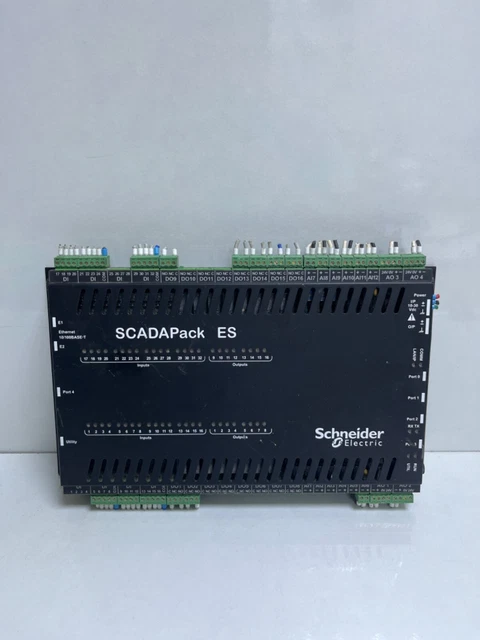
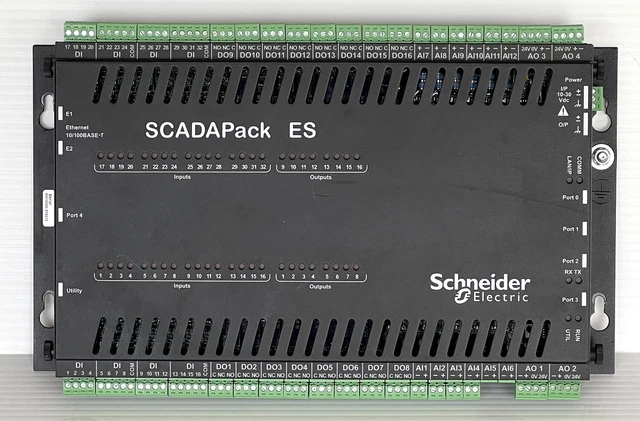
The SCADAPack family forms the edge processing backbone for Schneider’s telemetry systems. Modern deployments center on the SCADAPack x70 series (such as the SCADAPack 470, 474, 570, and 575), alongside legacy SCADAPack 300E and 300 series devices. Technical forum discussions surrounding SCADAPack typically revolve around:
- Transitioning logic implementations from legacy Telepace Studio or C/C++ applications to the Remote Controller Workbench (IEC 61131-3 logic engine).
- Configuring DNP3 point maps, including unsolicited response thresholds, event buffer allocation, and Class 1/2/3 data classification.
- Power management and sleep-mode optimization for solar-powered remote field sites.
- Dual-path communication fallbacks using embedded cellular modems alongside primary serial or Ethernet radio networks.
GeoSCADA Expert (ClearSCADA)
As Schneider Electric’s flagship telemetry master station, GeoSCADA Expert is designed to manage unreliable, narrow-bandwidth, or high-latency communication channels. Common forum queries cover:
- Optimizing server database performance, table index tuning, and historic data compression algorithms.
- Writing advanced C# and VBScript routines for automated alarm redirection, dynamic polling adjustments, and custom report generation.
- Configuring native protocol drivers for DNP3, DNP3 WITS (Water Industry Telemetry Standards), Modbus RTU/TCP, and IEC 60870-5-101/104.
- Implementation of GeoSCADA Hot-Standby redundancy pairs, database synchronization over WAN links, and main/standby server arbitration.
Trio Data Radios
Reliable data transport across remote topologies relies heavily on industrial radio networks. The Trio series—comprising digital licensed radios (Q-Series and E-Series) and license-free spread spectrum radios (J-Series and M-Series)—presents unique RF challenges. Community discussions focus on:
- Radio path analysis, RSSI degradation, fade margin management, and bit error rate (BER) troubleshooting.
- Configuring stream-routing protocols, digital repeater topologies, and collision avoidance in multi-hop radio trees.
- Interfacing serial radios with Ethernet-native RTUs using terminal server modes and transparent protocol encapsulation.
Critical Technical Topics and Forum Solutions
Engineers searching the Schneider telemetry forums typically aim to resolve specific operational roadblocks. Below are detailed technical overviews of the most frequent problem sets addressed within community channels.
1. DNP3 Point Mapping and Unsolicited Response Handling
Distributed Network Protocol (DNP3) is fundamental to wide-area telemetry due to its time-stamped event buffering and unsolicited reporting features. A standard forum challenge involves resolving event buffer overflows on SCADAPack RTUs when communication to GeoSCADA is temporarily severed.
Community solutions highlight proper buffer configuration within the RTU database:
- Define memory allocation for Class 1, Class 2, and Class 3 events based on point criticality (e.g., high-priority alarms assigned to Class 1).
- Configure unsolicited response delay timers and retry limits to prevent network flooding upon link restoration.
- Align DNP3 Master Object Types in GeoSCADA with the exact variation expected by the RTU (e.g., Group 20 Variation 5 for 32-bit Binary Counters with Flag and Time).
2. Upgrading Legacy SCADAPack 300E to SCADAPack x70 Platforms
With legacy hardware reaching end-of-life status, forum threads frequently address migration strategies. The transition from Telepace Studio to Remote Controller Workbench involves structural changes in data storage and logic execution:
- Data Model Transition: Legacy SCADAPack devices used register-based addressing (Modbus 30000/40000 registers). The SCADAPack x70 platform utilizes tag-based object structures. Engineers must map register arrays to structured tags within the SCADAPack x70 Workbench.
- Logic Conversion: Ladder logic routines written in Telepace cannot be automatically imported into EcoStruxure Automation Expert or Remote Controller Workbench. Logic structures must be recreated using IEC 61131-3 standards (Structured Text, Function Block Diagram, or Ladder Diagram).
- DNP3 Mapping: The x70 architecture decouples internal logic tags from DNP3 index assignments, requiring explicitly defined DNP3 configuration tables within the RTU application.
3. Diagnosing Radio Link Degradation via SNMP and Modbus Diagnostics
When remote sites experience intermittent communication dropouts, community experts emphasize leveraging embedded diagnostic points within Trio data radios. Trio radios expose system performance metrics via Modbus registers and Simple Network Management Protocol (SNMP) MIBs.
Key parameters monitored over the telemetry link include:
- Receiver Signal Strength Indicator (RSSI): Measured in dBm; values dropping below -95 dBm typically signal antenna misalignment, line-of-sight obstruction, or feeder cable damage.
- DC Supply Voltage: Voltage drops at remote solar sites during transmission cycles point to degrading battery capacity or insufficient solar panel output.
- Transmitter Forward and Reflected Power: High reflected power indicates high Voltage Standing Wave Ratio (VSWR), usually caused by moisture ingress in coaxial connectors or damaged antenna elements.
Technical Comparison of Schneider Telemetry Hardware and Software
To evaluate equipment selection and diagnostic approaches discussed across community threads, the following reference table outlines core specifications and targeted forum application profiles across the Schneider Electric telemetry portfolio.
| System / Component | Primary Core Architecture | Supported Protocol Native Stack | Target IDE / Configuration Tool | Primary Diagnostic Tools | Common Forum Query Focus |
|---|---|---|---|---|---|
| SCADAPack 470 / 474 | 32-bit ARM Cortex, Real-Time OS | DNP3 Level 4, DNP3 WITS, Modbus RTU/TCP, MQTT | Remote Controller Workbench (IEC 61131-3) | Trace Diagnostics, DevCmd Interface, System Log | Logic translation, DNP3 SA v5 configuration, sensor power switching |
| SCADAPack 570 / 575 | High-performance 32-bit RISC CPU | DNP3, DNP3 WITS, Modbus, IEC 60870-5-104 | Remote Controller Workbench, C++ Workbench | Wireshark PCAP captures, Terminal Diagnostics | High-density I/O handling, IEC 104 client-server setup, IP routing |
| GeoSCADA Expert | 64-bit Server Architecture, Multi-threaded | DNP3, Modbus, OPC UA, IEC 60870-5-101/104, MQTT | GeoSCADA ViewX Client, Configure Tool | DB LogWriter, Driver Trace Files, Telnet Session Monitor | Database indexing, C# script automation, redundant server synchronization |
| Trio Q-Series Radios | Digital Licensed Narrowband (400-900 MHz) | Transparent Serial, Ethernet IP Encapsulation | TrioTView, Web Graphic Interface | RF Power Metering, Internal RSSI Log, SNMP MIBs | Frequency coordination, repeater hop delays, antenna VSWR troubleshooting |
| Trio J-Series Radios | License-Free Spread Spectrum (900 MHz / 2.4 GHz) | Transparent Modbus, Native Ethernet Bridge | Web Management, Serial Diagnostics | Link Margin Test, Packet Error Rate (PER) Monitor | Industrial noise rejection, multipath interference, mesh routing setup |
How to Effectively Request Technical Support on Telemetry Forums
Formulating precise, data-rich requests significantly speeds up community resolution times. Experienced forum contributors and Schneider Technical Support Engineers require specific diagnostic evidence to isolate root causes.
Step 1: Capture Detailed Firmware and Build Revisions
Avoid generic descriptions. Specify exact build versions across every tier of the telemetry chain:
- Master Station: GeoSCADA Expert Version (e.g., GeoSCADA 2023 Monthly Update release build numbers).
- Field RTU: SCADAPack model and installed OS/firmware binary build.
- Development Environment: Exact software build of Remote Controller Workbench or Telepace Studio.
Step 2: Extract and Scrub Log Files
Provide anonymized log snippets directly relevant to the fault window:
- GeoSCADA Driver Logs: Enable driver tracing for the specific channel (e.g., DNP3 Master Driver trace) and extract the raw frame exchange preceding the error condition.
- SCADAPack Trace Output: Connect to the RTU via serial or Ethernet diagnostic commands (
DevCmd) to capture real-time task status and protocol engine messages.
Step 3: Map System Topology and Communication Medium
Detail the exact physical and logical network layout:
- Direct serial RS-232/RS-485 connections versus Ethernet bridges.
- Intermediate hardware configurations, including Trio radio bridge settings, cellular gateway APNs, or network switches.
- Protocol encapsulation layers, such as DNP3 over TCP/IP versus DNP3 over Serial Pass-through.
Cybersecurity and Protocol Migration Trends in Modern Telemetry
Community conversations heavily reflect modern cybersecurity mandates, specifically alignment with NERC CIP frameworks and IEC 62443 cyber standards. Implementing legacy protocol architectures over wide-area wireless networks exposes critical infrastructure to unauthorized access if unmitigated.
DNP3 Secure Authentication (SA v5) Implementation
Standard DNP3 communications send commands and data in plaintext without message authentication. DNP3 Secure Authentication version 5 (SA v5) addresses this vulnerability by incorporating cryptographic challenge-response mechanisms using HMAC-SHA-256 algorithms.
Forum discussions regularly center around:
- Managing aggressive key rotation schedules across thousands of field RTUs without causing communication timeouts.
- Configuring GeoSCADA Expert as an Authority Server to distribute Session Keys securely.
- Diagnosing authentication failures resulting from clock drift between the Master Station and field RTUs. Precise time synchronization via Network Time Protocol (NTP) or GPS receiver inputs at the SCADAPack level is mandatory for DNP3 SA operation.
Integrating MQTT and Sparkplug B into Legacy Telemetry
Modern OT strategies frequently require streaming field data directly to cloud-based analytics engines alongside traditional SCADA paths. Schneider SCADAPack x70 RTUs support dual-reporting models:
- SCADA Layer: Native DNP3 or Modbus protocols report operational real-time alarms and control actions directly to GeoSCADA Expert.
- Analytics Layer: Embedded MQTT clients package operational telemetry into Sparkplug B payloads, pushing data to enterprise MQTT Brokers over TLS-encrypted connections.
Community forum threads provide extensive guidance on balancing network bandwidth allocations when running concurrent DNP3 and MQTT stacks over limited-bandwidth radio links.
Frequently Asked Questions
Where can I access official legacy ClearSCADA and SCADAPack forum archives?
Official legacy archives from ClearSCADA and Control Microsystems have been migrated into the Schneider Electric Exchange Community platform. Users can search historical threads by using product-specific tags such as "GeoSCADA", "ClearSCADA", or "SCADAPack" within the main search index.
How do I troubleshoot DNP3 communication timeouts between GeoSCADA and a SCADAPack RTU?
Start by verifying physical layer connectivity, then inspect GeoSCADA Driver Trace logs to confirm whether the Master is sending requests and if the RTU is returning link-layer confirmations. Check DNP3 Data Link and Transport Layer settings (such as Source and Destination DNP3 Addresses) on both ends, and ensure the RTU’s DNP3 port speed and parity match the connected radio or modem parameters.
Why is my SCADAPack x70 RTU failing to execute IEC 61131-3 logic programs?
Execution failures typically stem from task configuration errors in Remote Controller Workbench, target hardware mismatch during compilation, or unresolved system faults. Verify that the application is built for the exact target RTU model and hardware revision, ensure that the execution task (Cyclic or Periodic) is active, and inspect the RTU system event log via terminal diagnostic tools for memory allocation errors.
What causes high bit error rates (BER) on Trio radio telemetry links?
High BER is generally caused by low signal margin, RF interference on the operating channel, improper antenna polarization, or damaged coaxial cabling. Use diagnostic utilities to monitor RSSI, ambient noise floor, and reflected power (VSWR) to isolate whether the root cause is physical RF path obstruction or electromagnetic interference.
Can legacy Telepace Studio logic be automatically converted to SCADAPack x70 Workbench?
No, Telepace Studio logic cannot be automatically converted due to fundamental differences in register-based versus tag-based architecture. Systems must be manually re-architected into IEC 61131-3 logic languages within Remote Controller Workbench, requiring tag creation, logic rewrite, and manual DNP3 point map assignment.
Summary and Next Steps for Telemetry Engineers
Leveraging the collective intelligence of the Schneider Electric Telemetry Forums allows automation professionals to overcome complex communication, programming, and hardware integration challenges efficiently. Whether optimizing DNP3 point maps in GeoSCADA Expert, converting legacy Telepace logic to SCADAPack x70 Workbench, or troubleshooting RF paths across Trio radio networks, community-validated solutions significantly reduce deployment downtime.
To maximize network reliability and maintain peak performance across your telemetry infrastructure:
- Access the official Schneider Electric Exchange Community to participate in peer technical exchanges and access verified solution databases.
- Keep SCADAPack firmware binaries, GeoSCADA driver packs, and radio management tools updated in accordance with Schneider field service advisories.
- Standardize diagnostic logging procedures to simplify root-cause analysis when seeking community support for complex WAN telemetry faults.
Image Gallery