Mastering iOS Mobile Management: A 2026 Strategic Guide for Enterprise Deployment
iOS mobile management refers to the comprehensive deployment, security, and administrative oversight of iPhone and iPad hardware within an organizational environment. This framework, commonly known as Mobile Device Management (MDM), ut...
iOS mobile management refers to the comprehensive deployment, security, and administrative oversight of iPhone and iPad hardware within an organizational environment. This framework, commonly known as Mobile Device Management (MDM), utilizes Apple’s native management protocols to enforce security policies, distribute internal applications, and ensure data privacy across corporate-owned or bring-your-own-device (BYOD) hardware deployments.
Contents
Core Architecture of Apple Device Management
Modern iOS management is built upon the Apple MDM framework, which interfaces directly with the Apple Business Manager (ABM) portal. This ecosystem allows administrators to push configuration profiles, certificates, and app licenses directly to devices over the air (OTA). In 2026, the reliance on automated enrollment via Automated Device Enrollment (ADE) remains the gold standard for zero-touch deployment.
To implement effective management, your organization must satisfy these primary technical prerequisites:
- Apple Business Manager Account: A centralized portal for managing volume purchases and device assignments.
- MDM Server Infrastructure: A specialized software solution (either cloud-native or on-premises) that acts as the control plane for your fleet.
- Push Certificates: The Apple Push Notification service (APNs) certificate, which must be renewed annually to maintain the communication link between your server and the managed devices.
- Managed Apple IDs: Provided through ABM, these IDs enable controlled access to Apple services without requiring personal iCloud accounts for corporate functionality.
Security Policies and Compliance Enforcement
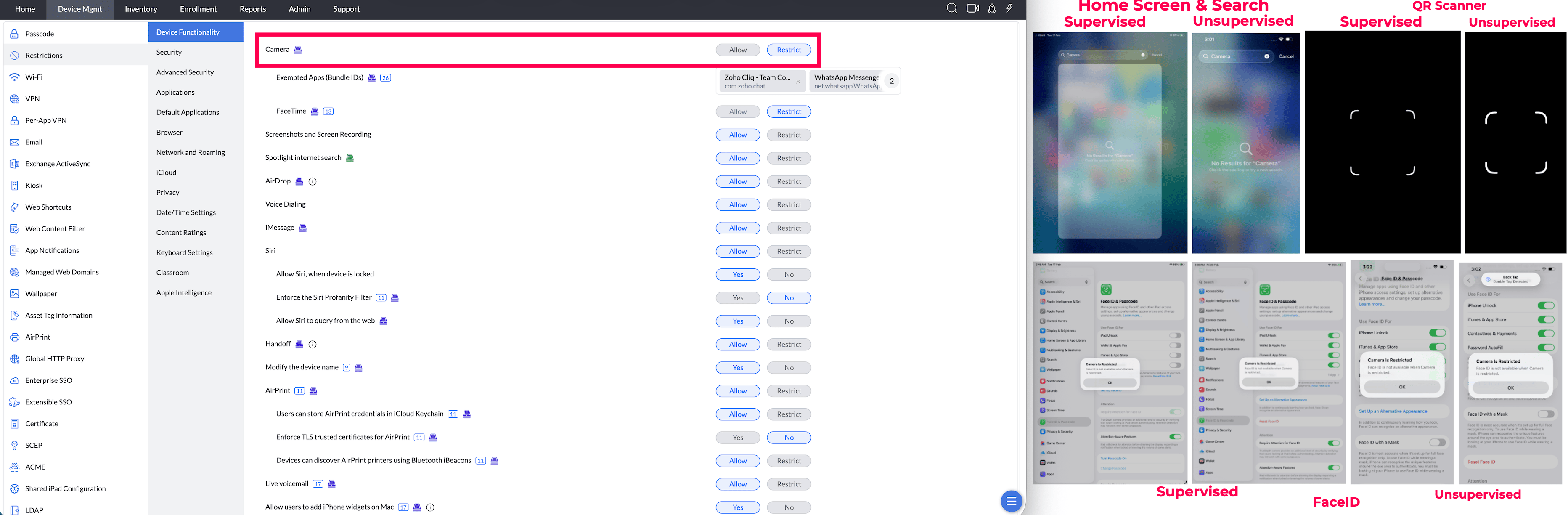
Enforcing organizational security requires a granular approach to iOS restrictions. By leveraging configuration profiles, administrators can programmatically restrict hardware features to mitigate data exfiltration risks.
Essential Security Configurations
- Passcode Enforcement: Mandating alphanumeric codes with specific complexity requirements.
- Data Protection: Utilizing Per-App VPN configurations to ensure corporate traffic remains isolated from personal browsing.
- Restriction Profiles: Disabling non-essential services such as AirDrop, iCloud backups, or the installation of unapproved software.
- Remote Wipe Capabilities: Executing a secure enterprise wipe to remove managed data while leaving personal user data untouched on BYOD devices.
Industry Compliance Standards Organizations handling regulated data, such as HIPAA-covered health information or financial records, must align their iOS management policies with SOC 2 Type II and ISO/IEC 27001 standards. In 2026, the shift toward zero-trust architecture requires that device health attestations—confirming that the OS is not jailbroken and is running a current, supported version of iOS—are evaluated before granting access to internal resources.
Deployment Methodologies: Corporate vs. BYOD
The choice between supervised and unsupervised management significantly impacts the level of control an administrator maintains over the device.
| Feature Category | Corporate-Owned (Supervised) | BYOD (Unsupervised) |
|---|---|---|
| Control Level | Full (Root-level policies) | Partial (App-level only) |
| Data Separation | User partition + Managed partition | Managed container only |
| Remote Management | Full wipe and lock capability | Limited to removal of managed profile |
| Activation Lock | Controlled via MDM bypass | Linked to user's personal ID |
| Privacy Impact | High visibility | Low visibility (User privacy focused) |
Troubleshooting Common iOS Management Failures
Effective management requires proactive monitoring of the handshake between the managed device and the MDM server. When devices fail to receive updates or policy changes, administrators should follow a systematic debugging workflow.
Primary Diagnostic Steps
- Verify APNs Validity: Check the Apple Push Notification certificate expiration status in your MDM dashboard. An expired certificate results in immediate communication failure across the entire fleet.
- Network Path Analysis: Ensure that managed devices can reach Apple’s activation servers and your specific MDM server endpoints. Use a packet capture tool if traffic is being blocked by a corporate firewall.
- Re-enrollment Triggers: If a specific configuration profile becomes corrupted, removing the MDM profile from the Settings menu and re-enrolling the device is the most reliable recovery method.
- Version Compatibility: Ensure that your MDM solution supports the latest iOS major release versions deployed within your fleet. Legacy servers may lack support for newer payloads introduced in recent updates.
Scaling Operations in 2026
As organizations scale their mobile footprint, manual device handling becomes unsustainable. The 2026 standard for management involves integrating your MDM with your Identity Provider (IdP) via SAML or OIDC. This ensures that when an employee leaves the organization, their access to internal resources is automatically revoked across all managed devices, while the device itself is either locked or cleared for future use.
Avoid the common pitfall of "over-management." Excessive restrictions, such as blocking essential communication apps or interfering with system-level notifications, often drive users to find workarounds, creating shadow IT risks. Focus your strategy on protecting corporate data assets rather than policing non-critical device usage.
Frequently Asked Questions
What is the difference between supervised and unsupervised iOS devices? Supervised mode provides deeper administrative control, including the ability to bypass Activation Lock and silently install apps, and is generally reserved for company-owned hardware. Unsupervised mode is intended for BYOD deployments, offering limited management capabilities that protect corporate data while respecting user privacy.
Can I manage an iOS device without an MDM server? No, a professional MDM server is required to push configuration profiles, security policies, and enterprise apps at scale. While Apple Configurator 2 can perform some initial setup tasks, it does not provide the ongoing administrative oversight necessary for enterprise security.
How does iOS management handle user privacy? Modern MDM frameworks separate personal and professional data containers. Administrators cannot view personal photos, messages, or web history on BYOD devices; they only exercise control over the managed enterprise profile and the corporate apps contained within it.
Is it mandatory to use Apple Business Manager? While you can enroll devices manually, ABM is essential for automated, zero-touch deployment at scale. It acts as the authoritative source for purchasing, assigning, and linking devices to your specific MDM solution.
What should I do if a device loses its connection to the MDM server? First, verify that the device has internet connectivity. If the connection remains broken, ensure the device is still managed in your MDM portal and that the local MDM profile has not been manually removed by the user, which would require a re-enrollment process.
Strategic Recommendation
For organizations managing more than 20 devices, transitioning to an Automated Device Enrollment workflow via Apple Business Manager is the most effective way to ensure long-term security. Standardize your security policies around the principle of least privilege, ensuring that users only have the access necessary for their role. Regularly audit your MDM logs for configuration errors and prioritize patching for any devices that fall more than one minor version behind the current iOS release. By automating your lifecycle management and maintaining strict alignment with current Apple protocols, you minimize the overhead of mobile administration while maximizing the security of your corporate data.
Image Gallery