Blooket Update 2026: New AI Tools, Game Modes, and Classroom Integration
The Blooket Update 2026 introduces the revolutionary SmartSet AI engine, a streamlined "Nexus" student hub, and three new competitive game modes designed to maximize classroom engagement. These updates focus on reducing teacher prep ti...
The Blooket Update 2026 introduces the revolutionary SmartSet AI engine, a streamlined "Nexus" student hub, and three new competitive game modes designed to maximize classroom engagement. These updates focus on reducing teacher prep time through automated content generation while enhancing data privacy protections to meet the latest 2026 global education security standards.
Contents
The Evolution of Gamified Learning: Understanding the 2026 Blooket Ecosystem
As we move through the 2026 academic year, Blooket has transitioned from a simple quiz platform into a comprehensive educational ecosystem. The primary shift this year is the integration of generative AI to assist educators in content curation. No longer are teachers required to manually input every question and answer; instead, the platform now interacts with educational standards (such as Common Core and IB) to suggest high-quality material.
For students, the experience has become more immersive. The 2026 update brings the "Blooket Nexus," a centralized social-educational space where students can showcase their earned Blooks and participate in seasonal global challenges. This transition addresses the growing demand for "persistent" learning environments where achievements in the classroom translate into long-term digital growth.
Revolutionary AI Question Generation: The SmartSet Engine
The standout feature of the 2026 update is the SmartSet Engine. This tool allows teachers to upload a PDF, a link to an educational video, or a chapter summary, which the AI then analyzes to produce a balanced set of questions.
Automated Difficulty Scaling The SmartSet Engine automatically categorizes questions into Bloom’s Taxonomy levels, ensuring that a single game can challenge advanced learners while supporting those who need more scaffolding. Teachers can toggle these settings before launching a game to ensure the difficulty matches the current lesson objective.
Contextual Feedback Loops In the 2026 version, when a student gets a question wrong, the AI provides a brief, context-specific explanation rather than just the correct answer. This turns every incorrect guess into a mini-learning moment, reducing the frustration often found in high-speed competitive games.
New Game Modes and Seasonal Blooks for 2026
Blooket’s popularity stems from its diverse game modes. For 2026, the developers have released three primary modes that focus on different cognitive skills:
- Quantum Quest: A strategy-heavy mode where students must manage resources and "timelines" to defend their base. It encourages long-term planning alongside quick recall.
- Circuit Breaker: A collaborative mode where the entire class works together to solve a digital puzzle. Instead of competing against each other, the class competes against a "system virus," fostering teamwork.
- Eco-Empire: A simulation-style game where correct answers contribute to the growth of a sustainable city. This mode is specifically designed for social studies and science curricula.
The 2026 Blook collection has also expanded. The "Prismatic Series" features Blooks that change color based on the student's accuracy streak during a live game, providing a visual badge of honor that other students can see in real-time.
Comparing Blooket Subscription Tiers: 2026 Pricing and Features
With the new AI features and expanded server capacities, Blooket has updated its pricing structure for the 2026 fiscal year. The focus is on providing flexible options for individual teachers and entire school districts.
| Feature | Blooket Free (Starter) | Blooket Plus (Individual) | Blooket Plus Flex (School/District) |
|---|---|---|---|
| Max Player Count | 60 Players | 300 Players | 1,000+ Players |
| AI SmartSet Generation | 5 Sets per Month | Unlimited | Unlimited |
| Game Mode Access | Standard Modes Only | All Modes + Early Access | All Modes + Custom Skins |
| Reporting & Analytics | Basic Summary | Detailed Student Growth | District-wide Data Dashboard |
| 2026 Price | $0 (Free Forever) | $4.99 / Month | Contact for Quote |
| Security Compliance | Standard | Enhanced | Full Enterprise (SOPPA/GDPR) |
Privacy and Security Standards: Keeping Classrooms Safe in 2026
Student data privacy is the most critical technical aspect of the 2026 update. Blooket has moved to a "Zero-Knowledge" architecture for student accounts, meaning that personal identifiable information (PII) is encrypted in a way that even Blooket’s internal servers cannot access it without the school's unique key.
- SOPPA and GDPR Compliance: Blooket 2026 fully complies with the Student Online Personal Protection Act and the latest European GDPR mandates.
- AI Ethics Filtering: The SmartSet AI includes a proprietary "Education-Safe" filter that prevents the generation of biased, inappropriate, or factually incorrect content by cross-referencing multiple verified educational databases.
- Ad-Free Environment: As of 2026, all tiers—including the free version—remain 100% ad-free to ensure a distraction-free learning environment and to prevent third-party tracking.
Step-by-Step Guide to Hosting a 2026 Blooket Session
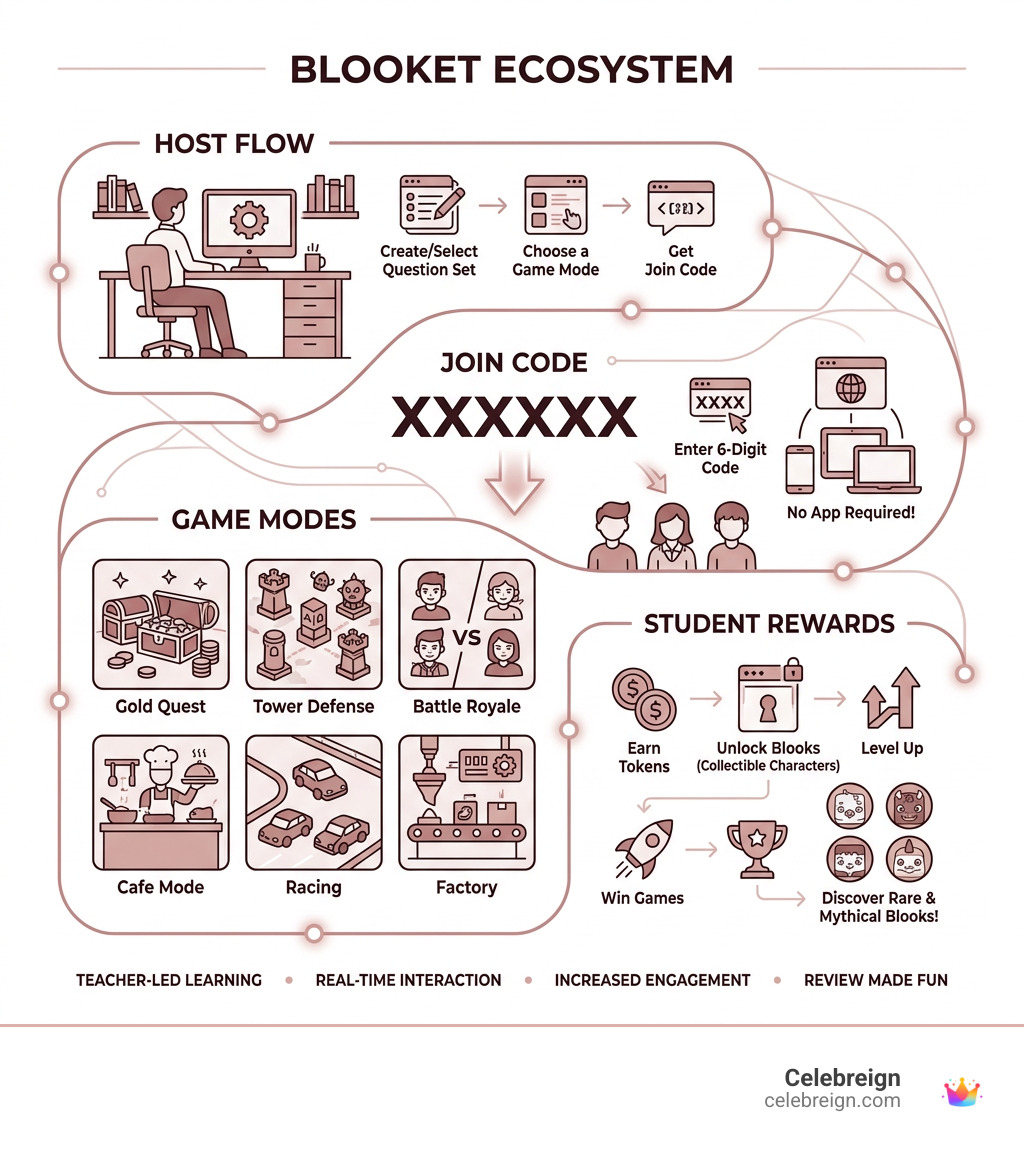
Hosting a game has been streamlined to under three clicks. Follow this updated 2026 workflow to get your class started.
- Select or Generate a Set: Go to your dashboard and choose a pre-made set, or use the "SmartSet AI" button to generate a new quiz based on your lesson plan.
- Choose a 2026 Game Mode: Select from the new modes like Quantum Quest or classic favorites like Gold Quest.
- Configure Game Settings: In 2026, you can now set "Speed Limits" (to prevent rushing) and "Assistance Levels" (to allow students to see hints after two wrong attempts).
- Launch the QR Join Code: Display the join screen. Students in 2026 typically join via the "Blooket Pass" app or by scanning the dynamic QR code on the screen.
- Review the Live Report: Once the game finishes, use the "Deep Dive" button to see which specific questions caused the most trouble across the whole class.
Pros and Cons of the 2026 Platform Ecosystem
While the 2026 update brings significant advancements, it is important to weigh the benefits against the potential challenges of such a high-tech platform.
Pros:
- Unparalleled Engagement: The new "Nexus" hub significantly increases student motivation.
- Time Efficiency: AI tools can save a teacher up to 3 hours of prep work per week.
- Customization: The ability to toggle AI assistance makes the platform more inclusive for Special Education (SPED) and English Language Learner (ELL) students.
Cons:
- Hardware Requirements: The 2026 game modes require updated browser versions, which may struggle on very old (pre-2019) school hardware.
- Subscription Gaps: Some of the most powerful AI analysis tools are locked behind the Plus tier, which may create equity issues between districts.
- Connectivity Dependence: The Nexus world requires a stable, high-speed internet connection to function without lag.
Troubleshooting Common 2026 Blooket Issues
Even with the 2026 stability patches, technical hurdles can occur. Here is how to resolve the most common issues:
- SmartSet AI "Hallucinations": If the AI generates a question that is factually incorrect, use the "Flag & Correct" button. This trains the local AI model for your account to be more accurate next time.
- Connection Lag in Quantum Quest: This mode uses WebGL 3.0. If students experience lag, have them go to "Settings" and toggle "Performance Mode" to lower the graphical fidelity.
- QR Code Not Scanning: Ensure the classroom projector's brightness is sufficient. Alternatively, students can use the "Direct Link" feature found in the host dashboard.
Frequently Asked Questions
Can I still import my old quiz sets from 2024 and 2025? Yes, Blooket 2026 is fully backward compatible with all previous quiz sets. When you open an older set, the platform will offer to "Enhance" it using the new SmartSet AI, which adds better distractor answers and contextual explanations.
How does Blooket 2026 prevent students from "hacking" or cheating? The 2026 update includes a server-side validation system that monitors for impossible click speeds or script injections. If the system detects a third-party extension attempting to manipulate the game, the student is automatically moved to a "Spectator" mode, and the teacher receives a private notification.
Is the Blooket Nexus safe for younger students? The Nexus is a moderated, "closed-loop" system. Students can only interact using pre-set emotes and phrases. There is no open text chat, ensuring a safe environment for elementary and middle school users.
What is the "Plus Flex" plan for schools? The Plus Flex plan is a new 2026 offering that allows schools to pay only for the number of active teacher licenses they use each month. It includes a single-sign-on (SSO) integration for Clever, ClassLink, and Google Workspace for Education.
Does Blooket 2026 work on tablets and mobile devices? Yes, the 2026 Blooket interface is built on a responsive framework that works natively in browsers on iPads, Android tablets, and smartphones. There is also an optional "Blooket Pass" app available in all major app stores for a more optimized experience.
Expert Insight: Maximizing Classroom ROI with Blooket
To get the most out of Blooket in 2026, educators should move beyond using it as a simple "reward" at the end of class. The depth of the 2026 analytics allows for "Data-Driven Gamification." By reviewing the post-game reports, teachers can identify specific sub-topics that the class has not yet mastered and use the SmartSet AI to generate a "Refresher Set" for the next day. This creates a feedback loop where the game is not just a break from learning, but the primary vehicle for identifying and closing instructional gaps.
Image Gallery