Cisco Security Cloud Support: A Comprehensive Guide to Technical Services and Resolution
Accessing Cisco Security Cloud support requires navigating the Cisco Technical Assistance Center (TAC) or the integrated support modules within the Security Cloud Control Center. Users can open cases via the online Support Case Manager...
Accessing Cisco Security Cloud support requires navigating the Cisco Technical Assistance Center (TAC) or the integrated support modules within the Security Cloud Control Center. Users can open cases via the online Support Case Manager, utilize the Cisco AI Assistant for automated triage, or contact regional TAC phone lines for high-severity (S1/S2) outages.
Contents
The Cisco Security Cloud represents a significant shift from siloed security products to a unified, AI-driven platform. In 2026, managing this ecosystem effectively demands a clear understanding of how support is structured across various components like Cisco Secure Access, Cisco Umbrella, and Cisco XDR. This guide outlines the essential procedures for obtaining technical help, the different service levels available, and best practices for rapid issue resolution.
Understanding the Cisco Security Cloud Support Ecosystem
As of 2026, Cisco has streamlined its security portfolio into the Cisco Security Cloud, a global, cloud-native platform designed to protect the entire corporate ecosystem. Because this platform integrates multiple technologies—including Secure Access Service Edge (SASE), Extended Detection and Response (XDR), and Multicloud Defense—support is no longer just about fixing a single device; it is about maintaining the integrity of an interconnected fabric.
The support structure is primarily managed through the Cisco Technical Assistance Center (TAC). However, the interface through which administrators interact with support has evolved. Most interactions now begin within the Security Cloud Control Center, where telemetry data and configuration states are readily available to support engineers, reducing the time spent on initial discovery.
The Role of the Cisco AI Assistant for Security
A cornerstone of the 2026 support experience is the Cisco AI Assistant for Security. This generative AI tool is embedded directly into the management console. It serves as the first line of support by:
- Analyzing complex policy configurations to identify conflicts.
- Generating step-by-step remediation guides for common connectivity issues.
- Automating the collection of diagnostic logs before a human engineer is even assigned to a case.
- Summarizing long support threads for administrators joining a complex, multi-day troubleshooting effort.
Tiers of Cisco Security Support Services
Not all support requirements are equal. Cisco offers several service levels tailored to the criticality of the environment and the complexity of the deployment. Selecting the right tier is essential for meeting internal Service Level Agreements (SLAs).
Cisco Solution Support
For Cisco Security Cloud customers, Solution Support is often the recommended tier. Unlike standard product support, Solution Support provides a primary point of contact who owns the case from start to finish, even if the issue involves third-party software or multi-vendor cloud environments (such as integrations with AWS, Azure, or Google Cloud).
- Response Time: Typically offers a 30-minute response objective for Severity 1 and 2 cases.
- Coordination: Cisco engineers coordinate with other vendors on your behalf, eliminating the "finger-pointing" often found in complex cloud outages.
Cisco Smart Net Total Care (SNTC)
This is the foundational support level. It provides 24/7 access to global TAC, hardware replacement options (if using physical appliances like Firepower/Secure Firewall), and access to extensive online tools. While robust, it is product-specific rather than "solution-aware."
Cisco Success Tracks
Success Tracks utilize the Cisco Lifecycle Services model. This is a more proactive approach compared to traditional reactive support. It includes "Ask the Experts" webinars, one-on-one coaching, and data-driven insights into how to optimize the Security Cloud configuration to prevent issues before they occur.
| Feature | Smart Net Total Care | Solution Support | Success Tracks |
|---|---|---|---|
| TAC Access | 24/7 Global Access | 24/7 Priority Access | 24/7 Priority Access |
| Case Ownership | Product-specific | Cross-architecture/Multi-vendor | Lifecycle-focused |
| Response SLA (S1) | 1 Hour | 30 Minutes | 30 Minutes |
| Proactive Insights | Basic Telemetry | Enhanced Analytics | AI-Driven Predictive Modeling |
| Learning Access | Documentation only | Documentation + Webinars | Personalized Coaching Sessions |
How to Open and Manage a Support Case
When a technical failure occurs within the Cisco Security Cloud—such as a failure in the SASE fabric or a misfiring XDR correlation rule—following a standardized submission process ensures the fastest resolution.
Step 1: Identification and Severity Classification
Before contacting support, determine the Severity Level of the issue. This classification dictates the response time and the level of resources Cisco will allocate.
- Severity 1 (S1): Network is down, or there is a critical impact on business operations. No workaround is available. Requires 24/7 availability from the customer side.
- Severity 2 (S2): Operation of an existing network is severely degraded.
- Severity 3 (S3): Operational performance is impaired, but most business operations remain functional.
- Severity 4 (S4): Information required on product capabilities, installation, or configuration.
Step 2: Utilizing the Support Case Manager (SCM)
The most efficient way to open a non-S1 case is through the Cisco Support Case Manager website.
- Log in with your Cisco Connection Online (CCO) ID.
- Enter the Serial Number or Service Contract Number. For cloud-native services like Umbrella or Secure Access, this is often linked to your Organization ID (OrgID).
- Provide a detailed description. In 2026, you can attach "Support Bundles" generated directly from the Security Cloud console.
- Specify the preferred contact method (Email, Phone, or Webex Teams).
Step 3: Engaging with TAC via Phone
For S1 or S2 issues, it is mandatory to call TAC directly after (or instead of) opening a case online. This ensures immediate routing to a front-line engineer. Have your CCO ID and contract information ready.
Technical Prerequisites and Information Gathering
One of the most common reasons for support delays is the "information gap" between the customer and the TAC engineer. To expedite Cisco Security Cloud support, have the following data points prepared:
- Organization ID (OrgID): Found in the Global Settings of the Security Cloud Control Center.
- Impacted User/Site List: Are all users affected, or only those in a specific geographic region or on a specific version of the Cisco Secure Client?
- Timestamped Logs: Provide the exact time (including time zone) when the issue first occurred.
- Network Topology: A brief description or diagram showing the path from the user to the Security Cloud ingress point (e.g., SD-WAN branch -> SASE Cloud -> SaaS Application).
- Recent Changes: Document any policy updates, firewall rule changes, or identity provider (IdP) modifications made in the 24 hours preceding the incident.
For issues involving the Cisco Secure Client, use the AnyConnect Support Diagnostics Platform (DART) tool. This utility bundles all necessary logs, including system information, installation logs, and connection statistics, into a single file for the TAC engineer to analyze.
Specialized Support for Security Cloud Components
The Cisco Security Cloud is an umbrella term for several distinct but integrated services. Support workflows may vary slightly depending on which component is malfunctioning.
Cisco Umbrella and Secure Access
Since these are cloud-delivered services, troubleshooting often revolves around DNS resolution and HTTP/HTTPS inspection. Support will frequently ask for "policy traces." Use the built-in Policy Tester in the dashboard to see which rule is blocking or allowing traffic before opening a case. This self-service step can often resolve "incorrect block" issues without TAC intervention.
Cisco XDR (Extended Detection and Response)
XDR support is unique because it involves data ingestion from various sources. If alerts are not appearing in the XDR dashboard, the issue is likely with the Device Insights integration or the API keys. Ensure that the integration modules for third-party tools (like CrowdStrike or Microsoft Defender) have valid, non-expired credentials.
Cisco Multicloud Defense
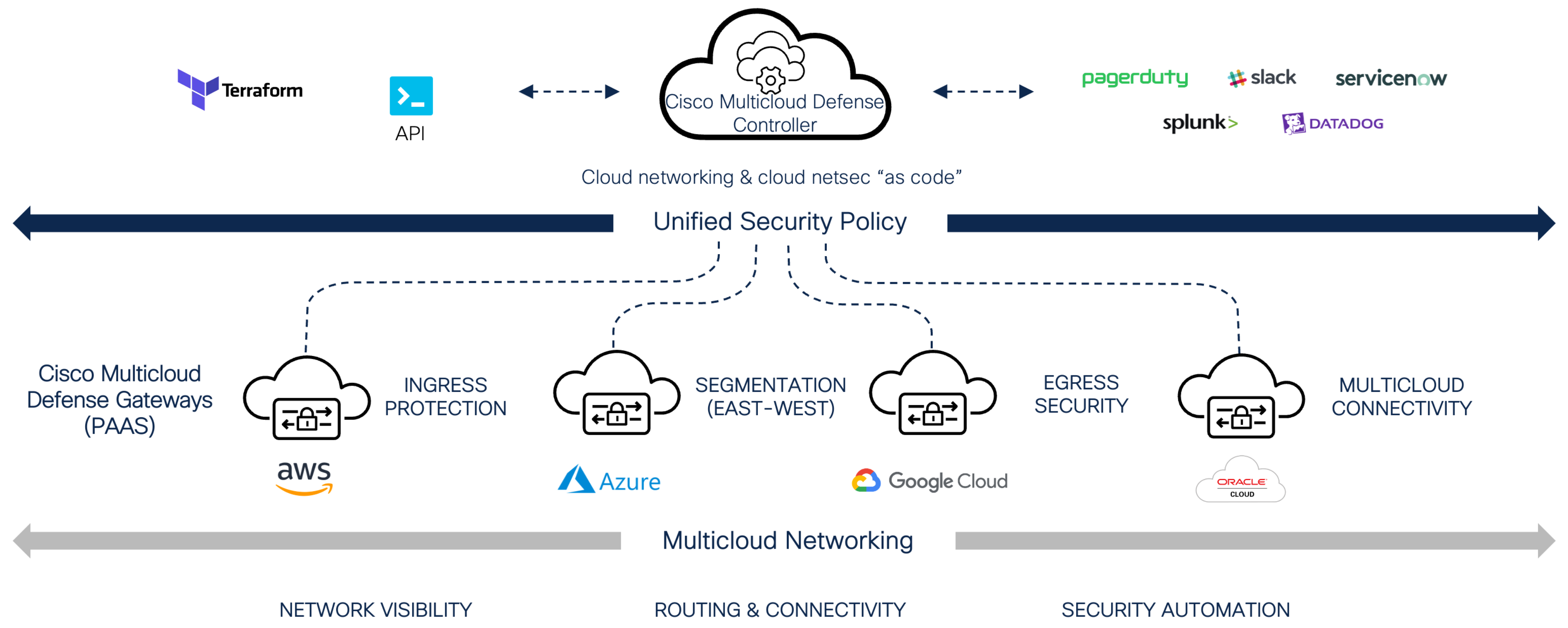
For issues protecting workloads in Azure or AWS, TAC will need access to the "Gateway" logs. Because these gateways run in your cloud VPC/VNET, you may need to provide temporary access or export logs from your cloud provider's native logging service (e.g., AWS CloudWatch).
Troubleshooting Common Issues in Cisco Security Cloud
While TAC is available for complex issues, many common hurdles can be resolved through standard troubleshooting steps.
Identity Provider (IdP) Synchronization Issues
Cisco Security Cloud relies heavily on external IdPs like Azure AD (Entra ID) or Okta. If users cannot authenticate:
- Verify the SAML certificate expiration date.
- Check the SCIM (System for Cross-domain Identity Management) logs to ensure user attributes are syncing correctly.
- Ensure the system clock on the local device is synchronized with an NTP server, as time skews can break SAML assertions.
Policy Propagation Delays
In a massive cloud-native architecture, changes made in the Control Center may take a few minutes to propagate globally. In 2026, the Control Center provides a "Propagation Status" bar. If a policy isn't taking effect, verify that the status is "Complete" across all relevant data centers.
Connectivity and Latency
If users experience slowness, the issue may be the path to the nearest Cisco Data Center. Use the "Cloud Reachability" tool within the Secure Client to determine if the user is being routed to a sub-optimal point of presence (PoP).
Best Practices for Proactive Support Management
To maximize the value of your Cisco Security Cloud investment and minimize downtime, consider the following operational strategies:
- Maintain an Updated Contact List: Ensure that the individuals authorized to open cases are correctly listed in the Cisco Service Contract Center (CSCC).
- Use the Cisco Support Mobile App: This allows administrators to track case updates and upload photos or logs directly from a mobile device during an emergency.
- Standardize on Tested Client Versions: Avoid running "bleeding edge" versions of the Cisco Secure Client on all machines. Maintain a "Gold Image" version that has been vetted in your environment.
- Review "Field Notices": Cisco regularly publishes Field Notices regarding software bugs or security vulnerabilities. Subscribing to these notifications allows you to patch proactively before a failure occurs.
FAQs
How do I find my Cisco Security Cloud contract number?
Your contract number is usually provided in the "Software Subscription" email sent at the time of purchase. You can also find it by logging into the Cisco Software Central portal or by contacting your Cisco account manager or authorized partner.
Can I open a support case if I bought through a partner?
Yes, but the workflow may differ. If you have "Partner Support," your first point of contact is the partner's help desk. If you have "Cisco Shared Support," you can contact Cisco TAC directly, but the partner is often involved in the resolution process.
What is the "Cisco Community" and should I use it?
The Cisco Community is a peer-to-peer forum where Cisco engineers and expert users share knowledge. It is excellent for "How-To" questions and configuration advice, but it is not a substitute for TAC when dealing with an active outage or a suspected software bug.
Is there an additional cost for the Cisco AI Assistant for Security?
As of 2026, the AI Assistant is generally included as a core feature of the Cisco Security Cloud platform tiers (Essentials, Advantage, and Premier), though some advanced "Expert" AI modules may require a Premier-level subscription.
How do I escalate a case if I am unhappy with the progress?
Every Cisco case has a "Request Manager Attention" button in the Support Case Manager. If the issue is critical and progress is stalled, you can also call TAC and ask to speak with the Duty Manager. Provide the case number and explain the business impact to justify the escalation.
Practical Recommendation
For any enterprise utilizing Cisco Security Cloud in 2026, the most effective strategy for support is proactive documentation. Ensure your team has a pre-defined "Incident Response Folder" containing your OrgID, contract numbers, and a current network diagram. Before opening a case, always run the AnyConnect DART tool or the Security Cloud Diagnostic collector; providing these logs at the moment of case creation can reduce the "Time to Resolution" by an average of 40%.
Image Gallery