Comprehensive Guide to Single Sign-On (SSO) in Cloud Service Security
Single Sign-On (SSO) in cloud service security is a centralized authentication process that allows users to access multiple, independent cloud applications and services using a single set of login credentials. By acting as a gateway, S...
Single Sign-On (SSO) in cloud service security is a centralized authentication process that allows users to access multiple, independent cloud applications and services using a single set of login credentials. By acting as a gateway, SSO eliminates password fatigue, streamlines administrative overhead, and strengthens security posture through unified identity management and enforced multi-factor authentication (MFA) protocols.
Contents
The Evolution of Authentication in Cloud Environments
The transition from on-premises infrastructure to distributed cloud ecosystems fundamentally changed the perimeter of corporate security. In the traditional model, security was defined by the physical network; once a user was "inside" the office, they were trusted. As of 2026, the perimeter is no longer a physical location but the identity of the user.
In the early days of cloud adoption, users were forced to manage dozens of separate passwords for different Software-as-a-Service (SaaS) platforms, such as Salesforce, Slack, and Microsoft 365. This led to "password sprawl," where users resorted to weak, recycled, or physically recorded passwords, creating massive vulnerabilities. SSO emerged as the essential solution to this problem, serving as the cornerstone of modern Identity and Access Management (IAM).
In the current landscape, SSO is not merely a convenience; it is a critical security requirement. Organizations now utilize SSO to implement Zero Trust architectures, where "never trust, always verify" is the guiding principle. By centralizing the point of authentication, security teams can apply granular access controls, monitor for anomalous behavior in real-time, and instantly revoke access across the entire cloud suite if a threat is detected.
Core Mechanisms of Cloud SSO: How It Works
Cloud-based SSO operates on a relationship of trust between three primary entities: the User, the Identity Provider (IdP), and the Service Provider (SP). Understanding the interaction between these entities is vital for any security professional.
The Identity Provider (IdP)
The IdP is the source of truth for user identities. In 2026, dominant IdPs include platforms like Microsoft Entra ID (formerly Azure AD), Okta, and Ping Identity. The IdP stores user credentials, manages their profiles, and performs the actual authentication process. When a user attempts to log in, the IdP verifies their identity—often requiring a biometric check or a hardware security key—and then "vouchers" for that user to other services.
The Service Provider (SP)
The SP is the cloud application or resource the user wants to access (e.g., AWS Console, HubSpot, or a proprietary cloud database). Instead of asking the user for a password, the SP trusts the IdP. It receives a digital "assertion" or "token" from the IdP, which proves the user has already been authenticated.
The Authentication Handshake
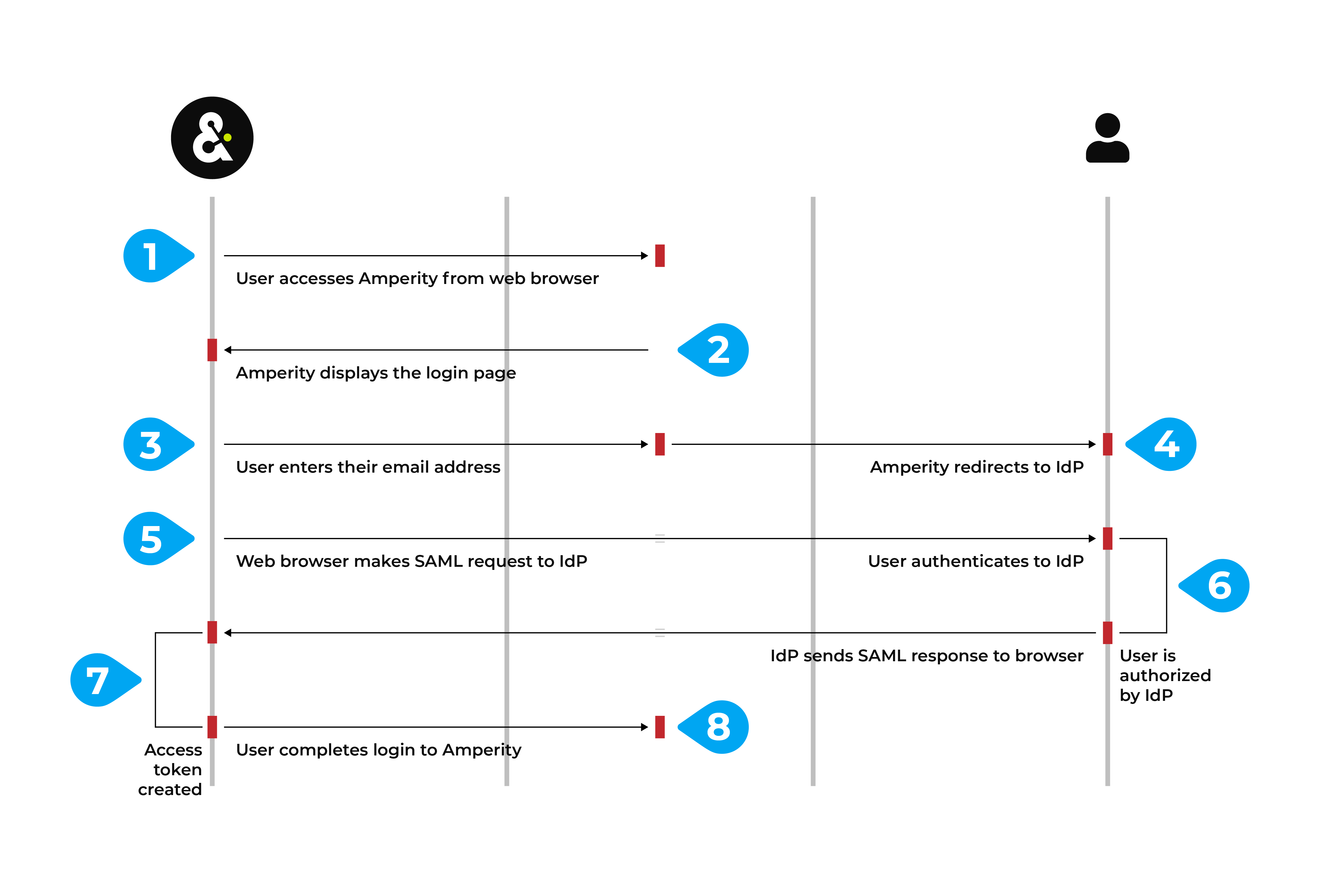
- Request: A user attempts to access a cloud application (SP).
- Redirection: The SP recognizes the user belongs to a specific organization and redirects the request to the organization's IdP.
- Authentication: The user provides credentials to the IdP.
- Token Issuance: Upon successful verification, the IdP generates a digitally signed security token.
- Access: The user’s browser passes this token back to the SP, which validates the signature and grants access without the user ever sharing their password with the SP.
Critical Protocols Powering Cloud SSO in 2026
The security of SSO depends entirely on the protocols used to transmit identity data. While several protocols exist, three dominate the enterprise cloud landscape.
1. SAML 2.0 (Security Assertion Markup Language)
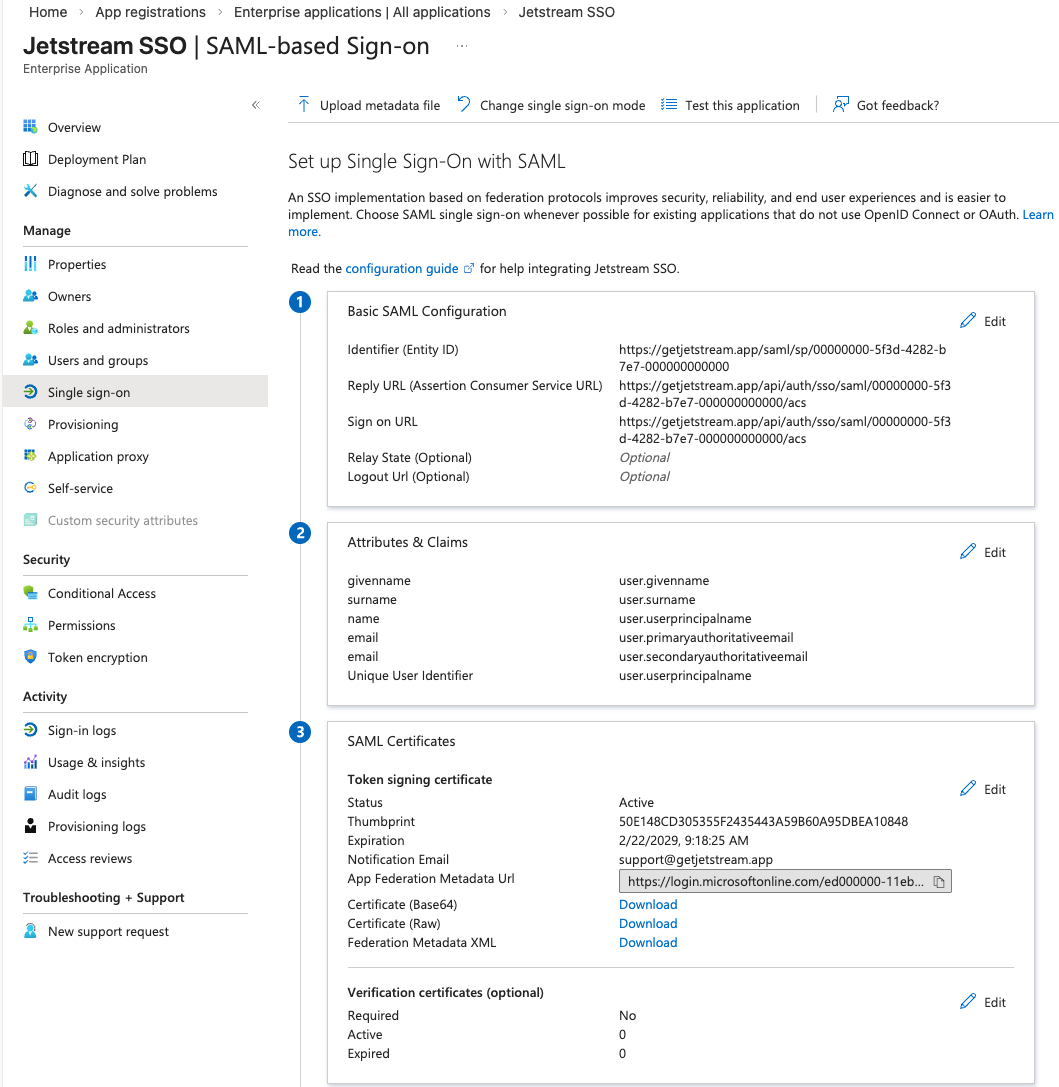
SAML remains the gold standard for enterprise web-based SSO. It uses XML (Extensible Markup Language) to exchange authentication and authorization data. SAML is particularly robust because it allows for the exchange of complex "claims" or "attributes," such as a user's department, job title, or security clearance level, which the SP can use to determine specific permissions within the app.
2. OIDC (OpenID Connect)
OIDC is a simpler identity layer built on top of the OAuth 2.0 framework. It uses JSON (JavaScript Object Notation) and is the preferred choice for modern web applications and mobile apps. OIDC is highly scalable and easier for developers to implement than SAML, making it the primary driver for SSO in consumer-facing cloud services and lightweight internal tools.
3. OAuth 2.0
It is important to distinguish between authentication and authorization. While SAML and OIDC handle who you are (authentication), OAuth 2.0 handles what you can do (authorization). In a cloud security context, OAuth allows one service to access data in another service on behalf of the user (e.g., allowing a project management tool to read files from Google Drive) without sharing the user's login credentials.
Comparison of Major SSO Protocols
| Feature | SAML 2.0 | OpenID Connect (OIDC) | OAuth 2.0 |
|---|---|---|---|
| Primary Goal | Authentication & Authorization | Identity/Authentication | Authorization/Delegation |
| Data Format | XML | JSON (JWT) | JSON |
| Common Use Case | Enterprise SaaS, Web Apps | Mobile Apps, Modern Web | API Access, App Integration |
| Complexity | High (Rigid & Secure) | Moderate (Developer Friendly) | Moderate |
| Transport | Browser-based Redirects | REST/HTTP APIs | REST/HTTP APIs |
Enhancing Cloud Security: Beyond Simple Logins
Implementing SSO provides several strategic security advantages that go beyond user convenience.
Centralized Security Policy Enforcement
Without SSO, an administrator would have to manually configure security settings (like password length or MFA requirements) for every single cloud application. With SSO, these policies are enforced at the IdP level. If the organization decides to transition to Passwordless Authentication (using FIDO2/WebAuthn), they only need to update the IdP configuration to apply that change to every integrated cloud service simultaneously.
Improved Offboarding and Lifecycle Management
One of the greatest risks in cloud security is "orphaned accounts"—accounts belonging to former employees that were never deactivated. If an employee has access to 20 different cloud tools, a manual deprovisioning process is prone to error. SSO solves this through a "Single Kill Switch." When an employee leaves, the administrator disables their account in the IdP, and access to all 20 tools is revoked instantly.
Visibility and Threat Detection
Centralizing logins provides a single point of audit for all access requests. In 2026, security teams use AI-driven analytics to monitor SSO logs for "impossible travel" (e.g., a login from New York followed by one from London ten minutes later) or brute-force attempts. This holistic view of user behavior makes it much easier to identify compromised credentials before a data breach occurs.
Managing the "Single Point of Failure" Risk
While SSO simplifies security, it also introduces a significant risk: the IdP becomes a "single point of failure." If a malicious actor compromises a user's SSO account, they potentially gain access to every application linked to that account. To mitigate this, organizations must implement a multi-layered defense strategy.
- Mandatory Multi-Factor Authentication (MFA): SSO should never be deployed without MFA. Using hardware keys (like YubiKeys) or encrypted push notifications is now the standard in 2026 to prevent session hijacking and phishing.
- Adaptive/Conditional Access: Security policies should change based on context. For example, a user logging in from a managed corporate laptop on the office network may only need their primary credentials. However, a user logging in from a personal device in a foreign country should be challenged with additional authentication factors or denied access to sensitive data.
- SCIM (System for Cross-domain Identity Management): To ensure identity data stays synchronized, organizations use SCIM to automate the provisioning and deprovisioning of users. This ensures that when a user's role changes in the IdP, their permissions are updated in the cloud apps in real-time.
Implementation Best Practices for 2026
- Audit Your Cloud Ecosystem: Before choosing an SSO provider, identify every cloud service currently in use. Determine which ones support SAML, OIDC, or require proprietary connectors.
- Prioritize Phishing-Resistant MFA: Move away from SMS-based codes or basic TOTP (Time-based One-Time Password) apps. In 2026, attackers frequently bypass these through SIM swapping or "MFA fatigue" attacks. Use FIDO2-compliant authenticators.
- Implement Least Privilege: SSO grants access, but it shouldn't grant excessive access. Use the attributes passed through SAML/OIDC to place users into specific roles (RBAC) within each application.
- Monitor and Test: Regularly audit SSO logs and conduct "red team" exercises to test the resilience of your IdP. Ensure that backup "break-glass" accounts are available in case the IdP itself experiences a service outage.
Troubleshooting Common SSO Issues
Even with mature protocols, SSO integrations can encounter hurdles. The most common issue is Clock Skew, where the system time on the IdP and the SP differ by more than a few minutes, causing the security token to be rejected as "expired." Administrators should ensure all servers are synchronized via NTP (Network Time Protocol).
Another frequent problem is Attribute Mismatch. If the SP expects the user's identity to be passed as an "Email Address" but the IdP sends a "Unique Employee ID," the login will fail. This requires careful mapping of metadata between the two systems during the initial setup phase.
FAQs
Is SSO more or less secure than individual passwords?
SSO is significantly more secure because it allows organizations to enforce a single, high-strength authentication standard (like biometric MFA) across all apps. While it does create a single point of failure, that point is much easier to defend, monitor, and audit than dozens of fragmented, weak passwords managed by individual users.
Can I use SSO with legacy applications that don't support modern protocols?
Yes, many 2026-era IdPs offer "App Proxies" or secure web gateways. These tools act as a bridge, allowing the IdP to authenticate the user and then "inject" credentials into the legacy application on the user's behalf, providing a unified experience even for older software.
What is the difference between SSO and "Same Sign-On"?
"Same Sign-On" usually refers to using the same password for different systems (often through directory synchronization), but the user still has to type it into each app separately. SSO involves a single authentication event that generates a token, allowing the user to move between apps without re-entering credentials.
Does SSO work for mobile and desktop applications?
Absolutely. While SAML was originally designed for browsers, OIDC and specialized SDKs allow SSO to work seamlessly across mobile apps (iOS/Android) and thick-client desktop applications, ensuring a consistent security policy across all devices.
Practical Recommendation
For organizations operating in the cloud in 2026, the recommended path is to adopt an OIDC-first approach for new applications while maintaining SAML 2.0 for established enterprise SaaS. Start by migrating your most sensitive data-handling applications to the SSO portal first, and mandate phishing-resistant MFA (such as Passkeys) for all users. This creates a foundation that balances high security with the frictionless user experience necessary for modern productivity.
Image Gallery