Maryland Judiciary Case Search: The Definitive 2026 Guide to Accessing Court Records
The Maryland Judiciary Case Search is the official digital portal for accessing public civil, criminal, and traffic records from the Maryland District and Circuit Courts. In 2026, it remains the essential tool for legal professionals a...
The Maryland Judiciary Case Search is the official digital portal for accessing public civil, criminal, and traffic records from the Maryland District and Circuit Courts. In 2026, it remains the essential tool for legal professionals and the public to track litigation, verify case statuses, and review judicial proceedings across all 24 Maryland jurisdictions through a centralized, real-time interface.
Contents
The Maryland Judiciary Case Search (MDJCS) serves as the primary window into the state’s judicial system. Whether you are a legal researcher, a business conducting due diligence, or a citizen tracking a personal matter, understanding the nuances of this system is critical. By 2026, the transition to the Maryland Electronic Courts (MDEC) system has been fully integrated across the state, ensuring that records from every county are accessible through this single point of entry. However, the depth of information available depends heavily on the court level and the specific nature of the case.
Navigating the Maryland Judiciary Case Search Interface
Accessing the database begins with an agreement to the terms of service, which outlines the limitations of the data provided. The interface is designed to be functional and lightweight, catering to high-volume searches while maintaining security. In 2026, the search engine supports multiple query types, though the most common remain name-based and case-number-based searches.
Searching by Individual or Company Name
When searching by name, precision is paramount. The system requires at least a last name, but providing a first name or initial significantly narrows the results. Users should be aware of the Soundex feature, which allows the system to search for names that sound similar to the input, accounting for common misspellings or phonetic variations.
Expert Search Strategy for 2026 To maximize accuracy when searching for common names, always utilize the Middle Name field if known. Furthermore, legal professionals frequently use the Date of Birth (DOB) filter to distinguish between individuals with identical names, especially in criminal background checks where precision is a matter of legal compliance.
Case Number and Citation Search
If you possess a specific case number or traffic citation number, this is the most direct route to a record. Case numbers in Maryland follow a specific nomenclature that indicates the court level, location, and year of filing. For example, a case number starting with a county code followed by a civil or criminal designation provides an immediate trail to the specific courthouse handling the matter.
Analyzing Search Results: District vs. Circuit Courts
The Maryland court system is bifurcated, and the data reflected in the Case Search database varies depending on whether the record originates from the District Court or the Circuit Court. Understanding these differences is vital for interpreting the outcome of a search.
| Feature | District Court Records | Circuit Court Records |
|---|---|---|
| Jurisdiction Type | Lower Court (Landlord-Tenant, Small Claims, Misdemeanors) | Trial Court (Felonies, Major Civil, Family Law) |
| Civil Claim Limit | Typically up to $30,000 | Claims exceeding $30,000 |
| Jury Trials | Not available at this level | Standard venue for jury trials |
| Case Codes | Often start with "D" or county-specific numeric strings | Often start with "C" or county-specific alphanumeric strings |
| Document Access | Summary data only on Case Search | Summary data with links to MDEC for authorized users |
The Maryland District Court handles the bulk of daily legal filings, including traffic citations and minor civil disputes. Conversely, the Circuit Court handles more complex matters, including most Maryland divorces, custody battles, and serious criminal charges. When a case is "prayed" for a jury trial or appealed from the District Court, the MDJCS will often show two separate entries: one for the original District Court filing and another for the new Circuit Court proceeding.
Detailed Information Found in Case Records
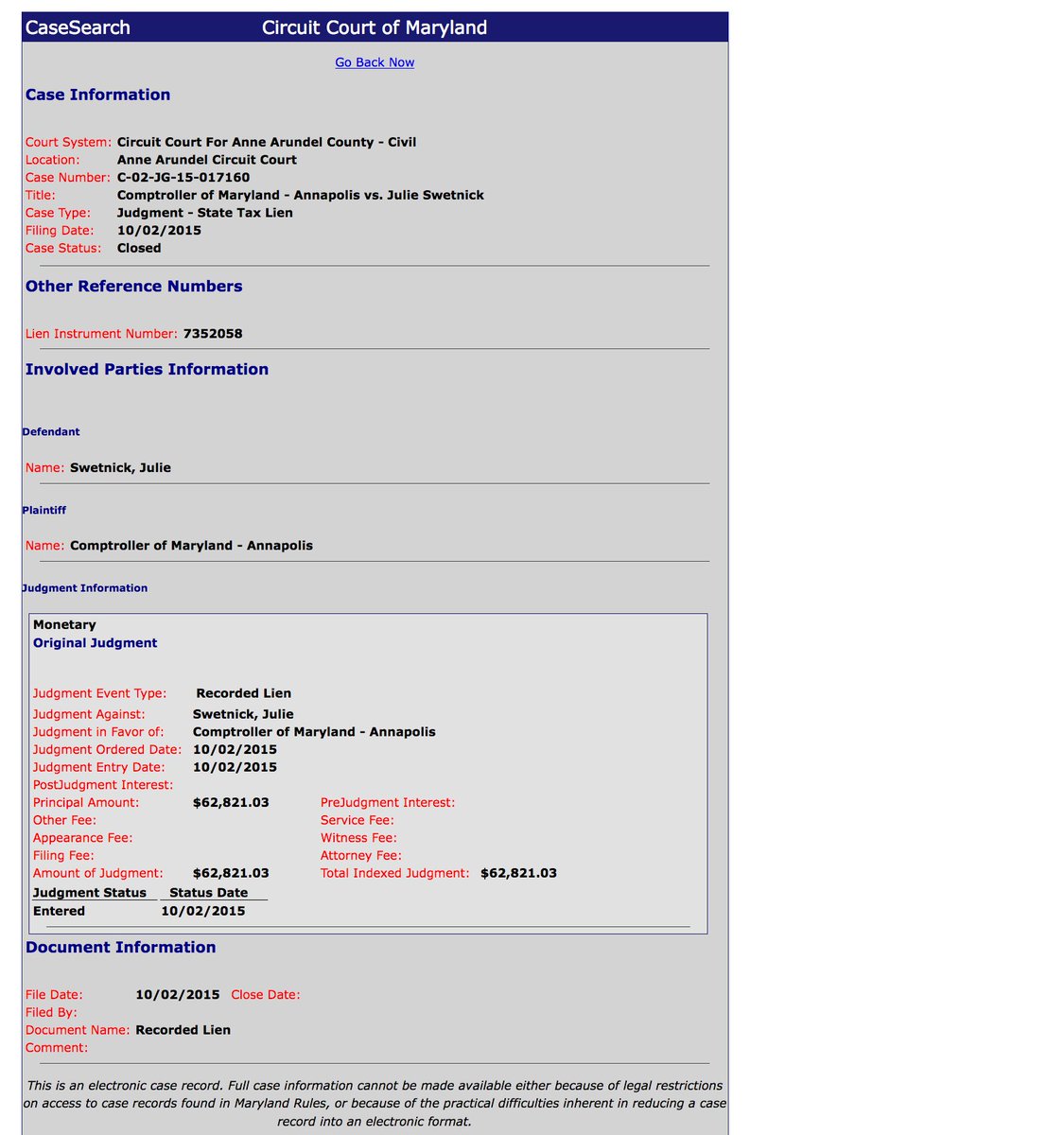
Once a specific case is selected, the system provides a comprehensive summary of the proceedings. In 2026, these summaries are more detailed than in previous iterations, offering a chronological view of the case's lifecycle.
- Header Information: Includes the case number, status (Active, Closed, or Inactive), and the presiding judge.
- Party Details: Lists the Plaintiff and Defendant, along with their legal representation. In 2026, attorney information is hyperlinked to the Maryland Client Protection Fund database for verification.
- Charge/Claim Information: For criminal cases, this section lists every charge, the degree (Felony or Misdemeanor), and the specific Maryland Code reference. For civil cases, it outlines the basis of the claim and the amount sought.
- Disposition and Sentencing: If the case is closed, the system displays the verdict (e.g., Guilty, Not Guilty, Nolle Prosequi, or Stet) and the details of any sentence or judgment.
- Event History: A line-by-line log of every motion filed, hearing held, and order issued by the court.
Interpretation of Legal Dispositions Understanding terms like Nolle Prosequi and Stet is essential. A Nolle Prosequi indicates the prosecutor has dropped the charges, while a Stet indicates the case has been moved to an inactive docket, often contingent on certain conditions being met by the defendant. Neither is equivalent to a "Guilty" verdict, but both will appear on a public record unless shielded or expunged.
Privacy, Shielding, and the Impact of 2026 Expungement Laws
Not all records remain public indefinitely. Maryland has some of the most progressive record-shielding and expungement laws in the United States. As of 2026, the "Redeem Act" and subsequent legislative updates have expanded the list of offenses eligible for expungement and shortened the waiting periods for non-violent crimes.
The Expungement Process
When a record is expunged, it is physically and electronically removed from the Maryland Judiciary Case Search database. This means that a search for that individual will yield "No Results Found" for that specific case. Expungement is usually available for cases resulting in acquittal, dismissal, or certain non-violent convictions after a designated period.
Shielding vs. Expungement
Shielding is distinct from expungement. Shielding limits public access to certain records—such as those involving domestic violence protective orders or specific non-violent misdemeanors—making them invisible to the general public and most employers while remaining accessible to law enforcement and the courts. In 2026, the MDJCS automatically filters shielded records, ensuring that only legally permissible data is displayed.
Technical Specifications and System Maintenance
The Maryland Judiciary Case Search is a high-availability system, but it is subject to routine maintenance that can affect access. Users should be aware of the following technical parameters to ensure a smooth experience.
- Browser Compatibility: The system is optimized for modern HTML5 browsers. In 2026, users on legacy browsers may experience rendering issues with the complex tables used for event histories.
- Update Frequency: While most entries are updated in real-time as the clerk's office enters data, there can be a lag of 24 to 48 hours for certain rural jurisdictions or during high-volume periods.
- Data Limits: To prevent scraping and system degradation, the Maryland Judiciary employs rate-limiting. Users attempting to perform thousands of automated searches per hour may find their IP addresses temporarily restricted.
- MDEC Integration: For attorneys and authorized researchers, the Case Search portal acts as a gateway to the MDEC (Maryland Electronic Courts) system, where actual PDFs of filed documents can be viewed. The general public, however, is limited to the summary data provided on the main portal.
Troubleshooting Common Search Issues
Even with a robust system, users often encounter hurdles when trying to locate specific information. Addressing these issues requires a systematic approach to data entry and filter adjustment.
- No Results for a Known Case: Verify that the name is spelled exactly as it was at the time of filing. Check for hyphenated names or suffixes (Jr., Sr., III) which are often placed in separate fields or included in the last name field depending on the clerk's entry style.
- Incorrect Case Status: If a case shows as "Active" but you know it has concluded, the clerk may not have yet "closed" the case in the system. This is common in complex civil litigation where post-trial motions are pending.
- Redacted Information: In cases involving minors (Juvenile Court) or sensitive medical information, you may see "Redacted" or "Confidential" notations. These records are not accessible to the public via Case Search due to Maryland Rule 16-900.
Professional Tip on Venue Confusion If you cannot find a case in the county where the incident occurred, search neighboring counties or the "All Maryland" option. Frequently, cases are filed in the jurisdiction where the defendant resides or where the business is incorporated, rather than where the dispute originated.
Frequently Asked Questions
Why can't I find a specific criminal record on the Maryland Case Search?
If a record does not appear, it may have been expunged, shielded, or the case may be handled in Juvenile Court, which is generally not public. Additionally, if the case is very recent, there may be a short delay between the filing and its appearance online.
Is there a fee to use the Maryland Judiciary Case Search in 2026?
No, the public search portal remains free to use for all citizens. However, obtaining certified paper copies of records from a courthouse clerk still requires a fee, typically ranging from $0.50 to $2.00 per page depending on the jurisdiction.
Can I see my own traffic ticket on the site?
Yes, most traffic citations issued by Maryland State Police or local county officers will appear on Case Search within 5 to 10 days of the violation. You can search using your name or the citation number printed on the ticket.
How do I correct an error I found in a court record?
To correct an error, you must file a "Motion to Correct Clerical Error" with the specific court that holds the record. The Maryland Judiciary Case Search team cannot change data; they only display what is entered by the court clerks.
Does the Maryland Case Search include federal court cases?
No, the MDJCS only includes Maryland State Court records. For federal cases (U.S. District Court for the District of Maryland), you must use the PACER (Public Access to Court Electronic Records) system, which requires a separate registration and typically involves per-page fees.
Optimizing Your Legal Research Strategy
The Maryland Judiciary Case Search is more than just a search engine; it is a vital component of the state's commitment to judicial transparency. In 2026, as data becomes increasingly central to legal and business decision-making, the ability to navigate this database with precision is an invaluable skill. For the best results, always cross-reference Case Search data with official court filings when high-stakes decisions are involved. If you are a legal professional, ensure your MDEC credentials are active to bridge the gap between the public summary and the full case file. For the general public, utilize the filtering tools to cut through the noise and find the specific information needed for your inquiry.
Image Gallery