How to Reschedule Your California DMV Appointment Successfully in 2026
Rescheduling a California DMV appointment is completely free and can be done online through the official California Department of Motor Vehicles portal using your original confirmation code, or by visiting a DMV office in person. You d...
Rescheduling a California DMV appointment is completely free and can be done online through the official California Department of Motor Vehicles portal using your original confirmation code, or by visiting a DMV office in person. You do not need to cancel your existing slot before booking a new one, but timely updates help avoid long wait times.
Contents
Navigating the California Department of Motor Vehicles often feels like a daunting task, especially when unexpected schedule conflicts arise. Whether you need to update your driver's license, register a vehicle, or apply for a Real ID, managing your appointment efficiently is vital to saving hours of waiting in line. The California DMV has modernized many of its digital services to give drivers better control over their bookings. Understanding the exact protocols, digital tools, and alternative options ensures you never lose your place in the administrative queue.
Understanding the California DMV Scheduling Framework
The California DMV operates on a centralized digital reservation system designed to streamline visitor flow across hundreds of field offices statewide. When you originally booked your appointment, the system generated a unique confirmation number and sent a confirmation email or text message. This alphanumeric string is your key to modifying, checking, or rescheduling your booking without starting the entire process from scratch.
Unlike private scheduling software that forces users to cancel an active appointment before reserving a new slot, the California DMV ecosystem allows certain flexibilities, though direct modification options depend heavily on how close your appointment date is. If your appointment is more than 24 hours away, the online portal typically allows you to adjust your details or pick a new time slot seamlessly.
Why You Might Need to Reschedule
- Personal or professional schedule conflicts that make travel to a field office impossible.
- Incomplete paperwork or missing physical documentation, such as proof of residency or social security verification, which cannot be gathered before the scheduled time.
- Sudden illness or emergency situations on the day of the visit.
- Deciding to switch from an in-person office visit to an online digital transaction for services like vehicle registration renewals.
Prerequisites and Information Required Before Modifying Your Booking
Before attempting to access the DMV portal to alter your schedule, gather the necessary identification and reference data. Attempting to log into the system without the correct identifiers will result in system lockouts or the inability to locate your file.
| Required Item | Description | Where to Find It |
|---|---|---|
| Confirmation Code | Unique alphanumeric tracking number assigned when booking. | Original confirmation email or SMS text message. |
| License or ID Number | Your current California driver's license or identification card number. | Physical card, renewal notice, or temporary paper document. |
| Last Name | Exact legal last name registered with the DMV. | Official identification documents. |
| Birth Date | Your date of birth formatted correctly for security validation. | Personal records. |
Having these details ready prevents session timeouts and ensures a frictionless digital experience when navigating the state's web infrastructure.
Step-by-Step Guide to Rescheduling Your DMV Appointment Online
Using the official state portal is the fastest, most reliable method to change your appointment date and time. Follow this structured workflow to complete the process correctly.
- Navigate to the Official Portal: Open your web browser and go to the official California DMV website at dmv.ca.gov. Avoid third-party aggregator sites that charge service fees for making or changing appointments.
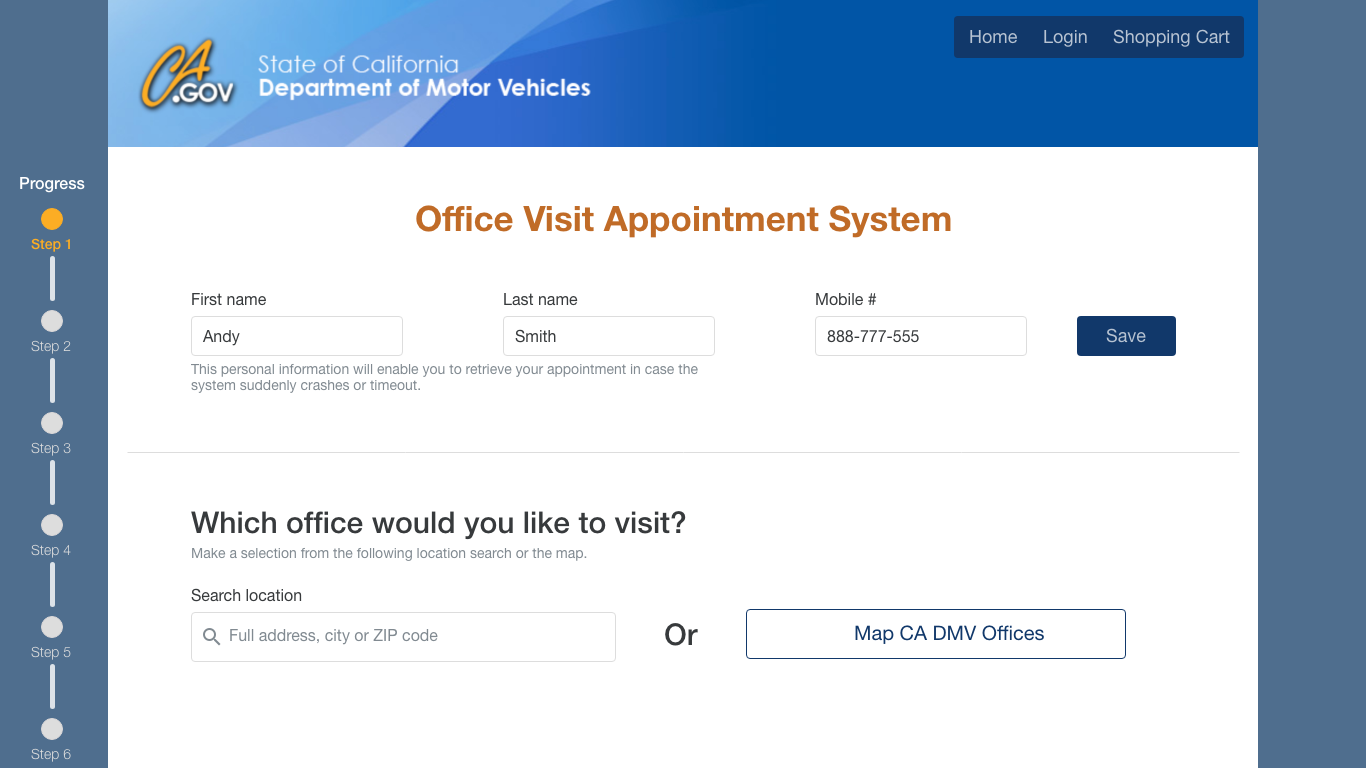
- Access the Appointment Manager: Locate the "Appointments" section on the homepage and select the option to check, modify, or cancel an existing appointment.
- Enter Your Verification Data: Input your unique confirmation code along with your driver's license number or the identification number used during the initial booking.
- Select the Modification Option: Choose the prompt to change your date or time. The system will display the current details of your scheduled visit.
- Choose a New Date and Time: Browse the calendar interface for participating field offices near you. Select an available slot that aligns with your updated availability.
- Confirm and Save: Review the updated appointment details carefully. Submit the change and ensure you receive a new confirmation message or email reflecting the updated schedule.
Exploring Alternative Methods: Phone and In-Person Adjustments
While the online portal handles the vast majority of scheduling changes, alternative pathways exist for individuals experiencing technical difficulties or digital access barriers.
Contacting the DMV Customer Service Center
You can reach the California DMV automated phone service or speak directly with a customer service representative. Call the primary public line at 1-800-777-0133. Be prepared for extended wait times, especially during peak morning hours and lunch rushes. When connected, provide your confirmation code and personal identification details to the representative, who can manually cancel or reschedule your slot within the mainframe.
Visiting a Field Office Directly
If your appointment is happening today and an emergency prevents you from attending, you can visit your designated field office and speak with the greeter at the entrance. While field offices are not strictly obligated to honor missed appointments as walk-ins, explaining your situation politely to the manager on duty can occasionally result in your being worked into the daily queue, though wait times may be substantial.
Comparing Your Options for DMV Service Management
Choosing how to interact with the California DMV depends on your technical comfort level, time constraints, and the urgency of your administrative needs.
| Service Method | Speed & Efficiency | Convenience | Best Used For |
|---|---|---|---|
| Online Portal | Instantaneous | High (Accessible 24/7 from any device) | Standard rescheduling, cancellations, and initial bookings. |
| Phone Support | Moderate to Slow | Medium (Subject to call queues and operating hours) | Technical glitches on the website or complex account errors. |
| In-Person Visit | Slow | Low (Requires physical travel and waiting) | Same-day emergencies or document drop-offs. |
Important Policies and Potential Pitfalls to Avoid
Failing to properly manage a DMV appointment can disrupt your timeline, particularly if you are facing hard deadlines such as driver's license expirations, registration grace periods, or DMV compliance holds.
Crucial Timing Rule: Always attempt to reschedule at least 24 to 48 hours before your scheduled time slot. Waiting until the exact hour of your appointment increases the risk that the system will automatically mark you as a no-show, locking you out of quick re-booking options and forcing you to join back-of-the-line availability.
Common Mistakes to Watch Out For
- Using Unauthorized Third-Party Websites: Numerous lookalike websites charge exorbitant fees for scheduling DMV appointments, which are entirely free through the state. Always verify the URL ends in .gov.
- Failing to Save the New Confirmation: Always take a screenshot or print out the updated confirmation page after rescheduling. Never rely solely on memory.
- Ignoring Document Requirements: Use the extra time gained by rescheduling to double-check that you possess all physical documents required for your specific transaction, such as two proofs of residency for a Real ID.
Frequently Asked Questions About California DMV Appointments
Can I reschedule my California DMV appointment on the same day?
Online systems usually lock modifications 24 hours prior to the scheduled time. If you need a same-day change, you must call customer service or visit the field office directly to explain your circumstances to an on-site supervisor.
Is there a financial penalty or fee for rescheduling a DMV appointment?
No, the California DMV does not charge any fees to schedule, modify, or cancel an appointment. Any website demanding payment to change your appointment date is a scam.
What happens if I completely miss my scheduled DMV appointment?
If you miss your appointment without canceling or rescheduling, your slot is forfeited. You will need to log back into the online portal and select a brand-new available date, which may be weeks away depending on office demand.
Can I change my appointment location to a different DMV field office?
Yes. When using the online appointment manager, the system allows you to select any participating field office within the state, letting you switch locations if a closer or less busy office opens up a convenient time slot.
Do I need an appointment for simple tasks like submitting documents?
While some offices accept limited walk-ins for specific quick transactions, appointments are strongly recommended for all services to guarantee service within a reasonable timeframe. Always check the daily operational status of your local field office before traveling.
Secure Your New Time Slot Today
Managing your DMV obligations proactively saves valuable time and eliminates unnecessary stress. Head over to the official California DMV portal with your confirmation code in hand to secure a new date that fits your schedule, ensuring your licensing and vehicle documentation remain fully compliant with state regulations.
Image Gallery