Why Is Cloud Storage or a Local Computer More Secure? A Cybersecurity Analysis
Determining whether a cloud environment or a local computer is more secure depends on your threat model, operational capacity, and resource allocation. Cloud platforms typically excel in physical infrastructure protection, automated se...
Determining whether a cloud environment or a local computer is more secure depends on your threat model, operational capacity, and resource allocation. Cloud platforms typically excel in physical infrastructure protection, automated security updates, and enterprise encryption. Conversely, local computers offer complete physical sovereignty, isolation from remote network exploits, and freedom from third-party vendor risks.
Contents
Understanding the Security Baseline: Cloud vs. Local Computer
Evaluating cybersecurity between cloud platforms and local computers requires defining what each architecture actually encompasses. A local computer relies on on-premises hardware, endpoint security software, and direct user management. Security boundaries are physical and local; data resides on hard drives or solid-state drives within the device, and network protection depends entirely on local firewalls and user actions.
Cloud computing, by contrast, operates on distributed infrastructure managed by hyper-scale providers such as Amazon Web Services (AWS), Microsoft Azure, and Google Cloud Platform (GCP). In this model, computing power, storage, and networking are virtualized across massive global data centers. Security is maintained through multi-tenant isolation, identity access management (IAM), hardware security modules (HSMs), and continuous telemetry monitoring.
The fundamental debate is not about which platform is inherently immune to cyber threats, but rather how each architecture mitigates risk:
- Cloud Architecture: Centralizes security management, shifting the burden of infrastructure hardening, physical security, and patching to dedicated cybersecurity teams. However, it introduces risks related to internet connectivity, complex identity access governance, and multi-tenant configurations.
- Local Computer: Decentralizes security, giving the owner total physical control and data sovereignty while eliminating third-party access risks. However, it relies heavily on individual user discipline for patch management, physical device protection, and backup execution.
Why Cloud Infrastructure Is Often Considered More Secure
For most individuals and organizations, cloud environments provide a baseline level of cybersecurity that is practically impossible to replicate on a standalone local computer or small private server. Hyper-scale cloud providers spend billions annually on defensive cybersecurity infrastructure, threat intelligence, and compliance frameworks.
| Cloud Security Advantages | Details |
|---|---|
| 1. Physical Security | Biometric access, 24/7 armed guards |
| 2. Automated Patching | Instant hypervisor & OS updates |
| 3. Advanced Encryption | Default AES-256 at rest, TLS in transit |
| 4. Telemetry & Monitoring | Global AI-driven threat intelligence |
| 5. High Availability | Multi-region redundancy & auto-backup |
Enterprise-Grade Physical and Environmental Protections
The physical protection surrounding tier-four cloud data centers vastly exceeds the physical security of a home office or standard enterprise building. Facilities housing cloud servers feature perimeter fencing, vehicle barriers, 24/7 armed security personnel, biometric multi-factor authentication for entry, and strict access logs.
Environmental protections are equally robust. Cloud facilities implement redundant power supplies (uninterruptible power supply systems and diesel generators), industrial-grade climate control, and advanced early-warning fire suppression systems that suppress electrical fires without damaging hardware. A local computer, by comparison, remains vulnerable to theft, physical tampering, localized power surges, flooding, and hardware failure due to overheating.
Automated Patching and Vulnerability Management
Unpatched software vulnerabilities remain one of the primary vectors for computer compromises. On local computers, updates for operating systems, firmware, and third-party applications often rely on user intervention or scheduled reboots that users deliberately delay.
Cloud environments utilize automated, centralized patch management systems. Cloud infrastructure providers automatically apply hot-patches to underlying hypervisors, hardware firmware, and platform services without disrupting active workloads. This ensures that zero-day vulnerabilities in basic infrastructure are mitigated system-wide within hours of discovery, protecting users who might otherwise take weeks to manually apply a patch to a local computer.
Encryption Frameworks and Data Resilience
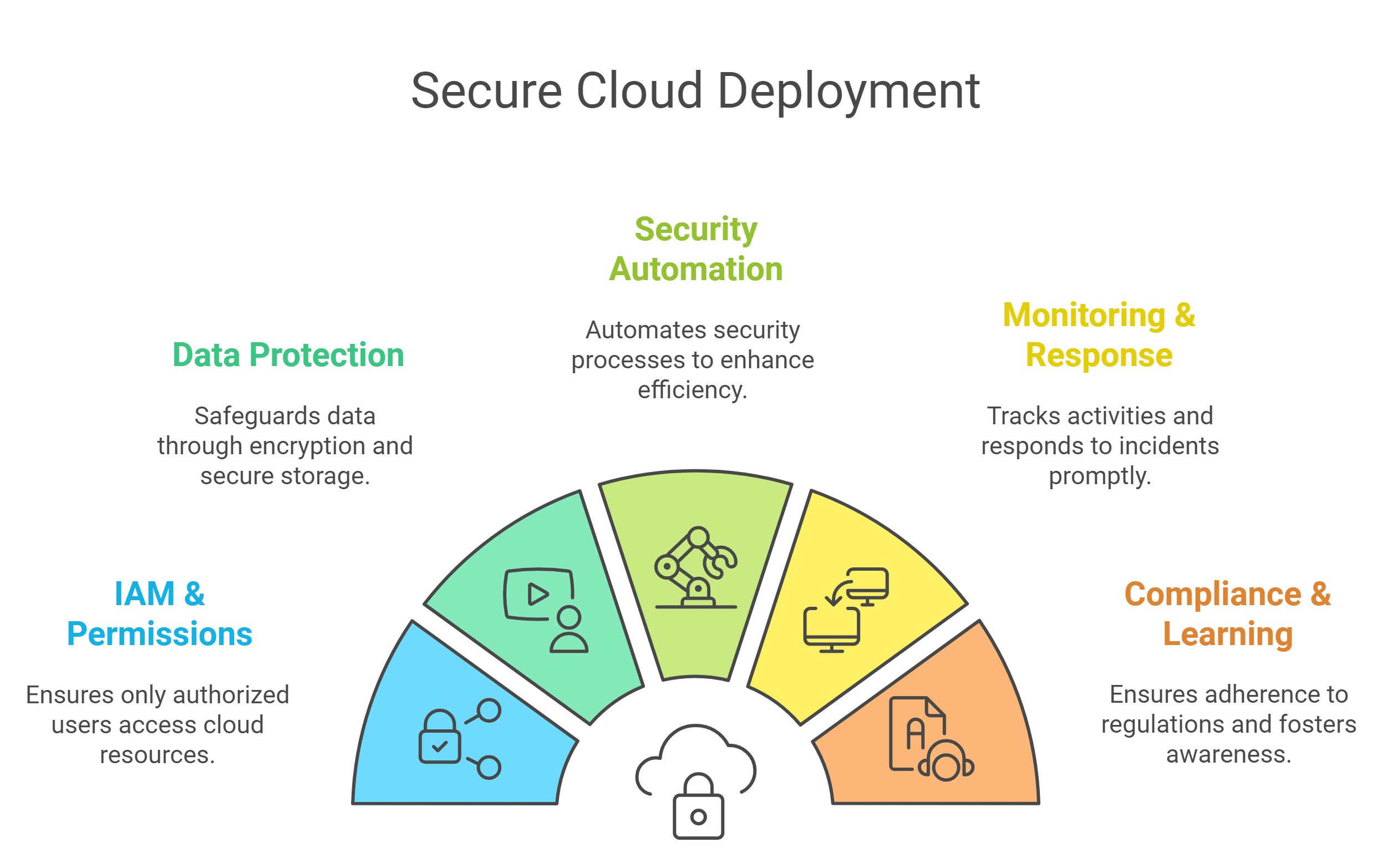
Modern cloud platforms enforce cryptographic standards by default. Data stored in the cloud is typically encrypted at rest using AES-256 encryption standards and encrypted in transit using Transport Layer Security (TLS 1.3). Key management services (KMS) allow enterprises to manage cryptographic keys via Hardware Security Modules (HSMs) without exposing raw keys to memory.
Furthermore, cloud systems provide near-infinite data resilience. Through automated replication across multiple Availability Zones (AZs) and geographic regions, data in the cloud is protected against catastrophic hardware failures. If an entire data center experiences an outage, data remains available from redundant sites. Recovering from a destroyed or corrupted hard drive on a local computer, conversely, is impossible without off-site manual backups.
Continuous Threat Intelligence and Telemetry
Cloud providers analyze petabytes of security telemetry daily across millions of global endpoints. This operational scale enables cloud SOC (Security Operations Center) teams to identify emerging malware patterns, nation-state attack tactics, and automated botnet behaviors in real time. When a new threat vector is detected in one region, defensive signatures and firewall rules are automatically deployed globally across the cloud provider's network, benefiting all platform tenants simultaneously.
Why a Local Computer Can Be More Secure
Despite the immense security investments made by cloud giants, local computers offer distinct security advantages under specific threat models—particularly when absolute privacy, physical isolation, or control over network interfaces is required.
| Local Computer Advantages | Details |
|---|---|
| 1. Air-Gapping Capability | Total disconnection from internet |
| 2. Data Sovereignty | Zero third-party access or subpoenas |
| 3. No Cloud Misconfig Risk | No S3 exposure or API credential leaks |
| 4. Targeted Attack Surface | Isolated device vs. high-value cloud |
| 5. Zero Network Dependency | Full functionality during outages |
Absolute Physical Sovereignty and Confidentiality
When data resides exclusively on a local computer, the data owner retains 100% physical sovereignty over the media. There are no third-party cloud administrators, hypervisor layers, or hosting employees who could theoretically gain unauthorized access due to insider threats or compromised administrative credentials.
Additionally, data on local storage is not subject to third-party subpoenas or legal demands served directly to cloud providers without the device owner's immediate knowledge. For investigative journalists, legal professionals, and confidential research projects, maintaining physical control over storage devices ensures that access control policies are governed entirely by the physical owner.
Elimination of Remote Cloud Attack Vectors
Cloud environments rely heavily on Application Programming Interfaces (APIs), Identity and Access Management (IAM) permissions, and web-based control consoles. Misconfigurations—such as accidentally exposing a cloud storage bucket to the public internet or misconfiguring an IAM role—are among the leading causes of modern data breaches.
A local computer that is not connected to a domain controller or cloud management platform completely eliminates these attack vectors:
- No API Exploitation: Attackers cannot exploit cloud control-plane APIs to exfiltrate local data remotely.
- No Multi-Tenant Side-Channel Attacks: While rare, side-channel attacks (such as hypervisor escape vulnerabilities) theoretically allow malicious virtual machines to read data from neighboring VMs on shared hardware. Local hardware dedicated to a single operating system eliminates multi-tenant exposure entirely.
- No Account Takeovers via Credential Stuffing: Local authentication (such as device-bound PINs, local passwords, or TPM-backed biometrics) cannot be compromised through web-based credential stuffing or remote phishing attacks targeting web login portals.
Capability for True Air-Gapping
The most secure computer is one that is physically disconnected from all networks—a practice known as air-gapping. Air-gapped local computers are completely immune to remote network-borne attacks, ransomware distribution channels, remote keyloggers, and online eavesdropping.
Because cloud computing inherently requires an active internet connection to process, store, and access data, a cloud system can never be air-gapped. For highly sensitive operations—such as managing offline cryptographic master keys, signing root certificates, or storing proprietary source code—an air-gapped local computer provides a defense barrier that cloud infrastructure cannot replicate.
The Shared Responsibility Model vs. Total Local Ownership
A major point of confusion when evaluating cloud security is assuming that the cloud provider manages all security. In reality, cloud security operates under the Shared Responsibility Model, a framework defined by bodies like the NIST Cloud Computing Security Reference Architecture.
| Shared Responsibility Model | Scope |
|---|---|
| Customer Responsibility | Data Classification, IAM Configuration, Endpoint Security, Network Rules |
| Provider Responsibility | Physical Data Centers, Host OS, Hypervisors, Hardware Infrastructure |
Under this model:
- Security OF the Cloud: The provider (e.g., AWS, Microsoft, Google) handles physical security, hardware maintenance, edge network protection, and hypervisor virtualization layers.
- Security IN the Cloud: The customer remains responsible for managing identity access policies, encrypting sensitive application data, configuring security group firewalls, patching tenant operating systems, and preventing user credential theft.
If an enterprise stores sensitive files in a cloud bucket but sets the access permission to "Public," the cloud infrastructure itself remains secure, but the customer's implementation causes a data breach.
With a local computer, there is no shared responsibility. The owner assumes 100% of the operational burden—including physical security, operating system updates, local disk encryption setup (e.g., BitLocker or FileVault), firewall rules, and malware protection. While this places significant demands on the user, it eliminates security gaps caused by unclear divisions of responsibility.
Comparative Matrix: Security & Operational Characteristics
The following table summarizes how cloud platforms and local computers evaluate across core security, technical, and operational dimensions.
| Security & Operational Dimension | Cloud Computing Infrastructure | Local Computer / On-Premise System |
|---|---|---|
| Physical Security | Exceptional: 24/7 biometric controls, armed guards, redundant power/cooling systems. | User-Dependent: Vulnerable to theft, physical tampering, localized disasters, and loss. |
| Patch Management | Automated: Core hypervisors, infrastructure, and platform services patched instantly. | Manual/User-Driven: Relies on user reboots, manual approvals, and system maintenance. |
| Data Encryption | Default Enterprise Standard: AES-256 at rest, TLS 1.3 in transit, cloud HSM key management. | Optional/Manual: Requires explicit user configuration (e.g., BitLocker, FileVault, LUKS). |
| Misconfiguration Risk | High: Complex IAM roles, open storage buckets, and public API management vulnerabilities. | Low: Limited to local settings; no exposed remote cloud management APIs. |
| Attack Surface | Public Edge: Accessible worldwide via web APIs and internet endpoints; target for DDoS. | Local Endpoint: Restricted to local network; near-zero remote internet exposure if offline. |
| Offline Resilience | None: Requires reliable internet connectivity to access resources and data. | Complete: Full functionality and access to local data without an active network connection. |
| Data Redundancy & Recovery | High: Multi-region automated replication, snapshots, and rapid disaster recovery options. | Low: Dependent on manual local backups, external drives, or secondary physical devices. |
| Compliance & Regulatory Control | Standardized: ISO 27001, SOC 2, HIPAA certified out-of-the-box; shared audit burden. | Custom: Complete sovereignty over physical placement, but manual audit compliance setup. |
Evaluating Threat Models: Which Is Right for You?
Choosing whether to rely on a cloud platform or a local computer requires evaluating your specific threat model, technical capacity, and security goals.
- What is your Primary Goal?
- Automated Infrastructure, Continuous Telemetry Updates, Distributed Off-Site Backups
- Choose Cloud Computing
- Absolute Physical Isolation, Direct Local Sovereignty, Zero Internet Connection
- Choose Local Computer
- Automated Infrastructure, Continuous Telemetry Updates, Distributed Off-Site Backups
Choose Cloud Infrastructure If:
- You Lack Dedicated Security Staff: You want baseline security (encryption, access controls, patching) managed by dedicated security engineering teams.
- You Require Multi-Location Access: Users need to securely collaborate across geographical locations using centralized access controls and single sign-on (SSO).
- Disaster Recovery Is Critical: You require automated, off-site redundancy to protect against hardware failures, fires, ransomware, or natural disasters.
- You Need Rapid Scalability: Your operations require instant scaling of computing power and security services without acquiring new hardware.
Choose a Local Computer If:
- You Manage Extremely Sensitive Data: You handle restricted operational files, regulatory data requiring local storage, or sensitive intellectual property that must not touch public networks.
- You Operate Offline or in Low-Bandwidth Environments: Your workflow requires zero latency or must function securely without an active internet connection.
- You Want Zero Third-Party Reliance: You cannot accept the risk of cloud vendor downtime, policy changes, legal subpoenas to third parties, or account lockouts.
- You Can Maintain an Air-Gapped Environment: You have the discipline to isolate the computer physically, apply patches manually via secure media, and manage offline encrypted backups.
Frequently Asked Questions
Can malware infect cloud storage the same way it infects a local computer?
Yes. If a local computer contracts ransomware or syncs infected files to a cloud drive (such as OneDrive, Google Drive, or Dropbox), those encrypted or malicious files will be uploaded to the cloud. However, modern cloud services offer versioning capabilities that allow users to rollback storage drives to an uninfected point in time, mitigating the permanent destruction typical of ransomware on local drives.
Is data on a local computer private if the drive is not encrypted?
No. If a local computer's storage drive is unencrypted, anyone with physical access to the machine can bypass operating system passwords using a bootable USB drive to read, copy, or modify all stored files. To make a local computer physically secure, full-disk encryption solutions such as Windows BitLocker, macOS FileVault, or Linux LUKS must be enabled.
Are cloud data centers safe from insider threats?
Cloud providers enforce zero-trust administrative frameworks, strict background checks, localized access segmentation, and automated log auditing to prevent employee tampering. Furthermore, if you encrypt your data prior to uploading it using keys managed on your own Hardware Security Module (HSM), cloud provider employees cannot read your stored data even if they gain physical access to the storage servers.
How does Zero Trust Architecture apply to local vs. cloud security?
NIST Special Publication 800-207 defines Zero Trust Architecture (ZTA) as a security framework based on the principle of "never trust, always verify." Cloud environments natively integrate Zero Trust principles through continuous identity verification, contextual access policies, and micro-segmentation. Applying Zero Trust to a local computer requires configuring multi-factor authentication, endpoint detection software, strict local firewall policies, and least-privilege account permissions.
Strategic Recommendations for Optimal Security
Rather than viewing cybersecurity as a strict choice between cloud systems and local computers, robust defense strategies typically combine the strengths of both architectures through a hybrid approach:
- Implement the 3-2-1 Backup Strategy: Maintain at least three copies of your data across two different media types, with at least one copy stored off-site in an encrypted cloud environment.
- Harden Local Endpoints: Ensure all local computers utilize mandatory Full Disk Encryption (FDE), biometric or hardware security keys (FIDO2/WebAuthn) for authentication, and automatic operating system updates.
- Enforce Cloud Access Controls: If using cloud platforms, apply the principle of least privilege using Identity and Access Management (IAM) controls, mandate Multi-Factor Authentication (MFA) across all accounts, and conduct regular security audit logging.
- Air-Gap Critical Secrets: Keep highly sensitive offline material (master encryption keys, cold cryptocurrency wallets, confidential archives) on dedicated, un-networked local computers, while running daily operational applications on secure cloud infrastructure.
Image Gallery