Mastering MyChart Baptist: Your 2026 Guide to Digital Patient Care
MyChart Baptist is the secure, centralized digital health portal used by patients within the Baptist Health networks—primarily Baptist Health South Florida and Baptist Health (Kentucky/Indiana)—to manage their medical journey. This pla...
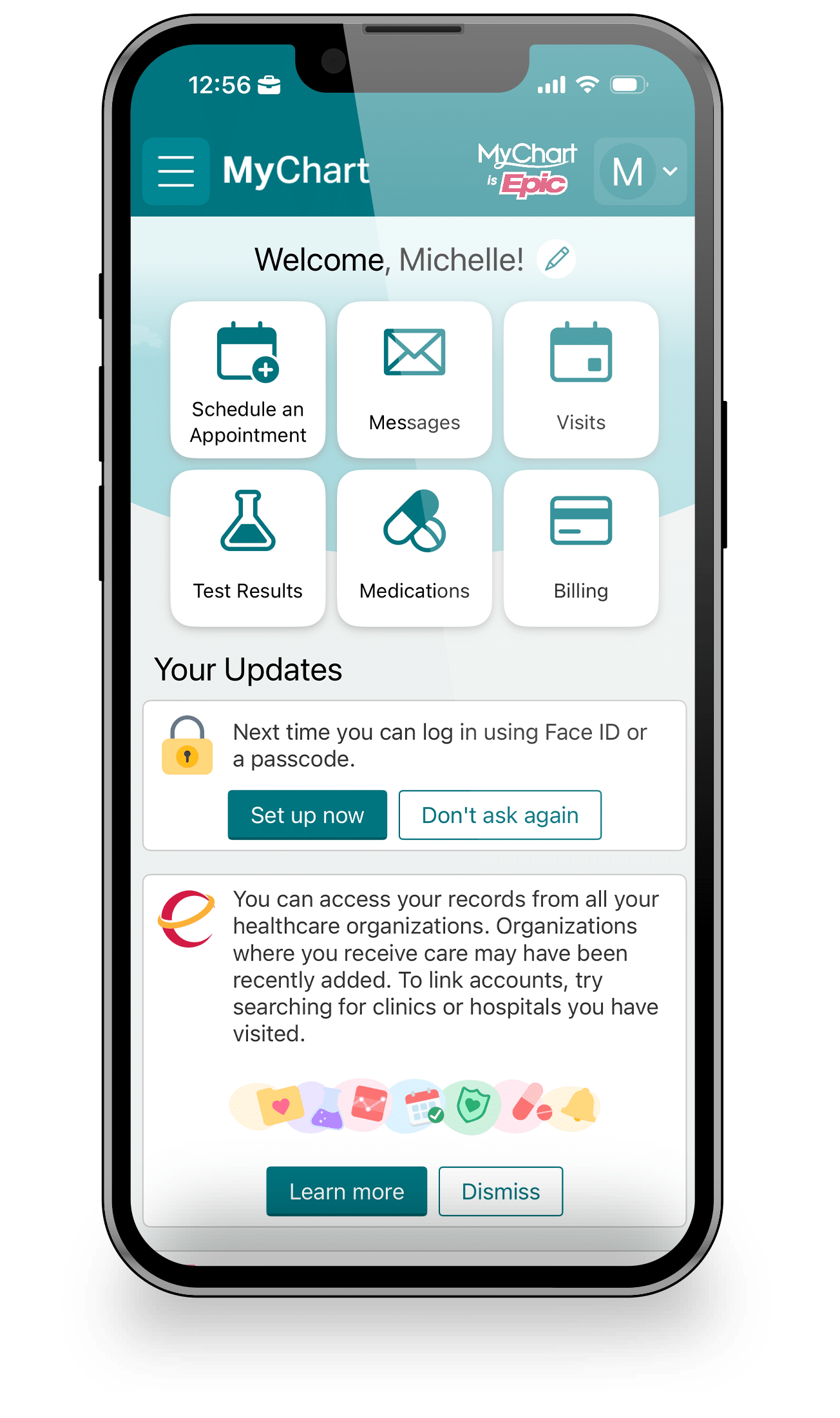
MyChart Baptist is the secure, centralized digital health portal used by patients within the Baptist Health networks—primarily Baptist Health South Florida and Baptist Health (Kentucky/Indiana)—to manage their medical journey. This platform provides real-time access to laboratory results, provider communication, appointment scheduling, and billing management, ensuring that your personal health information is available whenever and wherever you need it.
Contents
The Evolution of Patient Portals: Understanding MyChart Baptist in 2026
As we move through 2026, the MyChart Baptist portal has evolved from a simple repository of medical records into a proactive health management tool. Built on the industry-leading Epic Systems EHR (Electronic Health Record) framework, MyChart Baptist serves as the primary bridge between patients and the Baptist Health clinical teams. Whether you are navigating the extensive specialized services of Baptist Health South Florida (BHSF) or the regional primary care networks of Baptist Health Kentucky and Indiana, the MyChart interface provides a unified, high-security environment for healthcare data.
The 2026 iteration of the portal emphasizes "Participatory Medicine," where patients are no longer passive recipients of information. The integration of the 21st Century Cures Act mandates has ensured that "Open Notes" are the standard, meaning patients see their doctor’s clinical observations and diagnostic reasoning in real-time, often as soon as they are signed by the provider.
Core Features and Technical Capabilities
The utility of MyChart Baptist lies in its comprehensive suite of features designed to reduce the administrative burden on patients. By 2026, the following functionalities have become the gold standard for Baptist Health patients:
- Real-Time Diagnostic Access: View lab results, pathology reports, and imaging interpretations (CT, MRI, X-ray) often before your follow-up appointment.
- Secure Provider Messaging: Send non-urgent messages to your care team, including the ability to attach photos of symptoms or documents.
- Smart Scheduling: Use the "Find a Doctor" tool to book in-person or virtual visits based on provider availability, specialty, and insurance coverage.
- Prescription Management: Request refills for chronic medications directly to your preferred pharmacy and track the status of those requests.
- Health Reminders: Receive automated notifications for upcoming screenings, such as mammograms, colonoscopies, or annual physicals, based on your age and health history.
Comparative Functionality: Web Portal vs. Mobile App
While both platforms offer robust access, the MyChart mobile app (available on iOS and Android) includes hardware-specific features that the web portal cannot replicate.
| Feature | MyChart Web Portal | MyChart Mobile App (2026) |
|---|---|---|
| Biometric Login | No (Password/MFA) | Yes (FaceID / Fingerprint) |
| Push Notifications | No (Email/SMS only) | Yes (Real-time alerts) |
| Virtual Visit Integration | Browser-based | Native App integration |
| Health App Syncing | Limited | Direct (Apple Health / Google Fit) |
| Document Scanning | Manual Upload | Integrated Camera Capture |
| Wayfinding | Interactive Maps | GPS-guided Hospital Navigation |
Step-by-Step Guide to Account Activation and Enrollment
To utilize MyChart Baptist, patients must first establish a verified identity within the Baptist Health system. This ensures that sensitive HIPAA-protected data is only accessible by the correct individual.
1. Obtaining an Activation Code
Most patients receive an activation code during an office visit or on their "After Visit Summary" (AVS) paperwork. This code is typically valid for 14 to 30 days. If you do not have a code, you can use the "Self-Sign Up" feature on the Baptist MyChart website, which utilizes third-party identity verification (such as LexisNexis) to confirm your details.
2. Creating Your Credentials
Choose a unique username and a strong password. In 2026, Baptist Health requires Multi-Factor Authentication (MFA). You will need to link a mobile phone number or email address to receive a one-time passcode every time you log in from an unrecognized device.
3. Setting Up Proxy Access
For parents of minors or caregivers for elderly adults, "Proxy Access" is a critical feature.
Standard Proxy Protocols
Minor Proxy Access Parents can view the full record of children under 12. For adolescents (ages 12-17), access may be limited to comply with state privacy laws regarding reproductive health or mental health records.
Adult-to-Adult Proxy This requires the patient to sign a digital authorization form within their own MyChart account, granting a spouse or caregiver varying levels of access (Full Access vs. Read-Only).
Navigating Virtual Care and Telehealth
In 2026, Baptist Health has fully integrated telehealth into the MyChart ecosystem. Virtual visits are no longer just a fallback but a preferred method for follow-ups, mental health consultations, and minor acute care.
To ensure a successful virtual visit via MyChart Baptist, patients should follow these technical prerequisites:
- Hardware Check: Use a device with a working camera, microphone, and speakers.
- Connection Speed: A minimum of 5 Mbps upload/download speed is recommended to prevent video lagging.
- The "Pre-Check In" Process: Baptist Health requires patients to complete a "Pre-Check In" 24 hours before the appointment. This includes verifying insurance, signing consent forms, and paying any applicable co-pays.
- The Virtual Waiting Room: You can join the session up to 15 minutes early to test your hardware.
Billing, Insurance, and Financial Transparency
The MyChart Baptist portal serves as the primary financial interface for patients. With the integration of real-time insurance verification, the portal provides a high degree of transparency regarding out-of-pocket costs.
Accepted Insurance and Financial Policies
Baptist Health systems (specifically BHSF) maintain broad contracts with major carriers, including:
- Commercial Plans: Aetna, Blue Cross Blue Shield (Florida Blue / Anthem), Cigna, and UnitedHealthcare.
- Government Plans: Traditional Medicare and various Medicare Advantage plans (HMO/PPO). Note that some specific Medicare Advantage plans require a designated Primary Care Physician (PCP) within the Baptist network for full coverage.
- Managed Care: Various Medicaid Managed Care organizations specific to the region (Florida or KY/IN).
Financial Responsibility Guidelines
Price Estimates Use the "Estimator" tool within MyChart to get a personalized quote for surgeries or imaging based on your specific insurance plan and remaining deductible.
Payment Plans For high-balance accounts, MyChart allows users to set up automated monthly payment plans without needing to call the billing office.
Paperless Billing By default, Baptist Health has transitioned to paperless billing in 2026. All statements are delivered via the portal, and notifications are sent via email or SMS.
Advanced Data Security and Privacy Standards
Given the sensitivity of medical data, Baptist Health employs enterprise-grade security measures to protect the MyChart portal. These standards meet and exceed HIPAA and HITECH requirements.
- End-to-End Encryption: All data transmitted between your device and the Baptist servers is encrypted using TLS 1.3 protocols.
- Audit Logs: Patients can view a "Login History" to see exactly when and where their account was accessed.
- Session Timeouts: The portal automatically logs users out after a period of inactivity to prevent unauthorized access on shared devices.
- Data Minimization: Only the necessary medical history required for your care is surfaced in the primary dashboard, with deeper archives available upon request.
Troubleshooting Common MyChart Baptist Issues
Even with a robust system, users may encounter technical hurdles. Below are the most common issues and their 2026 remedies.
Login Failures and Account Lockouts
If you enter the wrong password five times, your account will be locked for security. In 2026, you can resolve this using the "Forgot Password" link, which triggers an MFA code to your mobile device. If you no longer have access to that mobile number, you must contact the Baptist Health Digital Help Desk at their dedicated support line.
Missing Test Results
Not all results appear instantly. Some specialized tests (e.g., genetic sequencing or certain biopsies) require manual review by a provider before they are released to the portal. If a result is missing after seven days, use the "Message My Provider" feature to request a status update.
App Crashing or Freezing
Ensure your mobile device is running the latest OS version. Baptist Health frequently updates the MyChart app to patch security vulnerabilities. Clearing the app cache or performing a fresh reinstall often resolves persistent loading issues.
The Future of MyChart Baptist: AI and Wearable Integration
Looking forward through 2026, Baptist Health is pioneering the use of Artificial Intelligence within the portal. The "MyChart AI Assistant" can now help patients interpret complex medical terminology in their lab reports, though it is not a substitute for professional medical advice.
Furthermore, patients with chronic conditions like hypertension or diabetes can now sync their smartwatches and glucose monitors directly to MyChart. This data is fed into a "Provider Dashboard," allowing the clinical team to monitor trends and intervene before a health event becomes an emergency.
Frequently Asked Questions
Is MyChart Baptist free to use? Yes, the MyChart Baptist portal is a free service provided to all patients of the Baptist Health network. While the portal itself is free, certain services accessed through it, such as virtual urgent care visits, may incur standard consultation fees or co-pays based on your insurance.
Can I see my family's records on my account? Yes, through a process called "Proxy Access." You must submit a request within the portal, and for adult family members, they must grant permission digitally. Once approved, you can toggle between your own record and those you manage using the "Switch Account" feature.
How do I download my complete medical record? Within the "Health" menu, select "Document Center." From there, you can choose "Visit Records" to download a ZIP file containing your clinical summaries in a standardized format (CCD/XML) that can be shared with other healthcare systems.
What should I do if I see an error in my medical record? If you notice an inaccuracy in your health history, medications, or allergies, you should use the "Request a Correction" feature or message your primary provider directly. Accurate records are vital for patient safety, and Baptist Health has a dedicated team to review and update these entries.
Does Baptist Health MyChart work with other hospitals? Yes, through "Happy Together" technology. If you have MyChart accounts with other organizations (like Mayo Clinic or Cleveland Clinic), you can link them within the Baptist MyChart app to see all your medications, allergies, and lab results in a single, consolidated view.
Practical Recommendations for Patients
To maximize the benefits of MyChart Baptist in 2026, patients should proactively manage their digital presence. Start by ensuring your "Communications Preferences" are set to your liking; choosing SMS alerts for "New Results" ensures you are notified the moment data is available. Additionally, take the time to complete your "Personal Profile," including an up-to-date emergency contact and an advanced directive (Living Will), which can be uploaded directly to the portal.
By centralizing your healthcare management within MyChart Baptist, you reduce the risk of medical errors, streamline your clinical visits, and take full ownership of your health data.
Image Gallery