Accessing Your Jacquie Lawson Account: Official Login Procedures for 2026
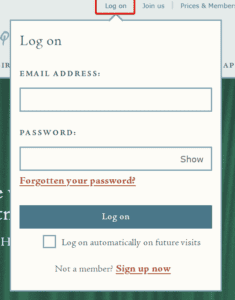
To access your Jacquie Lawson account in 2026, navigate to the official website and locate the Log In link in the top right corner of the homepage. You will need the email address associated with your membership and your unique passwor...
To access your Jacquie Lawson account in 2026, navigate to the official website and locate the Log In link in the top right corner of the homepage. You will need the email address associated with your membership and your unique password. If you encounter difficulties, ensure your browser is updated and verify that you are not using an outdated bookmark or an unauthorized third-party portal.
Contents
Navigating the Official Jacquie Lawson Sign-In Portal
Maintaining access to your digital greeting card account requires using the authentic web domain. As of 2026, the platform continues to prioritize user security and account integrity. When attempting to sign in, always ensure your browser address bar displays the official URL. Using third-party links or search engine advertisements that redirect through secondary sites can lead to authentication errors or, in rare cases, phishing risks.
If you are using a mobile device, the experience is optimized for modern browsers. While the service functions primarily through its web-based interface, ensure your device settings allow for cookies, as these are necessary to maintain your session state while you browse, customize, and send cards.
Prerequisites for Successful Account Authentication
Before attempting to log in, verify that your account status is current. Membership plans at Jacquie Lawson are typically managed on an annual basis. If your subscription has expired, you may be redirected to a renewal page rather than your user dashboard.
System Requirement Checklist for 2026 Access
Internet Connectivity A stable, high-speed connection is recommended to ensure that the animated high-definition card assets load correctly during your session.
Browser Compatibility Use the most recent versions of Chrome, Safari, Firefox, or Edge. Outdated browser versions may lack the security protocols (TLS 1.3 or higher) required by the platform to protect your login credentials.
Credential Verification Ensure your caps lock is disabled and that you are using the specific email address used during the initial account creation. If you have multiple email accounts, verify which one is tied to your active subscription.
Troubleshooting Common Login Barriers
Users occasionally encounter issues when signing in, often due to cached data or expired credentials. If the system rejects your password, avoid repeated attempts that could trigger a temporary account lockout for security purposes.
Steps to Resolve Authentication Failures
- Clear Browser Cache: Navigate to your browser settings and clear your cookies and cached images/files. Old session data can interfere with the authentication handshake.
- Password Recovery: If you have forgotten your password, use the "Forgot Password" link on the login screen. You will receive an automated email at your registered address with a secure link to reset your credentials.
- Check for Network Restrictions: If you are accessing the site from a corporate or public network, firewall restrictions may block the scripts necessary for the login function to execute properly.
- Email Address Changes: If you no longer have access to the email account used for your subscription, you must contact official customer support to verify your identity and update your account details.
Security Standards and Data Protection
In 2026, protecting your digital identity is paramount. The Jacquie Lawson platform employs industry-standard encryption to secure the transmission of your login credentials. You are responsible for maintaining the confidentiality of your password. Never share your credentials with unauthorized third parties or use your account password for other, less secure websites.
| Feature Category | Implementation Standard | User Responsibility |
|---|---|---|
| Authentication | Encrypted TLS 1.3 | Use strong, unique passwords |
| Session Security | Automatic Token Expiration | Log out on public/shared devices |
| Recovery | Email-Verified Reset | Keep registered email address current |
| Browser Safety | Secure HTTPS Protocol | Update browser to latest version |
Membership Management and Renewal Cycles
Understanding your account standing is critical to avoiding login confusion. If your account is inactive, the login process may fail or redirect you to a payment gateway. For the 2026 calendar year, managing your subscription remains straightforward:
- Subscription Verification: Check your account dashboard to see your renewal date.
- Auto-Renewal Settings: If you have enabled automatic renewal, your access will persist seamlessly unless your payment method on file has expired or was declined by your financial institution.
- Payment Methods: Update your billing profile under the account settings tab to ensure uninterrupted service.
Frequently Asked Questions Regarding Account Access
Why am I being redirected to the homepage after clicking login? This often occurs if your browser is blocking cookies. Ensure your privacy settings allow cookies from the official website domain.
Can I use my social media accounts to log in? Currently, the platform requires a dedicated email and password combination for individual account security. There is no native integration for third-party social media logins.
What should I do if I am not receiving the password reset email? Check your spam or junk folders. If it is not there, ensure that you entered the email address exactly as it was registered. If the issue persists, whitelist the platform's support email address to prevent filtering.
Does my membership expire automatically if I do not renew? Yes, once your annual subscription term ends, your account privileges, including access to your sent card history and address book, will be restricted until the subscription is reactivated.
How many devices can I use with one account? The account is intended for personal use; however, you can generally sign in from multiple devices as long as the concurrent session limit is not exceeded. Avoid sharing your credentials with others to prevent account flags.
Is there a mobile app for logging in? The service operates via a web-responsive interface. While there is no standalone app store download for account management, the mobile-optimized website functions exactly like the desktop version.
Contacting Official Support
If you have performed the troubleshooting steps outlined above and still cannot gain access, reach out directly to the official support channel. Provide them with your registered email address and a clear description of the error code or behavior you are experiencing. Do not provide your password to anyone, including support staff; official support will never request your password during a troubleshooting inquiry.
By following these established procedures, you can ensure that your account remains secure and your access to premium features remains consistent throughout 2026. Consistent maintenance of your browser environment and credential hygiene is the most effective way to prevent access issues.
Image Gallery