How to Set Shutter Speed on Canon Rebel T3i
To set the shutter speed on a Canon Rebel T3i, turn the Mode Dial to Tv (Shutter Priority) or M (Manual). Once in either mode, rotate the Main Dial (the black wheel located near the shutter button) to the left to slow the shutter or to...
To set the shutter speed on a Canon Rebel T3i, turn the Mode Dial to Tv (Shutter Priority) or M (Manual). Once in either mode, rotate the Main Dial (the black wheel located near the shutter button) to the left to slow the shutter or to the right to increase the speed.
Contents
The Canon EOS Rebel T3i, also known as the EOS 600D in European markets, remains a popular entry-level DSLR even in 2026 due to its robust build and excellent learning curve for student photographers. Controlling shutter speed is one of the three pillars of the "Exposure Triangle," alongside aperture and ISO. Mastering this setting allows you to either freeze fast-moving action or create artistic motion blur in your images.
Understanding the Physical Controls for Shutter Speed
Before diving into the menus, it is essential to identify the physical components of the Canon Rebel T3i that control exposure settings. Unlike professional-tier Canon bodies that feature dual dials (one for shutter and one for aperture), the Rebel series utilizes a single-dial system.
The Mode Dial
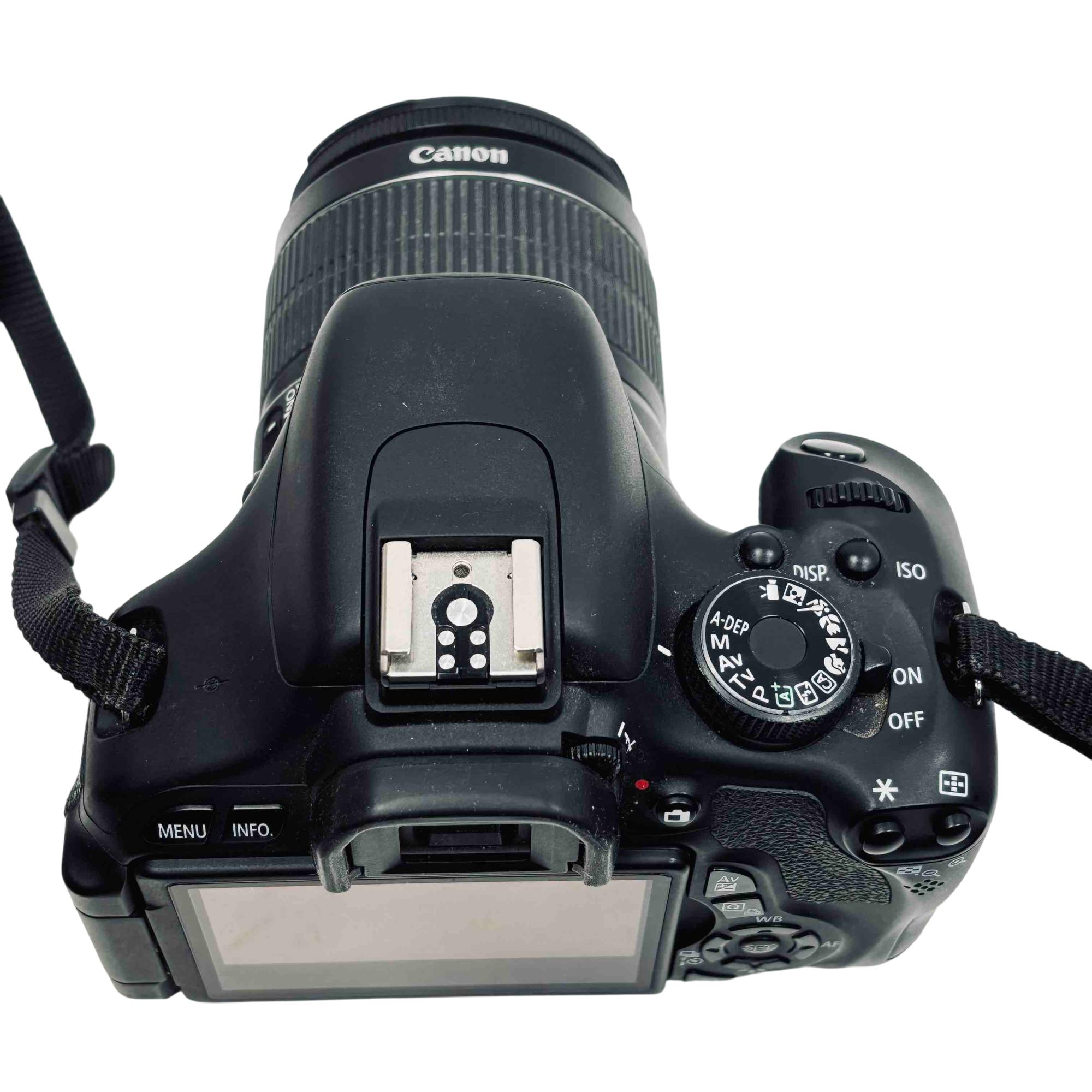
The Mode Dial is located on the top right of the camera body. To have any control over the shutter speed, you must move away from the "Green" Scene Intelligent Auto mode. Shutter speed adjustment is primarily available in:
- Tv (Time Value): This is Shutter Priority mode. You choose the shutter speed, and the camera automatically calculates the appropriate aperture for a balanced exposure.
- M (Manual): You have full control over both shutter speed and aperture.
The Main Dial
The Main Dial is the vertical black wheel positioned just behind the shutter release button. On the Rebel T3i, this is your primary tool for navigating through shutter speed increments.
The LCD Monitor and Viewfinder
You can monitor your shutter speed changes in two places. If the camera is held to your eye, the shutter speed appears as the leftmost number in the viewfinder's status bar. If you are using the rear LCD, the shutter speed is displayed in the top-left corner of the shooting info screen.
Step-by-Step: Setting Shutter Speed in Shutter Priority (Tv) Mode
Shutter Priority mode is the most efficient way to learn how shutter speed affects your images without worrying about the complexities of aperture.
- Turn the Mode Dial to "Tv": Rotate the dial on top of the camera until the "Tv" icon aligns with the white indicator line.
- Wake the Camera: Half-press the shutter button to activate the internal light meter and the display.
- Rotate the Main Dial:
- To the Right: This increases the shutter speed (e.g., from 1/125 to 1/500). High speeds are used to freeze movement.
- To the Left: This decreases the shutter speed (e.g., from 1/60 to 1/10). Slow speeds are used to capture light in dark environments or create blur.
- Verify the Setting: Watch the numbers on the screen. A value like "500" represents 1/500th of a second. A value followed by quote marks, such as "0"5", represents half a second.
Step-by-Step: Setting Shutter Speed in Manual (M) Mode
In Manual mode, the Main Dial defaults to controlling the shutter speed. However, because there is only one dial, changing the aperture requires an additional step.
- Turn the Mode Dial to "M": This gives you total control over the exposure.
- Adjust the Shutter Speed: Simply rotate the Main Dial to your desired speed.
- Note the Exposure Level Indicator: In the viewfinder or on the LCD, you will see a bar with a needle (the light meter). As you change the shutter speed, the needle moves. To get a "standard" exposure, adjust the shutter speed until the needle is at the "0" mark in the center.
- Aperture Conflict: Remember that if you want to change the aperture in this mode, you must press and hold the Av +/- button on the back of the camera while turning the Main Dial.
Understanding Shutter Speed Values on the T3i
The Canon Rebel T3i displays shutter speeds in a shorthand format that can be confusing for beginners. Understanding these notations is critical to avoiding unintended exposure errors.
- Whole Seconds: If you see a number followed by two tick marks (e.g., 1", 2", 30"), the shutter will stay open for that many full seconds.
- Fractions of a Second: If you see a plain number (e.g., 60, 125, 1000), it represents a fraction. "60" means 1/60th of a second. "4000" means 1/4000th of a second.
- Bulb Mode: If you rotate the dial to the left past 30", the camera will display "BULB". In this mode, the shutter stays open for as long as you hold down the shutter button. This is typically used for astrophotography or fireworks with a remote shutter release.
Recommended Shutter Speeds for Common Scenarios
Choosing the right speed depends entirely on your subject and the available light. Use the following table as a general guide for the Canon Rebel T3i.
| Subject/Scenario | Recommended Shutter Speed | Purpose |
|---|---|---|
| Birds in flight / Racing cars | 1/2000 to 1/4000 | Freezes extremely fast motion completely. |
| Sports / Active children | 1/500 to 1/1000 | Prevents motion blur in human movement. |
| Handheld Portraits | 1/125 to 1/200 | Fast enough to avoid "camera shake" blur. |
| Street Photography | 1/250 | A good middle-ground for walking subjects. |
| Slow Panning (Blurred Background) | 1/30 to 1/60 | Keeps subject sharp while blurring the background. |
| Smooth Waterfalls / Rivers | 1/2 to 2 seconds | Creates a "silky" effect on moving water. |
| Night Landscapes / Stars | 15 to 30 seconds | Gathers enough light from dark environments. |
The Impact of Shutter Speed on Image Quality
Setting the shutter speed is not just about motion; it fundamentally changes how your sensor interacts with light.
Motion Blur vs. Freezing Action
The shutter is a physical curtain in front of the sensor. If it stays open for a long time (a slow shutter speed), any movement that occurs while the curtain is up will be "smeared" across the pixels. This is excellent for creative shots of light trails or soft water. Conversely, a very fast shutter speed opens and closes so quickly that it captures a "slice" of time, effectively freezing a hummingbird's wings or a splashing droplet.
The Rule of Reciprocals
On a crop-sensor camera like the T3i, you should generally follow the Reciprocal Rule to avoid blurry images caused by your hands shaking. The rule suggests that your shutter speed should be at least 1 / (Focal Length x 1.6). For example, if you are using a 50mm lens, your shutter speed should be at least 1/80th of a second to ensure a sharp handheld shot.
Light Compensation
When you increase the shutter speed (e.g., moving from 1/60 to 1/1000), the sensor has less time to collect light. The image will become darker. To compensate for a fast shutter speed on the T3i, you may need to:
- Open the Aperture: Use a lower f-number (like f/3.5).
- Increase the ISO: Use a higher ISO setting (like 800 or 1600), though this introduces "noise" or grain to the image.
Troubleshooting Shutter Speed Issues
Even after learning the dials, you might encounter technical hurdles. Here are the most common issues reported by T3i users:
The Dial Isn't Changing Anything
If you are rotating the Main Dial and the shutter speed isn't moving, ensure you are not in Full Auto (Green Box) or Program (P) mode where the camera restricts manual overrides. Additionally, if the camera's meter has timed out, the LCD might be blank. Tap the shutter button halfway to "wake" the camera.
The Numbers are Flashing
In Tv mode, if the aperture value (f-number) is flashing, it means the camera cannot find a setting to create a balanced exposure.
- Flashing Low Number (e.g., f/3.5): The scene is too dark. Slow down your shutter speed or increase your ISO.
- Flashing High Number (e.g., f/22): The scene is too bright. Increase your shutter speed or lower your ISO.
"Busy" Message
If the camera displays "Busy" after a shot, you likely used a very long shutter speed (Long Exposure) or a high ISO. The T3i is performing Long Exposure Noise Reduction, which takes as long as the exposure itself to process. You can disable this in the Custom Functions menu if you need to take shots more rapidly.
FAQs
Can I set the shutter speed using the touch screen?
No, the Canon Rebel T3i does not have a touch-sensitive screen. All adjustments must be made using the physical Mode Dial, Main Dial, and buttons.
What is the maximum shutter speed on the T3i?
The maximum (fastest) shutter speed is 1/4000th of a second. This is standard for entry-level DSLRs and is sufficient for almost all daylight sports and wildlife photography.
How do I access 1/8000 shutter speed?
The Rebel T3i is hardware-limited to 1/4000. To access 1/8000, you would need to upgrade to a mid-range or professional body, such as the Canon 90D or an R-series mirrorless camera.
Why does my shutter speed change automatically?
If you are in Aperture Priority (Av) or Auto mode, the camera will change the shutter speed based on the lighting conditions to ensure a proper exposure. To lock your shutter speed, you must use Tv or M modes.
Does shutter speed affect the flash?
Yes. The T3i has a flash sync speed of 1/200th of a second. If you try to use a shutter speed faster than 1/200 while using the built-in flash, the camera will usually default back to 1/200 to ensure the shutter is fully open when the flash fires.
Practical Recommendation
For those just starting with the Canon Rebel T3i, the best way to master shutter speed is to spend a day shooting exclusively in Tv (Shutter Priority) mode. Set your ISO to "Auto" and experiment with different subjects. Try capturing a moving car at 1/1000 to see it frozen, and then at 1/30 while "panning" (moving the camera with the car) to see the background blur. This hands-on approach will build the muscle memory required to use the Main Dial instinctively without looking away from the viewfinder.
Image Gallery