Top Security Practices for Cloud Web App Hosting in 2026
Securing cloud-hosted web applications in 2026 requires a multi-layered "defense-in-depth" strategy that integrates identity management, automated threat detection, and zero-trust networking. Organizations must move beyond basic firewa...
Securing cloud-hosted web applications in 2026 requires a multi-layered "defense-in-depth" strategy that integrates identity management, automated threat detection, and zero-trust networking. Organizations must move beyond basic firewalls to implement continuous security monitoring and rigorous encryption protocols to protect sensitive data against increasingly sophisticated, AI-driven cyber threats and complex supply chain vulnerabilities.
Contents
Understanding the Shared Responsibility Model
In 2026, cloud security begins with a clear understanding of the Shared Responsibility Model. This framework defines the security obligations of the Cloud Service Provider (CSP) and the customer. While providers like Amazon Web Services (AWS), Microsoft Azure, and Google Cloud Platform (GCP) are responsible for the security of the cloud—including physical data centers, hardware, and the virtualization layer—the customer is responsible for security in the cloud.
For web application hosting, this means you are responsible for securing the guest operating system, application code, data, and access management. Misconfigurations in the customer-managed portion of this model remain the leading cause of cloud data breaches. To mitigate this risk, security teams must audit their environment against the specific division of labor defined by their provider’s Service Level Agreement (SLA).
Identity and Access Management (IAM) and Zero Trust
Identity has become the new perimeter. In a cloud environment, traditional network boundaries are fluid, making Identity and Access Management (IAM) the most critical control point.
Principle of Least Privilege (PoLP)
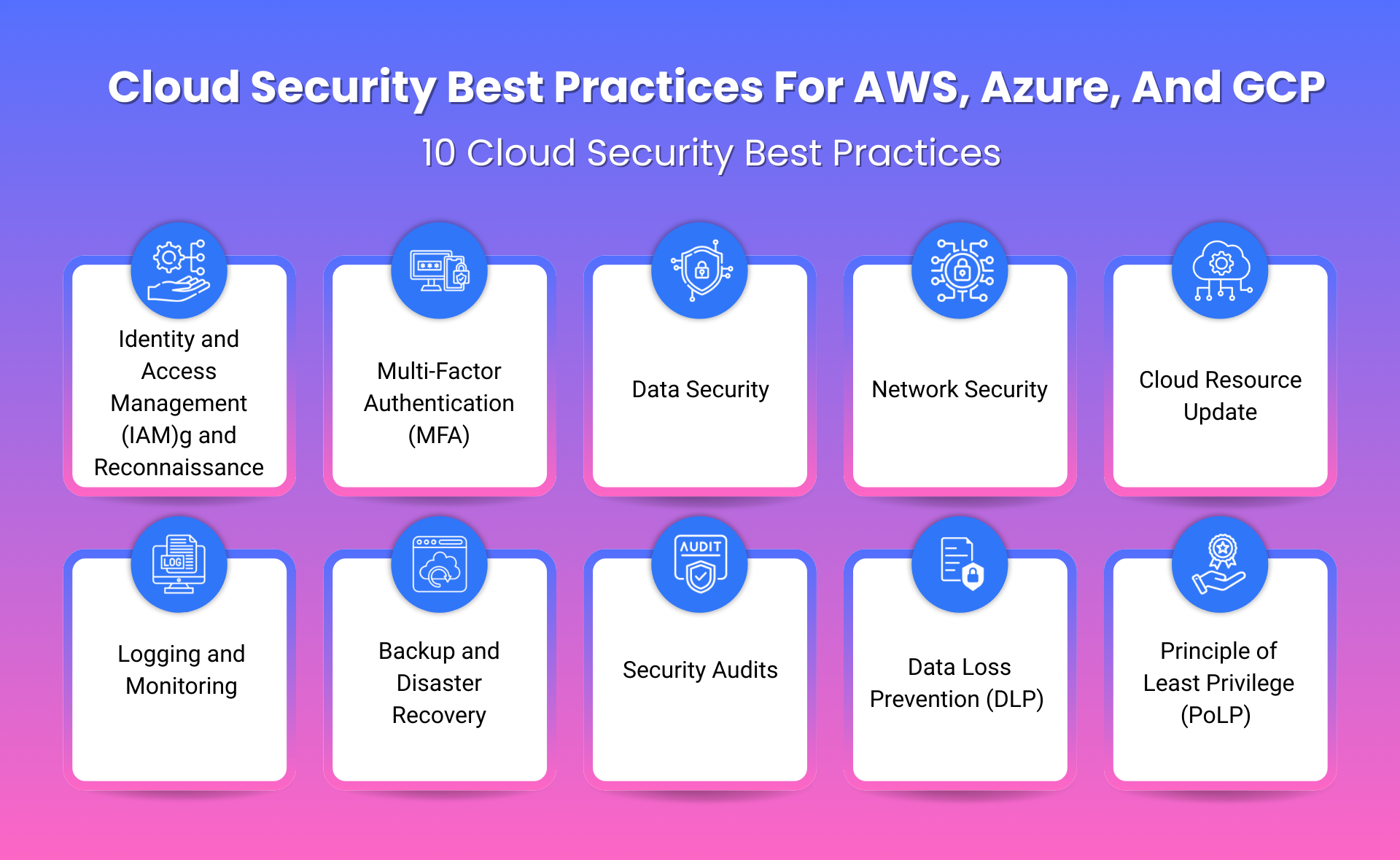
The Principle of Least Privilege dictates that users, service accounts, and applications should only have the minimum permissions necessary to perform their functions. In 2026, organizations use automated IAM analyzers to identify over-privileged accounts. For instance, a web server should have "read-only" access to its database credentials but no permission to delete or modify the database schema itself.
Multi-Factor Authentication (MFA)
Standard password-based authentication is no longer sufficient. By 2026, Phishing-Resistant MFA, such as FIDO2-compliant hardware keys or biometric passkeys, has become the industry standard. SMS-based MFA is widely discouraged due to its vulnerability to SIM-swapping attacks. Implementing MFA across all administrative consoles and developer accounts is a non-negotiable prerequisite for cloud hosting.
Zero Trust Architecture (ZTA)
Zero Trust operates on the mantra "never trust, always verify." Under this framework, every request for access—whether from inside or outside the network—must be authenticated, authorized, and encrypted. This approach limits lateral movement, ensuring that if a single web server is compromised, the attacker cannot easily jump to the database or other sensitive infrastructure.
Network Hardening and Infrastructure Protection
Securing the network path to your cloud web application involves more than just opening port 443 for HTTPS. It requires a tiered infrastructure approach.
Virtual Private Clouds (VPC) and Micro-segmentation
Web applications should reside within a Virtual Private Cloud (VPC). Use public subnets only for load balancers or bastion hosts, while keeping application servers and databases in private subnets with no direct route to the internet. Micro-segmentation further divides these subnets into smaller, isolated zones, using security groups to restrict traffic between specific components (e.g., allowing only the Web Tier to talk to the App Tier).
Web Application Firewalls (WAF)
A Web Application Firewall (WAF) is essential for protecting against the OWASP Top 10 risks, including SQL injection, Cross-Site Scripting (XSS), and broken access control. Modern WAFs in 2026 utilize behavioral analysis to distinguish between legitimate users and automated bots or scanners, providing real-time mitigation against zero-day exploits.
DDoS Mitigation
Distributed Denial of Service (DDoS) attacks have grown in scale and complexity. Cloud providers offer native shielding services—such as AWS Shield or Azure DDoS Protection—that integrate with Content Delivery Networks (CDNs) to scrub malicious traffic at the edge of the network before it ever reaches your origin server.
Data Protection and Encryption Strategies
Data is the ultimate prize for attackers. Protecting it requires rigorous encryption both at rest and in transit.
| Security Layer | Practice | Objective |
|---|---|---|
| Data in Transit | TLS 1.3 | Encrypts data between the client and server using high-performance protocols. |
| Data at Rest | AES-256 Encryption | Protects stored data on disks and in databases from unauthorized access. |
| Key Management | Cloud KMS / HSM | Centrally manages and rotates encryption keys using hardware security modules. |
| Secret Management | Vaulting Services | Prevents hardcoding API keys and database passwords in source code. |
TLS and Certificate Management
All web traffic must be encrypted using TLS 1.3. Organizations should use automated certificate management services (like AWS Certificate Manager or Let's Encrypt) to ensure that SSL/TLS certificates are automatically renewed, preventing downtime and "not secure" browser warnings.
Encryption at Rest and Key Rotation
All storage volumes, databases, and backups must be encrypted. Utilizing a Key Management Service (KMS) allows for centralized control and the ability to implement automatic key rotation. This limits the amount of data at risk if a single cryptographic key is ever compromised.
Securing the Application and CI/CD Pipeline
Security must be "shifted left," meaning it is integrated early in the software development lifecycle (SDLC) rather than being treated as an afterthought.
DevSecOps and Automated Scanning
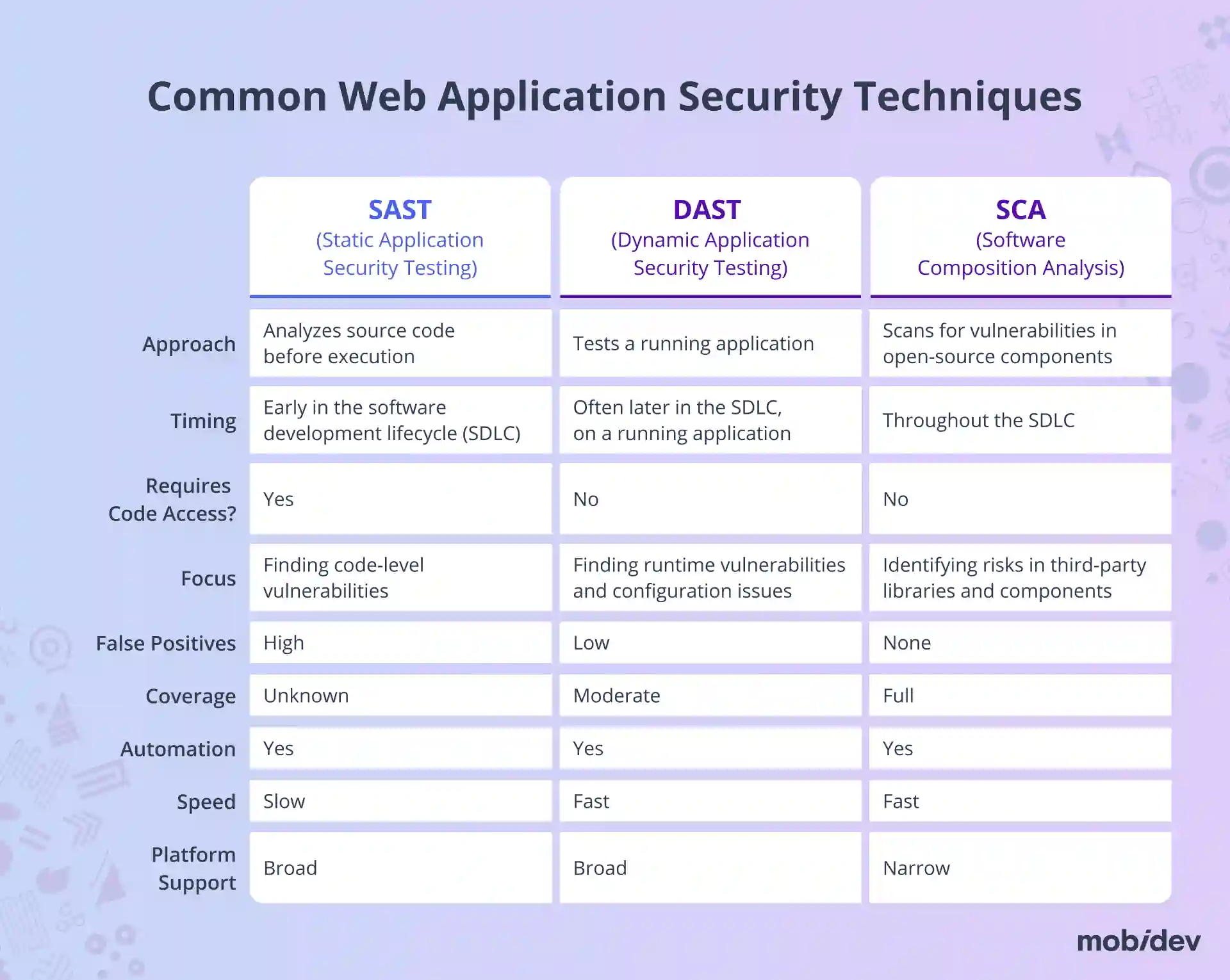
The CI/CD (Continuous Integration/Continuous Deployment) pipeline should include automated security gates.
- Static Application Security Testing (SAST): Scans source code for vulnerabilities during the build phase.
- Dynamic Application Security Testing (DAST): Tests the running application for flaws like insecure headers or misconfigured cookies.
- Software Composition Analysis (SCA): Scans open-source libraries and dependencies for known vulnerabilities (CVEs).
Secret Management
Never store credentials, API keys, or database strings in your code repository (e.g., GitHub or GitLab). Instead, use a dedicated Secret Management service. Applications should programmatically retrieve these secrets at runtime, ensuring that developers never see production passwords.
Continuous Monitoring and Incident Response
In the cloud, visibility is the foundation of security. You cannot protect what you cannot see.
Logging and Auditing
Enable comprehensive logging across all layers of your stack. This includes:
- VPC Flow Logs: For network traffic analysis.
- CloudTrail/Activity Logs: To track every API call made in your cloud account.
- Application Logs: To monitor for errors and unauthorized access attempts.
These logs should be aggregated into a Security Information and Event Management (SIEM) system. In 2026, AI-driven SIEMs can correlate disparate logs to identify complex attack patterns that a human operator might miss.
Vulnerability Management
Cloud environments are dynamic. New instances are spun up and down constantly. Use automated vulnerability scanners to perform regular assessments of your virtual machines and container images. Ensure that "Golden Images" (standardized, pre-hardened OS templates) are used for all deployments.
Common Mistakes in Cloud Web App Security
Even with advanced tools, simple errors can lead to catastrophe.
- Publicly Accessible S3 Buckets: Storing sensitive data in cloud storage without proper access controls remains a frequent error.
- Using Default Passwords: Failing to change default credentials for database engines or administrative panels.
- Inadequate Patching: Assuming the cloud provider patches your software. In Infrastructure-as-a-Service (IaaS), the customer is responsible for patching the OS and application.
- Permissive Security Groups: Using "0.0.0.0/0" for SSH (Port 22) or RDP (Port 3389) access, which exposes management interfaces to the entire internet.
Frequently Asked Questions
What is the most important security practice for cloud hosting?
The most important practice is implementing Multi-Factor Authentication (MFA) on all accounts, especially administrative ones. This single step prevents the majority of credential-based attacks, which are the primary entry point for cloud breaches.
Do I still need a WAF if I have a network firewall?
Yes. A traditional network firewall filters traffic based on IP addresses and ports, but it cannot "see" the content of the web traffic. A Web Application Firewall (WAF) inspects the actual HTTP/HTTPS requests to identify and block application-level attacks like SQL injection and cross-site scripting that a network firewall would allow through.
How often should I rotate my cloud encryption keys?
The NIST (National Institute of Standards and Technology) and major cloud providers generally recommend rotating keys at least once a year, or more frequently for highly sensitive data. However, 2026 best practices suggest using automated rotation every 90 days to minimize the blast radius of a potential key compromise.
Is serverless hosting more secure than using Virtual Machines?
Serverless hosting (like AWS Lambda or Azure Functions) can be more secure because the cloud provider manages the underlying operating system and runtime patching. This reduces the attack surface. However, you are still responsible for securing the application code and ensuring proper IAM permissions for the function.
How does Zero Trust apply to my web application?
Zero Trust applies by ensuring that your web server does not automatically trust other servers in your network. For example, your database should not trust your web server simply because they are in the same VPC; it should require a verified service identity and specific permissions before allowing any data retrieval.
Final Recommendations
To maintain a secure cloud web application in 2026, start by performing a comprehensive audit of your IAM roles and enforcing phishing-resistant MFA. Transition your infrastructure toward a Zero Trust model by implementing micro-segmentation and removing direct public access to your backend servers. Finally, automate your security testing within your CI/CD pipeline to ensure that vulnerabilities are identified and remediated before they ever reach your production environment. Continuous improvement and vigilance are the only ways to stay ahead of modern cloud threats.
Image Gallery