Modern Online Substitute Management Software: The 2026 Guide for Educational Institutions
Online substitute management software streamlines the process of filling teacher absences, tracking substitute teacher credentials, managing leave requests, and automating dispatch notifications. By replacing legacy phone-tree systems...
Online substitute management software streamlines the process of filling teacher absences, tracking substitute teacher credentials, managing leave requests, and automating dispatch notifications. By replacing legacy phone-tree systems and manual spreadsheets with cloud-based workflows, schools and districts can drastically reduce administrative overhead, ensure classroom continuity, and maintain compliance with district-wide staffing policies.
Contents
Understanding the Core Architecture of Substitute Management Platforms
The operational efficiency of educational institutions relies heavily on how quickly and accurately unplanned staff absences are covered. Traditional methods of calling substitutes late at night or early in the morning are prone to human error, low fill rates, and significant administrative burnout. Modern platforms automate this entire lifecycle, integrating directly with existing Human Resources Information Systems (HRIS) and payroll databases.
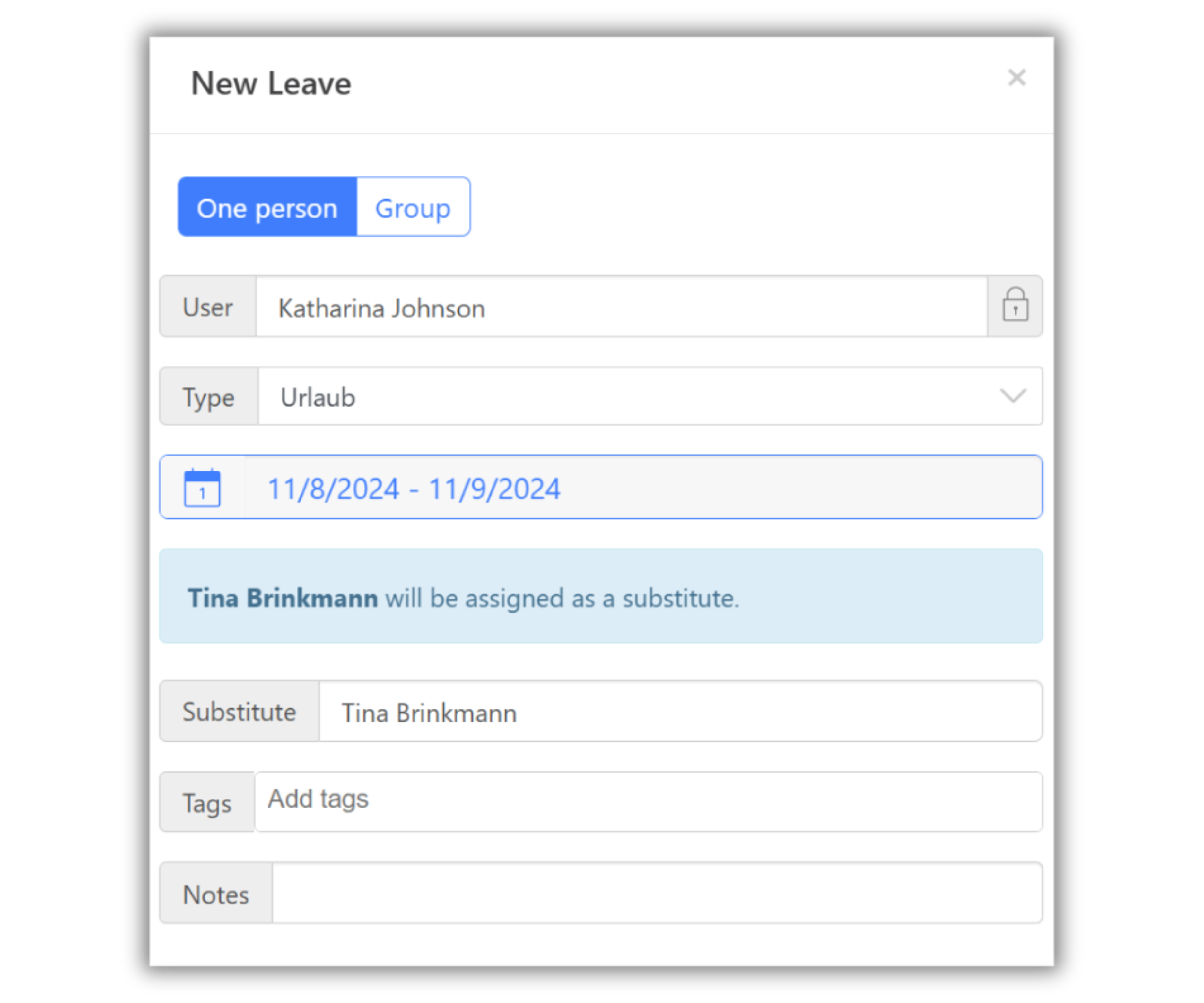
At its core, a robust substitute management system performs three primary functions: absence intake, substitute matching, and attendance/payroll reconciliation. When a teacher logs an absence due to illness, professional development, or personal leave, the software captures the date, duration, subject area, and specific school location. It then evaluates eligible substitutes based on pre-set rules, certifications, and proximity, notifying qualified candidates instantly through mobile applications, SMS, or email.
The technological shift toward cloud-native solutions has also introduced advanced features such as predictive analytics. Administrators can now forecast substitute shortage days based on historical absenteeism trends, weather patterns, and seasonal flu spikes. This data-driven approach allows HR departments to adjust incentive pay structures or proactively recruit floating substitutes before shortages impact student learning time.
Essential Features to Evaluate in Digital Absence Management Tools
Selecting the right platform requires a deep technical and operational evaluation of software capabilities. Educational technology standards demand high levels of data security, accessibility compliance, and user-friendly interfaces for both aging substitute pools and tech-savvy administrators.
Automated Dispatch and Smart Matching Rules
Automated dispatch algorithms remove bias and manual phone calls from the equation. Advanced configuration options allow districts to establish cascading notification rules. For example, the system can first offer a job to preferred substitutes listed by the absent teacher, then open it to certified substitutes within the specific subject area, and finally broadcast it to the entire qualified district pool.
Mobile-First Accessibility for Educators and Substitutes
Substitute teachers operate on the move, making dedicated mobile applications or fully responsive mobile web portals a non-negotiable requirement. Substitutes must be able to view job descriptions, map school locations, accept assignments, and sync schedules with their personal calendars instantly. Similarly, teachers need the ability to submit lesson plans, upload attachments, and request absences from their smartphones.
Comprehensive Credential Tracking and Compliance
Maintaining compliance with state licensing requirements and background check mandates is a major administrative burden. Top-tier platforms include automated credential verification features that track expiration dates for substitute teaching licenses, fingerprinting, background checks, and mandatory district training modules. If a substitute's credential expires, the system automatically blocks them from accepting future assignments.
Comparing Leading Substitute Management Solutions
To understand the market landscape, districts typically evaluate several enterprise solutions. The following comparison highlights the structural differences among prominent platforms used by K-12 school districts and higher education institutions.
| Software Solution | Primary Target Market | Core Strengths | Integration Capabilities | Notable Limitation |
|---|---|---|---|---|
| Frontline Education (Aesop) | K-12 Districts of All Sizes | Industry veteran, deep substitute pool network, robust reporting. | Deep sync with major K-12 ERPs (Tyler, PowerSchool). | Legacy user interface can feel rigid for modern users. |
| Redline / Red Rover | Modern K-12 Districts | Intuitive cloud-native design, fast onboarding, transparent pricing. | API-first architecture connecting to modern HRIS platforms. | Smaller historical substitute database than legacy giants. |
| SmartFind Express (ClassLink/VeriTime) | Medium to Large School Districts | Advanced time-clock integration, strict attendance verification. | Strong biometric and web-clock hardware compatibility. | Steeper learning curve for substitute users. |
| AbsenceSoft | Enterprise & Higher Education | Highly flexible workflow engine, handles complex FMLA/leave management. | Extensive custom API integrations for enterprise HR stacks. | Less K-12 specific out-of-the-box substitute pooling. |
Step-by-Step Implementation and Deployment Workflow
Transitioning from a legacy or manual substitute tracking system to a modern online platform requires a structured deployment strategy. Districts must coordinate across IT, HR, and school administration teams to ensure a seamless rollout.
- Data Audit and Clean-Up: Audit existing employee records, substitute databases, school bell schedules, and pay rates. Remove inactive users and standardize job title classifications within the HRIS before syncing.
- System Configuration and Rule Setup: Configure district policies inside the software, including absence reason codes, approval workflows, blackout dates, and substitute pay tier structures.
- Integration and Single Sign-On (SSO) Setup: Collaborate with IT administrators to connect the platform via secure APIs to the district directory services (such as Google Workspace or Microsoft Azure AD) and payroll software.
- Stakeholder Training and Onboarding: Conduct tailored training webinars and distribute step-by-step documentation for teachers, school administrators, and substitute teachers. Emphasize mobile app downloads and notification settings.
- Soft Launch and Pilot Testing: Run a pilot program with a single school cluster or specific grade level for two weeks to catch configuration errors, test notification delivery speeds, and refine matching rules.
- Full District-Wide Go-Live: Open the platform district-wide, monitor daily fill rates closely during the first month, and provide dedicated help-desk support for troubleshooting login or scheduling issues.
Addressing Common Operational Challenges and Pitfalls
Even with advanced software, districts often encounter specific operational roadblocks. Recognizing these challenges early allows leadership to implement proactive countermeasures.
Low Substitute Engagement: One of the most frequent hurdles is a low adoption rate among older or less tech-savvy substitute teachers who struggle with mobile apps. Actionable Remedy: Establish a dedicated substitute support help desk, host in-person tech onboarding sessions at the district office, and provide simplified SMS-accept options that do not require smartphone app navigation.
Data Sync Discrepancies: Automated API bridges between the substitute platform and payroll software can occasionally experience latency or mismatched employee IDs, leading to payroll errors. Actionable Remedy: Implement weekly reconciliation reports between HR and finance departments, and configure automated error-alert flags within the software dashboard to highlight sync failures immediately.
Last-Minute Absence Spikes: Severe weather events or sudden illness outbreaks can overwhelm automated dispatch queues, causing high unfilled absence rates. Actionable Remedy: Utilize the platform's advanced configuration to set up emergency incentive pay multipliers for high-demand days, automatically routing notifications to preferred internal staff or floating substitutes.
Frequently Asked Questions
What is online substitute management software?
Online substitute management software is a cloud-based platform that automates teacher absence reporting, substitute recruitment, job dispatching, credential verification, and payroll tracking for educational institutions. It replaces manual phone trees and spreadsheets with real-time digital workflows.
How do substitute teachers find and accept jobs using these platforms?
Substitutes receive instant notifications via mobile app push alerts, SMS text messages, or emails when a matching job is posted. They can review the location, grade level, and lesson plan details, then tap a single button to accept the assignment directly from their mobile device.
Can substitute management software integrate with existing school district payroll systems?
Yes. Modern platforms utilize secure APIs and pre-built connectors to integrate seamlessly with major educational enterprise resource planning (ERP) and human resources systems like PowerSchool, Tyler Technologies, Skyward, and various financial software suites.
How do platforms verify substitute credentials and compliance?
These systems maintain digital records of each substitute's certifications, background checks, fingerprinting data, and training histories. If a credential expires or fails district compliance standards, the software automatically restricts the user from accepting new assignments.
What happens when an absence cannot be filled automatically?
When an absence remains unfilled near the start time, the software can trigger escalation protocols, such as alerting school administrators via priority notifications, broadcasting to a broader secondary substitute pool, or prompting internal staff reassignments according to union agreements.
Optimizing District Staffing Operations
Transitioning to a modern digital substitute management platform represents a foundational step toward operational stability in education. By automating routine administrative tasks, ensuring strict compliance with credentialing requirements, and providing a frictionless mobile experience for educators and substitutes alike, districts can protect instructional time and minimize teacher burnout. Evaluate your institution's specific workflow requirements, select a scalable cloud-native solution, and execute a structured deployment plan to secure long-term staffing resilience.
Image Gallery