Where Is the Identification Number on a Passport? A Complete Guide
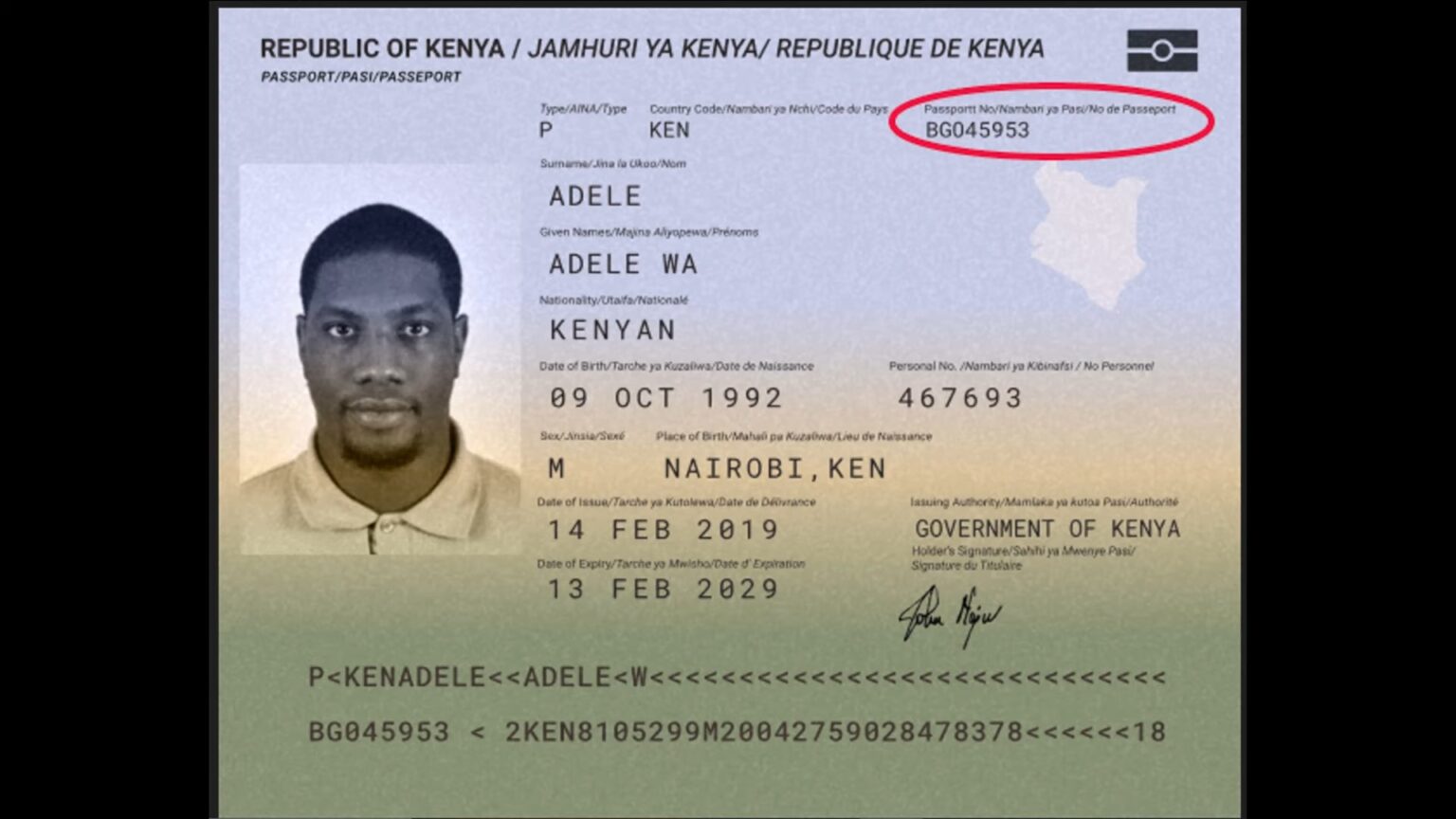
The identification number on a passport, commonly referred to as the passport number, is typically located in the top right-hand corner of the data page (the page featuring your photograph and personal details). Additionally, this uniq...
The identification number on a passport, commonly referred to as the passport number, is typically located in the top right-hand corner of the data page (the page featuring your photograph and personal details). Additionally, this unique alphanumeric code is repeated at the bottom of the same page in the Machine-Readable Zone (MRZ) and is often perforated through the subsequent visa pages of the booklet.
Contents
Locating the Primary Passport Number
When you open your passport to the primary biodata page, the identification number is the most critical piece of administrative data. For the vast majority of nations, including the United States, the United Kingdom, Canada, and Australia, this number is positioned prominently at the top right. This placement is standardized by the International Civil Aviation Organization (ICAO), though slight variations exist depending on the document’s generation.
The number is designed to be easily accessible for customs officers, airline agents, and digital scanners. In modern "e-Passports" issued leading up to 2026, this number is also stored electronically within the embedded RFID chip. If you are looking at a physical document, you will see it printed in a high-contrast font, often using OCR-B typeface to ensure that both humans and machines can read it without error.
Beyond the top right corner, the number appears in the Machine-Readable Zone. This is the section at the bottom of the data page consisting of two or three lines of text, numbers, and chevrons (<<<<). The passport number typically occupies the first nine characters of the second line in this zone. Security-conscious travelers should also check the back of the passport or the top of the internal visa pages; many countries use laser-perforation to punch the identification number through every page of the book to prevent page substitution or tampering.
Understanding Different Types of Identification Numbers
A common point of confusion for travelers is the distinction between various numbers printed on the document. Depending on your nationality, your passport may contain multiple "identification" strings, and providing the wrong one on a visa application or flight booking can lead to significant delays.
The Passport Number vs. The National ID Number
In many countries, particularly within the European Union and parts of Asia, a passport will display both a Passport Number and a National Identification Number (often labeled as "Personal No." or "Identity No."). The Passport Number is specific to the document itself and changes every time the passport is renewed. The National ID Number, however, is a permanent identifier tied to the individual citizen regardless of which document they hold. If a form asks for your "Passport Identification Number," you should almost always use the document-specific number found in the top right corner.
The Passport Book Number
Some older or specific versions of passports, such as certain U.S. passport books, contain a "Passport Book Number." This is distinct from the Passport Number. While the Passport Number is used for travel and identification, the Book Number is an internal inventory control number used by the issuing authority. In 2026, most Next Generation Passports (NGP) have moved away from separate book numbers, consolidating identification into the primary passport string, but travelers with older, valid documents may still see this number on the side or on a different page.
Regional Variations: Where to Look Based on Issuing Country
While international standards provide a general framework, different jurisdictions have unique layouts. Understanding these variations is essential for accurate data entry during international transit.
| Country/Region | Primary Number Location | Character Format | Notes |
|---|---|---|---|
| United States | Top Right of Data Page | 9 Alphanumeric Characters | Next-Gen Passports use a letter followed by 8 digits. |
| United Kingdom | Top Right of Data Page | 9 Digits | Often repeated on the header of every page via perforation. |
| Canada | Top Right of Data Page | 2 Letters + 6 Digits | Also found on the very last page of the booklet. |
| European Union | Top Right of Data Page | Varies (e.g., 9 alphanumeric) | Check for a separate "Personal Number" field to avoid confusion. |
| Australia | Top Right of Data Page | 1 Letter + 7 Digits | Found at the top right of the photo page. |
| India | Top Right of Data Page | 1 Letter + 7 Digits | Usually starts with a letter followed by seven numbers. |
United States Next Generation Passports (NGP)
As of 2026, the U.S. Department of State has fully transitioned to the Next Generation Passport. In these documents, the passport number is laser-engraved onto the polycarbonate data page. This makes the number feel slightly raised to the touch. Unlike older versions that were strictly numeric, the NGP identification number is alphanumeric, beginning with a letter followed by eight numbers. This change was implemented to increase the pool of available numbers and enhance security.
UK and Commonwealth Passports
In British passports, the number is typically located at the top right of the biodata page and is also found on the back cover in some versions. A unique feature of many Commonwealth passports is the use of perforated numbers. If you hold the passport up to a light source, you will see the identification number "dotted" through the pages. This is a primary security feature used to verify the integrity of the entire booklet.
The Role of the Machine-Readable Zone (MRZ)
The Machine-Readable Zone is the most reliable place to find the identification number if the top of the page is damaged or blurred. The MRZ is designed for high-speed scanning at kiosks and border gates.
The format of the MRZ is strictly regulated by ICAO Document 9303. The second line of the MRZ starts with the passport number. It is followed by a "check digit," which is a single number calculated based on a mathematical formula applied to the passport number itself. This check digit helps the scanner confirm that the number was read correctly. When manually typing your passport number into a website, do not include the check digit unless specifically asked; the identification number is only the first segment of that string.
Security Features and Digital Identifiers
In 2026, the physical identification number printed on the page is only one layer of a multi-factor identity system. Modern passports are "Smart Documents."
- The Biometric Chip: Tucked inside the cover or the data page is a tiny RFID chip. This chip contains a digital copy of the identification number, along with your photo and biographical data. When you use an "e-Gate" at an airport, the machine compares the number read by the camera (the printed one) with the number stored on the chip.
- Ghost Images: Many passports now feature a "ghost image" of the holder. Often, the identification number is subtly integrated into the background pattern of this ghost image or printed in micro-text that is only visible under magnification.
- UV Fluorescence: Under ultraviolet light, the identification number may glow in a specific color (often neon green or red) or appear in a location that is invisible to the naked eye under normal lighting conditions.
Common Challenges and Troubleshooting
Locating and accurately recording the identification number can sometimes be difficult due to wear and tear or complex formatting.
Dealing with Wear and Fading
If your passport is nearing its ten-year expiration, the ink on the data page may have faded. If the number in the top right is unreadable, check the MRZ at the bottom or the perforated numbers on the internal pages. If the number is illegible in all locations, the passport is considered "damaged" and may be rejected by airlines or border authorities. In such cases, you must apply for a replacement before traveling.
The "O" vs. "0" Dilemma
One of the most common errors in travel documentation is confusing the letter "O" with the number "0." Most passport issuing authorities attempt to mitigate this by using specific fonts where the zero is narrower or has a dot/slash in the middle. In the U.S. NGP system and many others, the identification numbers are designed to avoid ambiguous characters where possible, but you should always double-check the MRZ, as the MRZ uses a standardized font that clearly distinguishes between the two.
Passport Number Changes
It is important to remember that your identification number changes every time you get a new passport. If you have booked a flight months in advance and then renewed your passport, you must update your booking with the new identification number. Your old passport number becomes "cancelled" in the international Interpol and IATA databases once the new document is issued.
Best Practices for Document Security in 2026
Your passport identification number is a sensitive piece of PII (Personally Identifiable Information). In the wrong hands, it can be used for identity theft or to create fraudulent travel documents.
- Avoid Public Sharing: Never post a photo of your passport data page on social media. Even if you blur your face, the identification number and MRZ can be used to harvest your personal data.
- Digital Backups: Store a high-resolution scan of your data page in an encrypted cloud service or a password-protected folder. If your passport is lost or stolen while abroad, having the identification number readily available will significantly speed up the process of getting an emergency travel document from your embassy.
- Verification: When filling out "Advance Passenger Information" (API) for airlines, always read the number directly from the physical document rather than relying on memory. A single character error can result in being denied boarding.
Frequently Asked Questions
Is the passport number the same as the ID number? Not necessarily. The passport number is a document-specific identifier. Some countries also list a "National ID Number" or "Personal Number" on the passport data page, which is a separate identifier for the citizen. For travel purposes, the "Passport Number" is the one required.
Can I find my passport number online? Generally, no. For security reasons, government agencies like the U.S. Department of State do not provide passport numbers over the phone or through unencrypted web portals. You must look at the physical document or a previously made copy.
Does a passport card have the same number as a passport book? No. If you have both a U.S. passport book and a U.S. passport card, they will have different identification numbers. They are treated as two distinct travel documents.
Where is the identification number on an Irish passport? On an Irish passport, the number is located at the top right of the data page, labeled "Pas/Passport No." It consists of two letters followed by seven digits.
What should I do if the number on my visa doesn't match my passport? If you have renewed your passport after receiving a long-term visa (like a U.S. B1/B2 visa), the numbers will not match. In most cases, you must carry both the old passport (containing the valid visa) and the new passport (the valid identification) when traveling.
Specific Recommendation: If you are currently preparing for international travel, take a moment to verify the identification number on your data page against your flight itinerary. If your document is an older version and the number appears faded, visit an official government office to verify its readability before you reach the airport.
Image Gallery