The Best Trello Alternatives in 2026: Comprehensive Feature, Cost, and Workflow Comparison
Finding the right Trello alternative depends on whether your team needs advanced Gantt charts, native document editing, deeper subtask hierarchies, or self-hosted data privacy. While Trello excels at simple visual Kanban boards, growin...
Finding the right Trello alternative depends on whether your team needs advanced Gantt charts, native document editing, deeper subtask hierarchies, or self-hosted data privacy. While Trello excels at simple visual Kanban boards, growing organizations often outgrow its reliance on third-party Power-Ups for basic dependencies, reporting, and resource management.
Contents
Why Teams Move Beyond Trello
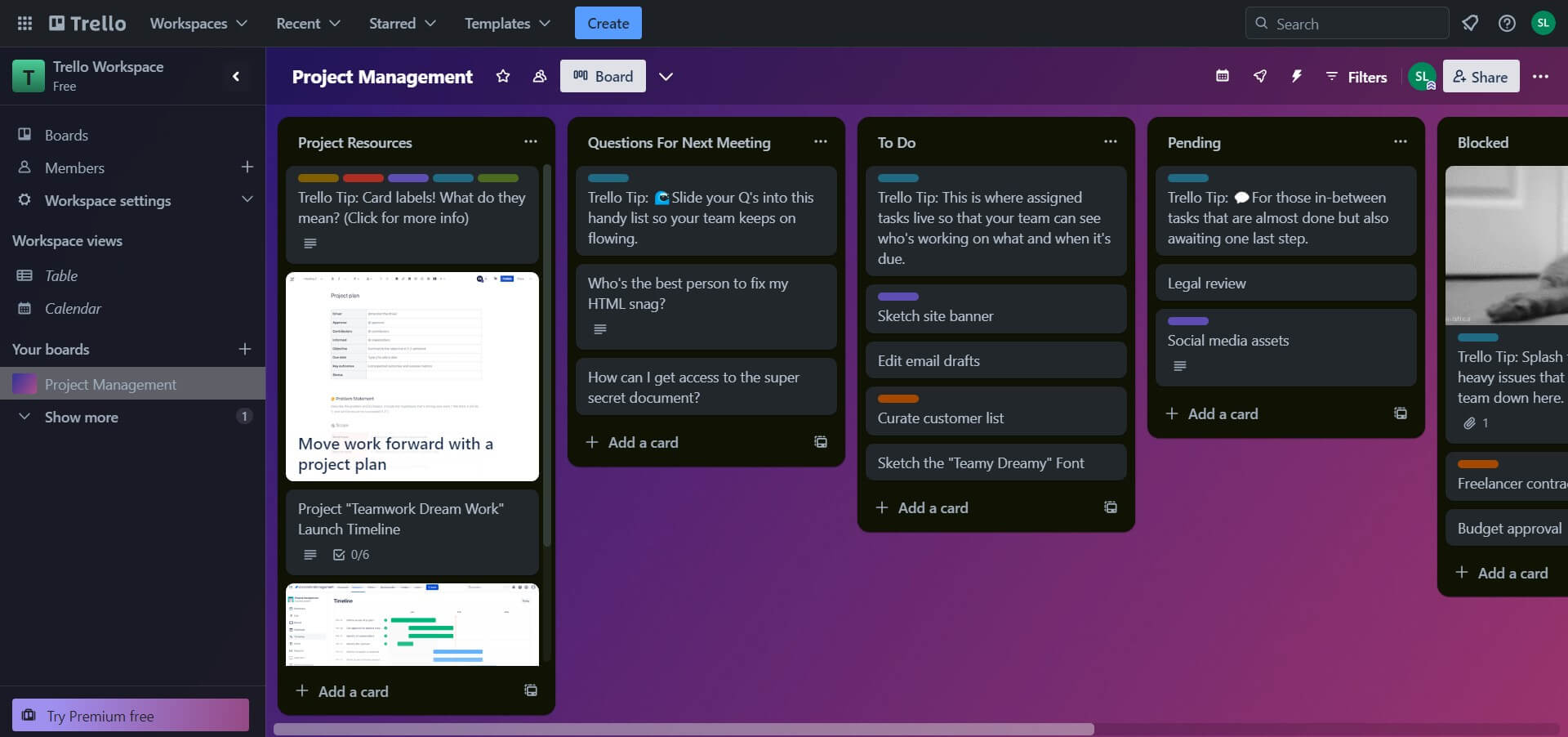
Trello introduced millions of users to visual project management through simple cards, lists, and boards. However, as projects scale, the lightweight Kanban design that makes Trello accessible can become a bottleneck for cross-functional teams.
Trello Growth Bottlenecks:
- Card-level view only
- Multi-level hierarchy (Workspaces > Projects > Tasks > Subtasks)
- Power-Up dependencies
- Native Gantt, Automations & Time Tracking
- Basic custom fields
- Relational Databases & Rollup Properties
1. Dependence on Power-Ups for Core Features
Trello relies heavily on its add-on architecture, known as Power-Ups, to provide functionality that competitor platforms include natively. Critical project management tools—such as Gantt charts, interactive timelines, native time tracking, and multi-board reporting—frequently require third-party integration modules. Managing multiple Power-Up subscriptions increases software administration overhead and often requires secondary per-user licensing fees.
2. Shallow Task Hierarchies
Trello’s structure is fundamentally two-dimensional: a board contains lists, and lists contain cards. While checklists can be added inside cards, Trello lacks true multi-tiered work breakdown structures (WBS). Teams managing complex projects spanning multiple departments struggle to create nested task dependencies, milestone rollups, and sub-subtasks without cluttering individual cards.
3. Limited Native Analytics and Workload Management
Calculating team capacity, tracking billable hours, and visualizing velocity across multiple projects requires external reporting engines or custom scripts in Trello. Enterprise organizations require real-time resource allocation dashboards to prevent team burnout and reassign tasks dynamically.
Core Criteria for Evaluating Trello Alternatives
When evaluating software to replace Trello, teams must look past interface design and assess how underlying project structures handle workload management, reporting, and operational efficiency.
- View Versatility: Look for platforms providing seamless switching between Kanban boards, Gantt/Timeline views, spreadsheet grids, calendar layouts, and interactive mind maps from a single dataset.
- Automation Capabilities: Evaluate native visual automation builders. Superior platforms allow multi-trigger logic, webhook actions, and condition conditional branching without code.
- Database and Data Relationships: Modern productivity tools use relational databases rather than static boards, enabling task items to link across repositories, compute dynamic rollups, and share metadata across departments.
- Scalability and Permission Controls: Enterprise operations require granular control, including role-based access control (RBAC), custom guest permissions, enterprise single sign-on (SSO), and audited security controls.
- Total Cost of Ownership (TCO): Weigh baseline per-user monthly costs against hidden expenses, such as mandatory third-party plugins, elevated tier limits, and administrative training costs.
The Top Trello Alternatives Analyzed by Use Case
1. Monday.com: Best Overall for Visual Workflow Customization
Monday.com is a work operating system (Work OS) designed for teams that appreciate visual boards but require advanced automation, relational data tracking, and multi-project reporting dashboards.
Monday.com Architecture:
- Workspace
- Boards (Pulse Items)
- Views: Kanban | Timeline | Gantt | Chart
- Columns: Status | Dependencies | People | Formula
- Boards (Pulse Items)
Key Capabilities and Architecture
Monday.com relies on dynamic boards where rows (called "pulses") represent tasks, assets, or client projects, and columns hold customizable field data. Unlike Trello cards, Monday.com items can easily feed data into centralized executive dashboards.
- Native Views: Toggle instantly between Kanban, Gantt charts, workload views, and form responses without installing add-ons.
- No-Code Automations: Build complex automations using natural-language triggers (e.g., "When status changes to Done, move item to Archive board and notify Team Lead").
- Resource Management: Track team bandwidth using native Workload widgets that tally allocated hours across multiple projects.
Operational Trade-offs
Monday.com enforces minimum seat pack purchases (typically 3 or 5 users), which can increase costs for small teams. Additionally, advanced features like workload management and baseline tracking are locked behind higher pricing tiers.
2. Asana: Best for Structured Process Management and Dependencies
Asana excels at managing complex projects that require strict task hierarchies, dynamic project roadmaps, and detailed cross-departmental dependencies.
Key Capabilities and Architecture
Asana separates work into Projects, Tasks, and Subtasks, complemented by Portfolios for executive oversight. It provides robust dependency management: if an upstream task is delayed, downstream dependencies adjust automatically along the critical path.
- Critical Path Analysis: Visualize project bottlenecks using interactive Gantt charts that highlight tasks directly impacting completion deadlines.
- Workflow Builder: Create standardized project intake forms that generate categorized tasks and trigger approval routing automatically.
- Goal Tracking: Connect daily tasks to high-level strategic objectives (OKRs) for clear organizational visibility.
Operational Trade-offs
Asana's board view is secondary to its list structure. Teams looking for a pure, simple visual Kanban interface may find Asana's structured hierarchy overly rigid for rapid, informal task tracking.
3. ClickUp: Best Feature Density and Value for Money
ClickUp positions itself as an "all-in-one" productivity suite, offering built-in docs, whiteboards, goals, dynamic dashboards, and detailed task management to replace multiple software subscriptions.
Key Capabilities and Architecture
ClickUp organizes data using a deep structural hierarchy: Workspaces > Spaces > Folders > Lists > Tasks > Subtasks. This depth allows large operations to manage complex portfolios within a single ecosystem.
- Customization Depth: Apply up to 15 different task views, including Kanban, Mind Maps, Tables, and Map views for location data.
- Integrated Documentation: Create collaborative documents, wikis, and standard operating procedures (SOPs) linked directly to tasks.
- Built-in Time Tracking: Track billable hours natively across browser extensions, desktop clients, and mobile apps with granular estimate reporting.
Operational Trade-offs
The sheer volume of features, settings, and views creates a steeper learning curve for non-technical users compared to Trello's minimal interface.
4. Notion: Best for Document-Centric Workflows and Relational Databases
Notion blends project management, note-taking, and wiki documentation into a flexible workspace based on modular content blocks and relational databases.
Notion Database Linkage:
- Project Database
- Relational Relation with Tasks Database
- Rollup: Total Progress (%)
Key Capabilities and Architecture
Unlike Trello's static cards, every page in Notion can act as a relational database entry. Teams can construct customized project systems by linking a "Projects" database directly to a "Tasks" database using relations and rollups.
- Flexible Layouts: View identical database records as Kanban boards, galleries, calendars, simple lists, or structured tables.
- Unified Knowledge Base: Maintain documentation alongside task boards to prevent context-switching between tools.
- Custom Properties: Define metadata using formulas, rollups, multi-select tags, rich media uploads, and user assignments.
Operational Trade-offs
Notion lacks native project management guardrails out of the box. Teams must build custom systems from scratch or adopt templates, and native dependency automations are less mature than dedicated PM tools like Asana or Linear.
5. Linear: Best for Software Engineering Teams and Issue Tracking
Linear is a streamlined project management system designed specifically for software development teams, product managers, and engineering organizations prioritizing speed and Git-integrated workflows.
Key Capabilities and Architecture
Built around performance and keyboard shortcuts, Linear removes interface drag to speed up issue creation, sprint planning, and backlog refinement.
- Developer Ecosystem: Sync automatically with GitHub, GitLab, and Sentry to update task statuses based on pull requests and commit triggers.
- Cycles and Roadmaps: Group tasks into automated sprint cycles while tracking strategic product initiatives on high-level roadmaps.
- Speed and Offline Support: Instant search, offline caching, and keyboard navigation eliminate loading delays during product standups.
Operational Trade-offs
Linear is tailored for software development cycles. Marketing, legal, and operational teams usually find its developer-focused workflow design too restrictive for general business tasks.
6. Jira Software: Best for Enterprise Agile/Scrum Ecosystems
Developed by Atlassian—the parent company of Trello—Jira Software provides advanced project management features designed specifically for scale, enterprise governance, and formal Agile frameworks.
Key Capabilities and Architecture
While Trello serves light visual needs, Jira supports complex Scrum frameworks, sprint burn-down charts, component categorization, and advanced issue security permissions.
- Agile Reporting: Access 12+ built-in reports, including velocity charts, cumulative flow diagrams, and burndown metrics out of the box.
- Atlassian Integration: Connect directly with Confluence for documentation and Bitbucket for code pipelines.
- Custom Issue Schemes: Define custom workflows, transition rules, and required field validators for different issue types across departments.
Operational Trade-offs
Jira requires dedicated administrative setup to run smoothly. Its complex configuration menus can intimidate non-technical users accustomed to Trello's lightweight interface.
7. Planka & Taiga: Best Open-Source and Self-Hosted Alternatives
For privacy-conscious organizations, healthcare providers, or defense entities requiring strict data sovereignty, self-hosted open-source software provides full control over data assets.
- Planka: An open-source, self-hosted Kanban board built with React and Redux that closely mirrors Trello's visual interface while storing all files and databases on local infrastructure.
- Taiga: An open-source platform tailored for Agile software developers, offering customizable Kanban boards, user stories, and backlogs alongside self-hosting capabilities via Docker containers.
Side-by-Side Comparison of Top Trello Alternatives
| Platform | Primary Target Audience | Distinctive Advantage | Native Views Offered | Free Tier Availability |
|---|---|---|---|---|
| Trello | Small teams & freelancers | Ultra-simple Kanban cards | Kanban, Table*, Calendar* (*Paid) | Generous basic plan |
| Monday.com | Operations & cross-functional teams | Visual automation builder & dynamic dashboards | Kanban, Gantt, Chart, Workload, Map | Limited (2 seats max) |
| Asana | Process-driven teams | Dependencies, critical path tracking & portfolios | Kanban, List, Timeline, Calendar | Robust (Up to 10 users) |
| ClickUp | Teams wanting an all-in-one platform | High feature density, native time tracking & docs | Kanban, Table, Gantt, Mind Map, 10+ views | Generous free tier |
| Notion | Document-centric teams & wikis | Relational database customization & wikis | Kanban, Table, List, Gallery, Timeline | Robust personal/team free tier |
| Linear | Software & product engineering | Keyboard-driven interface, Git integrations | Kanban, List, Cycle views | Free up to 250 active issues |
| Jira | Enterprise Agile & Scrum teams | Advanced sprint reporting & issue governance | Kanban, Scrum Board, Timeline | Free up to 10 users |
| Planka | Privacy-focused & IT administrators | Self-hosted data sovereignty, zero telemetry | Pure Kanban | 100% Free Open Source |
Migration Strategy: How to Switch from Trello Without Data Loss
Transitioning your organization from Trello to an alternative platform requires structured planning to prevent data loss, broken attachments, and lost project context.
Migration Lifecycle:
- Step 1: Export Trello JSON/CSV
- Step 2: Audit & Sanitize Board Data
- Step 3: Map Power-Up Fields to Native Features
- Step 4: Run Test Batch Import
- Step 5: Execute Migration & Cutover
Step 1: Export Raw Board Data
Trello allows users to export individual boards to JSON format on all tiers, while Business Class and Enterprise tiers support workspace-wide CSV exports. Navigate to Board Menu > More > Print and Export to save your raw JSON files. This step guarantees you have a static backup of all card descriptions, custom field entries, movement histories, and comment threads.
Step 2: Map Data Fields to the New Platform Architecture
Because alternative tools use different structural hierarchies, build a schema mapping document before importing:
- Map Trello Boards to Projects, Spaces, or Databases.
- Map Trello Lists to Task Statuses (e.g., To-Do, In Progress, Review, Complete) or Folders.
- Map Trello Cards to Tasks or Rows.
- Map Trello Checklists to Subtasks or Checklist Items.
- Map Trello Custom Fields directly to destination properties (Dropdowns, Dates, Numbers, Text fields).
Step 3: Account for Power-Ups and Attachments
Third-party Power-Up data stored in Trello may not transfer cleanly via standard CSV importers. If your team relies heavily on plugins for custom fields or voting, verify whether your target migration importer supports Trello Power-Up metadata parsing, or manually export plugin data to flat CSV tables prior to migration.
Step 4: Run a Test Batch Import
Never import an entire enterprise workspace in a single run. Select a representative, non-critical Trello board containing custom fields, user tags, and attachments. Import this test board into your destination platform to verify that:
- User assignments map accurately to active user emails.
- File attachments migrate without broken URLs.
- Date formats and timezone settings match your global workspace configuration.
Frequently Asked Questions (FAQs)
What is the most seamless direct alternative to Trello for simple Kanban?
For teams seeking a direct replacement focused purely on Kanban boards without complex setups, Planka (if self-hosting) or Monday.com (set to simple board view) offer the most familiar visual drag-and-drop experiences. Additionally, tools like KanbanFlow retain lightweight layouts while adding built-in Pomodoro timers and native time tracking.
Which Trello alternative provides the best free tier?
ClickUp and Asana offer some of the most comprehensive free plans for task management. ClickUp's free plan includes unlimited tasks, dynamic views, and subtasks, while Asana allows up to 10 team members to collaborate on tasks, lists, and Kanban views with zero cost.
Can Notion replace Trello completely for project management?
Yes, Notion can replace Trello for teams comfortable working with databases. By creating a database view set to "Board," Notion functions identically to Trello while offering deeper flexibility, such as linking tasks to meeting notes, design documents, and custom relational formulas. However, Notion requires manual setup to mirror Trello's automated card movements.
Why do engineering teams prefer Linear or Jira over Trello?
Engineering teams often outgrow Trello because it lacks built-in software development workflows. Linear and Jira offer native integrations with code repositories (GitHub, GitLab), automated sprint cycles, pull request triggers, git branch creation directly from tasks, and advanced Agile reporting metrics (such as burn-down charts and velocity logs) out of the box.
Is Jira harder to use than Trello despite being owned by the same company?
Yes. Atlassian designed Trello for lightweight visual task tracking and Jira for structured, enterprise-grade issue management. Jira requires administrative setup to manage complex issue schemes, custom permission structures, and release cycles, making it far more complex than Trello's intuitive interface.
Final Recommendation: Selecting the Right Platform
Selecting the optimal project management platform requires matching your team's operational needs to software capabilities:
- Select Monday.com if your team needs visual, customizable dashboards, strong automation capabilities, and executive resource tracking across non-technical departments.
- Select Asana if your organization manages complex cross-departmental projects requiring strict task dependencies, critical path timelines, and clear portfolio tracking.
- Select ClickUp if you want maximum feature density (docs, native time tracking, dynamic views, and whiteboards) within a single software subscription.
- Select Notion if your operational model is document-heavy and relies on building customized wikis and interconnected relational data tables.
- Select Linear if you manage an agile software engineering team prioritizing high-speed performance, clean keyboard workflows, and deep Git integration.
By auditing your team's structural dependencies, automation needs, and administrative budget, you can transition to a project platform that supports long-term growth without sacrificing productivity.
Image Gallery