Understanding Google Cloud Security Flaws: Risks, Mitigation, and Operational Best Practices
Google Cloud Platform (GCP) provides a robust infrastructure used by enterprises worldwide, but no cloud environment is immune to misconfigurations, identity mismanagement, or architectural vulnerabilities. Security in the cloud follow...
Google Cloud Platform (GCP) provides a robust infrastructure used by enterprises worldwide, but no cloud environment is immune to misconfigurations, identity mismanagement, or architectural vulnerabilities. Security in the cloud follows a shared responsibility model, meaning that while Google secures the physical hardware and underlying infrastructure, the customer remains responsible for securing their data, configurations, and identity access management policies. Understanding these potential flaws is the first step toward building a resilient cloud posture in 2026.
Contents
The Shared Responsibility Model in Practice
The fundamental premise of cloud security is the division of duties between the Cloud Service Provider (CSP) and the user. Google Cloud is responsible for "security of the cloud," including the physical security of data centers, the integrity of the hardware, and the virtualization layer. The user is responsible for "security in the cloud," which encompasses the configuration of virtual machines, the management of Identity and Access Management (IAM) roles, and the encryption of data at rest and in transit.
Most security incidents in GCP do not arise from flaws in Google’s own underlying code, but from how that code is implemented by the end-user. When researchers or security teams identify a "Google Cloud security flaw," they are often pointing to a failure in the application of security principles—such as overly permissive access keys or unencrypted storage buckets—rather than a breach of Google’s core infrastructure.
Common Security Vulnerability Vectors
To manage risks effectively, organizations must recognize the specific areas where human error and architectural oversight often manifest.
Over-Privileged IAM Roles
The most frequent cause of cloud compromise is the misuse of Identity and Access Management (IAM). Administrators often assign broad, "Owner" or "Editor" roles to service accounts or individual users out of convenience. If a service account with broad permissions is compromised via an application vulnerability, an attacker can move laterally throughout the entire project, exfiltrating data or deploying malicious resources.
Misconfigured Storage Buckets
Google Cloud Storage buckets are powerful tools for hosting data, but they are frequently misconfigured. Setting a bucket to "public" allows anyone on the internet to view or modify its contents. While Google has implemented clearer warnings in the console to prevent accidental public disclosure, automated scripts and human oversight errors continue to lead to exposed datasets.
Metadata Service Exploitation
The Compute Engine Metadata Server is a crucial component that allows virtual machines to interact with the GCP environment. If an attacker gains limited access to an instance through a web application vulnerability, they may attempt to query the metadata server to harvest service account tokens. Without proper restrictions on metadata access, this can lead to privilege escalation.
Insecure API Implementations
GCP relies heavily on APIs for automation and management. If API keys are committed to public repositories (such as GitHub) or stored insecurely within application code, they become accessible to automated crawlers. Once an API key is leaked, attackers can interact with your cloud resources as if they were a legitimate administrator.
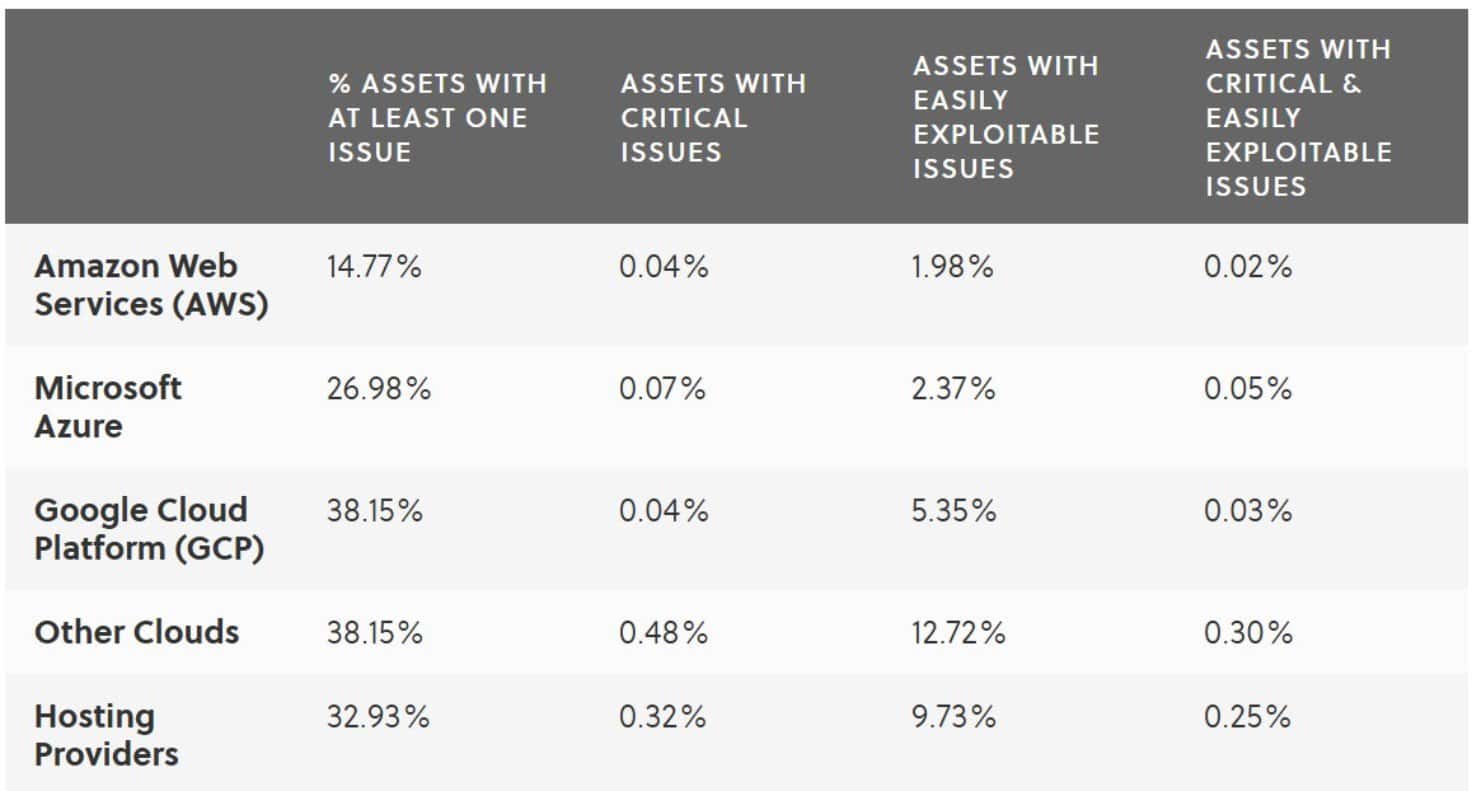
Assessing Risk: A Comparative View of Security Focus Areas
Understanding where to prioritize defensive efforts is essential for security operations teams. The following table outlines high-risk areas and the corresponding defensive strategy.
| Risk Category | Nature of Flaw | Mitigation Strategy |
|---|---|---|
| IAM Policy | Over-privileged service accounts | Apply the Principle of Least Privilege (PoLP) |
| Cloud Storage | Publicly accessible buckets | Enforce Organization Policy Constraints |
| API Management | Leaked or hardcoded credentials | Use Secret Manager and service account impersonation |
| Networking | Unrestricted ingress/egress rules | Implement VPC Service Controls and firewalls |
| Logging/Audit | Lack of visibility | Enable Cloud Audit Logs and Security Command Center |
Implementing a Defense-in-Depth Strategy
A successful security strategy in 2026 requires more than just checking boxes; it requires a layered approach. By integrating automated tools with strict governance, you can reduce the window of opportunity for attackers.
1. Enforcing Organization Policy Constraints
Google Cloud allows administrators to set organizational policies that act as "guardrails." For example, you can globally disable the ability to make Cloud Storage buckets public, regardless of individual user permissions. By enforcing these policies at the project or folder level, you remove the human element of error for critical security settings.
2. Automating Secret Management
Never store credentials in environment variables or hardcoded files. Use Google Cloud Secret Manager to store, access, and rotate sensitive information. This ensures that even if an application is compromised, the attacker does not have immediate access to long-lived credentials.
3. Leveraging Security Command Center (SCC)
Security Command Center is a native tool that provides centralized visibility into your security posture. In 2026, SCC serves as the primary dashboard for identifying misconfigurations, detecting anomalous behavior, and ensuring compliance with industry standards like PCI-DSS or HIPAA. Regularly reviewing these findings prevents small flaws from evolving into major breaches.
4. Implementing VPC Service Controls
VPC Service Controls help define a security perimeter around sensitive GCP resources. By restricting the ability for data to move outside your trusted network, you add an extra layer of protection against unauthorized exfiltration, even if an attacker manages to obtain legitimate user credentials.
Frequently Asked Questions
Are Google Cloud security flaws usually the fault of Google?
Rarely. Most "flaws" are actually misconfigurations caused by users. While Google occasionally patches vulnerabilities in its management software, the vast majority of security incidents involve users granting excessive permissions or failing to secure endpoints.
How can I check if my GCP project has security vulnerabilities?
The most efficient way is to use the Google Cloud Security Command Center. It continuously scans your project for common misconfigurations, such as public storage buckets, firewall rules that are too broad, and identity roles that violate the principle of least privilege.
What is the principle of least privilege in GCP?
It is the practice of granting only the minimum level of access necessary for a user or service to perform its task. In GCP, this means using custom roles rather than primitive roles (like Owner or Editor) and rotating service account keys frequently.
Can an attacker access my virtual machines if I have a firewall?
Yes, if your firewall is misconfigured. A common mistake is allowing SSH access (port 22) from "0.0.0.0/0," which makes your instance accessible to the entire internet. Always restrict inbound traffic to specific IP ranges or use Identity-Aware Proxy (IAP) to manage access without exposed public IPs.
What should I do if I suspect a security breach?
Immediately isolate the affected resources, revoke the compromised service account keys, and review the Cloud Audit Logs to track the attacker's activity. Contact Google Cloud Support immediately through the console to report the incident and obtain professional assistance for containment.
Next Actions for Securing Your Infrastructure
To move forward, start by conducting a comprehensive audit of your current IAM landscape. Use the IAM Recommender tool in the Google Cloud console to identify accounts that have been granted more permissions than they are actually using. Once you have pruned unnecessary access, enable Organization Policy constraints to prevent the most common misconfigurations, such as public storage access.
By shifting your mindset from reactive patching to proactive governance and utilizing the native tools Google provides, you create a hardened environment that is significantly more difficult for unauthorized parties to penetrate. Constant vigilance and the automation of security policies are the standard requirements for safe cloud operations in 2026.
Image Gallery