Apple Warranty Check: How to Verify Official Coverage and AppleCare Status
To check your Apple warranty status, navigate to checkcoverage.apple.com and enter your device serial number alongside the security verification code. Alternatively, view your active coverage directly on any modern iPhone, iPad, or Mac...
To check your Apple warranty status, navigate to checkcoverage.apple.com and enter your device serial number alongside the security verification code. Alternatively, view your active coverage directly on any modern iPhone, iPad, or Mac by opening Settings or System Settings, selecting General, and tapping AppleCare & Coverage to inspect real-time hardware warranty and support entitlements.
Contents
Locating Your Apple Serial Number Across All Devices
Before validating warranty entitlements on Apple's servers, you must retrieve the exact hardware serial number. Apple assigns a unique alphanumeric identifier to every iPhone, iPad, Mac, Apple Watch, Apple Vision Pro, and pair of AirPods.
iPhone, iPad, and Apple Vision Pro
The quickest retrieval path relies on the operating system interface:
- Open the Settings app.
- Select General, then tap About.
- Locate the Serial Number row. Press and hold the string of characters to copy it directly to your clipboard.
If the device does not power on, inspect the physical hardware. On iPhone models from iPhone 8 through iPhone 14 series (outside the US), the serial number or IMEI is etched onto the SIM tray. For eSIM-only models (such as US iPhone 14, 15, and 16 series), retrieve the IMEI or serial number from the original packaging barcode label, your carrier billing statement, or the original sales invoice.
Mac Desktops and MacBooks
macOS provides direct access via the system menu:
- Click the Apple menu in the top-left corner of the display.
- Select About This Mac.
- In the window that appears, highlight and copy the displayed serial number.
If macOS will not boot:
- MacBook Pro and MacBook Air: Invert the laptop. The serial number is laser-etched into the bottom metal casing near the regulatory compliance marks.
- Mac mini, Mac Studio, and Mac Pro: The serial number is printed on the bottom base or the rear I/O casing near the power port.
- iMac: Inspect the underside of the aluminum desktop stand.
Apple Watch
- On the watch, open the Settings app.
- Tap General, then select About.
- Scroll down to find the serial number.
Alternatively, open the companion Watch app on your paired iPhone, select the My Watch tab, navigate to General > About, and view the identifier. On physical Apple Watch cases, remove the band; the serial number is etched inside the band slot mechanism.
AirPods and Beats Audio Products
When your AirPods or Beats are connected to an iOS or iPadOS device:
- Open Settings on your iPhone or iPad.
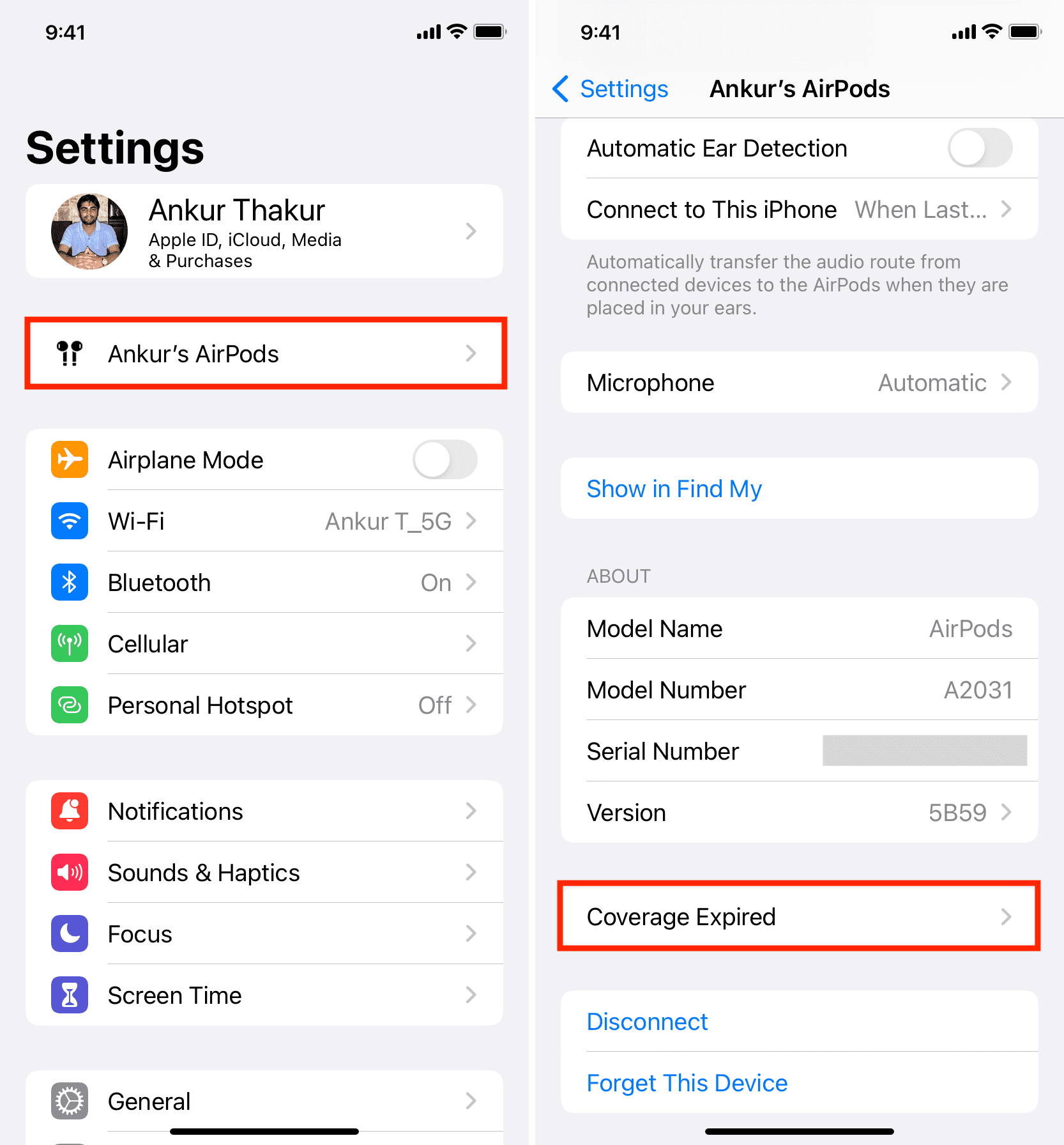
- Tap your AirPods name directly below your Apple Account profile banner, or go to Bluetooth and tap the More Info icon beside the device.
- Scroll down to the About section to view the serial number.
If the earbuds cannot connect, look on the underside of the charging case lid. The serial number is printed in fine type inside the recessed cavity of the lid on AirPods, AirPods Pro, and AirPods Max ear cushions (under the magnetic magnetic mesh cushion).
Official Methods to Check Apple Warranty Status
Apple maintains several centralized databases for warranty tracking. Depending on whether you have physical access to the device or are managing equipment remotely, choose the appropriate validation method below.
Method 1: The Apple Check Coverage Portal
The Check Coverage tool is the standard, unauthenticated verification portal used by consumers, enterprise IT departments, and secondhand electronics buyers.
- Launch any web browser and visit checkcoverage.apple.com.
- Enter the serial number of your hardware into the input field.
- Complete the visual or audio CAPTCHA security prompt.
- Click Submit to generate your real-time coverage summary.
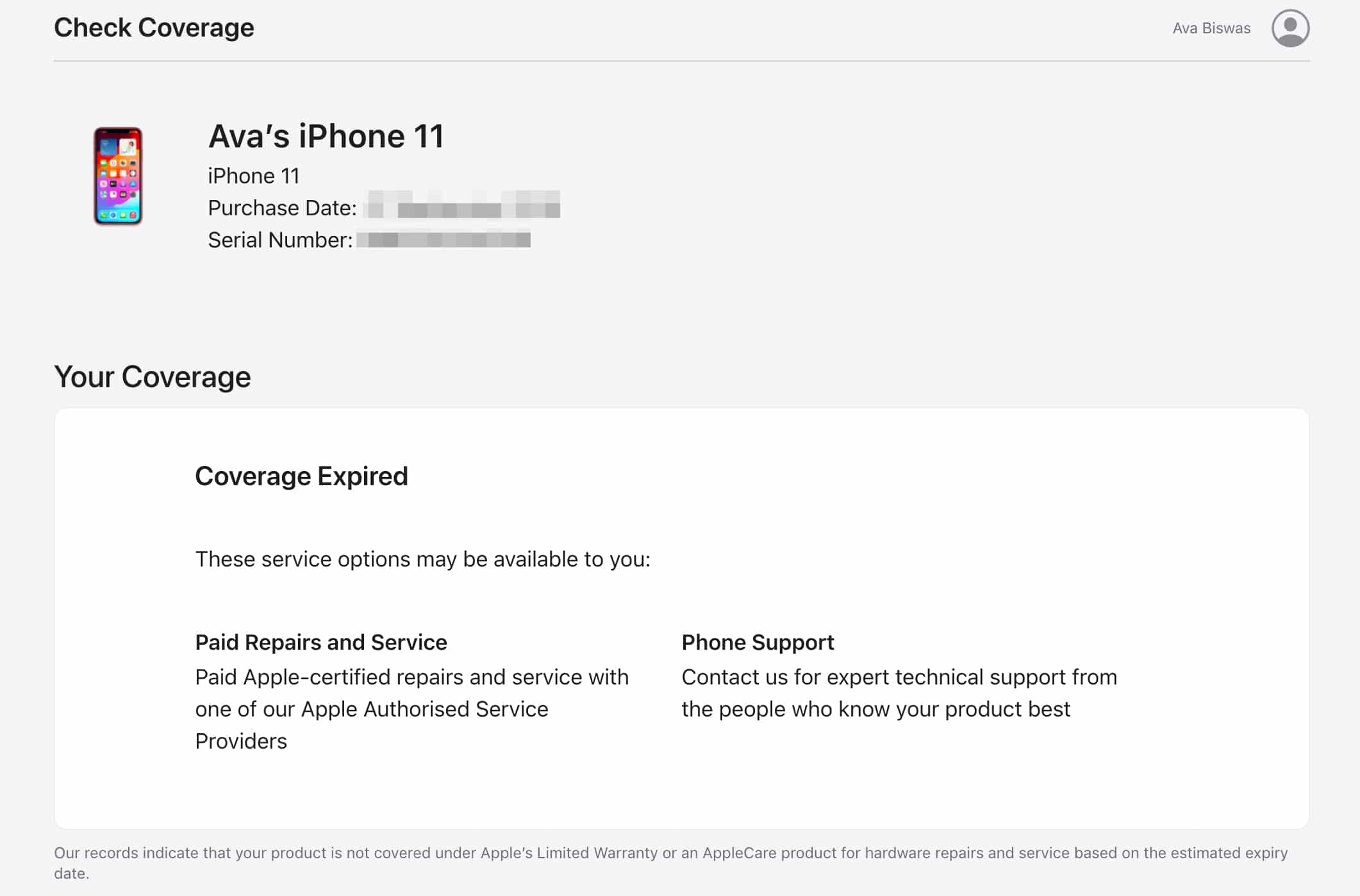
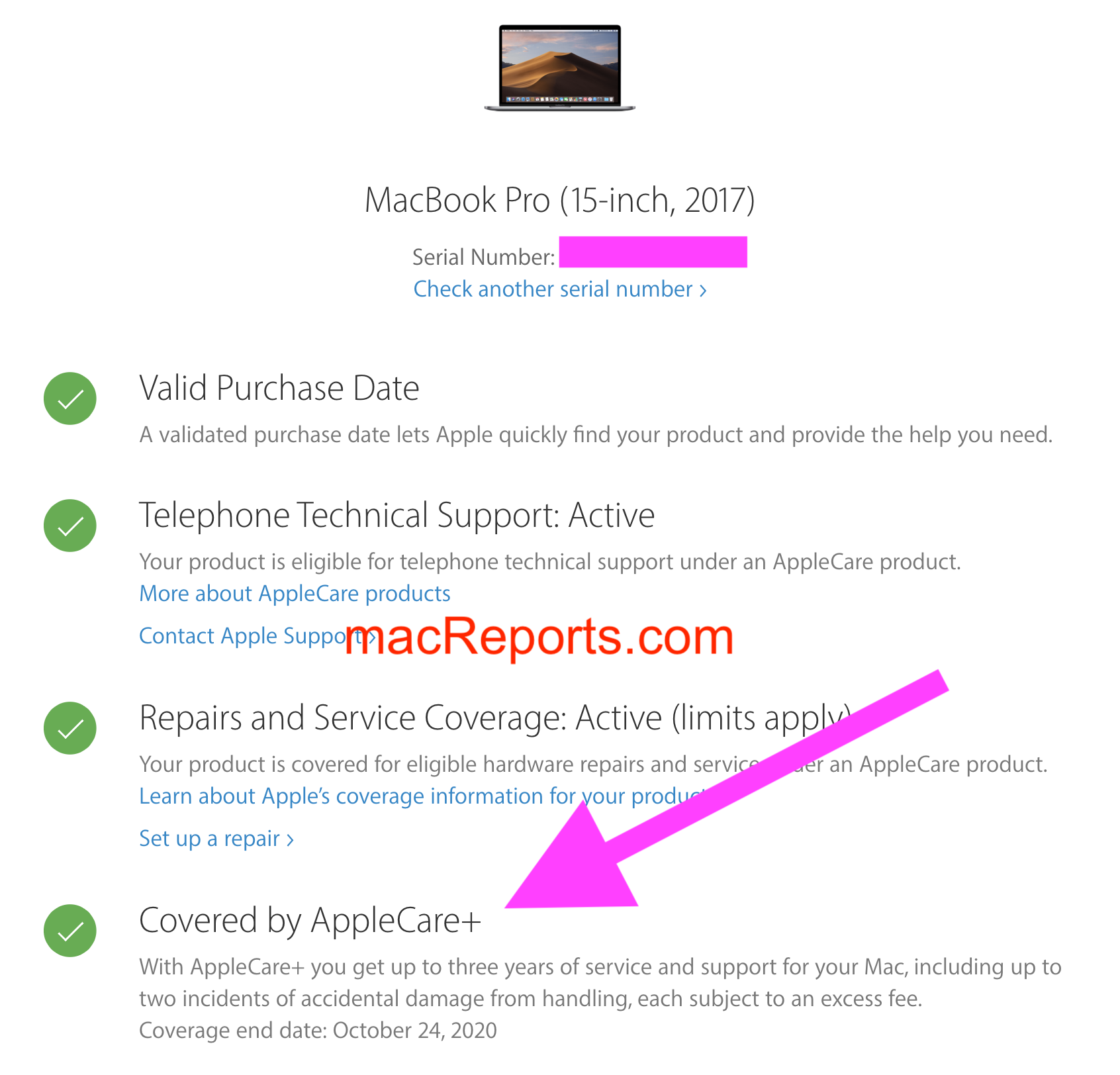
This portal confirms your valid purchase date, eligibility for telephone technical support, active hardware repair coverage, and whether the unit is backed by an active AppleCare+ agreement.
Method 2: The My Support Dashboard
If you own multiple Apple products tied to an Apple Account (formerly Apple ID), the My Support dashboard centralizes your hardware portfolio without requiring manual serial number entry.
- Navigate to mysupport.apple.com.
- Sign in using your Apple Account credentials and complete two-factor authentication.
- Review the My Devices panel. Every device registered to your profile appears in a unified list.
- Click on any specific hardware item to view full warranty expiration dates, active AppleCare contracts, open service requests, and complete repair history logs.
Method 3: Native On-Device Coverage Verification
Apple embeds coverage telemetry directly into current versions of iOS, iPadOS, and macOS, communicating with Apple activation servers in the background.
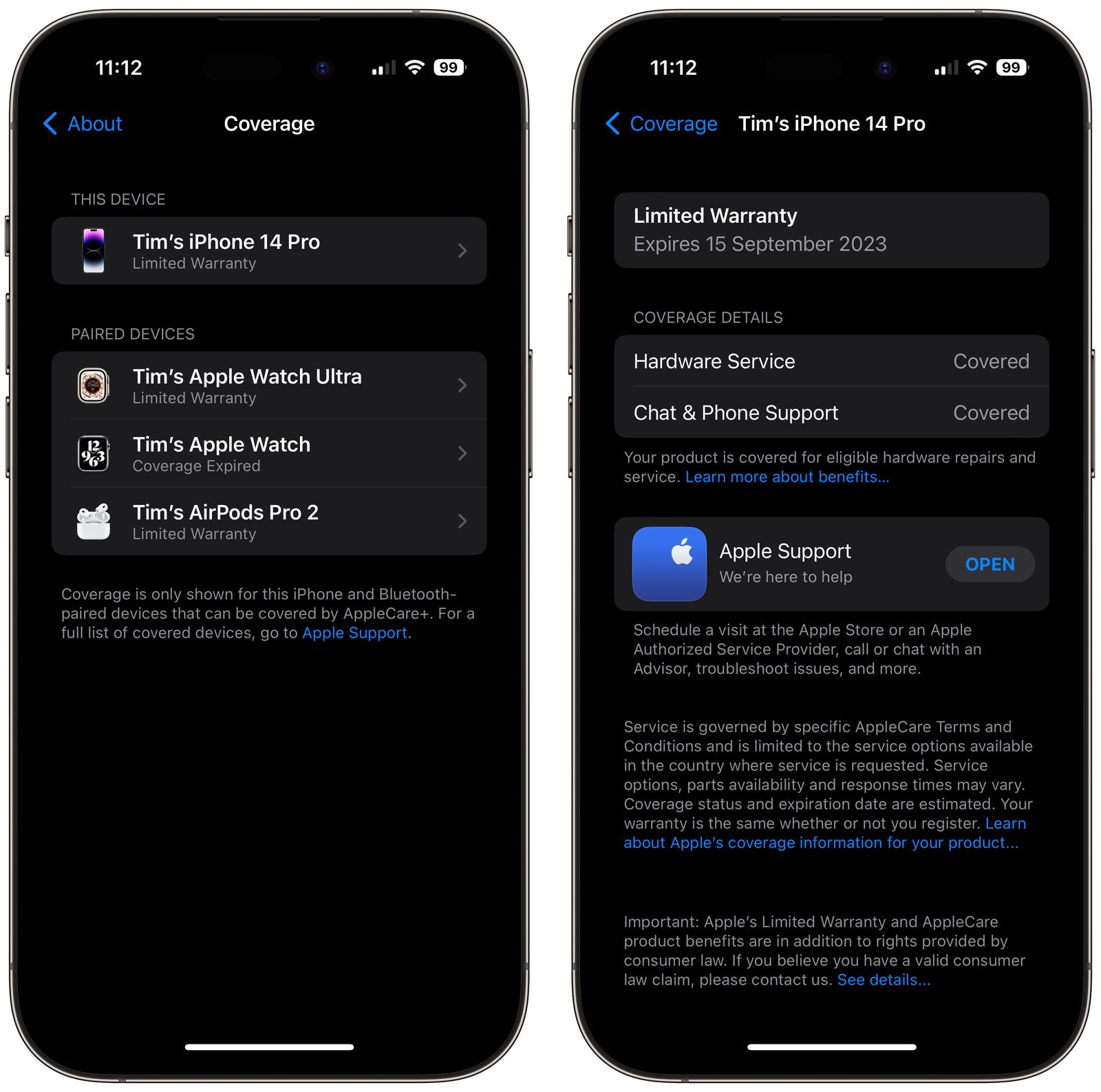
- On iPhone and iPad: Open Settings > General > AppleCare & Coverage. Tap the device name to reveal repair entitlements, parts and service history, and options to purchase additional coverage if eligible.
- On Mac: Open the Apple menu > System Settings > General > Coverage. Select your Mac or paired accessories (such as keyboards, trackpads, or headphones) to inspect active warranty timelines.
Method 4: The Official Apple Support App
For mobile devices, download the free Apple Support application from the iOS App Store. Once authenticated, tap your profile icon or select any assigned hardware from the My Devices screen. The app immediately flags warranty expirations, active service contracts, and certified walk-in repair availability at nearby Genius Bars or Apple Authorized Service Providers (AASPs).
Decoding Your Apple Coverage Results
Once you query Apple’s servers, the database outputs a diagnostic status screen. Understanding the terminology prevents surprise repair expenses.
Valid Purchase Date
A green checkmark indicating a Valid Purchase Date means Apple has confirmed the original retail sale through an authorized channel. This timestamp marks the operational baseline for standard one-year warranty terms and sets the countdown for optional AppleCare+ enrollment.
Telephone Technical Support
Apple provides 90 days of complimentary remote technical support starting from the original purchase date. This includes software troubleshooting, operating system configuration, and initial setup assistance. Once this displays Expired, you must pay an out-of-warranty diagnostic fee or possess an active AppleCare+ tier to receive live phone guidance on software matters.
Repairs and Service Coverage: Active vs. Expired
- Active: The machine falls within either the base Apple Limited Warranty or an active AppleCare agreement. Hardware defects stemming from manufacturing errors, materials failures, or component breakdown are serviced at zero cost. The portal specifies the exact calendar day your coverage concludes.
- Expired: The standard factory coverage has lapsed. Any physical defect, logic board failure, display malfunction, or hardware degradation must be funded out-of-pocket, handled via third-party insurance, or claimed under applicable consumer protection statutes.
AppleCare+ vs. Recurring Extended Coverage
If your device shows AppleCare+, it includes accidental damage protection and priority service routing. Depending on how the agreement was executed:
- Fixed-Term Agreements: Common on Macs, iPads, and Apple Displays, these cover a preset two- or three-year window paid upfront.
- Monthly or Annual Recurring Subscriptions: Common on iPhones, Apple Watches, and iPads, these plans remain active indefinitely until canceled, provided the underlying payment method remains valid.
Warranty Boundary Rule The standard Apple One-Year Limited Warranty covers solely manufacturing defects and component failures under normal operating conditions. It explicitly excludes damage caused by drops, liquid submersion, unauthorized component modifications, cosmetic scratches, and normal consumable battery depletion. Accidental damage claims require an active AppleCare+ policy.
Comprehensive Coverage Comparison
Understanding what each layer of protection delivers protects you from unexpected out-of-pocket expenses when scheduling hardware service.
| Coverage Element | Apple 1-Year Limited Warranty | AppleCare+ Standard | AppleCare+ with Theft & Loss | Statutory Consumer Law |
|---|---|---|---|---|
| Duration | 1 Year from original retail purchase | 2 to 3 Years (or ongoing monthly/annual renewal) | Ongoing monthly or 2-year fixed term | Region-dependent (e.g., 2 years in EU; up to 6 years in UK) |
| Hardware Defects | Covered ($0 deductible) | Covered ($0 deductible) | Covered ($0 deductible) | Covered if defect was inherent at sale |
| Battery Health (<80%) | Covered only if defective | Covered ($0 replacement fee) | Covered ($0 replacement fee) | Rarely covered unless proven defective at manufacture |
| Accidental Drops/Cracks | NOT COVERED | Covered (Standard service tier deductible applies) | Covered (Standard service tier deductible applies) | NOT COVERED |
| Liquid Intrusion | NOT COVERED | Covered (Standard service tier deductible applies) | Covered (Standard service tier deductible applies) | NOT COVERED |
| Theft and Disappearance | NOT COVERED | NOT COVERED | Covered (Requires Find My enabled at incident) | NOT COVERED |
| Express Replacement Service | Unavailable | Included at no additional fee | Included at no additional fee | Unavailable |
| Third-Party Repairs Impact | May void coverage if damage caused | Covered, but unauthorized parts may void related repairs | Covered, but unauthorized parts may void related repairs | Varies by jurisdiction |
Troubleshooting Common Coverage Errors
Querying Apple's warranty portal occasionally surfaces system flags or validation roadblocks. Below are the steps required to clear them.
"Purchase Date Not Validated"
This message appears when a retail partner (such as a major telecommunications carrier, Amazon, or a big-box retailer) failed to report the point-of-sale inventory transaction to Apple's centralized database. Because the activation date is unconfirmed, Apple cannot calculate warranty expiration.
To resolve this issue:
- Locate your official purchase receipt or commercial invoice. The document must display the merchant name, purchase date, total price paid, and the specific device serial or IMEI number.
- Visit getsupport.apple.com and choose Hardware Coverage > Update Purchase Date.
- Upload a high-resolution PDF or scan of the invoice. An Apple support advisor reviews the document and manually updates the coverage database within 24 to 72 hours.
Serial Number Not Recognized
If the system rejects your serial number:
- Re-check character ambiguities: Apple does not use the letter "O" in hardware serial numbers (using the number "0" instead), and letters like "I" can be confused with the numeral "1".
- If querying an Apple Watch band, MagSafe charger, or secondary accessory, note that many small peripheral accessories share coverage with their paired host device rather than supporting standalone serial tracking on the public portal.
Replacement Device Showing Incorrect Coverage
If Apple replaces your unit at a Genius Bar or via mail-in service, the replacement hardware carries either the remaining balance of your original warranty or a 90-day service warranty—whichever is longer.
Sometimes, the automated tracking script fails to mirror the predecessor device's AppleCare+ agreement onto the replacement serial number. When this happens:
- Contact Apple Support directly via telephone or chat.
- Provide the original Repair Number (R-Number) or Service Order ID along with the serial numbers of both the defective unit and the replacement unit.
- Request a manual asset transfer of the AppleCare+ agreement to the new hardware.
Post-Expiration Strategy: Extending Protection and Repair Pathways
When the coverage check confirms your device is fully out of warranty, you have several structured paths forward:
Extending AppleCare+ Post-Expiration
In supported countries (including the United States, United Kingdom, Canada, Australia, and select European markets), Apple permits users on fixed-term AppleCare+ plans to transition to continuous monthly or annual coverage:
- You must enroll within 30 days of the original fixed coverage expiration date.
- The device must pass an on-device remote diagnostic scan administered through the Settings app or an Apple Support representative.
- Coverage continues automatically on a recurring billing cycle until canceled or until Apple can no longer supply functional service parts for that vintage of hardware.
Authorized vs. Independent Repair Providers
When servicing hardware after warranty expiration:
- Apple Authorized Service Providers (AASPs): Independent business operations certified by Apple. They employ certified technicians and use original equipment manufacturer (OEM) parts, diagnostic suites, and system calibration tools. Service logged through an AASP writes directly to Apple's internal service history.
- Independent Repair Providers (IRPs): Third-party shops that have access to official Apple genuine parts, tools, manuals, and diagnostics for out-of-warranty repairs. They do not service active in-warranty claims or AppleCare+ subsidized claims.
- Self Service Repair: Individuals comfortable performing their own hardware repairs can use Apple's Self Service Repair program. You can review factory repair manuals, rent professional-grade calibration toolkits from Apple's logistics hub, and order genuine components directly to complete home repairs.
Frequently Asked Questions
Can I check an Apple warranty without a serial number?
No, the public Apple coverage checker requires a valid hardware serial number. However, if you cannot locate the serial number, you can log in to mysupport.apple.com with your Apple Account credentials to review warranty status for any hardware paired to your ecosystem. Alternatively, on an active iPhone or iPad, go to Settings > General > AppleCare & Coverage to inspect coverage directly without manually typing a serial number.
Does AppleCare+ transfer to a new owner if I sell my device?
Yes, AppleCare+ stays tied to the hardware serial number unless the original purchaser bought it on a personal monthly subscription or formally submitted a cancellation and refund request through Apple Support. When transferring ownership of a device with an upfront-paid agreement, submit a formal transfer request through Apple Support by providing the plan agreement number, the serial number, and the new owner's contact details.
How long do I have to buy AppleCare+ after purchasing an Apple device?
In most regions, you have up to 60 days from the validated retail purchase date to add AppleCare+ coverage. The purchase can be completed directly in the device's Settings menu, through the online Apple Store, or at an Apple Store following a successful physical inspection or automated remote hardware diagnostic scan.
What does "Purchase Date Not Validated" mean on Apple's coverage checker?
This status indicates that Apple has no automated record of the commercial transaction from the retailer who sold the product. It frequently occurs when devices are purchased from third-party authorized resellers or mobile network carriers whose inventory checkout systems are not linked in real time to Apple's activation portal. You can resolve it by uploading an itemized proof of purchase to Apple Support.
Does checking Apple warranty tell me if an iPhone is blacklisted or stolen?
No, Apple's standard Check Coverage portal does not indicate whether a device is carrier-blacklisted or reported lost or stolen. It reports only hardware repair coverage and AppleCare status. To determine if an iPhone is blacklisted by cellular carriers, run the device IMEI through an independent GSMA database lookup, check with your mobile network provider, or attempt to activate an active SIM card on the hardware.
Verify your device's standing today through the official coverage portal to ensure your hardware is fully protected before component issues, accidental drops, or unexpected battery degradation occur. If your equipment needs service, schedule a Genius Bar reservation or contact an Apple Authorized Service Provider directly through your verified support dashboard.
Image Gallery