Understanding the Professional Work Voicemail Script in 2026
A work voicemail script is a pre-written template or structured guide used to record a professional outgoing greeting or to leave a concise, actionable message for a recipient. In a business context, these scripts ensure that communica...
A work voicemail script is a pre-written template or structured guide used to record a professional outgoing greeting or to leave a concise, actionable message for a recipient. In a business context, these scripts ensure that communication remains clear, consistent with brand identity, and provides all necessary information to minimize "phone tag" and administrative friction.
Contents
While digital messaging and AI-driven communication platforms have expanded significantly by 2026, the traditional voicemail remains a vital touchpoint in professional life. Whether you are an entrepreneur, a corporate executive, or a customer service representative, the way you present yourself through audio communication sets the tone for your professional relationships. A well-crafted script removes the "umm" and "ahh" of spontaneous recording, replacing them with a polished, authoritative presence.
The Core Components of an Effective Work Voicemail Script
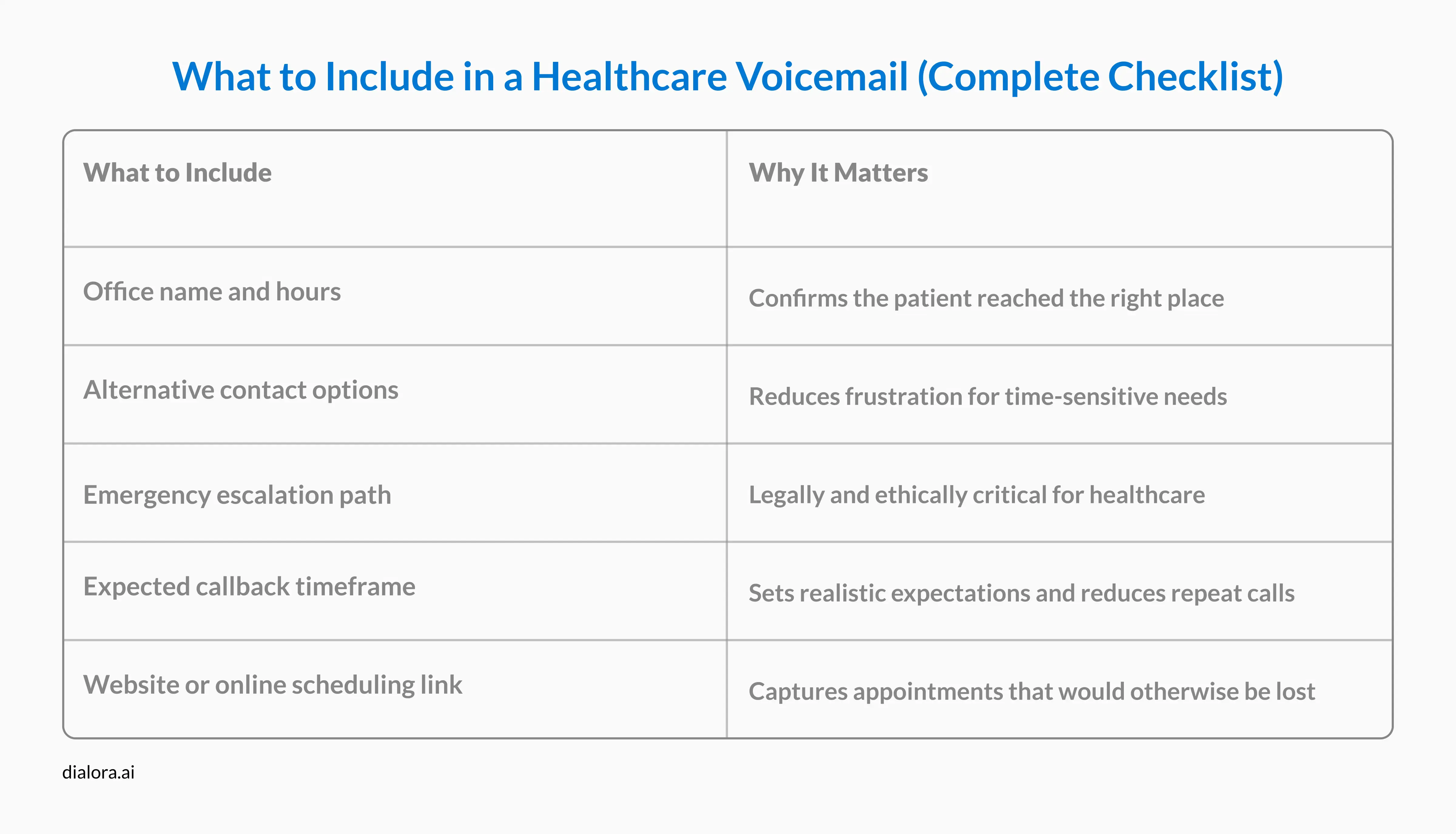
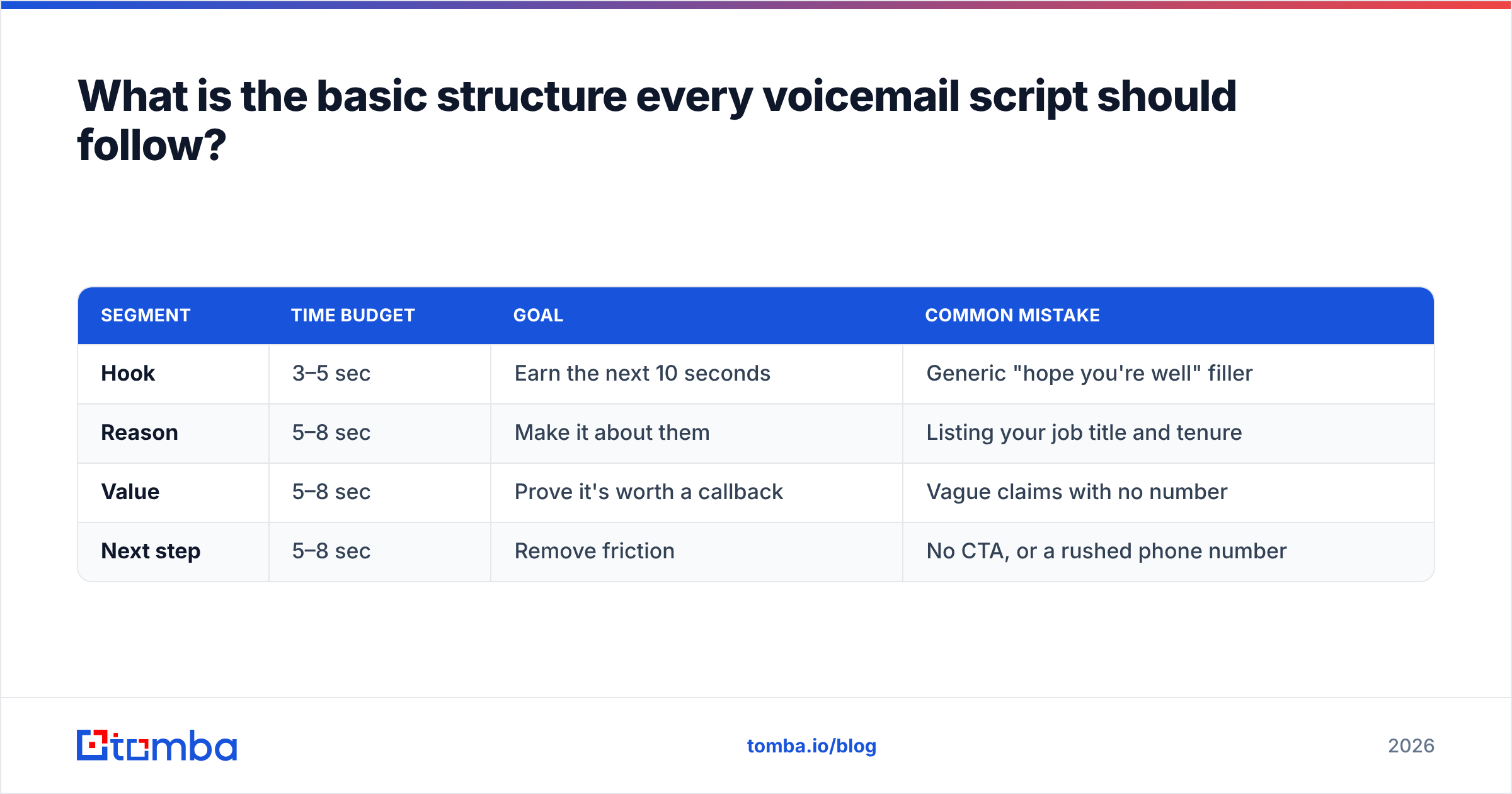
An effective script is not merely a sentence or two; it is a strategic tool designed to manage expectations. Every professional script should follow a logical flow that respects the caller's time while providing them with the path forward.
1. The Professional Greeting
The script should begin with a polite opening. In 2026, the trend has shifted toward "human-centric" professionalism—meaning you should sound approachable but structured. Using "Hello" or "Hi there" is generally acceptable, followed immediately by your full name and job title. This confirms to the caller that they have reached the correct person.
2. The Reason for Unavailability
You do not need to provide exhaustive details about your schedule, but a brief mention of why you cannot take the call adds a layer of transparency. Common reasons include being "away from my desk," "in a meeting," or "out of the office for the day."
3. The Call to Action (CTA)
This is the most critical part of the script. What should the caller do next? Should they leave a message, send an email, or contact a colleague? If you want them to leave a message, specify what information you need (name, number, and the specific reason for the call) to ensure you are prepared when you return the call.
4. Alternative Contact Information
In high-velocity business environments, waiting for a callback is often not an option. Your script should provide an alternative, such as a colleague’s extension or a general support email address, for urgent matters.
Why Using a Script is Essential in Modern Business
Using a script might seem restrictive, but it actually provides the freedom to be precise. In 2026, many organizations use unified communications (UCaaS) platforms that automatically transcribe voicemails into text or email. If your spoken message is rambling or unclear, the AI transcription will likely be nonsensical, leading to missed opportunities or misunderstandings.
Ensuring Brand Consistency
For businesses with multiple employees, a standardized script ensures that every caller receives the same level of professional courtesy. This is particularly important for sales and support teams where the "first impression" can dictate the future of a client relationship.
Reducing Cognitive Load
Recording an outgoing message on the fly often leads to "recording anxiety," where the speaker speaks too quickly or forgets vital information. Having a written script allows the speaker to focus on their tone, pace, and clarity rather than searching for the right words.
Categories of Work Voicemail Scripts
Depending on your role and the situation, your script will vary. It is a common mistake to use a "one-size-fits-all" approach for every scenario.
The Standard Daily Greeting
This is the default script for a normal working day. It should be updated occasionally to reflect that the mailbox is being actively monitored.
- Example Focus: "You have reached the office of [Name]. I am currently helping other clients or away from my desk. Please leave your name and a brief message, and I will return your call by [Time/Day]."
The Out-of-Office (OOO) Script
Used for vacations, conferences, or extended leave. This script must be specific about return dates to prevent callers from feeling ignored.
- Example Focus: "I am out of the office starting [Date] and will return on [Date]. I will have limited access to voicemail during this time. For urgent assistance regarding [Project/Topic], please contact [Colleague Name] at [Phone/Email]."
The Departmental or Team Script
When a caller reaches a general line, the script represents the entire organization rather than an individual.
- Example Focus: "Thank you for calling [Company Name]. Our team is currently assisting other callers. Your call is important to us. Please leave a message or visit our website at [URL] for 24/7 support resources."
Technical Specifications for Recording Scripts
In 2026, audio quality is non-negotiable. With high-fidelity (Hi-Fi) voice codecs used in most VoIP (Voice over Internet Protocol) systems, background noise and "muffled" audio are more noticeable than ever.
- Pacing: Aim for approximately 125 to 150 words per minute. This is the "sweet spot" for human comprehension and AI transcription accuracy.
- Tone: Use a "smile in your voice." Research in vocal acoustics shows that the physical act of smiling while speaking alters the shape of the mouth, creating a warmer, more resonant tone that listeners perceive as more trustworthy.
- Environment: Record in a carpeted room or a space with soft furnishings to minimize echo. Avoid using a speakerphone for recording; a dedicated headset or the handset of a desk phone provides the best frequency response.
| Script Type | Primary Goal | Essential Elements | Recommended Length |
|---|---|---|---|
| Standard | General Availability | Name, Title, Callback Promise | 15-20 Seconds |
| Out-of-Office | Expectation Management | Return Date, Alternative Contact | 20-30 Seconds |
| Urgent/Sales | Lead Retention | Direct Mobile or SMS Option | 10-15 Seconds |
| Holiday | Relationship Building | Holiday Greeting, Special Hours | 20-25 Seconds |
Common Mistakes to Avoid
Even with a script, certain pitfalls can undermine your professionalism. Avoiding these ensures that your voicemail remains a tool for productivity rather than a barrier.
The "Busy" Cliche Avoid saying, "I'm sorry, I'm too busy to take your call." This can unintentionally signal to the caller that they are a burden. Instead, use "I am currently away from my phone" or "I am assisting another client."
Outdated Information Nothing frustrates a caller more than a voicemail saying you will be back "Tuesday, October 12th" when that date passed three weeks ago. If your script includes specific dates, it is your responsibility to update it the moment you return.
The "Memory Lane" Introduction In 2026, time is the most valuable commodity. Do not spend ten seconds thanking the person for calling before you get to your name. Get straight to the point. Most callers decide whether to leave a message within the first five seconds of hearing a greeting.
Integrating AI and Automation with Voicemail Scripts
As we move through 2026, the intersection of human scripts and AI automation has become seamless. Many professionals now use "Visual Voicemail" scripts. These are essentially the text versions of your audio scripts that appear on a caller’s screen if they are using a compatible smartphone or enterprise communication app.
Furthermore, some advanced systems allow you to upload a text script which an AI-generated version of your own voice then reads. This ensures perfect delivery and allows for rapid updates without the need for a quiet recording environment. However, when using these tools, ensuring the script is written in "natural language" is vital to avoid sounding robotic.
Frequently Asked Questions
Should I include my email address in a work voicemail script?
Yes, but only if your email address is easy to dictate. If your email is complex or prone to spelling errors, it is better to direct callers to a "Contact Us" page on your website or simply promise a callback where you can then provide the email. In 2026, many professionals prefer "Please send me an SMS at this number" as a faster alternative to email.
How often should I update my work voicemail greeting?
At a minimum, you should update it when your availability changes (vacations, holidays). Ideally, a "standard" greeting should be re-recorded every few months to ensure the audio quality remains high and to prevent your regular callers from "tuning out" a message they have heard too many times.
Is it professional to use humor in a voicemail script?
This depends entirely on your industry and brand identity. In creative fields, a lighthearted script can be a great way to show personality. However, in legal, medical, or financial sectors, stick to a formal, concise script. When in doubt, lean toward a neutral, helpful tone.
How long should a voicemail script be?
For an outgoing greeting, aim for 20 to 30 seconds. Anything longer risks the caller hanging up before they hear the instructions for leaving a message. For a message you are leaving for someone else, aim for under 45 seconds, ensuring the most important information (your name and number) is stated at the beginning and repeated at the end.
Should I ask the caller to "please leave a message"?
While it seems redundant, explicitly asking for a message acts as a psychological prompt. It encourages the caller to gather their thoughts and provide the details you need to help them, rather than just leaving a "Call me back" message with no context.
Final Recommendation for Professional Communication
To maximize the effectiveness of your work voicemail script, treat it as a living document. Start by drafting a simple version that covers the four core components: Identity, Status, Call to Action, and Alternative. Record it, listen back to it, and ask yourself: "If I were a first-time caller, would I feel confident that my inquiry is being handled?" If the answer is yes, you have successfully leveraged one of the oldest, yet most resilient, tools in the professional communication toolkit.
Image Gallery