Understanding MDM Network Architecture for Enterprise Device Management
An MDM network refers to the communication infrastructure and logical pathways used by Mobile Device Management (MDM) solutions to push policies, commands, and security updates to managed endpoints. This architecture relies on an inter...
An MDM network refers to the communication infrastructure and logical pathways used by Mobile Device Management (MDM) solutions to push policies, commands, and security updates to managed endpoints. This architecture relies on an intermediary server, known as an MDM server, which acts as the control plane between enterprise administrators and distributed devices across diverse network environments.
Contents
The primary function of an MDM network is to maintain persistent, secure connectivity between the management console and registered hardware—such as smartphones, tablets, and laptops—to enforce compliance, distribute software, and mitigate data risks. By utilizing protocols like the Apple Push Notification service (APNs) for iOS/macOS or Google Cloud Messaging/Firebase for Android, the MDM server ensures that endpoints remain under administrative control regardless of their physical location or network connection.
Core Components of MDM Network Topology
To operate effectively, an MDM network requires a specialized set of components that facilitate the handshake between the enterprise server and the managed device. Understanding these components is critical for troubleshooting connectivity issues and ensuring robust policy enforcement in 2026.
- The Managed Endpoint: The client device, which must have an MDM agent or native profile installed to communicate with the server.
- The MDM Server: The central repository for device configurations, profiles, and commands. In 2026, most organizations leverage cloud-native SaaS MDM solutions, though on-premises servers remain common in highly regulated sectors.
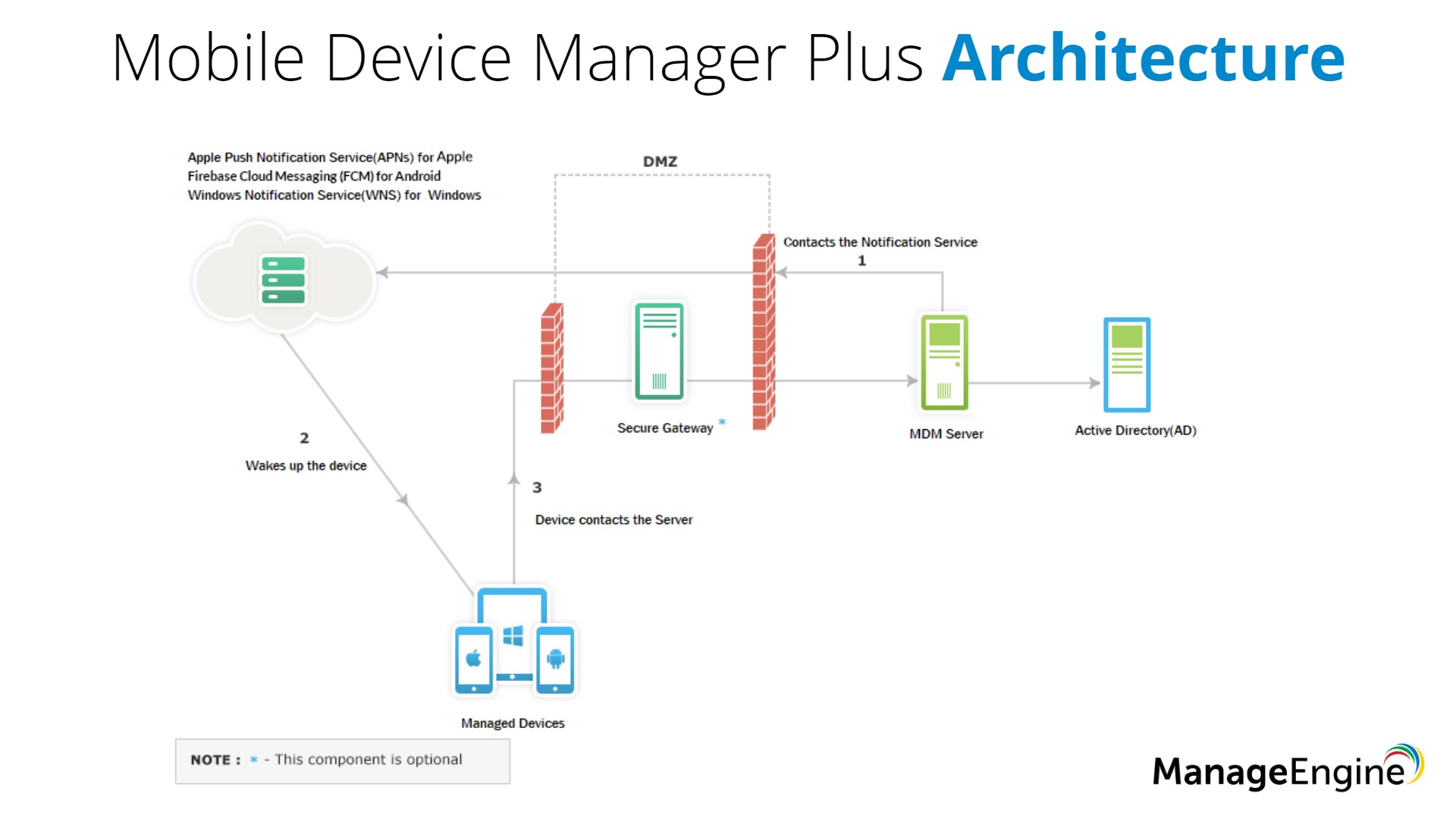
- Push Notification Services: The signaling layer. Because mobile devices prioritize battery life, the MDM server does not maintain an open, active socket to the device. Instead, it sends a wake-up signal to a third-party service (Apple APNs, Google FCM, or Microsoft Push), which then alerts the device to check in with the MDM server.
- Communication Protocols: Standardized APIs, such as the OMA Device Management (OMA-DM) protocol, which dictate the structure and syntax of the commands sent from the server to the device.
Network Requirements and Security Configurations
For an MDM network to function, administrators must ensure that the underlying infrastructure allows traffic through specific gateways. Blocking these paths often results in "orphaned" devices that can no longer receive remote wipes, password resets, or application updates.
- Outbound Traffic: Managed devices must be permitted to reach the MDM server's URL. If the server is hosted on-premises, firewall rules must permit traffic on standard ports (typically 443 for HTTPS).
- Certificate-Based Authentication: Modern MDM networks rely on SCEP (Simple Certificate Enrollment Protocol) or ACME to issue identity certificates to devices. This ensures that the device can prove its identity to the MDM server before any sensitive configuration data is transmitted.
- DNS Resolution: Devices must be able to resolve the FQDN (Fully Qualified Domain Name) of the MDM server, regardless of the network (e.g., public Wi-Fi, cellular, or VPN).
Security Note on Network Segmentation Organizations should isolate MDM traffic from general user traffic. By implementing a dedicated management VLAN for MDM traffic, administrators can ensure that critical policy updates receive priority and remain shielded from potential lateral movement attempts initiated from compromised guest or IoT devices.
Comparison of MDM Deployment Models
The choice between cloud-based and on-premises MDM network architectures impacts scalability, maintenance overhead, and control.
| Feature | Cloud-Native MDM | On-Premises MDM |
|---|---|---|
| Maintenance | Managed by Vendor | Managed by Internal IT |
| Scalability | Near-Infinite | Limited by Local Hardware |
| Network Path | Public Internet (Secure) | Internal Network / VPN |
| Visibility | Global / Remote Ready | Requires Robust Gateway Access |
| 2026 Suitability | Industry Standard for Hybrid Work | Niche / Restricted Air-Gapped Labs |
Troubleshooting Common MDM Network Failures
Even with a well-configured architecture, network-level issues occur. Identifying the specific stage of failure is essential for rapid remediation. If a device stops responding to commands, follow this diagnostic sequence.
- Verify Push Service Connectivity: Check the status of the platform-specific notification service. If APNs is experiencing a regional outage, no amount of local troubleshooting will restore control to Apple devices.
- Audit Certificate Validity: An expired identity or SSL certificate will break the trust relationship between the device and the server. Always monitor expiry dates for push certificates and enrollment profiles.
- Assess Geo-Blocking and Firewall Rules: If a workforce is distributed, ensure that the MDM server is not being blocked by regional ISPs or strict office firewall policies that prevent the device from contacting the MDM cloud endpoint.
- Validate Enrollment Profiles: Ensure that the device has not been "unenrolled" by the user. If the management profile is removed, the device effectively exits the MDM network, rendering it invisible to the administrator.
Frequently Asked Questions
Does an MDM network require a constant VPN connection to function? No, modern MDM solutions operate over standard HTTPS traffic and do not require a persistent VPN. As long as the device has internet connectivity and can reach the MDM server's FQDN, the management tunnel remains functional for receiving commands.
Why are my managed devices failing to receive remote commands? The most common cause is a failure in the push notification pipeline or an expired certificate. Verify that the device has an active internet connection, ensure the APNs/FCM certificate is valid, and check if the device's management profile is still active and trusted.
Is it possible to manage devices on different networks simultaneously? Yes, that is the core strength of MDM. Because the MDM server acts as a centralized cloud-based control point, devices can be located on home Wi-Fi, cellular networks, or public hotspots while still receiving the same security policies and application updates synchronously.
What is the impact of a firewall blocking MDM traffic? If a firewall blocks access to the MDM server or its associated push notification services, the devices will lose the ability to sync with the server. This results in "stale" compliance data, where the admin console shows the device as offline, and the device fails to apply any new security configurations or OS updates.
Does MDM network traffic consume significant data? MDM traffic is generally very lightweight, consisting of small JSON payloads and metadata packets. However, if the MDM is being used to push large software updates or corporate applications, the data consumption will scale based on the size of those files, which is why admins often schedule such updates during off-peak hours.
Optimizing for 2026 Standards
As we look toward the 2026 landscape of device management, the focus is shifting toward Zero Trust Network Access (ZTNA) integration. An MDM network is no longer just about pushing policies; it is now a critical feed for Zero Trust platforms. The health and compliance status reported by the MDM network now act as a gatekeeper for access to corporate SaaS applications and cloud resources. Ensure your MDM solution is fully integrated with your Identity and Access Management (IAM) suite to maximize the security posture of your mobile infrastructure.
For organizations currently struggling with endpoint visibility, conducting a full audit of your MDM network pathways is the recommended first step. Verify that all endpoints have an active "heartbeat" with your server and that no regional network restrictions are impeding your ability to execute security commands. Contact your MDM vendor support team to ensure your deployment is utilizing the latest API versions available for the 2026 calendar year to avoid deprecated protocol issues.
Image Gallery