Understanding What Roaming on a Phone Means for Your Connectivity
Roaming on a phone means that your mobile device connects to a network infrastructure other than your home service provider’s own network to maintain service, typically when you travel outside your provider's coverage area. While your...
Roaming on a phone means that your mobile device connects to a network infrastructure other than your home service provider’s own network to maintain service, typically when you travel outside your provider's coverage area. While your phone continues to send and receive data, voice calls, and text messages, it relies on agreements between your home carrier and a host network in that location.
Contents
When you leave your home area, your device constantly scans for available cellular signals. If your home network is unavailable, your SIM card identifies compatible networks operated by foreign or regional partners. These partners grant your device access to their towers and backhaul infrastructure, allowing you to stay connected without needing a local SIM card. However, this process often incurs additional fees, data usage restrictions, or specific settings requirements that users must manage to avoid unexpected billing.
The Mechanics of Roaming
At a technical level, roaming is a managed handshake between your home network—the Public Land Mobile Network (PLMN)—and a visiting network. Your SIM card stores the credentials necessary to authenticate your identity with these partner networks. When you arrive in a new territory, the roaming network identifies your Mobile Country Code (MCC) and Mobile Network Code (MNC), which are hardcoded into your SIM, to determine if they have a roaming agreement with your provider.
If an agreement exists, the visiting network contacts your home carrier to verify your account status and roaming eligibility. Once authorized, the visiting network permits your device to register. You will often see a roaming indicator, such as a "R" icon or a change in the carrier name displayed on your notification bar. This connection functions as a tunnel; traffic originating from your device is routed through the visiting network back to your home carrier's core network before reaching the internet or the public switched telephone network. This is why latency may increase when you are roaming, as your data must travel an extra distance.
Distinguishing Between Domestic and International Roaming
It is important to distinguish between two primary types of roaming, as their implications for your bill and connectivity differ significantly.
- Domestic Roaming: This occurs when your carrier lacks coverage in a specific rural or remote area within your home country. In such cases, your phone may switch to a competitor's tower to ensure you remain connected. Historically, this was common in the United States and Canada; today, most major carriers include domestic roaming in their standard unlimited plans without extra charges.
- International Roaming: This involves connecting to a network outside your home country. This is where users most often encounter "bill shock." International roaming is subject to complex wholesale agreements between carriers. While many modern plans now offer "roam like home" features for select countries, utilizing data or voice services outside these defined zones can trigger high per-megabyte or per-minute rates.
Prerequisites for Successful Roaming
Before traveling, you must ensure your device and plan are configured to support roaming. Failure to prepare can lead to total loss of connectivity or inability to reach emergency services in some jurisdictions.
- Check Your Carrier’s Roaming Policy: Verify if your specific plan covers your destination. Many carriers offer "day passes" or travel add-ons that provide a flat daily rate for unlimited data and calling.
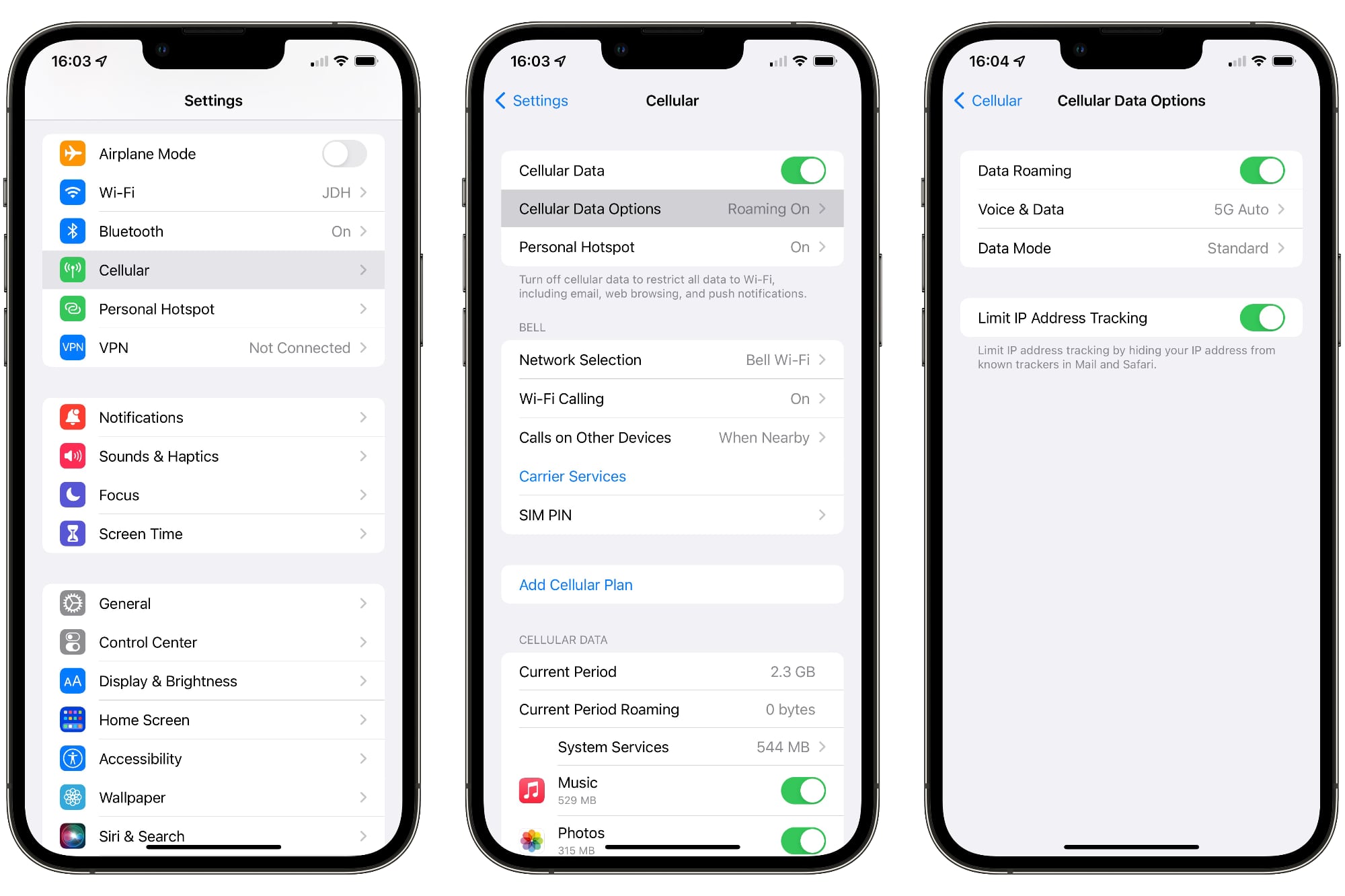
- Enable Roaming in Settings: Even if your plan allows it, your phone’s software acts as a safeguard. You must navigate to your cellular or mobile data settings and toggle "Data Roaming" to the "On" position to allow the device to connect to foreign towers.
- Confirm Device Compatibility: Ensure your phone is "unlocked" if you intend to use a local SIM card, though this is not required if you are simply roaming on your existing plan. Additionally, ensure your device supports the frequency bands used in your destination country, as network standards (e.g., GSM, LTE, 5G) vary globally.
Comparison of Roaming Solutions
Depending on the length and nature of your trip, you may have several ways to handle connectivity.
| Method | Best For | Pros | Cons |
|---|---|---|---|
| Carrier Roaming Plan | Short trips, convenience | Seamless, keep your number | Can be expensive, dependent on coverage |
| Local SIM Card | Long stays, cost-efficiency | Lowest rates, high data caps | Requires physical swap, new number |
| Travel eSIM | Flexible data, multi-country | Instant activation, no swap | Usually data-only, no local voice number |
| Wi-Fi Only | Occasional use | Free, avoids all roaming fees | Limited to Wi-Fi zones, no emergency calls |
Troubleshooting Common Roaming Issues
If you have arrived at your destination and your phone is not connecting, follow this logical troubleshooting sequence:
- Toggle Airplane Mode: Sometimes a device fails to handshake with the new network upon arrival. Toggling Airplane Mode off and on forces the phone to re-scan for nearby towers.
- Manual Network Selection: If automatic selection fails, go into your phone's cellular settings and choose "Network Selection." Switch from "Automatic" to "Manual" and select one of the available local providers from the list. If one fails, try another.
- Check APN Settings: Access Point Names (APNs) define the path your data takes. If you use a local SIM or a travel eSIM, you may need to manually update these settings to match the provider’s requirements.
- Verify Plan Status: Occasionally, a carrier may block roaming by default to prevent fraud. Log into your carrier’s account portal to ensure "International Roaming" is toggled "On" for your account profile.
Managing Costs and Data Usage
Roaming can quickly become the most expensive part of a trip if not managed properly. Background data is the primary culprit. Applications on your phone, such as cloud storage, email clients, and social media, often sync in the background regardless of whether you are actively using them.
To mitigate costs, set your phone to "Low Data Mode" if available in your settings. This restricts background activities and pauses automatic updates. Furthermore, download maps, documents, and entertainment media while on a stable Wi-Fi connection before you leave. If you are using a daily-rate roaming plan, keep a close watch on your usage; some carriers reduce speeds significantly once you cross a specific data threshold (e.g., 500MB per day).
Frequently Asked Questions
Will I be charged for receiving a phone call while roaming? Yes, in many cases, you are charged for both incoming and outgoing calls while roaming internationally. Even if the call is short, you may be billed based on per-minute roaming rates. Check your provider’s policy, as some plans now include incoming calls for free.
Does turning off mobile data stop all roaming charges? Turning off mobile data prevents background apps from using the network, which is the best way to prevent data fees. However, if you place a voice call or send a traditional SMS, you will still trigger voice and messaging roaming charges.
Can I use emergency services while roaming? In most countries, you can connect to any available network to place an emergency call (such as 911 in the U.S. or 112 in the EU), even if your home carrier does not have a roaming agreement with that specific provider. However, you must have a signal from at least one tower.
What is an eSIM and how does it relate to roaming? An eSIM is a digital version of a physical SIM card. It allows you to add a second "line" to your phone specifically for data roaming. This is often cheaper than paying your home carrier’s roaming fees, as you can purchase a local data plan from an eSIM provider without removing your primary SIM.
Is there a way to avoid roaming entirely? To avoid roaming entirely, keep your phone in Airplane Mode and use Wi-Fi exclusively for messaging apps and VoIP calling (like FaceTime or WhatsApp). Ensure your mobile data is turned off in settings to prevent any accidental "leakage" of data that could trigger daily fees.
Final Recommendation
Before your next trip, proactively log into your mobile carrier's website or app to review your current plan's roaming terms. If the daily costs are prohibitive, look into purchasing a travel-specific eSIM before you depart. This allows you to maintain your home number for important calls while using a low-cost, high-speed data plan for navigation and web browsing, effectively separating your communication needs from your connectivity requirements.
Image Gallery